


How to Scan Barcodes from an IP Camera in Python Using OpenCV and Dynamsoft
In today’s rapidly evolving digital landscape, IP camera systems have become the backbone of numerous industries requiring real-time monitoring, automation, and data capture. In this article, we will explore how to turn a USB camera into an IP camera for remote monitoring, as well as how to implement a GUI application to scan 1D/2D barcodes from IP camera using Python, PySide6, and Dynamsoft Barcode Reader.
What you’ll build: A two-part Python system — an MJPEG IP camera server powered by Flask and OpenCV, and a PySide6 GUI client that reads the stream and decodes 1D/2D barcodes in real time using Dynamsoft Barcode Reader.
Key Takeaways
- You can stream USB camera video over HTTP as MJPEG using Flask and OpenCV, making any USB camera accessible as a network IP camera.
- Dynamsoft Barcode Reader integrates with OpenCV by converting
Matframes toImageDatavia a customImageSourceAdapter, enabling real-time decode without blocking the UI thread. - The solution supports both 1D and 2D barcodes (including QR codes, Data Matrix, and PDF417) with overlay rendering directly on the OpenCV Mat.
- This architecture applies directly to industrial automation, retail inventory, and warehouse scanning use cases where fixed-mount cameras feed a central processing node.
Common Developer Questions
How do I decode barcodes from an IP camera stream in Python?
Open the MJPEG stream with OpenCV, read frames continuously, and send each frame into the Dynamsoft barcode pipeline from the GUI client. In this article, Flask serves the IP camera stream, the PySide6 client pulls frames with cv2.VideoCapture(url), and barcode results are drawn back onto the live video feed.
How do I integrate Dynamsoft Barcode Reader with OpenCV in a Python GUI app?
Use OpenCV for frame capture and display, then connect those frames to Dynamsoft through a custom ImageSourceAdapter and result receiver. That keeps the GUI responsive while the SDK processes frames asynchronously and returns barcode results through a queue-friendly callback path.
How do I convert an OpenCV Mat frame to a format Dynamsoft Capture Vision can process?
Extract the frame bytes, width, height, channel count, and stride from the OpenCV Mat, then wrap them in an ImageData object before pushing the frame into the SDK buffer. The helper shown here maps 3-channel frames to IPF_RGB_888 and grayscale frames to IPF_GRAYSCALED, which is enough for the custom fetcher to hand them to Dynamsoft Capture Vision.
Demo Video: IP Camera Barcode Scan
Prerequisites
- A 30-day free trial license for Dynamsoft Barcode Reader
Understand the Project Structure
The project contains two sub-projects:
-
IP camera server that streams video from a USB camera over the network.
requirements.txt:Flask==2.3.3 opencv-python==4.8.1.78 numpy>=1.21.0,<2.0.0 -
GUI client that receives the stream and scans barcodes.
requirements.txt:PySide6==6.7.2 requests==2.31.0 opencv-python==4.8.1.78 numpy>=1.21.0,<2.0.0 dynamsoft-capture-vision-bundle>=3.0.6000
Build the IP Camera Server
An IP (network) camera sends video over your LAN or the internet. A simple way to achieve this is by using HTTP MJPEG (a sequence of JPEG frames over HTTP).
Define the Core Server Architecture
class IPCameraServer:
    def __init__(self, camera_index=0, host='0.0.0.0', port=5000,
                 resolution=(640, 480), fps=30):
        self.camera_index = camera_index
        self.host = host
        self.port = port
        self.resolution = resolution
        self.fps = fps

        self.app = Flask(__name__)
        self.camera = None
        self.frame = None
        self.lock = threading.Lock()
        self.running = False
Initialize and Manage the USB Camera
The server implements camera initialization with OpenCV:
def initialize_camera(self):
    """Initialize USB camera with comprehensive error handling"""
    try:
        logging.info(f"Initializing camera {self.camera_index}...")
        self.camera = cv2.VideoCapture(self.camera_index)

        if not self.camera.isOpened():
            logging.error(f"Failed to open camera {self.camera_index}")
            return False

        self.camera.set(cv2.CAP_PROP_FRAME_WIDTH, self.resolution[0])
        self.camera.set(cv2.CAP_PROP_FRAME_HEIGHT, self.resolution[1])
        self.camera.set(cv2.CAP_PROP_FPS, self.fps)

        ret, frame = self.camera.read()
        if not ret or frame is None:
            logging.error("Failed to capture test frame")
            return False

        logging.info(f"Camera initialized: {self.resolution[0]}x{self.resolution[1]} @ {self.fps}fps")
        return True

    except Exception as e:
        logging.error(f"Camera initialization error: {e}")
        return False
Capture Frames with a Dedicated Thread
For real-time video processing, the server uses a dedicated thread for continuous frame capture:
def capture_frames(self):
    """Capture frames in separate thread for optimal performance"""
    logging.info("Starting frame capture thread...")

    while self.running:
        try:
            if self.camera is None or not self.camera.isOpened():
                logging.warning("Camera unavailable, attempting reconnection...")
                if not self.initialize_camera():
                    time.sleep(5)
                    continue

            ret, frame = self.camera.read()
            if not ret or frame is None:
                logging.warning("Failed to capture frame, retrying...")
                time.sleep(0.1)
                continue

            timestamp = datetime.now().strftime("%Y-%m-%d %H:%M:%S")
            cv2.putText(frame, timestamp, (10, 30),
                       cv2.FONT_HERSHEY_SIMPLEX, 0.7, (0, 255, 0), 2)

            with self.lock:
                self.frame = frame.copy()
                self.frame_count += 1

            time.sleep(1.0 / self.fps)

        except Exception as e:
            logging.error(f"Frame capture error: {e}")
            time.sleep(1)
Stream MJPEG Frames over HTTP
Encode frame as JPEG with optimized quality and send over HTTP:
def generate_frames(self):
    """Generate MJPEG frames for HTTP streaming"""
    while self.running:
        try:
            with self.lock:
                if self.frame is not None:
                    frame = self.frame.copy()
                else:
                    continue

            ret, buffer = cv2.imencode('.jpg', frame,
                                     [cv2.IMWRITE_JPEG_QUALITY, 85])
            if not ret:
                continue

            frame_bytes = buffer.tobytes()

            yield (b'--frame\r\n'
                   b'Content-Type: image/jpeg\r\n\r\n' +
                   frame_bytes + b'\r\n')

        except Exception as e:
            logging.error(f"Frame generation error: {e}")
            time.sleep(0.1)
Expose Flask Routes and a Web Interface
The server exposes multiple endpoints for different use cases:
def setup_routes(self):
    """Setup Flask routes for web interface and streaming"""

    @self.app.route('/')
    def index():
        """Main web interface with live video display"""
        return render_template_string(
            self.get_html_template(),
            resolution=self.resolution,
            host=self.host,
            port=self.port,
            local_ip=self.get_local_ip()
        )

    @self.app.route('/video_feed')
    def video_feed():
        """MJPEG streaming endpoint - core functionality"""
        return Response(
            self.generate_frames(),
            mimetype='multipart/x-mixed-replace; boundary=frame'
        )

    @self.app.route('/status')
    def status():
        """JSON API endpoint for camera statistics"""
        current_time = time.time()
        uptime = int(current_time - self.start_time)
        current_fps = self.frame_count / max(1, uptime)

        return jsonify({
            'status': 'online' if self.running else 'offline',
            'fps': f"{current_fps:.1f}",
            'frames': self.frame_count,
            'uptime': uptime,
            'resolution': f"{self.resolution[0]}x{self.resolution[1]}",
            'timestamp': datetime.now().isoformat()
        })
Auto-Detect the Local Network IP
The server automatically detects the local IP address for easy network access:
def get_local_ip(self):
    """Automatically detect local IP address for network access"""
    try:
        s = socket.socket(socket.AF_INET, socket.SOCK_DGRAM)
        s.connect(("8.8.8.8", 80))
        ip = s.getsockname()[0]
        s.close()
        return ip
    except Exception:
        return "127.0.0.1"
Start the Server and Handle Errors
Start up the server and handle any initialization errors:
def start(self):
    """Start IP camera server with full error handling"""
    try:
        logging.info("Starting USB IP Camera Server...")

        if not self.initialize_camera():
            logging.error("Camera initialization failed")
            return False

        self.running = True
        self.start_time = time.time()

        capture_thread = threading.Thread(
            target=self.capture_frames, daemon=True
        )
        capture_thread.start()

        local_ip = self.get_local_ip()
        logging.info(f"Server starting on {self.host}:{self.port}")
        logging.info(f"Web interface: http://{local_ip}:{self.port}")
        logging.info(f"Stream URL: http://{local_ip}:{self.port}/video_feed")

        self.app.run(
            host=self.host,
            port=self.port,
            debug=False,
            threaded=True,
            use_reloader=False
        )

    except KeyboardInterrupt:
        logging.info("Shutdown signal received")
        self.stop()
    except Exception as e:
        logging.error(f"Server error: {e}")
        self.stop()
        return False
Run the IP Camera Server
Starting the IP camera server is straightforward:
if __name__ == "__main__":
    server = IPCameraServer(
        camera_index=0,
        host='0.0.0.0',
        port=5000,
        resolution=(640, 480),
        fps=30
    )

    server.start()
Once running, the server provides:
- Web Interface:
http://localhost:5000 - Stream Endpoint:
http://localhost:5000/video_feed - Status API:
http://localhost:5000/status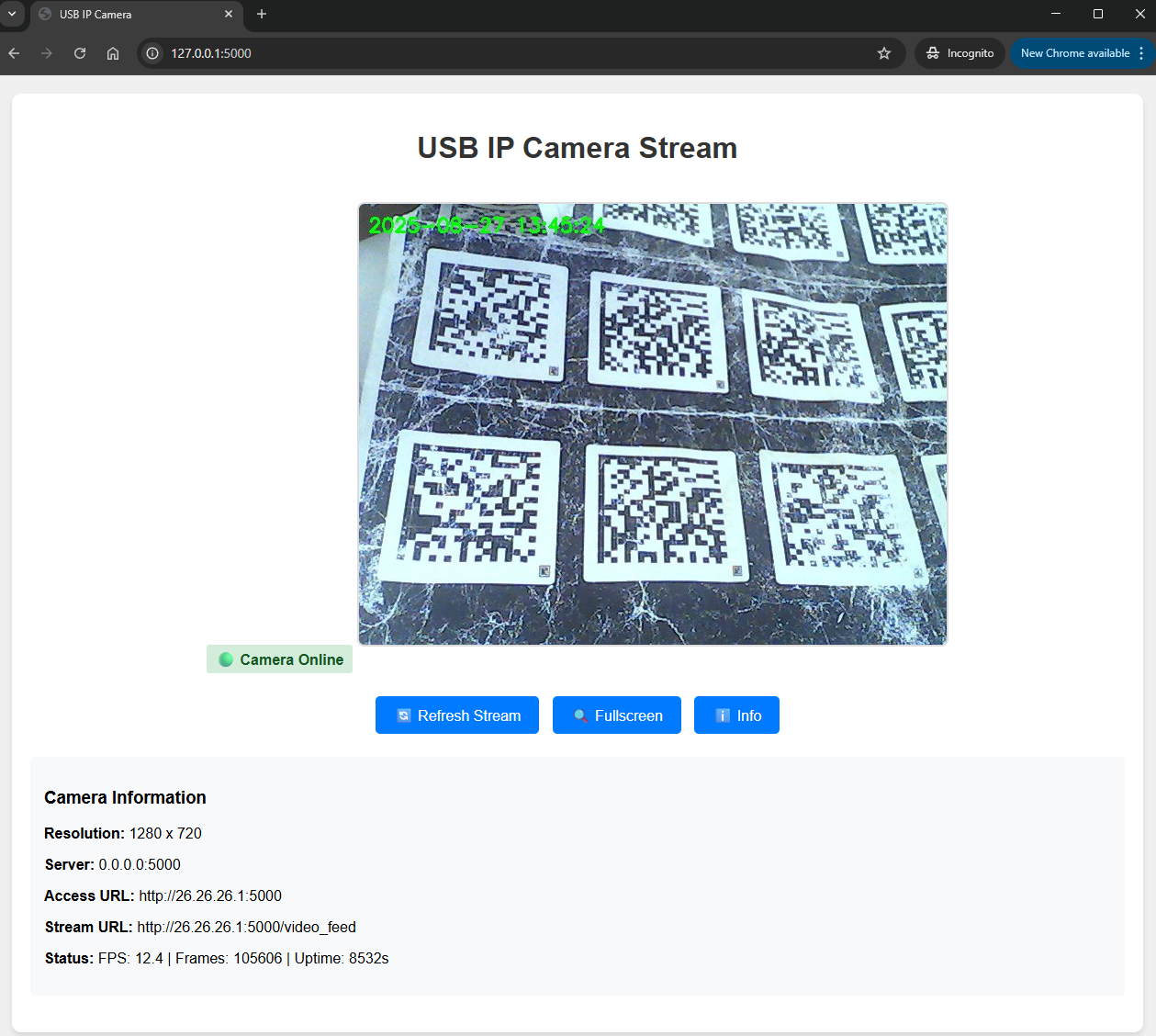
Build the Python GUI App for IP Camera Streaming and Barcode Scanning
To scan barcodes from the video stream:
- Construct the GUI layout using PySide6.
- Capture frames from the video feed using OpenCV.
- Process each frame with Dynamsoft Barcode Reader.
- Display the video feed and draw detected barcode results.
Decode the Camera URL into an OpenCV Mat
The OpenCV VideoCapture() function can be used to continuously retrieve frames from the IP camera stream:
def connect_to_stream(self, url: str, protocol: str = "http"):
    """Connect to IP camera stream and initialize OpenCV capture"""
    self.cap = cv2.VideoCapture(url)
    if not self.cap.isOpened():
        raise ConnectionError("Failed to connect to camera stream")

def read_frames(self):
    """Continuously read frames from the video stream"""
    while self.cap.isOpened():
        ret, frame = self.cap.read()
        if not ret:
            break
        self.process_frame(frame)
Connect OpenCV Frames to Dynamsoft Barcode Reader
-
OpenCV Mat objects use BGR color format, while Dynamsoft Barcode Reader expects specific image data structures. Create a utility function to handle the conversion:
def convertMat2ImageData(mat): """Convert OpenCV Mat to Dynamsoft ImageData format""" if len(mat.shape) == 3: height, width, channels = mat.shape pixel_format = EnumImagePixelFormat.IPF_RGB_888 else: height, width = mat.shape channels = 1 pixel_format = EnumImagePixelFormat.IPF_GRAYSCALED stride = width * channels imagedata = ImageData(mat.tobytes(), width, height, stride, pixel_format) return imagedata -
Create a custom image source adapter to append the converted image data to the barcode reader:
 class BarcodeScanner(QObject):
     """Main barcode scanning engine with Dynamsoft integration"""

     def __init__(self):
         self.cvr = CaptureVisionRouter()
         self.fetcher = FrameFetcher()
         self.receiver = BarcodeResultReceiver(self.result_queue)

         self.cvr.set_input(self.fetcher)
         self.cvr.add_result_receiver(self.receiver)


 class FrameFetcher(ImageSourceAdapter):
     """Custom frame fetcher for Dynamsoft Capture Vision"""

     def add_frame(self, image_data):
         """Add OpenCV frame to Dynamsoft processing queue"""
         self.add_image_to_buffer(image_data)
         self._has_frame = True

 class BarcodeResultReceiver(CapturedResultReceiver):
     """Custom result receiver for barcode detection results"""

     def __init__(self, result_queue):
         super().__init__()
         self.result_queue = result_queue

     def on_captured_result_received(self, result):
         """Called when barcode detection results are available"""
         try:
             self.result_queue.put_nowait(result)
         except queue.Full:
             try:
                 self.result_queue.get_nowait()
                 self.result_queue.put_nowait(result)
             except queue.Empty:
                 pass
Detect Barcodes in Real Time and Draw Overlays
-
Detect barcodes in real-time from the IP camera stream:
def process_frame(self, mat): """Process OpenCV frame for barcode detection""" if not self.is_scanning: return try: image_data = convertMat2ImageData(mat) self.fetcher.add_frame(image_data) except Exception as e: pass -
Draw barcode detection results as overlays on the video stream:
 def _draw_barcode_overlay_on_mat(self, mat):
     """Draw barcode overlays directly on OpenCV Mat"""
     fresh_barcodes = self.barcode_scanner.get_fresh_results()

     for barcode in fresh_barcodes:
         points = barcode['points']
         text = barcode['text']

         pts = np.array(points, dtype=np.int32)
         cv2.drawContours(mat, [pts], 0, (0, 255, 0), 3)

         if points:
             text_x, text_y = points[0]
             cv2.putText(mat, text, (text_x, text_y - 10),
                        cv2.FONT_HERSHEY_SIMPLEX, 0.8, (0, 255, 255), 2)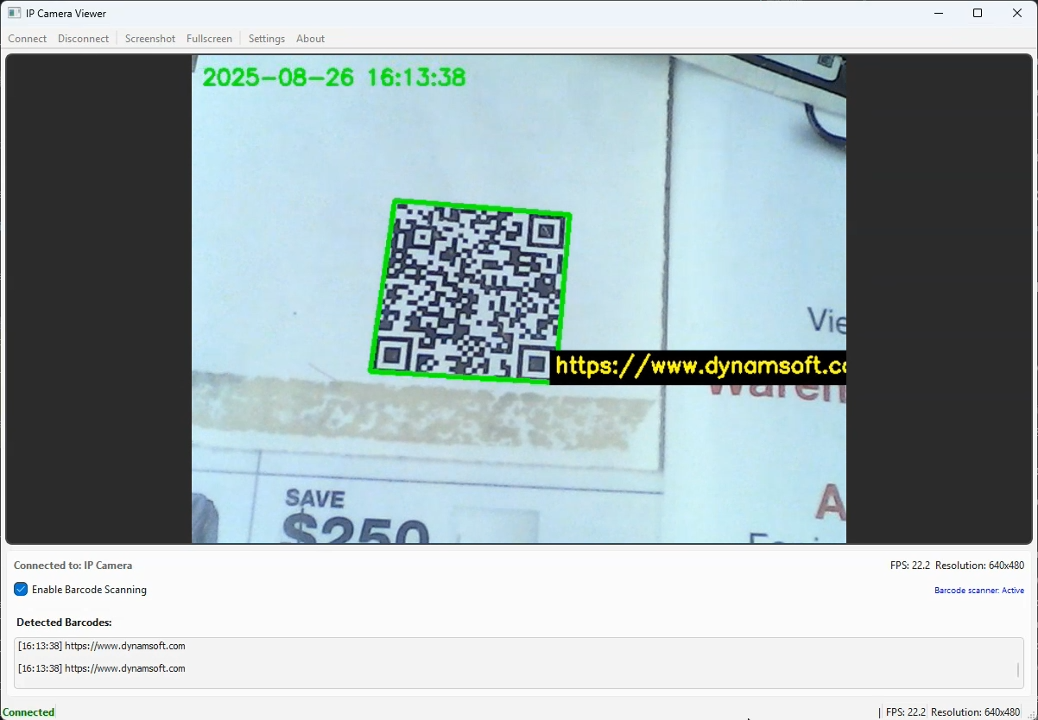
Common Issues & Edge Cases
- Stream connection fails or drops silently:
cv2.VideoCapture(url)returnsFalseforisOpened()if the server hasn’t started yet or the URL is wrong. Always validate after callingVideoCaptureand implement a retry loop with exponential back-off before surfacing an error to the user. - Barcode results arrive on a background thread: Dynamsoft’s
on_captured_result_receivedcallback runs on an internal SDK thread. Never update Qt widgets directly from this callback — use aqueue.Queueand poll from the main thread (or useQMetaObject.invokeMethod) to avoid race conditions and crashes. - High CPU usage at 30 fps: Running barcode detection on every frame is expensive. Consider throttling with a frame-skip counter (e.g., process every 3rd frame) or reducing
ImageSourceAdapterbuffer depth to 1 so the SDK self-regulates to a sustainable decode rate.