


Building an MCP Server for Dynamsoft SDKs: Enabling AI-Assisted Barcode and Document Scanning Development
Large Language Models (LLMs) like Claude and GitHub Copilot are revolutionizing how developers write code. However, they face a critical limitation: they’re trained on data with knowledge cutoffs, meaning they lack information about:
- Latest SDK versions and their breaking changes
- Actual working code examples from official repositories
- Platform-specific implementations (Android vs iOS, high-level vs low-level APIs)
- Real license keys and configuration needed for testing
When developers ask AI assistants to generate code for specialized SDKs like barcode scanners or document imaging libraries, the results are often:
- Outdated or using deprecated APIs
- Syntactically correct but functionally broken
- Missing critical configuration steps
- Unable to run without extensive modifications
What you’ll build: A Node.js Model Context Protocol server that gives AI assistants live access to Dynamsoft SDK versions, code samples, license guidance, and platform-specific integration details for barcode and document scanning tasks.
Key Takeaways
- An MCP server helps coding assistants overcome stale training data by exposing current SDK metadata, working samples, and configuration details at runtime.
- The implementation shown here uses the official MCP TypeScript SDK with stdio transport, JSON registry data, and tool endpoints backed by local sample files.
- Dynamsoft SDK support benefits from MCP especially because package names, versions, platforms, and integration steps change faster than model training corpora.
- The registry-plus-tools design scales across mobile, desktop, web, and Python scanning workflows without hardcoding answers into the model.
Common Developer Questions
Why build an MCP server for barcode scanning and document SDKs?
Because SDK-specific AI answers often fail on version drift, missing samples, or outdated package names. An MCP server fixes that by giving the model direct access to current Dynamsoft docs, sample code, and configuration data during generation.
What does an MCP server expose to AI coding assistants?
In this architecture it exposes tools, resources, and a structured SDK registry containing versions, documentation links, sample repositories, and platform metadata. That lets the assistant answer with current implementation details instead of relying only on its baked-in training knowledge.
How do I implement an MCP server in Node.js for SDK integration help?
Set up a Node.js project with the official MCP SDK, load your SDK registry JSON at startup, register tools and resources, and connect the server over stdio transport. The article uses that exact shape so AI clients like Claude or Copilot can query real Dynamsoft integration data on demand.
Demo Video: Vibe Coding with Dynamsoft MCP Server
Prerequisites
- Node.js 18 or later
- Familiarity with JSON-based API tooling and JavaScript project setup
- Access to the Dynamsoft SDK docs or sample repositories you want the MCP server to surface
The Solution: Model Context Protocol (MCP)
The Model Context Protocol bridges this gap. MCP is an open standard that allows AI assistants to access external data sources and tools in real-time. Think of it as an API that lets AI models fetch up-to-date information during conversations.
Why Build an MCP Server for Dynamsoft SDKs?
Dynamsoft provides enterprise-grade SDKs for:
- Barcode Reading (mobile, web, desktop, server)
- Document Scanning (TWAIN/WIA/ICA/SANE scanners)
- Document Processing (PDF conversion, OCR, image enhancement)
These SDKs span multiple platforms (Android/iOS/Web/Python), API levels (high-level/low-level), and programming languages (Java/Kotlin/Swift/JavaScript/Python). An MCP server can provide:
- Real, working code snippets from official sample repositories
- Latest SDK versions and documentation links
- Trial license keys for immediate testing
- Platform-specific configuration (Gradle, Podfile, npm)
- API usage patterns for complex scenarios
Architecture Overview
MCP Server Components
Our MCP server consists of four key layers:
┌─────────────────────────────────────────────────┐
│          AI Clients (Claude, Copilot)           │
└─────────────────┬───────────────────────────────┘
                  │ JSON-RPC over stdio
┌─────────────────▼───────────────────────────────┐
│              MCP Server (Node.js)                │
│  ┌───────────────────────────────────────────┐  │
│  │    Tools (14 endpoints)                   │  │
│  │  - list_sdks, get_code_snippet, etc.     │  │
│  └───────────────────────────────────────────┘  │
│  ┌───────────────────────────────────────────┐  │
│  │    Resources (Dynamic registration)       │  │
│  │  - SDK info, code samples by platform    │  │
│  └───────────────────────────────────────────┘  │
│  ┌───────────────────────────────────────────┐  │
│  │    Registry (dynamsoft_sdks.json)         │  │
│  │  - Version info, docs, platforms         │  │
│  └───────────────────────────────────────────┘  │
└─────────────────┬───────────────────────────────┘
                  │ File System Access
┌─────────────────▼───────────────────────────────┐
│          Code Snippets Directory                 │
│  - Android/iOS samples (Java/Kotlin/Swift)      │
│  - Python samples                                │
│  - Web samples (JavaScript/TypeScript)          │
│  - Dynamic Web TWAIN samples (HTML/JS)          │
└──────────────────────────────────────────────────┘
Technology Stack
- Runtime: Node.js 18+ (ES Modules)
- MCP SDK:
@modelcontextprotocol/sdk(official TypeScript SDK) - Schema Validation: Zod (for input validation)
- Transport: stdio (standard input/output for JSON-RPC)
- Data Format: JSON for registry, source code files for samples
Implementation Guide
1. Project Setup and Dependencies
First, initialize the project with proper Node.js configuration:
package.json
{
  "name": "simple-dynamsoft-mcp",
  "version": "2.0.2",
  "type": "module",
  "engines": {
    "node": ">=18"
  },
  "bin": {
    "simple-dynamsoft-mcp": "./src/index.js"
  },
  "dependencies": {
    "@modelcontextprotocol/sdk": "^1.25.2",
    "zod": "~3.24.0"
  }
}
Key decisions:
"type": "module"enables ES modules (required by MCP SDK)"engines": {"node": ">=18"}enforces minimum Node.js version"bin"entry allowsnpxexecution- Zod pinned to
~3.24.0to avoid breaking changes in v4
2. SDK Registry Design
The registry (data/dynamsoft_sdks.json) is the single source of truth:
{
  "trial_license": "DLS2eyJoYW5kc2hha2VDb2RlIjoiMjAwMDAxLTE2NDk4Mjk3OTI2MzUi...",
  "license_request_url": "https://www.dynamsoft.com/customer/license/trialLicense/?product=dcv&package=cross-platform",
  "maven_url": "https://download2.dynamsoft.com/maven/aar",
  "sdks": {
    "dbr-mobile": {
      "name": "Dynamsoft Barcode Reader Mobile SDK",
      "version": "11.2.5000",
      "platforms": {
        "android": {
          "languages": ["Kotlin", "Java"],
          "docs": {
            "high-level": {
              "user-guide": "https://...",
              "api-reference": "https://..."
            },
            "low-level": { /* ... */ }
          },
          "samples": {
            "high-level": "https://github.com/...",
            "low-level": "https://github.com/..."
          }
        },
        "ios": { /* ... */ }
      }
    },
    "dbr-python": { /* Python SDK config */ },
    "dbr-web": { /* Web SDK config */ },
    "dwt": { /* Dynamic Web TWAIN config */ }
  }
}
Design principles:
- Hierarchical structure: SDK → Platform → API Level → Docs/Samples
- Separation of concerns: global settings vs SDK-specific settings
- Extensibility: easy to add new SDKs or platforms
- Documentation-first: every platform includes links to official docs
3. MCP Server Initialization
The entry point (src/index.js) sets up the server with stdio transport:
#!/usr/bin/env node
import { Server } from "@modelcontextprotocol/sdk/server/index.js";
import { StdioServerTransport } from "@modelcontextprotocol/sdk/server/stdio.js";
import { z } from "zod";
import { readFileSync, existsSync, readdirSync, statSync } from "fs";
import { join, dirname } from "path";
import { fileURLToPath } from "url";

// ES module path resolution
const __filename = fileURLToPath(import.meta.url);
const __dirname = dirname(__filename);
const projectRoot = join(__dirname, "..");

// Load SDK registry
const registryPath = join(projectRoot, "data", "dynamsoft_sdks.json");
const registry = JSON.parse(readFileSync(registryPath, "utf-8"));

// Initialize MCP server
const server = new Server(
  {
    name: "simple-dynamsoft-mcp",
    version: "2.0.2"
  },
  {
    capabilities: {
      tools: {},
      resources: {}
    }
  }
);

// Tool and resource registration will follow...

// Start server with stdio transport
const transport = new StdioServerTransport();
await server.connect(transport);
Critical details:
- Shebang
#!/usr/bin/env nodeenablesnpxexecution - ES module
__dirnameemulation usingfileURLToPath - Server declares capabilities for both tools and resources
- Stdio transport for JSON-RPC communication
4. Implementing Tools
Tools are the primary interface for AI assistants. The new registerTool() API requires:
- Name: unique identifier
- Options:
{ title, description, inputSchema } - Handler: async function returning result
Example: list_sdks Tool
server.registerTool(
  "list_sdks",
  {
    title: "List SDKs",
    description: "List all available Dynamsoft SDKs with versions and platforms",
    inputSchema: {}
  },
  async () => {
    const lines = ["# Available Dynamsoft SDKs\n"];

    for (const [id, sdk] of Object.entries(registry.sdks)) {
      lines.push(`## ${sdk.name} (v${sdk.version})`);
      lines.push(`**SDK ID:** \`${id}\``);
      lines.push(`**Platforms:** ${Object.keys(sdk.platforms).join(", ")}`);

      // Add documentation links
      const firstPlatform = Object.values(sdk.platforms)[0];
      if (firstPlatform.docs) {
        lines.push(`**Docs:** ${firstPlatform.docs["user-guide"] || firstPlatform.docs["high-level"]?.["user-guide"]}`);
      }
      lines.push("");
    }

    return {
      content: [{
        type: "text",
        text: lines.join("\n")
      }]
    };
  }
);
Example: get_code_snippet Tool (Complex Logic)
This tool demonstrates file system interaction and fallback logic:
server.registerTool(
  "get_code_snippet",
  {
    title: "Get Code Snippet",
    description: "Get actual source code from mobile sample projects",
    inputSchema: {
      platform: z.enum(["android", "ios"]).describe("Platform: android or ios"),
      sample_name: z.string().describe("Sample name, e.g. ScanSingleBarcode"),
      api_level: z.string().optional().describe("API level: high-level or low-level"),
      language: z.string().optional().describe("Language: java, kotlin, swift"),
      file_name: z.string().optional().describe("Specific file to retrieve")
    }
  },
  async ({ platform, sample_name, api_level, language, file_name }) => {
    // Normalize and locate sample
    const level = normalizeApiLevel(api_level);
    let samplePath = getMobileSamplePath(platform, level, sample_name);

    // Auto-fallback: try opposite API level if not found
    if (!existsSync(samplePath)) {
      const otherLevel = level === "high-level" ? "low-level" : "high-level";
      samplePath = getMobileSamplePath(platform, otherLevel, sample_name);
      if (!existsSync(samplePath)) {
        return {
          content: [{
            type: "text",
            text: `Sample "${sample_name}" not found. Use list_samples to see available.`
          }]
        };
      }
    }

    // Find code files
    const codeFiles = findCodeFilesInSample(samplePath);

    // Filter by language if specified
    if (language) {
      const langExts = {
        java: [".java"],
        kotlin: [".kt"],
        swift: [".swift"]
      };
      codeFiles = codeFiles.filter(f =>
        langExts[language]?.some(ext => f.filename.endsWith(ext))
      );
    }

    // Return main file or all files
    const mainFile = getMainCodeFile(platform, samplePath);
    const filesToReturn = mainFile ? [mainFile] : codeFiles.slice(0, 3);

    // Format response with metadata
    const output = [
      `# ${sample_name} - ${platform} (${level})`,
      `**SDK Version:** ${registry.sdks["dbr-mobile"].version}`,
      `**Trial License:** \`${registry.trial_license}\``,
      ""
    ];

    for (const file of filesToReturn) {
      const content = readFileSync(file.path, "utf-8");
      output.push(`## ${file.relativePath}`);
      output.push("```" + getFileExtension(file.filename));
      output.push(content);
      output.push("```");
      output.push("");
    }

    return {
      content: [{ type: "text", text: output.join("\n") }]
    };
  }
);
Key patterns demonstrated:
- Zod schema validation for inputs
- Intelligent fallback logic (try alternate API levels)
- Language filtering
- Automatic main file detection
- Markdown-formatted output with code blocks
- Inclusion of SDK version and license in response
5. Dynamic Resource Registration
Resources provide structured access to data. We dynamically register resources based on discovered samples:
// Discover samples from file system
function discoverMobileSamples(platform) {
  const samples = { "high-level": [], "low-level": [] };
  const basePath = join(projectRoot, "code-snippet", "dynamsoft-barcode-reader", platform);

  const highLevelPath = join(basePath, "BarcodeScannerAPISamples");
  const lowLevelPath = join(basePath, "FoundationalAPISamples");

  if (existsSync(highLevelPath)) {
    samples["high-level"] = readdirSync(highLevelPath)
      .filter(name => statSync(join(highLevelPath, name)).isDirectory());
  }

  if (existsSync(lowLevelPath)) {
    samples["low-level"] = readdirSync(lowLevelPath)
      .filter(name => statSync(join(lowLevelPath, name)).isDirectory());
  }

  return samples;
}

// Register resources dynamically
for (const platform of ["android", "ios"]) {
  const samples = discoverMobileSamples(platform);

  for (const level of ["high-level", "low-level"]) {
    for (const sampleName of samples[level]) {
      const resourceUri = `dynamsoft://samples/mobile/${platform}/${level}/${sampleName}`;
      const resourceName = `mobile-${platform}-${level}-${sampleName}`
        .toLowerCase()
        .replace(/[^a-z0-9-]/g, "-");

      server.registerResource(
        resourceName,
        resourceUri,
        {
          title: `${sampleName} (${platform})`,
          description: `${sampleName} for ${platform} (${level})`,
          mimeType: "text/plain"
        },
        async (uri) => {
          const samplePath = getMobileSamplePath(platform, level, sampleName);
          const mainFile = getMainCodeFile(platform, samplePath);

          if (!mainFile) {
            return {
              contents: [{
                uri: uri.href,
                text: "Sample not found",
                mimeType: "text/plain"
              }]
            };
          }

          const content = readFileSync(mainFile.path, "utf-8");
          const mimeType = getMimeType(mainFile.filename);

          return {
            contents: [{
              uri: uri.href,
              text: content,
              mimeType
            }]
          };
        }
      );
    }
  }
}
Design highlights:
- Discovery-driven: resources are created based on actual file system contents
- URI scheme:
dynamsoft://samples/{sdk}/{platform}/{level}/{sample} - Sanitized names: convert to lowercase kebab-case for consistency
- Lazy loading: content read only when requested
- MIME type detection: appropriate content-type for different languages
6. Helper Functions and Utilities
The server includes several utility functions that follow consistent patterns:
// Normalize user input
function normalizeApiLevel(level) {
  if (!level) return "high-level";
  const l = level.toLowerCase();
  if (l.includes("high") || l.includes("scanner")) return "high-level";
  if (l.includes("low") || l.includes("foundation") || l.includes("router")) return "low-level";
  return "high-level";
}

function normalizeLanguage(lang) {
  if (!lang) return null;
  const l = lang.toLowerCase();
  if (l.includes("java") && !l.includes("script")) return "java";
  if (l.includes("kotlin") || l === "kt") return "kotlin";
  if (l.includes("swift")) return "swift";
  return null;
}

// Path construction
function getMobileSamplePath(platform, level, sampleName) {
  const apiFolder = level === "high-level"
    ? "BarcodeScannerAPISamples"
    : "FoundationalAPISamples";

  return join(
    projectRoot,
    "code-snippet",
    "dynamsoft-barcode-reader",
    platform,
    apiFolder,
    sampleName
  );
}

// File discovery
function findCodeFilesInSample(samplePath) {
  const codeFiles = [];
  const extensions = [".java", ".kt", ".swift", ".m", ".h"];

  function traverse(dir) {
    const entries = readdirSync(dir);
    for (const entry of entries) {
      const fullPath = join(dir, entry);
      const stat = statSync(fullPath);

      if (stat.isDirectory() && !entry.startsWith(".")) {
        traverse(fullPath);
      } else if (stat.isFile() && extensions.some(ext => entry.endsWith(ext))) {
        codeFiles.push({
          path: fullPath,
          filename: entry,
          relativePath: fullPath.replace(samplePath + "/", "")
        });
      }
    }
  }

  traverse(samplePath);
  return codeFiles;
}

// Smart main file detection
function getMainCodeFile(platform, samplePath) {
  const files = findCodeFilesInSample(samplePath);

  // Platform-specific patterns
  const mainPatterns = platform === "android"
    ? ["MainActivity", "ScanActivity", "Application"]
    : ["ViewController", "AppDelegate"];

  // Priority 1: Match pattern
  for (const pattern of mainPatterns) {
    const match = files.find(f => f.filename.includes(pattern));
    if (match) return match;
  }

  // Priority 2: Shortest path (likely in main source dir)
  files.sort((a, b) => a.relativePath.length - b.relativePath.length);
  return files[0];
}
Pattern observations:
- Defensive programming: always provide defaults
- Fuzzy matching: accept various input formats
- Platform-aware logic: different conventions for Android vs iOS
- Prioritized search: use heuristics to find the most relevant file
Configuration and Usage
Setting Up MCP Clients
The server can be used with any MCP-compatible client. Here are the most common configurations:
OpenCode
Location:
- macOS:
~/.config/opencode/opencode.json - Windows:
%USERPROFILE%\.config\opencode\opencode.json
Configuration:
{
  "$schema": "https://opencode.ai/config.json",
  "mcp": {
    "dynamsoft": {
      "type": "local",
      "command": [
        "npx",
        "simple-dynamsoft-mcp"
      ]
    }
  }
}
Claude Desktop
Location:
- macOS:
~/Library/Application Support/Claude/claude_desktop_config.json - Windows:
%APPDATA%\Claude\claude_desktop_config.json
Configuration:
{
  "mcpServers": {
    "dynamsoft": {
      "command": "npx",
      "args": ["-y", "simple-dynamsoft-mcp"]
    }
  }
}
VS Code with GitHub Copilot
Global Location:
- macOS:
~/Library/Application Support/Code/User/mcp.json - Windows:
%APPDATA%\Code\User\mcp.json
{
  "servers": {
    "dynamsoft": {
      "command": "npx",
      "args": ["-y", "simple-dynamsoft-mcp"]
    }
  }
}
Or create workspace-specific .vscode/mcp.json:
{
  "servers": {
    "dynamsoft": {
      "command": "npx",
      "args": ["-y", "simple-dynamsoft-mcp"]
    }
  }
}
Cursor
Location:
- macOS:
~/.cursor/mcp.json - Windows:
%USERPROFILE%\.cursor\mcp.json
Configuration:
{
  "mcpServers": {
    "dynamsoft": {
      "command": "npx",
      "args": ["-y", "simple-dynamsoft-mcp"]
    }
  }
}
Windsurf
Location:
- macOS:
~/.codeium/windsurf/mcp_config.json - Windows:
%USERPROFILE%\.codeium\windsurf\mcp_config.json
{
  "mcpServers": {
    "dynamsoft": {
      "command": "npx",
      "args": ["-y", "simple-dynamsoft-mcp"]
    }
  }
}
Real-World Usage Examples
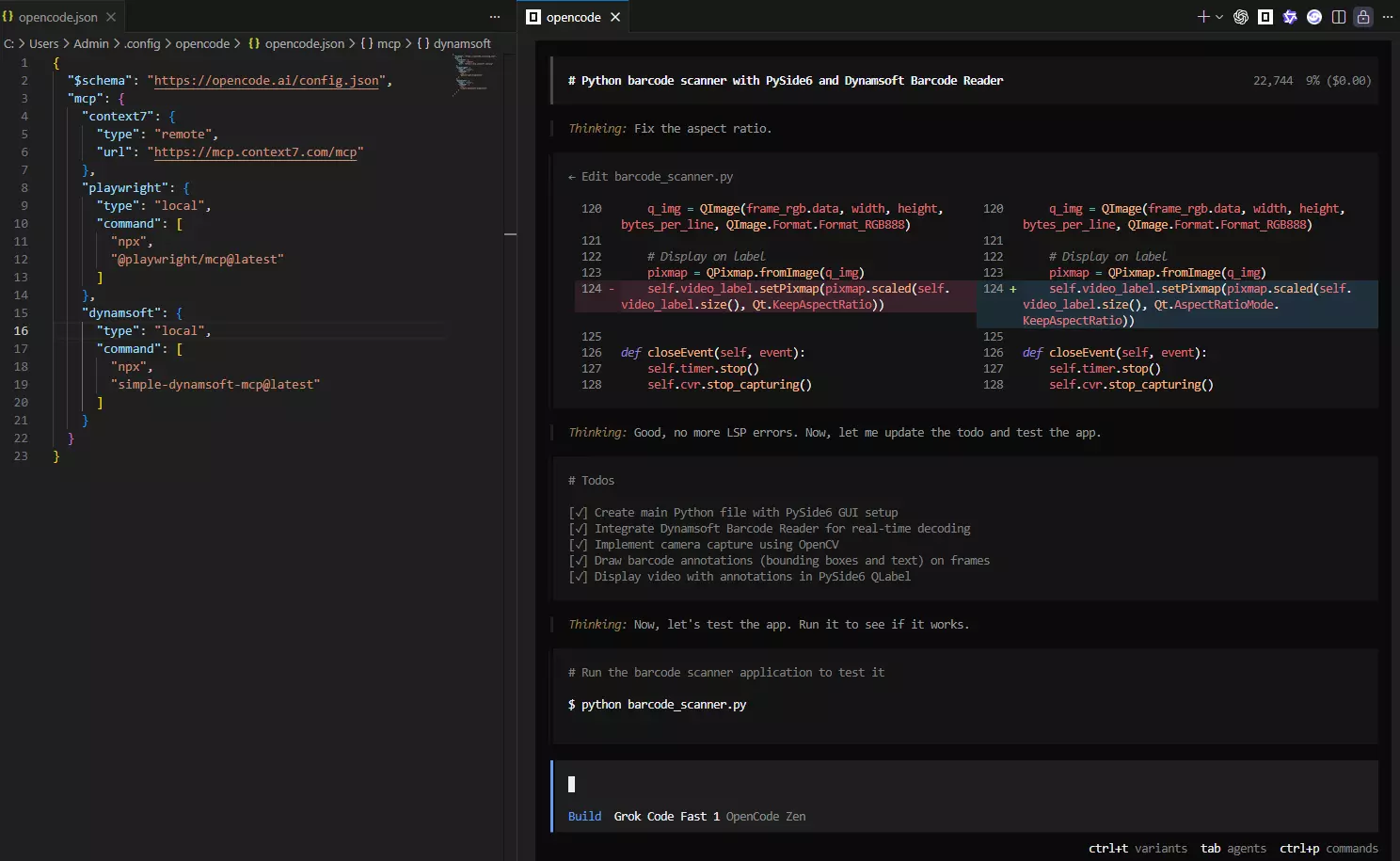
Example 1: Android Barcode Scanner (High-Level API)
User prompt:
"Create an Android barcode scanner app using Dynamsoft's high-level API"
Example 2: Python Video Decoding
User prompt:
"Create a Python barcode scanner with PySide6 and Dynamsoft Barcode Reader. Display barcode annotations on video frames."
Example 3: Web Document Scanner
User prompt:
"Create a web page that scans documents from a TWAIN scanner using Dynamic Web TWAIN"
Testing the Server
Manual Testing via stdio
Test the server without an MCP client. Note that tools/call requires an arguments field:
-
List all tools:
echo '{"jsonrpc":"2.0","id":1,"method":"tools/list"}' | node src/index.js -
Call a specific tool (list_sdks):
echo '{"jsonrpc":"2.0","id":1,"method":"tools/call","params":{"name":"list_sdks","arguments":{}}}' | node src/index.js -
Call tool with arguments (get_code_snippet):
echo '{"jsonrpc":"2.0","id":1,"method":"tools/call","params":{"name":"get_code_snippet","arguments":{"platform":"android","sample_name":"ScanSingleBarcode"}}}' | node src/index.js -
List resources:
echo '{"jsonrpc":"2.0","id":1,"method":"resources/list"}' | node src/index.js -
Read a specific resource:
echo '{"jsonrpc":"2.0","id":1,"method":"resources/read","params":{"uri":"dynamsoft://sdk-info"}}' | node src/index.js
Automated Testing
Create test scripts:
import { spawn } from "child_process";

async function testMCPServer() {
  const server = spawn("node", ["src/index.js"]);

  const tests = [
    { method: "tools/list" },
    { method: "tools/call", params: { name: "list_sdks" } },
    { method: "resources/list" }
  ];

  for (const test of tests) {
    const request = JSON.stringify({
      jsonrpc: "2.0",
      id: Date.now(),
      ...test
    });

    server.stdin.write(request + "\n");

    // Wait for response
    await new Promise((resolve) => {
      server.stdout.once("data", (data) => {
        const response = JSON.parse(data.toString());
        console.log(`✓ ${test.method}:`, response.result ? "OK" : "FAIL");
        resolve();
      });
    });
  }

  server.kill();
}

testMCPServer();
Publishing and Distribution
# Test package contents
npm pack --dry-run

# Publish to npm
npm publish

# Verify installation
npx -y simple-dynamsoft-mcp@latest