


How to Decode GS1-128 Barcodes and Parse GS1 Application Identifiers in Python
GS1 is a global organization that develops and maintains supply chain standards, including barcode formats. Its system is widely adopted across industries to identify products, logistics units, locations, and more. A key part of this system is the GS1 Application Identifier (AI) — a standardized prefix that specifies the type and format of data encoded in a barcode. For instance, the AI “01” denotes a Global Trade Item Number (GTIN), while “10” refers to a batch or lot number.
Decode GS1-compliant barcodes and extract their Application Identifiers in Python with the barcode module of the Dynamsoft Capture Vision SDK (DCV) — also known as Dynamsoft Barcode Reader.
What you’ll build: A Python script that reads GS1-compliant barcodes from images using Dynamsoft Capture Vision SDK and automatically parses the embedded GS1 Application Identifiers into structured, human-readable fields — with no manual string parsing required.
Key Takeaways
- Dynamsoft Capture Vision SDK (Barcode Reader module) decodes GS1-compliant barcodes such as GS1 DataBar Expanded Stacked and GS1-128 in Python with minimal code.
- The built-in
GS1_AIcode specification automatically parses Application Identifiers — GTIN (AI 01), expiration date (AI 17), net weight (AI 310n), and price (AI 392n) — no regex or manual parsing needed. - Parsed results are returned as structured JSON with field-level validation, making them immediately usable in supply chain, retail, or pharmaceutical inventory systems.
- The full pipeline (barcode detection → decoding → GS1 AI parsing) is configured via a single JSON template file, keeping Python code concise and reusable.
Common Developer Questions
How do I decode GS1-128 barcodes and extract Application Identifiers in Python?
Decode the barcode with CaptureVisionRouter first, then apply a template that includes a semantic processing step configured with the GS1_AI code specification. That way the same pipeline returns both the raw barcode data and parsed AI fields such as GTIN, lot number, or expiry date.
How do I parse GS1 AI fields like GTIN, expiration date, and lot number automatically from a barcode?
Configure the code parser task with the built-in GS1_AI specification and let the SDK interpret the barcode payload into named fields automatically. That removes the need for manual substring logic or regex rules for common identifiers like AI 01, 10, 17, 310n, or 392n.
What Python library supports GS1 DataBar and GS1-128 barcode parsing with structured JSON output?
Dynamsoft Capture Vision’s Python package handles both barcode decoding and GS1 AI parsing in one configurable pipeline, so it is the library used here. The parsed output is already structured, which makes it easier to feed into inventory, logistics, or compliance systems.
Demo: Parsing GS1 AIs from Barcodes
Prerequisites
-
Install required Python packages:
pip install dynamsoft-capture-vision-bundle opencv-python -
Get a trial license key for Dynamsoft Capture Vision SDK.
-
Create a configuration file named
GS1AI_Scanner.jsonwith the following content:{ "BarcodeReaderTaskSettingOptions": [ { "Name": "task_gs1_ai_barcode", "ExpectedBarcodesCount": 1, "BarcodeFormatIds": [ "BF_DEFAULT" ], "SectionArray": [ { "Section": "ST_REGION_PREDETECTION", "ImageParameterName": "ip_localize_barcode", "StageArray": [ { "Stage": "SST_PREDETECT_REGIONS" } ] }, { "Section": "ST_BARCODE_LOCALIZATION", "ImageParameterName": "ip_localize_barcode", "StageArray": [ { "Stage": "SST_LOCALIZE_CANDIDATE_BARCODES" }, { "Stage": "SST_LOCALIZE_BARCODES" } ] }, { "Section": "ST_BARCODE_DECODING", "ImageParameterName": "ip_decode_barcode", "StageArray": [ { "Stage": "SST_RESIST_DEFORMATION" }, { "Stage": "SST_COMPLEMENT_BARCODE" }, { "Stage": "SST_SCALE_BARCODE_IMAGE" }, { "Stage": "SST_DECODE_BARCODES" } ] } ] } ], "CaptureVisionTemplates": [ { "Name": "ReadGS1AIBarcode", "ImageROIProcessingNameArray": [ "roi_gs1_ai_barcode" ], "SemanticProcessingNameArray": [ "sp_gs1_ai" ] } ], "ImageParameterOptions": [ { "Name": "ip_localize_barcode", "ApplicableStages": [ { "Stage": "SST_BINARIZE_IMAGE", "BinarizationModes": [ { "Mode": "BM_LOCAL_BLOCK" } ] }, { "Stage": "SST_BINARIZE_TEXTURE_REMOVED_GRAYSCALE" }, { "Stage": "SST_TRANSFORM_GRAYSCALE", "GrayscaleTransformationModes": [ { "Mode": "GTM_ORIGINAL" }, { "Mode": "GTM_INVERTED" } ] } ] }, { "Name": "ip_decode_barcode", "ApplicableStages": [ { "Stage": "SST_TRANSFORM_GRAYSCALE", "GrayscaleTransformationModes": [ { "Mode": "GTM_ORIGINAL" } ] }, { "Stage": "SST_SCALE_IMAGE", "ImageScaleSetting": { "ScaleType": "ST_SCALE_DOWN", "ReferenceEdge": "RE_SHORTER_EDGE", "EdgeLengthThreshold": 99999 } } ] } ], "TargetROIDefOptions": [ { "Name": "roi_gs1_ai_barcode", "TaskSettingNameArray": [ "task_gs1_ai_barcode" ] } ], "SemanticProcessingOptions": [ { "Name": "sp_gs1_ai", "ReferenceObjectFilter": { "ReferenceTargetROIDefNameArray": [ "roi_gs1_ai_barcode" ] }, "TaskSettingNameArray": [ "dcp_gs1_ai" ] } ], "CodeParserTaskSettingOptions": [ { "Name": "dcp_gs1_ai", "CodeSpecifications": [ "GS1_AI" ] } ] }
Step 1: Read and Decode a GS1 Barcode in Python
Here’s an example GS1 barcode image:
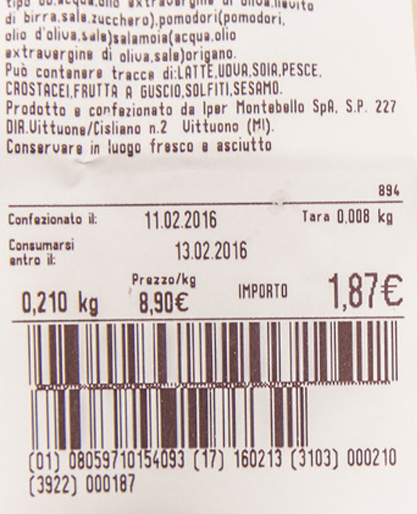
Use the following Python script to decode it:
import sys
from dynamsoft_capture_vision_bundle import *
import os
import json
import cv2
import numpy as np

if __name__ == '__main__':

    print("**********************************************************")
    print("Welcome to Dynamsoft Capture Vision - Barcode Sample")
    print("**********************************************************")

    error_code, error_message = LicenseManager.init_license("LICENSE-KEY")
    if error_code != EnumErrorCode.EC_OK and error_code != EnumErrorCode.EC_LICENSE_CACHE_USED:
        print("License initialization failed: ErrorCode:",
              error_code, ", ErrorString:", error_message)
    else:
        cvr_instance = CaptureVisionRouter()
        cvr_instance.init_settings_from_file('GS1AI_Scanner.json')
        while (True):
            image_path = input(
                ">> Input your image full path:\n"
                ">> 'Enter' for sample image or 'Q'/'q' to quit\n"
            ).strip('\'"')

            if image_path.lower() == "q":
                sys.exit(0)

            if not os.path.exists(image_path):
                print("The image path does not exist.")
                continue

            cv_image = cv2.imread(image_path)
            result = cvr_instance.capture(
                cv_image, "ReadGS1AIBarcode")
            if result.get_error_code() != EnumErrorCode.EC_OK:
                print("Error:", result.get_error_code(),
                      result.get_error_string())
            else:
                items = result.get_items()
                for item in items:
                    if item.get_type() == EnumCapturedResultItemType.CRIT_BARCODE:
                        format_type = item.get_format_string()
                        text_bytes = item.get_bytes()
                        text = text_bytes.decode('utf-8')
                        print('Barcode text: {} '.format(text))
                        print('Barcode format: {} '.format(format_type))

                        location = item.get_location()
                        x1 = location.points[0].x
                        y1 = location.points[0].y
                        x2 = location.points[1].x
                        y2 = location.points[1].y
                        x3 = location.points[2].x
                        y3 = location.points[2].y
                        x4 = location.points[3].x
                        y4 = location.points[3].y

                        cv2.drawContours(
                        cv_image, [np.intp([(x1, y1), (x2, y2), (x3, y3), (x4, y4)])], 0, (0, 255, 0), 2)

                        cv2.putText(cv_image, text, (x1, y1 - 10),
                                    cv2.FONT_HERSHEY_SIMPLEX, 0.5, (0, 0, 255), 2)

            cv2.imshow(
                "Original Image with Detected Barcodes", cv_image)
            cv2.waitKey(0)
            cv2.destroyAllWindows()

    input("Press Enter to quit...")
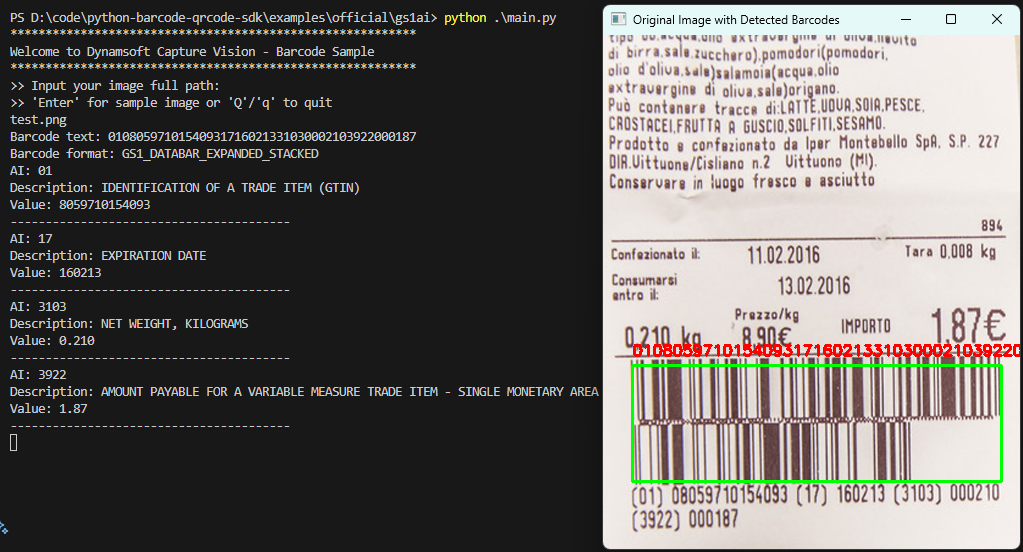
After running the script, you’ll see output like:
Barcode text: 01080597101540931716021331030002103922000187
Barcode format: GS1_DATABAR_EXPANDED_STACKED
Step 2: Parse GS1 Application Identifiers from Barcode Text
The Dynamsoft Capture Vision SDK can automatically parse GS1 AIs from barcode text. The item list returned by the capture method contains both barcode and parsed result items. If the item type is EnumCapturedResultItemType.CRIT_PARSED_RESULT, you can call the get_json_string method to get the parsed result in JSON format:
if item.get_type() == EnumCapturedResultItemType.CRIT_PARSED_RESULT:
    try:
        json_string = item.get_json_string()
        print(json_string)
    except json.JSONDecodeError as e:
        print("JSON Decode Error:", e)
        continue
The JSON string will look like this:
{
    "CodeType": "GS1_AI",
    "ResultInfo": [
        {
            "ChildFields": [
                [
                    {
                        "FieldName": "01AI",
                        "MappingStatus": "MS_SUCCEEDED",
                        "RawValue": "01",
                        "Value": "Identification of a trade item (GTIN)"
                    },
                    {
                        "FieldName": "01Data",
                        "RawValue": "08059710154093",
                        "ValidationStatus": "VS_SUCCEEDED",
                        "Value": "8059710154093"
                    }
                ]
            ],
            "FieldName": "01",
            "RawValue": "0108059710154093",
            "ValidationStatus": "VS_SUCCEEDED",
            "Value": "8059710154093"
        },
        {
            "ChildFields": [
                [
                    {
                        "FieldName": "17AI",
                        "MappingStatus": "MS_SUCCEEDED",
                        "RawValue": "17",
                        "Value": "Expiration date"
                    },
                    {
                        "ChildFields": [
                            [
                                {
                                    "FieldName": "YearOfExpirationDate",
                                    "RawValue": "16",
                                    "ValidationStatus": "VS_SUCCEEDED",
                                    "Value": "2016"
                                },
                                {
                                    "FieldName": "MonthOfExpirationDate",
                                    "ValidationStatus": "VS_SUCCEEDED",
                                    "Value": "02"
                                },
                                {
                                    "FieldName": "DayOfExpirationDate",
                                    "ValidationStatus": "VS_SUCCEEDED",
                                    "Value": "13"
                                }
                            ]
                        ],
                        "FieldName": "17Data",
                        "Value": "160213"
                    }
                ]
            ],
            "FieldName": "17",
            "RawValue": "17160213",
            "Value": "160213"
        },
        {
            "ChildFields": [
                [
                    {
                        "ChildFields": [
                            [
                                {
                                    "FieldName": "310nDecimalPointIndicator",
                                    "Value": "3"
                                }
                            ]
                        ],
                        "ExtraInfo": [
                            {
                                "InfoString": "310",
                                "Position": "0"
                            }
                        ],
                        "FieldName": "310nAI",
                        "MappingStatus": "MS_SUCCEEDED",
                        "RawValue": "3103",
                        "Value": "Net weight, kilograms"
                    },
                    {
                        "FieldName": "310nData",
                        "RawValue": "000210",
                        "Value": "0.210"
                    }
                ]
            ],
            "FieldName": "310n",
            "RawValue": "3103000210",
            "Value": "0.210"
        },
        {
            "ChildFields": [
                [
                    {
                        "ChildFields": [
                            [
                                {
                                    "FieldName": "392nDecimalPointIndicator",
                                    "Value": "2"
                                }
                            ]
                        ],
                        "ExtraInfo": [
                            {
                                "InfoString": "392",
                                "Position": "0"
                            }
                        ],
                        "FieldName": "392nAI",
                        "MappingStatus": "MS_SUCCEEDED",
                        "RawValue": "3922",
                        "Value": "Amount payable for a variable measure trade item - Single monetary area"
                    },
                    {
                        "FieldName": "392nData",
                        "RawValue": "000187",
                        "Value": "1.87"
                    }
                ]
            ],
            "FieldName": "392n",
            "RawValue": "3922000187",
            "Value": "1.87"
        }
    ]
}
Step 3: Format Parsed GS1 AIs for Human-Readable Output
To make the output user-friendly, extract and format the parsed AIs:
data = json.loads(item.get_json_string())
output_lines = []
for item in data.get("ResultInfo", []):
    ai = item.get("FieldName", "")
    description = ""
    value = ""

    child_fields = item.get("ChildFields", [[]])[0]
    for field in child_fields:
        if field["FieldName"].endswith("AI"):
            ai = field.get("RawValue", ai)
            description = field.get("Value", "")
        elif field["FieldName"].endswith("Data"):
            value = field.get("Value", "")

    output_lines.append(f"AI: {ai}")
    output_lines.append(f"Description: {description.upper()}")
    output_lines.append(f"Value: {value}")
    output_lines.append("-" * 40)

"\n".join(output_lines)

print("\n".join(output_lines))
The further processed output is as follows:
AI: 01
Description: IDENTIFICATION OF A TRADE ITEM (GTIN)
Value: 8059710154093
----------------------------------------
AI: 17
Description: EXPIRATION DATE
Value: 160213
----------------------------------------
AI: 3103
Description: NET WEIGHT, KILOGRAMS
Value: 0.210
----------------------------------------
AI: 3922
Description: AMOUNT PAYABLE FOR A VARIABLE MEASURE TRADE ITEM - SINGLE MONETARY AREA
Value: 1.87
----------------------------------------
Common Issues & Edge Cases
- Barcode not detected: Ensure the image resolution is sufficient and the
BarcodeFormatIdsin the JSON config includes the correct format. GS1 DataBar variants may require explicitly addingBF_GS1_DATABARto the format list. - GS1 parsing returns empty results: The semantic processing step (
sp_gs1_ai) only runs when a barcode result item exists in the same capture. Verify the barcode was successfully decoded before expectingCRIT_PARSED_RESULTitems. - Encoding error on barcode bytes: Some GS1 barcodes include non-printable ASCII control characters such as FNC1 (
\x1d). Ifdecode('utf-8')raises an exception, inspectget_bytes()directly or usedecode('latin-1')as a fallback.
Source Code
Get the complete sample project source code on GitHub