


Qt6 C++ Barcode Scanner on Windows: Step-by-Step Integration with Dynamsoft Barcode Reader
Qt is a cross-platform C++ framework for developing applications with graphical user interfaces (GUIs). In this tutorial, you’ll learn how to create a robust, production-ready Qt C++ barcode scanner integration using Qt 6.7.2, Microsoft Visual C++ (MSVC), C++17, and the Dynamsoft Barcode Reader C++ SDK on Windows. The app decodes QR codes, Code 128, DataMatrix, and 20+ other formats from image files and a live webcam feed.
What you’ll build: A Windows desktop barcode scanner application in Qt 6.7.2/C++17 that reads QR codes, Code 128, DataMatrix, and other 1D/2D formats from both image files and a live webcam — powered by the Dynamsoft Barcode Reader C++ SDK for detection and OpenCV for camera capture.
Key Takeaways
- Dynamsoft’s
CCaptureVisionRouterC++ API integrates directly into Qt6 MSVC projects via CMake, enabling QR code, Code 128, DataMatrix, and 20+ barcode format detection with a singleCapture()call. - Running barcode detection in a dedicated
QThreadvia aBarcodeWorkerclass keeps the Qt GUI fully responsive during continuous live camera scanning. - CMake with
CMAKE_AUTOMOC ON,CMAKE_AUTOUIC ON, andCMAKE_AUTORCC ONis required to correctly compile Qt’s meta-object system alongside MSVC; missing these flags causes unresolved symbol linker errors. - OpenCV replaces Qt6 Multimedia for camera access on Windows, providing more reliable raw frame capture without codec dependencies.
Common Developer Questions
How do I build a Qt6 C++ barcode scanner on Windows with MSVC and CMake?
Create a Qt 6.7.2 C++17 project, enable the required Qt CMake automation flags, then link Qt6, OpenCV, and the Dynamsoft SDK libraries from the same build. In this setup, CCaptureVisionRouter handles barcode detection, while CMake manages the MSVC build, Qt meta-object compilation, and post-build DLL copying.
How do I scan QR codes and Code 128 barcodes from a live webcam in a Qt C++ application?
Use OpenCV to read frames from the webcam, convert each frame into a QImage, and pass that image into the barcode worker for detection. With CPresetTemplate::PT_READ_BARCODES, the same live camera loop can recognize QR Code, Code 128, DataMatrix, and other supported 1D or 2D formats.
How do I run Dynamsoft Barcode Reader on a background thread so the Qt GUI stays responsive?
Move barcode decoding into a BarcodeWorker running on its own QThread, then return results to the main window through Qt signals. That keeps the event loop responsive during continuous camera scanning and avoids UI freezes when CCaptureVisionRouter::Capture() is called repeatedly.
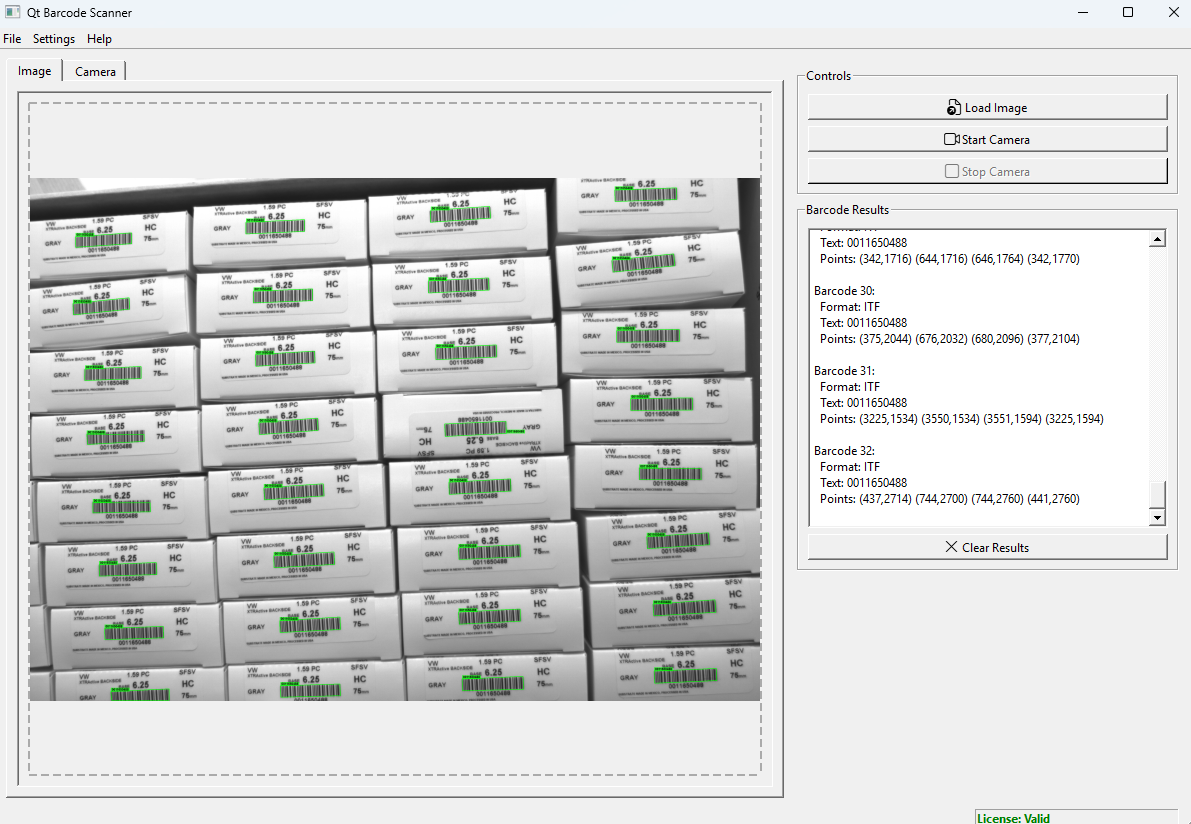
Demo: Qt Barcode Scanner for Windows
Prerequisites
- 30-day trial license for Dynamsoft Barcode Reader
- Dynamsoft C++ Barcode Reader SDK for barcode detection
- Windows 10/11 (64-bit)
- Visual Studio 2019/2022 with MSVC compiler
- CMake 3.16 or later
- Qt 6.7.2+ with Multimedia components
- OpenCV 4.8.0+ for enhanced camera support
What You’ll Build
By the end of this tutorial, you’ll create a barcode scanner application with these features:
- Dual-mode scanning: Image file scanning and real-time camera scanning
- Visual feedback: Live barcode detection overlays with bounding boxes
- Multiple format support: Support for 1D and 2D barcodes (QR codes, Code 128, DataMatrix, etc.)
- Drag-and-drop functionality: Easy image loading via drag-and-drop
Step 1: Set Up Qt 6.7.2, MSVC, and OpenCV
1.1 Install Qt 6.7.2 with the MSVC Compiler
Download and install Qt 6 from the official Qt installer:
- Run the Qt Online Installer.
- Select Qt 6.7.2 or later.
- Choose MSVC 2019/2022 64-bit component.
-
Install to
C:\Qt\6.7.2\msvc2022_64# Set Qt environment variable set Qt6_DIR=C:\Qt\6.7.2\msvc2022_64\lib\cmake\Qt6
1.2 Install OpenCV 4.8 for Camera Support
Download OpenCV 4.8.0 from opencv.org:
- Download the Windows release
- Extract to
C:\opencv -
Set environment variable:
set OpenCV_DIR=C:\opencv\build
Step 2: Configure the CMake Project with Qt6 and Dynamsoft
2.1 Create Project Directory
mkdir qt-barcode-scanner
cd qt-barcode-scanner
2.2 Write CMakeLists.txt to Link Qt6, OpenCV, and Dynamsoft
Create a CMakeLists.txt file that handles all dependencies:
cmake_minimum_required(VERSION 3.16)
project(QtBarcodeScanner VERSION 1.0 LANGUAGES CXX)

set(CMAKE_CXX_STANDARD 17)
set(CMAKE_CXX_STANDARD_REQUIRED ON)

# Find Qt6 components
find_package(Qt6 REQUIRED COMPONENTS Core Widgets Multimedia MultimediaWidgets)

# Enable Qt MOC, UIC, and RCC
set(CMAKE_AUTOMOC ON)
set(CMAKE_AUTOUIC ON)
set(CMAKE_AUTORCC ON)

# OpenCV for camera support - always enabled
find_package(OpenCV REQUIRED)
if(OpenCV_FOUND)
    message(STATUS "OpenCV found: ${OpenCV_VERSION}")
endif()

# Source files
set(SOURCES
    main.cpp
    mainwindow.cpp
    mainwindow.h
    mainwindow.ui
    barcodeworker.cpp
    barcodeworker.h
    opencvcamera.cpp
    opencvcamera.h
)

# Create executable
add_executable(QtBarcodeScanner ${SOURCES})

# Link Qt libraries
target_link_libraries(QtBarcodeScanner
    Qt6::Core
    Qt6::Widgets
    Qt6::Multimedia
    Qt6::MultimediaWidgets
)

# Link OpenCV
if(OpenCV_FOUND)
    target_link_libraries(QtBarcodeScanner ${OpenCV_LIBS})
    target_include_directories(QtBarcodeScanner PRIVATE ${OpenCV_INCLUDE_DIRS})
endif()

# Dynamsoft SDK configuration
set(DCV_ROOT "${CMAKE_CURRENT_SOURCE_DIR}/../../dcv")
target_include_directories(QtBarcodeScanner PRIVATE "${DCV_ROOT}/include")

if(WIN32)
    target_link_libraries(QtBarcodeScanner
        "${DCV_ROOT}/lib/win/DynamsoftCaptureVisionRouter.lib"
        "${DCV_ROOT}/lib/win/DynamsoftCore.lib"
        "${DCV_ROOT}/lib/win/DynamsoftUtility.lib"
        "${DCV_ROOT}/lib/win/DynamsoftLicense.lib"
    )
endif()

# Post-build DLL and resource copying
if(WIN32)
    # Copy Qt platform plugins
    add_custom_command(TARGET QtBarcodeScanner POST_BUILD
        COMMAND ${CMAKE_COMMAND} -E make_directory
        "$<TARGET_FILE_DIR:QtBarcodeScanner>/platforms"
        COMMAND ${CMAKE_COMMAND} -E copy_directory
        "${Qt6_DIR}/../../../plugins/platforms"
        "$<TARGET_FILE_DIR:QtBarcodeScanner>/platforms"
    )

    # Copy complete DLL directory
    add_custom_command(TARGET QtBarcodeScanner POST_BUILD
        COMMAND ${CMAKE_COMMAND} -E copy_directory
        "${DCV_ROOT}/lib/win"
        "$<TARGET_FILE_DIR:QtBarcodeScanner>"
    )
endif()
Key Configuration Points:
- Automatic MOC/UIC/RCC: Essential for Qt meta-object compilation
- Complete DLL copying: Ensures all Dynamsoft libraries are available
- Plugin directory copying: Required for Qt platform plugins
- Conditional compilation: Enables camera features based on available components
Step 3: Define the Core Application Classes
3.1 Declare the Main Window and Camera Interface
#ifndef MAINWINDOW_H
#define MAINWINDOW_H

#include <QtWidgets/QMainWindow>
#include <QtWidgets/QLabel>
#include <QtCore/QThread>
#include <QtCore/QTimer>
#include <QtGui/QDragEnterEvent>
#include <QtGui/QDropEvent>
#include <QtGui/QPainter>

#include <QtMultimedia/QCamera>
#include <QtMultimedia/QMediaCaptureSession>
#include <QtMultimedia/QMediaDevices>
#include <QtMultimediaWidgets/QVideoWidget>

#include "opencvcamera.h"
#include <QtWidgets/QLabel>

#include "barcodeworker.h"

QT_BEGIN_NAMESPACE
namespace Ui { class MainWindow; }
QT_END_NAMESPACE

class MainWindow : public QMainWindow
{
    Q_OBJECT

public:
    MainWindow(QWidget *parent = nullptr);
    ~MainWindow();

protected:
    void dragEnterEvent(QDragEnterEvent *event) override;
    void dropEvent(QDropEvent *event) override;
    void resizeEvent(QResizeEvent *event) override;
    void changeEvent(QEvent *event) override;

private slots:
    void openImageFile();
    void startCamera();
    void stopCamera();
    void clearResults();
    void about();
    void setLicense();
    void loadTemplate();

    void onBarcodeResults(const QList<BarcodeResult> &results);
    void onImageTabSelected();
    void onCameraTabSelected();
    void onLicenseStatusChanged(const QString &status, bool isValid);

private:
    void setupConnections();
    void loadImageFile(const QString &filePath);
    void updateImageDisplay(const QPixmap &pixmap, const QList<BarcodeResult> &results = QList<BarcodeResult>());
    void updateResultsDisplay(const QList<BarcodeResult> &results);
    void updateCameraDisplay();
    void updateLicenseStatus(const QString &status, bool isValid);

    bool tryStartOpenCVCamera();

    Ui::MainWindow *ui;

    std::unique_ptr<QCamera> camera;
    std::unique_ptr<QMediaCaptureSession> captureSession;
    std::unique_ptr<QVideoWidget> videoWidget;

    OpenCVCamera *openCVCamera;
    QLabel *cameraLabel;
    bool useOpenCVCamera;
    QTimer *resizeTimer;
    bool cameraUpdatesPaused;
#endif

    QThread *workerThread;
    BarcodeWorker *barcodeWorker;

    QPixmap currentPixmap;
    QList<BarcodeResult> currentImageResults;
    QPixmap currentCameraFrame;
    QList<BarcodeResult> currentCameraResults;
    QString licenseKey;
    QString templateContent;
    QString lastImageDirectory;

    QLabel *licenseStatusLabel;
};

#endif // MAINWINDOW_H
3.2 Design the Thread-safe BarcodeWorker Interface
The BarcodeWorker class handles barcode detection in a separate thread to prevent UI blocking:
// barcodeworker.h
#ifndef BARCODEWORKER_H
#define BARCODEWORKER_H

#include <QtCore/QObject>
#include <QtCore/QList>
#include <QtCore/QPoint>
#include <QtGui/QImage>

#include "DynamsoftCaptureVisionRouter.h"
#include "DynamsoftUtility.h"

using namespace dynamsoft::license;
using namespace dynamsoft::cvr;
using namespace dynamsoft::dbr;
using namespace dynamsoft::utility;
using namespace dynamsoft::basic_structures;

struct BarcodeResult
{
    QString format;
    QString text;
    QList<QPoint> points;
};

class BarcodeWorker : public QObject, public CCapturedResultReceiver
{
    Q_OBJECT

public:
    explicit BarcodeWorker(QObject *parent = nullptr);
    ~BarcodeWorker();

    virtual void OnDecodedBarcodesReceived(CDecodedBarcodesResult *pResult) override;

public slots:
    void initialize();
    void processImage(const QImage &image);
    void processFrame(const QImage &frame);
    void setLicense(const QString &license);

signals:
    void resultsReady(const QList<BarcodeResult> &results);
    void licenseStatusChanged(const QString &status, bool isValid);

private:
    QList<BarcodeResult> convertResults(CDecodedBarcodesResult *pResult);

    CCaptureVisionRouter *m_router;
    QString m_licenseKey;
    bool m_initialized;
};

#endif // BARCODEWORKER_H
Key Implementation Details:
- Thread Safety: All barcode processing happens in a worker thread
- Dynamsoft Integration: Implements
CCapturedResultReceiverfor result callbacks - Signal-Slot Communication: Uses Qt signals for thread-safe communication
- License Management: Handles Dynamsoft license initialization and validation
Step 4: Implement the Thread-safe Barcode Detection Worker
4.1 Activate the Dynamsoft License and Create the Capture Router
// barcodeworker.cpp
void BarcodeWorker::initialize()
{
    try
    {
        char errorMsgBuffer[512];
        int ret = CLicenseManager::InitLicense(m_licenseKey.toUtf8().constData(), errorMsgBuffer, 512);
        if (ret != EC_OK)
        {
            QString errorMsg = QString::fromUtf8(errorMsgBuffer);
            emit licenseStatusChanged(QString("License: Failed (%1)").arg(errorMsg), false);
        }
        else
        {
            emit licenseStatusChanged("License: Valid", true);
        }

        m_router = new CCaptureVisionRouter();
        if (!m_router)
        {
            return;
        }

        m_router->AddResultReceiver(this);

        m_initialized = true;
    }
    catch (const std::exception &e)
    {
        m_initialized = false;
    }
}
4.2 Decode a QImage Using the Capture Vision Router
void BarcodeWorker::processImage(const QImage &image)
{
    if (!m_initialized || !m_router || image.isNull())
    {
        if (!m_initialized)
        {
            initialize();
            if (!m_initialized)
            {
                emit resultsReady(QList<BarcodeResult>());
                return;
            }
        }

        if (image.isNull())
        {
            emit resultsReady(QList<BarcodeResult>());
            return;
        }
    }

    try
    {
        // Convert QImage to Dynamsoft-compatible format
        QImage rgbImage = image.convertToFormat(QImage::Format_RGB888);

        CImageData imageData(
            rgbImage.sizeInBytes(),
            rgbImage.bits(),
            rgbImage.width(),
            rgbImage.height(),
            rgbImage.bytesPerLine(),
            IPF_RGB_888
        );

        CCapturedResult *result = m_router->Capture(&imageData, CPresetTemplate::PT_READ_BARCODES);

        if (result)
        {
            if (result->GetErrorCode() != EC_OK)
            {
                emit resultsReady(QList<BarcodeResult>());
            }
            else
            {
                CDecodedBarcodesResult *barcodeResult = result->GetDecodedBarcodesResult();
                if (barcodeResult)
                {
                    QList<BarcodeResult> results = convertResults(barcodeResult);
                    emit resultsReady(results);
                }
                else
                {
                    emit resultsReady(QList<BarcodeResult>());
                }
            }
            result->Release();
        }
        else
        {
            emit resultsReady(QList<BarcodeResult>());
        }
    }
    catch (const std::exception &e)
    {
        emit resultsReady(QList<BarcodeResult>());
    }
}
Critical Points in Image Processing:
- Format Conversion: Dynamsoft requires
RGB888format for optimal performance - Preset Templates: Using
PT_READ_BARCODESfor optimal detection settings
4.3 Convert Barcode Results into Qt-friendly BarcodeResult Structs
QList<BarcodeResult> BarcodeWorker::convertResults(CDecodedBarcodesResult *pResult)
{
    QList<BarcodeResult> results;

    if (!pResult || pResult->GetErrorCode() != EC_OK)
    {
        return results;
    }

    int count = pResult->GetItemsCount();

    for (int i = 0; i < count; i++)
    {
        const CBarcodeResultItem *barcodeItem = pResult->GetItem(i);
        if (!barcodeItem)
            continue;

        BarcodeResult result;
        result.format = QString::fromUtf8(barcodeItem->GetFormatString());
        result.text = QString::fromUtf8(barcodeItem->GetText());

        CQuadrilateral location = barcodeItem->GetLocation();
        CPoint points[4];
        location.points[0] = points[0];
        location.points[1] = points[1];
        location.points[2] = points[2];
        location.points[3] = points[3];

        for (int j = 0; j < 4; j++)
        {
            result.points.append(QPoint(points[j].coordinate[0], points[j].coordinate[1]));
        }

        results.append(result);
    }

    return results;
}
Step 5: Draw Real-time Barcode Detection Overlays
5.1 Draw Bounding Polygons on Decoded Image Frames
void MainWindow::updateImageDisplay(const QPixmap &pixmap, const QList<BarcodeResult> &results)
{
    QPixmap displayPixmap = pixmap;

    if (!results.isEmpty())
    {
        QPainter painter(&displayPixmap);
        painter.setPen(QPen(Qt::green, 3));
        painter.setFont(QFont("Arial", 12, QFont::Bold));

        for (const auto &result : results)
        {
            if (result.points.size() >= 4)
            {
                // Draw bounding polygon
                QPolygon polygon;
                for (const auto &point : result.points)
                {
                    polygon << point;
                }
                painter.drawPolygon(polygon);

                if (!result.points.isEmpty())
                {
                    int textWidth = painter.fontMetrics().horizontalAdvance(result.text);
                    QRect textRect(result.points[0].x(), result.points[0].y() - 20,
                                  textWidth + 10, 20);

                    painter.fillRect(textRect, QColor(0, 255, 0, 180));
                    painter.setPen(Qt::black);
                    painter.drawText(result.points[0].x() + 5, result.points[0].y() - 5, result.text);
                    painter.setPen(QPen(Qt::green, 3));
                }
            }
        }
    }

    ui->imageLabel->setPixmap(displayPixmap.scaled(ui->imageLabel->size(),
                                                  Qt::KeepAspectRatio,
                                                  Qt::SmoothTransformation));
}
5.2 Overlay Live Detection Boxes on the Camera Feed
connect(openCVCamera, QOverload<const QPixmap &>::of(&OpenCVCamera::frameReady),
        this, [this](const QPixmap &pixmap)
{
    if (useOpenCVCamera && cameraLabel && cameraLabel->isVisible() && !cameraUpdatesPaused) {
        currentCameraFrame = pixmap;
        QSize labelSize = cameraLabel->size();

        if (labelSize.width() > 10 && labelSize.height() > 10) {
            if (!currentCameraResults.isEmpty()) {
                // Create overlay on current frame
                QPixmap overlayPixmap = pixmap;
                QPainter painter(&overlayPixmap);
                painter.setRenderHint(QPainter::Antialiasing);

                // Draw real-time barcode detection boxes
                for (const auto &result : currentCameraResults) {
                    if (!result.points.isEmpty() && result.points.size() >= 4) {
                        QPen pen(Qt::green, 3);
                        painter.setPen(pen);

                        // Draw detection polygon
                        QPolygonF polygon;
                        for (const auto &point : result.points) {
                            polygon << point;
                        }
                        painter.drawPolygon(polygon);

                        // Draw format label
                        if (!result.format.isEmpty()) {
                            painter.setPen(QPen(Qt::yellow, 2));
                            QFont font = painter.font();
                            font.setPointSize(12);
                            font.setBold(true);
                            painter.setFont(font);

                            QPointF textPos = result.points.first();
                            textPos.setY(textPos.y() - 10);
                            painter.drawText(textPos, result.format);
                        }
                    }
                }
                painter.end();

                QPixmap scaledPixmap = overlayPixmap.scaled(labelSize,
                                                          Qt::KeepAspectRatio,
                                                          Qt::SmoothTransformation);
                cameraLabel->setPixmap(scaledPixmap);
            } else {
                // No overlay needed
                QPixmap scaledPixmap = pixmap.scaled(labelSize,
                                                   Qt::KeepAspectRatio,
                                                   Qt::SmoothTransformation);
                cameraLabel->setPixmap(scaledPixmap);
            }
        }

        // Process frame for barcode detection
        if (barcodeWorker) {
            QImage image = pixmap.toImage();
            barcodeWorker->processImage(image);
        }
    }
});
Step 6: Integrate OpenCV for Real-time Camera Scanning
The application uses OpenCV exclusively for camera access, providing better reliability and cross-platform compatibility than Qt6 Multimedia.
6.1 Start the OpenCV Camera and Wire Up Qt Signals
void MainWindow::startCamera()
{
    if (openCVCamera && openCVCamera->start(0))
    {
        // Show OpenCV camera display
        if (cameraLabel)
        {
            cameraLabel->show();
        }

        ui->startCameraButton->setEnabled(false);
        ui->stopCameraButton->setEnabled(true);

        ui->resultsTextEdit->append("OpenCV camera started successfully!");
    }
    else
    {
        QStringList availableCameras = openCVCamera ? openCVCamera->availableCameras() : QStringList();
        if (availableCameras.isEmpty())
        {
            ui->resultsTextEdit->append("No cameras detected by OpenCV");
        }
        else
        {
            ui->resultsTextEdit->append(QString("Available cameras: %1, but failed to start")
                                       .arg(availableCameras.join(", ")));
        }
    }
}
6.2 Define the OpenCVCamera Qt Object
// opencvcamera.h
class OpenCVCamera : public QObject
{
    Q_OBJECT

public:
    explicit OpenCVCamera(QObject *parent = nullptr);
    ~OpenCVCamera();

    bool start(int cameraIndex = 0);
    void stop();
    bool isActive() const { return active; }
    bool isAvailable() const;
    QStringList availableCameras() const;

signals:
    void frameReady(const QPixmap &frame);

private slots:
    void captureFrame();

private:
    cv::VideoCapture capture;
    QTimer *captureTimer;
    bool active;
    int currentCameraIndex;
};
6.3 Capture, Convert, and Emit Frames for Barcode Scanning
void OpenCVCamera::captureFrame()
{
    if (!active || !capture.isOpened())
        return;

    cv::Mat frame;
    if (capture.read(frame) && !frame.empty())
    {
        // Convert BGR to RGB for Qt
        cv::Mat rgbFrame;
        cv::cvtColor(frame, rgbFrame, cv::COLOR_BGR2RGB);

        // Convert to QImage then QPixmap
        QImage qImage(rgbFrame.data, rgbFrame.cols, rgbFrame.rows,
                     rgbFrame.step, QImage::Format_RGB888);
        QPixmap pixmap = QPixmap::fromImage(qImage);

        emit frameReady(pixmap);
    }
}
Step 7: Build and Deploy the Application with CMake
Create build.bat for easy building:
@echo off
echo Building Qt Barcode Scanner in Release mode...

REM Check for Qt6_DIR environment variable
if not defined Qt6_DIR (
    echo Qt6_DIR environment variable not set. Searching for Qt installations...

    REM Search common Qt installation paths
    for %%d in (
        "C:\Qt\6.7.2\msvc2022_64\lib\cmake\Qt6"
        "C:\Qt\6.7.2\msvc2019_64\lib\cmake\Qt6"
        "C:\Qt\6.6.0\msvc2022_64\lib\cmake\Qt6"
    ) do (
        if exist %%d (
            set "Qt6_DIR=%%~d"
            echo Found Qt at: %%~d
            goto :found_qt
        )
    )

    echo Qt6 installation not found. Please install Qt6 or set Qt6_DIR manually.
    pause
    exit /b 1
)

:found_qt
echo Using Qt6_DIR: %Qt6_DIR%
set "CMAKE_PREFIX_PATH=%Qt6_DIR%\..\..\.."

echo Configuring CMake...
if not exist build mkdir build
cd build

cmake .. -DQt6_DIR="%Qt6_DIR%" -DOpenCV_DIR="%OpenCV_DIR%" -G "Visual Studio 17 2022"
if errorlevel 1 (
    echo CMake configuration failed
    pause
    exit /b 1
)

echo Building project...
cmake --build . --config Release
if errorlevel 1 (
    echo Build failed
    pause
    exit /b 1
)

echo Build completed successfully
echo Executable location: %CD%\bin\QtBarcodeScanner.exe

echo To run the application:
echo   cd %CD%\bin
echo   QtBarcodeScanner.exe

pause
Common Issues & Edge Cases
- Missing platform DLL at runtime: If the application crashes immediately with “platform plugin not found”, ensure
platforms/qwindows.dllis present in the same directory as the executable. The CMakecopy_directorypost-build step handles this automatically forReleasebuilds — if it is missing, re-run CMake with--config Release. - OpenCV camera index out of range: On machines with multiple capture devices (built-in webcam and USB camera),
cv::VideoCapture(0)may open the wrong device. ThestartCamera()function tries index0; if no frames appear, callavailableCameras()to enumerate detected devices and pass the correct index toopenCVCamera->start(n). CLicenseManager::InitLicensereturns error on first run: The Dynamsoft license activation requires an internet connection on first use. Behind a proxy, set theDYNAMSOFT_PROXYenvironment variable or verify outbound HTTPS access tolicense.dynamsoft.combefore callingInitLicense.
Frequently Asked Questions
How do I decode multiple barcode formats (QR, Code 128, DataMatrix) in a single Qt6 C++ scan?
Pass CPresetTemplate::PT_READ_BARCODES to CCaptureVisionRouter::Capture(). This preset activates all supported formats simultaneously — over 20 types including QR Code, Code 128, Data Matrix, PDF417, and Aztec. Inspect GetFormatString() on each CBarcodeResultItem to identify the specific format at runtime.
Why does my Qt barcode scanner UI freeze during live camera scanning?
Move all calls to CCaptureVisionRouter::Capture() into a BarcodeWorker object running on a dedicated QThread. Emit decoded results back to the main thread exclusively via Qt signals. Calling processImage() directly from the UI thread will block the event loop and produce dropped frames and an unresponsive UI.
Can I use Qt6 Multimedia instead of OpenCV for camera access on Windows?
Qt6 Multimedia on Windows relies on the Media Foundation backend and does not expose raw QImage frame buffers as conveniently as OpenCV. Using cv::VideoCapture driven by a QTimer is more reliable for real-time barcode scanning: it guarantees direct access to BGR frames, avoids codec dependency issues, and converts cleanly to QImage::Format_RGB888 for Dynamsoft processing.