


Python OCR Tutorial: Recognize SEMI Semiconductor Fonts with Dynamsoft Capture Vision SDK
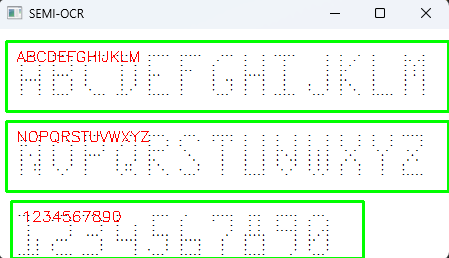
SEMI (Semiconductor Equipment and Materials International) font is a special dot matrix font used for marking silicon wafers. In this tutorial, we’ll walk through building a Python application to recognize these specialized markings using Dynamsoft Capture Vision SDK.
What you’ll build: A cross-platform Python script that loads a custom SEMI OCR model, processes semiconductor wafer images, and overlays recognized dot-matrix font characters as bounding-box annotations using Dynamsoft Capture Vision SDK.
Key Takeaways
- Dynamsoft Capture Vision SDK supports custom OCR models, enabling recognition of non-standard fonts such as the SEMI dot-matrix font used on silicon wafers.
- The
CaptureVisionRouterclass accepts user-supplied model buffers viaappend_model_buffer(), making the pipeline extensible to any industry-specific character set. - Recognition results include per-character bounding-box location data, making it straightforward to overlay text annotations on wafer images using OpenCV.
- The complete solution runs on Windows, Linux, and macOS with a single
pip installcommand.
Common Developer Questions
How do I recognize SEMI font characters on semiconductor wafers using Python OCR?
Load the custom SEMI OCR model into CaptureVisionRouter, initialize the matching JSON recognition settings, and run capture on the wafer image. The returned text-line results include both recognized characters and bounding boxes for overlay visualization.
Can Dynamsoft Capture Vision SDK read custom or non-standard dot-matrix fonts?
Yes. This article shows that the SDK can load a domain-specific OCR model and recognize a non-standard dot-matrix font used in semiconductor workflows rather than only common printed text.
How do I load a custom OCR model into Dynamsoft Capture Vision SDK in Python?
Read the model file as bytes and pass it to append_model_buffer(), then load the companion JSON settings file before capture. Both the binary model and the settings are required for the SEMI recognition template to work correctly.
Watch SEMI OCR Font Recognition in Action
Prerequisites
- Python 3.8 or later
- Dynamsoft Capture Vision Trial License: Get a 30-Day trial license key for the Dynamsoft Capture Vision SDK.
-
Python Packages: Install the required Python packages using the following commands:
pip install dynamsoft-capture-vision-bundle opencv-pythondynamsoft-capture-vision-bundle: Python binding for Dynamsoft Capture Vision SDK.opencv-python: For displaying source images and overlaying recognition results.
What This Implementation Provides
- Specialized SEMI Font Recognition: Uses a custom model trained for single-density dot matrix fonts (uppercase letters A-Z and digits 0-9).
- Visual Feedback: Draws bounding boxes around recognized text.
- Batch Processing: Processes single images or entire directories.
- Cross-Platform: Works on Windows, Linux, and macOS.
Step 1: Initialize the Dynamsoft Capture Vision SDK
Create a new Python file and initialize the SDK with your license key:
from dynamsoft_capture_vision_bundle import *

err_code, err_str = LicenseManager.init_license("LICENSE-KEY")
if err_code != EnumErrorCode.EC_OK and err_code != EnumErrorCode.EC_LICENSE_CACHE_USED:
    print("License initialization failed: " + err_str)
Step 2: Load the SEMI OCR Model
A custom model trained by Dynamsoft enables the Capture Vision SDK to recognize SEMI fonts:
cvr = CaptureVisionRouter()

# Load the SEMI OCR model
with open('models/semi-ocr.data', 'rb') as f:
    model_data = f.read()

err_code, err_str = cvr.append_model_buffer('semi-ocr', model_data, 1)
if err_code != EnumErrorCode.EC_OK:
    print("Model loading failed: " + err_str)
For model-related questions, please contact Dynamsoft Support.
Step 3: Configure SEMI OCR Recognition from a JSON Settings File
Besides the model file, recognition settings must be loaded from a semi-ocr.json file.
err_code, err_str = cvr.init_settings_from_file("semi-ocr.json")
if err_code != EnumErrorCode.EC_OK:
    print("Configuration loading failed: " + err_str)
Step 4: Process Wafer Images and Visualize Recognition Results
Here’s the core recognition logic that processes images and overlays results:
import cv2
import numpy as np

def process_image(image_path, cvr):
    cv_image = cv2.imread(image_path)

    result = cvr.capture(image_path, "recognize_semi_ocr")

    if result.get_error_code() != EnumErrorCode.EC_OK:
        print("Error: " + str(result.get_error_code())+ result.get_error_string())
    else:
        items = result.get_items()
        for item in items:
            if isinstance(item, TextLineResultItem):
                print(f"{RED}{item.get_text()}{RESET}")

                location = item.get_location()
                points = [(p.x, p.y) for p in location.points]
                cv2.drawContours(cv_image, [np.intp(points)], 0, (0, 255, 0), 2)

                cv2.putText(cv_image, item.get_text(), (points[0][0] + 10, points[0][1] + 20),

        cv2.FONT_HERSHEY_SIMPLEX, 0.5, (0, 0, 255), 1)

        cv2.imshow(
            os.path.basename(image_path), cv_image)
Step 5: Build an Interactive File and Directory Scanner
Add a loop to handle single files or directories:
import os

def main():
    cvr = CaptureVisionRouter()
    # ... initialization code from previous steps ...

    while True:
        path = input("Enter image path or directory (Q to quit): ").strip()

        if path.lower() == "q":
            break

        if not os.path.exists(path):
            print("File not found: " + path)
            continue
        else:
            if os.path.isfile(path):
                process_image(path, cvr)
            elif os.path.isdir(path):
                files = os.listdir(path)
                for file in files:
                    if file.endswith(".jpg") or file.endswith(".jpeg") or file.endswith(".png"):
                        process_image(os.path.join(path, file), cvr)

            cv2.waitKey(0)
            cv2.destroyAllWindows()

if __name__ == '__main__':
    main()
Step 6: Run the SEMI Font OCR Application
python read_semi_ocr.py

Common Issues & Edge Cases
- Model file not found: Ensure
models/semi-ocr.datais present in the working directory.append_model_buffer()returns a non-zero error code if the file cannot be read — inspecterr_strfor details. EC_LICENSE_CACHE_USEDon startup: This is not a failure; the SDK is using a locally cached license and recognition proceeds normally. Only treat the result as an error when the code is neitherEC_OKnorEC_LICENSE_CACHE_USED.- Empty results from
get_items(): Verify thatsemi-ocr.jsonwas loaded successfully and that the task name passed tocvr.capture()—"recognize_semi_ocr"— exactly matches the template name defined in that JSON file. - Low accuracy on degraded wafers: The custom model targets clean single-density dot-matrix fonts. For heavily worn or etched surfaces, apply contrast enhancement or grayscale normalization with OpenCV before calling
cvr.capture().