


How to Generate and Scan VIN Barcodes with JavaScript (Code 39, Code 128, QR Code and Data Matrix)
A Vehicle Identification Number (VIN) is the 17-character code that identifies one specific vehicle — the automotive equivalent of a serial number, stamped on the dashboard, door jamb and registration papers. Fleet check-ins, insurance claims, dealer service lanes and parts catalogs all start with capturing it accurately. This article builds the barcode route end to end in the browser: a generator that produces valid VIN barcodes for testing, and a scanner that decodes them back into structured data — both working demos, with the full source on GitHub.
A note on scope before the code. VINs are captured by two very different technologies: barcode decoding and optical character recognition (OCR). Some vendors offer VIN OCR that reads the stamped characters directly. Dynamsoft’s SDK is a barcode reader — it decodes VINs from barcode symbols and has no VIN OCR model, which is why this article (and the demos it ships with) is barcode-only. The two approaches are complementary rather than competing: if your users photograph the stamped VIN on a bare chassis, you need an OCR product; if the vehicle carries a label with a barcode — as every North American vehicle does, and most European paperwork does — a barcode scan is the faster, more deterministic capture path, because a decode always yields the same 17 characters and the check digit lets you validate it on the spot.
Try it online: the VIN barcode generator and the VIN barcode scanner are both hosted on Codepool, no sign-up needed.
What you’ll build
Two single-page JavaScript apps that share one VIN model:
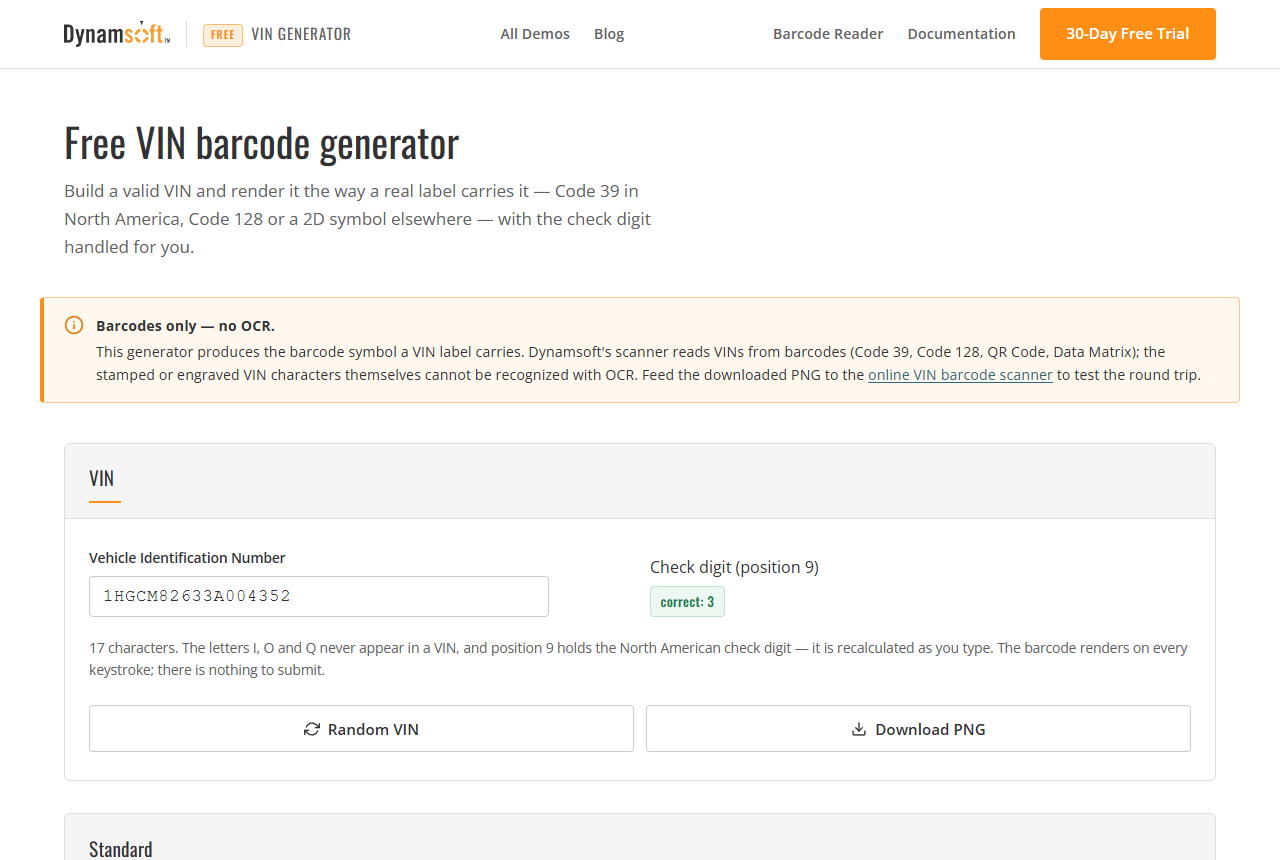
- A generator: type a VIN (or click Random), pick a standard preset — North America (FMVSS 115) or Europe (ISO 3779) — and render the symbol as Code 39, Code 128, QR Code or Data Matrix with bwip-js. The check digit recalculates as you type, with a one-click fix.
- A scanner: decode VIN barcodes with Dynamsoft Barcode Reader from a camera or an image, strip the 18-character import-prefix form, verify the check digit and parse the WMI, region, model year, plant code and serial number.
Key Takeaways
- A VIN barcode decodes to 17 characters from
A–Zand0–9, minusI,OandQ— and sometimes 18: a leadingIimport marker that the scanner strips before validating. - The check digit in position 9 covers every other position. It is mandatory in North America (FMVSS 115) and China, absent in Europe — so a mismatch is an error under the North American preset and a non-issue under the European one.
- The check digit covers positions 1–8 and 10–17: compute it only after the tail of the VIN (year, plant, serial) is final, or the weights land on the wrong positions.
- Dynamsoft Barcode Reader is barcode-only: there is no VIN OCR in the SDK, so barcode presence on the label is a hard requirement for this route.
Common Developer Questions
Does Dynamsoft Barcode Reader support VIN OCR?
No. Dynamsoft Barcode Reader decodes VINs from barcode symbols — Code 39, Code 128, QR Code and Data Matrix. The SDK has no OCR model for the stamped or printed VIN characters. If your capture scenario has no barcode on the vehicle, you need a dedicated OCR product; the rest of this article covers the barcode route.
Which symbology should a VIN barcode use?
On North American vehicle labels, Code 39 — that is what FMVSS 115 expects. European labels and import paperwork commonly use Code 128, and a 17-character VIN also fits a QR Code or Data Matrix. The generator below supports all four and the scanner accepts all four.
Why does my scanner return 18 characters for a VIN?
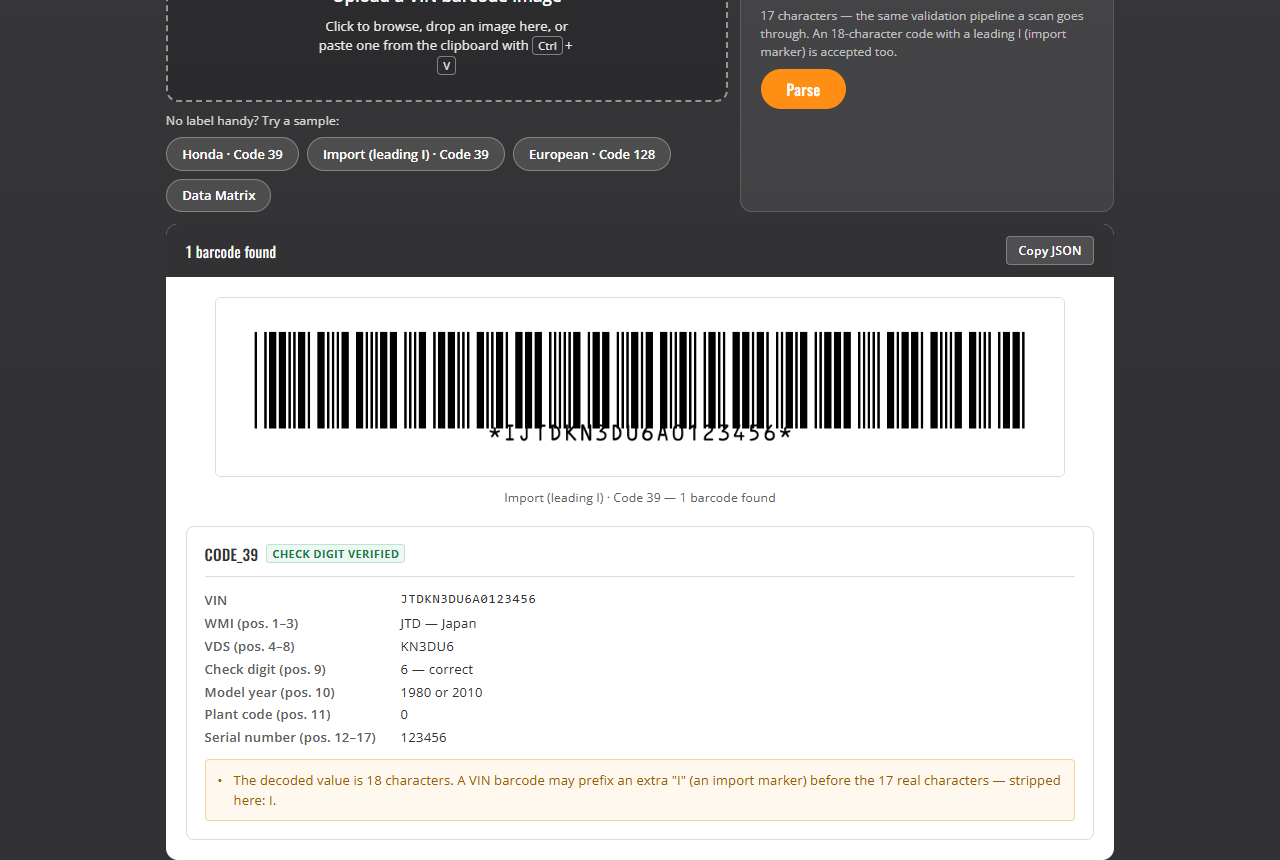
A VIN barcode may carry a leading I before the 17 real characters — an import marker. I is legal in Code 39 but illegal in a VIN, which is how you know it is a marker: strip it before validating. The scanner in this article does this automatically and reports the strip in the result.
Prerequisites
- A modern browser with WebAssembly support (Chrome, Edge, Firefox, Safari). Camera scanning additionally needs HTTPS or localhost and camera permission.
- A Dynamsoft license. The hosted demos activate one automatically; for your own deployment, Get a 30-day free trial license.
- The bwip-js CDN bundle for the generator side.
Step 1: Model the VIN — check digit, year codes, regions
Everything downstream shares one set of pure functions in vin-model.js (a UMD module used by both demos, so the rules cannot drift between generator and scanner).
The check digit: transliterate each character (digits keep their value; A=1 … H=8, then J=1, K=2, L=3, M=4, N=5, P=7, R=9, then S=2 … Z=9), multiply by the weights 8,7,6,5,4,3,2,10,0,9,8,7,6,5,4,3,2 — position 9 gets weight 0 because that is the check digit itself — sum, mod 11, and a remainder of 10 is written as X:
var VIN_WEIGHTS = [8, 7, 6, 5, 4, 3, 2, 10, 0, 9, 8, 7, 6, 5, 4, 3, 2];

function vinCheckDigit(vin17) {
    var sum = 0;
    for (var i = 0; i < 17; i++) {
        sum += (VIN_VALUES[vin17[i]] || 0) * VIN_WEIGHTS[i];
    }
    var check = sum % 11;
    return check === 10 ? 'X' : String(check);
}
The model year code (position 10) repeats every 30 years, so one character maps to two candidate years — W is 1998 or 2028. The demos show both rather than guessing:
var MODEL_YEAR_CODES = 'ABCDEFGHJKLMNPRSTVWXY123456789';

function modelYearCandidates(code) {
    var index = MODEL_YEAR_CODES.indexOf(code);
    if (index < 0) return null;
    return [1980 + index, 2010 + index];
}
Step 2: Generate — random VINs that are actually valid
A random VIN has a trap worth calling out: the check digit covers every position except 9, so the placeholder string must already carry the final year, plant and serial characters before the check digit is computed. Compute it against a partially filled string and the weights land on the wrong positions — the demo’s first draft did exactly that, and the self-test caught it.
Under the European preset the rule inverts: position 9 is a free character (the demo tosses in an X half the time, like real European VINs) and no check digit is computed at all.
function randomVin(standard) {
    var pick = SAMPLE_WMIS[Math.floor(Math.random() * SAMPLE_WMIS.length)];
    var chars = [];
    for (var i = 0; i < 5; i++) {
        chars.push(VIN_ALPHABET[Math.floor(Math.random() * VIN_ALPHABET.length)]);
    }
    var year = MODEL_YEAR_CODES[Math.floor(Math.random() * MODEL_YEAR_CODES.length)];
    var plant = 'ABCDEFGHJKLMNPRSTVWXYZ'[Math.floor(Math.random() * 22)];
    var serial = '';
    for (var j = 0; j < 6; j++) serial += Math.floor(Math.random() * 10);

    var position9;
    if (standard === 'na') {
        position9 = vinCheckDigit(pick[0] + chars.join('') + '0' + year + plant + serial);
    } else {
        position9 = Math.random() < 0.5 ? 'X' : randomAllowed(); // filler, like real EU VINs
    }

    var vin = pick[0] + chars.join('') + position9 + year + plant + serial;

    if (standard === 'na' && vinCheckDigit(vin) !== position9) {
        throw new Error('randomVin produced an invalid check digit');
    }
    return { vin: vin, wmiNote: pick[1] };
}
The generator UI recalculates position 9 as you type — under the North American preset a mismatch is an error with a one-click Fix button; under the European preset position 9 is shown but never judged — and the canvas redraws on every keystroke. There is no render button to forget:
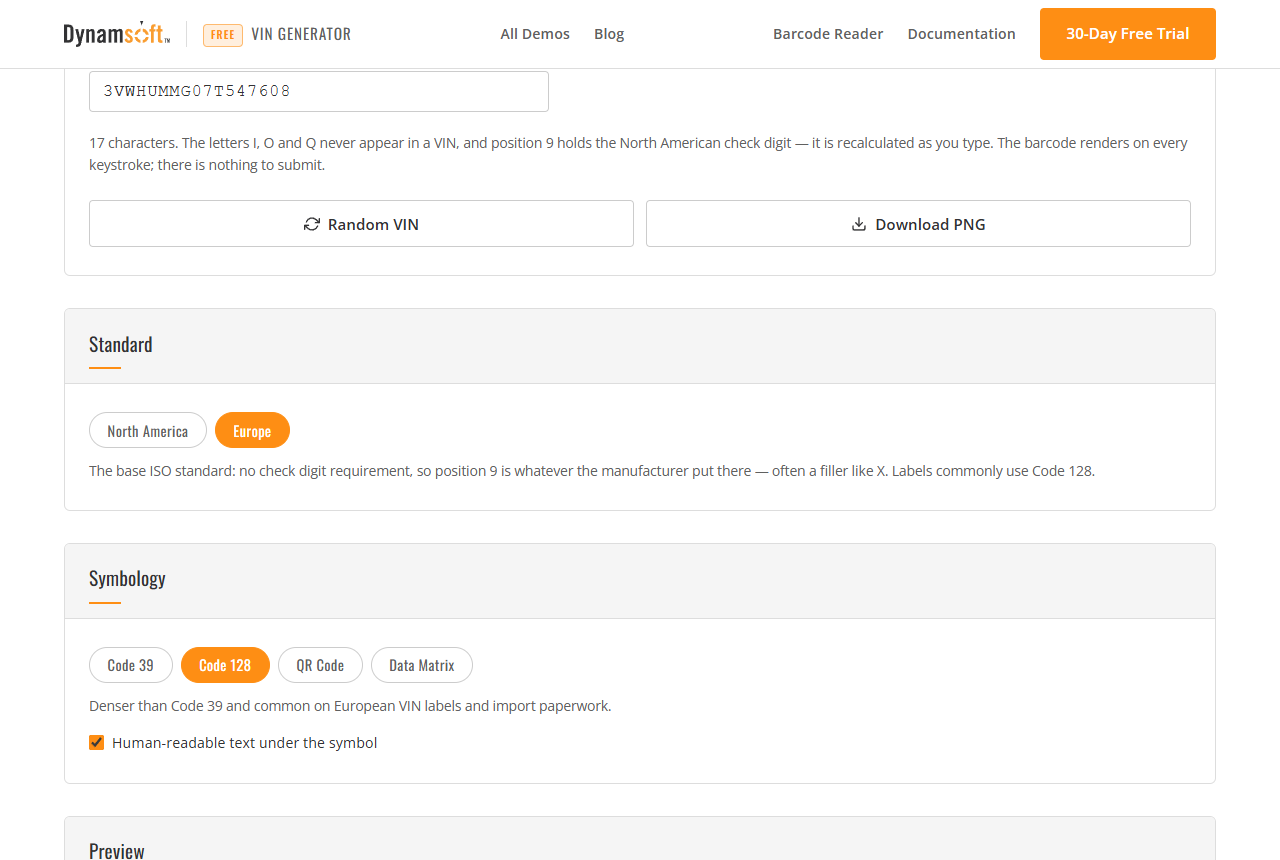
Rendering goes through bwip-js, with a white background baked into the exported PNG so the downloaded file matches what the page shows:
function renderBarcode() {
    var options = {
        bcid: state.symbology.bcid, // code39 | code128 | qrcode | datamatrix
        text: state.vin,
        backgroundcolor: 'FFFFFF',
        paddingwidth: 12,
        paddingheight: 10
    };
    if (state.symbology.textCapable && els.includeText.checked) {
        Object.assign(options, { includetext: true, textsize: 10, textyoffset: 2, textxalign: 'center' });
    }
    window.bwipjs.toCanvas(els.barcodeCanvas, options);
}
Step 3: Scan — restrict the reader to VIN symbologies
The scanner initializes Dynamsoft Barcode Reader from the dynamsoft-barcode-reader-bundle CDN package:
await Dynamsoft.License.LicenseManager.initLicense(licenseKey, true);
await Dynamsoft.Core.CoreModule.loadWasm(['DBR', 'DCE']);
cvRouter = await Dynamsoft.CVR.CaptureVisionRouter.createInstance();
Do not hand-write a template JSON for the format restriction — read a preset, change one field, write it back. A hand-written template is accepted by initSettings() and then rejected by startCapturing() with error [-10038], because the engine validates the document as a whole. Format IDs in simplified settings take the numeric runtime mask, and those values are BigInt:
var PRESET_TEMPLATE = 'ReadBarcodes_Balance';
var VIN_FORMAT_NAMES = ['BF_CODE_39', 'BF_CODE_128', 'BF_QR_CODE', 'BF_DATAMATRIX'];

async function applySettings() {
    if (!sdkReady || configured) return;
    var settings = await cvRouter.getSimplifiedSettings(PRESET_TEMPLATE);
    var mask = 0n;
    var table = Dynamsoft.DBR.EnumBarcodeFormat;
    VIN_FORMAT_NAMES.forEach(function (name) { mask |= table[name]; });
    settings.barcodeSettings.barcodeFormatIds = mask;
    await cvRouter.updateSettings(PRESET_TEMPLATE, settings);
    configured = true;
}
Restricting the list is not only a speed win: a QR Code on a service booklet that happens to encode a URL will not compete with the VIN symbol.
Step 4: Decode and strip the import prefix
CaptureVisionRouter.capture() wants raw pixels, not an element — passing a canvas takes an internal path that can silently return no results. Build the DSImageData shape from getImageData():
function imageToDsImageData(img) {
    var width = img.naturalWidth, height = img.naturalHeight;
    var canvas = document.createElement('canvas');
    canvas.width = width; canvas.height = height;
    var ctx = canvas.getContext('2d', { willReadFrequently: true });
    ctx.drawImage(img, 0, 0, width, height);
    var pixels = ctx.getImageData(0, 0, width, height);
    return {
        bytes: new Uint8Array(pixels.data.buffer, pixels.data.byteOffset, pixels.data.length),
        width: width, height: height, stride: 4 * width,
        format: 10 // IPF_ABGR_8888
    };
}

var result = await cvRouter.capture(imageToDsImageData(img), PRESET_TEMPLATE);
var items = result.barcodeResultItems; // barcode items live in `items`
The decoded string goes through the frame-character strip before validation, per the North American VIN barcode convention:
function normalizeVinFromBarcode(raw) {
    var text = String(raw || '').toUpperCase().replace(/[\s\-]/g, '');
    if (text.length === 17) return { vin: text, notes: [] };
    if (text.length === 18) {
        return {
            vin: text.slice(1),
            notes: ['The decoded value is 18 characters. A VIN barcode may prefix an extra "I" '
                + '(an import marker) before the 17 real characters — stripped here: ' + text[0] + '.']
        };
    }
    if (text.length === 19) return { vin: text.slice(1, 18), notes: [/* frame digits note */] };
    if (text.length === 20) return { vin: text.slice(2, 19), notes: [/* frame digits note */] };
    return { vin: null, errors: ['Not a VIN symbol — got ' + text.length + ' characters.'] };
}
Anything the scanner strips is reported in the result card, so a user can see why the decoded string did not look like a VIN:
Step 5: Parse the decoded VIN
One analyzer serves the scanner and the manual-entry box. A failed check digit is a warning, not a rejection: the rule is North American (and Chinese); a European VIN with a filler in position 9 is still valid under ISO 3779. The result card words it that way instead of declaring the VIN broken:
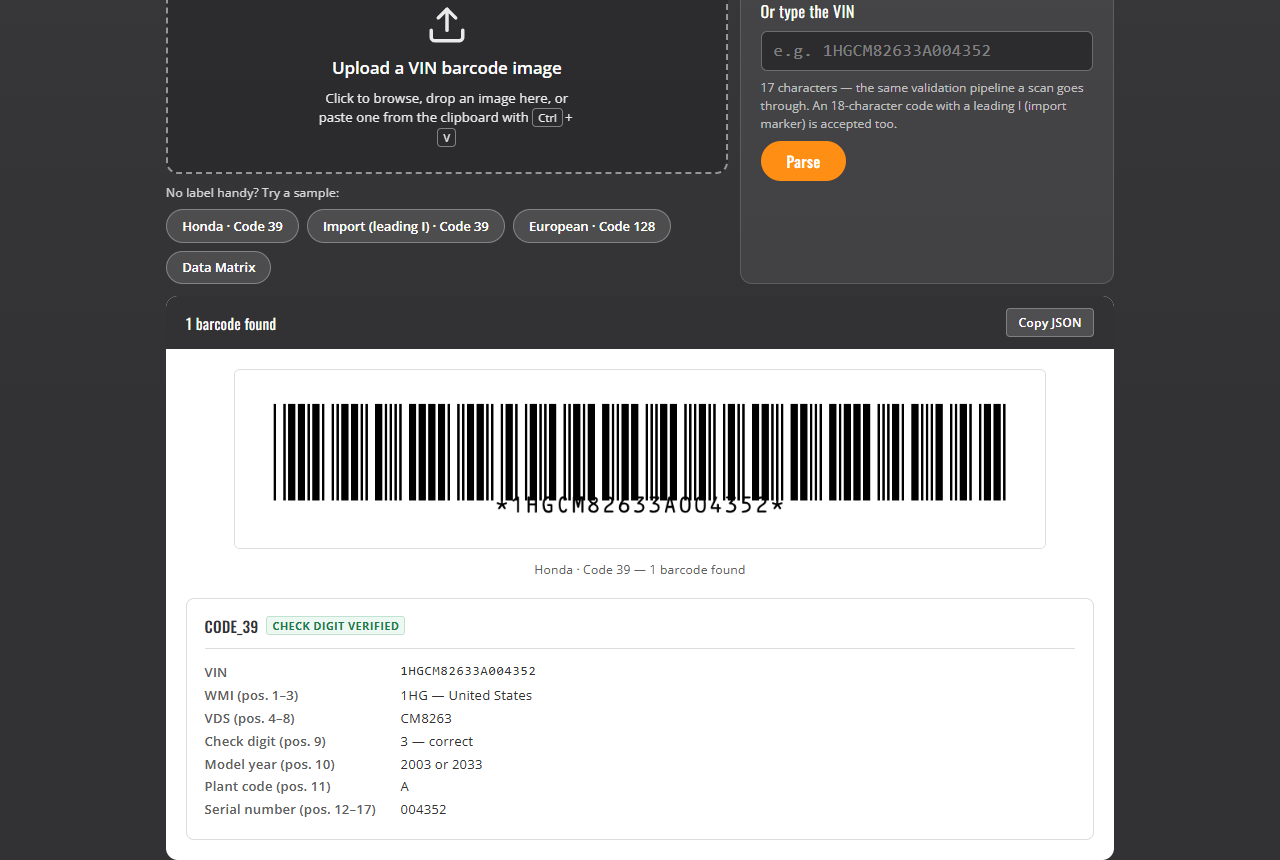
function analyzeVin(vin) {
    // charset check: /^[A-HJ-NPR-Z0-9]{17}$/ — I, O, Q are illegal
    // wmi = vin.slice(0,3); region from the first character
    // checkVerified = vin[8] === vinCheckDigit(vin)
    // modelYears = modelYearCandidates(vin[9])
    // plant = vin[10]; serial = vin.slice(11)
}
Camera mode follows the same pattern as the other Codepool scanners: the Camera Enhancer pushes frames, and a MultiFrameResultCrossFilter with result deduplication keeps a steady shot from re-rendering the panel dozens of times.
Common Issues & Edge Cases
- A stamped VIN with no barcode cannot be scanned. The barcode route requires a symbol on the label; the bare stamped or engraved characters are out of scope for a barcode SDK (see the OCR note at the top).
- The decoded value is 18–20 characters. Strip the leading
I(18) or the frame digits (19/20) before validating — but report the strip, as the demo does. - The capture returns no results for a canvas. Pass raw
DSImageDatabytes instead of an element. - A European VIN reports a check-digit mismatch. It is a warning under this demo’s default; switch the generator to the Europe preset to see position 9 treated as a free character.
Source Code
Get the complete sample project source code on GitHub: examples/vin-barcode-generator and examples/vin-barcode-scanner in the javascript-barcode-qr-code-scanner repository. The generator runs anywhere with no SDK; the scanner needs your own Dynamsoft license outside dynamsoft.com.