


ISBN Barcode Lookup Tool
Use this free ISBN barcode lookup tool to search book information instantly by entering an ISBN number or scanning a book barcode.
NO files are uploaded as barcode scanning runs on your device. Powered by Dynamsoft Barcode Reader JavaScript Edition.

Free ISBN Barcode Lookup Tool for Book Identification
Dynamsoft ISBN barcode lookup tool provides fast access to book information and is free to use! Find critical information about a product with ISBN by simply typing the code into the search field.
Our extensive database houses a substantial collection of ISBN codes, continually expanding with new additions to ensure that retrieving the required information is seamless and uncomplicated.
If you are a retailer, wholesaler, or even a consumer looking for book information, this tool is perfect because it is accurate and free.
What is ISBN?
ISBN stands for International Standard Book Number. It is a unique barcode that is used for identifying books and related materials. The ISBN code contains ten to thirteen digits that contain critical information, such as the country or language group, title, edition, publisher name, and one check digit for error detection. These barcodes are used in publishing, bookselling, libraries, sales, and academics for efficient cataloging, accurate identification, inventory management, and enhanced accessibility.
Look up any ISBN instantly to find details like the book's title, author, and publisher, with this free online tool!
Reliable ISBN Search to Get Accurate Book Information
Just enter the ISBN into our free barcode lookup tool to get the full details on that item, including the manufacturer and image.
This barcode scanner is highly accurate since it draws its data from a massive repository that is regularly updated. Rarely, the database might not have the barcode number stored, or the information retrieved might need to be corrected or updated.
Scan ISBN Barcodes Instantly with Your Smartphone
Scan ISBN barcodes on the go with our free barcode lookup tool. Driven by the innovative Dynamsoft Barcode Reader SDK, you can use your smartphone's camera to scan the item's ISBN, and the relevant information is instantly retrieved!
Note: Although this barcode lookup tool excels at quickly providing basic information such as the product's name, brand, and image, it does not include pricing information retrieval. However, you can use this information to speed up your search for pricing information on other websites.
Customer Stories
Rediv leverages Dynamsoft Barcode Reader SDK to build a solution to buy/sell used books.
Rediv launched a mobile application for users to scan the barcodes (ISBN 13) of used books and get the repurchase price of the books. Users then send the books to Rediv and get a gift card of the partner retailer with the total amount of every book Rediv buys. The company required a user-friendly barcode scanner solution but didn’t want to develop the feature from scratch. They tried several SDKs for barcode scanners but ultimately settled with Dynamsoft Barcode Reader.
Learn More About the Case Study >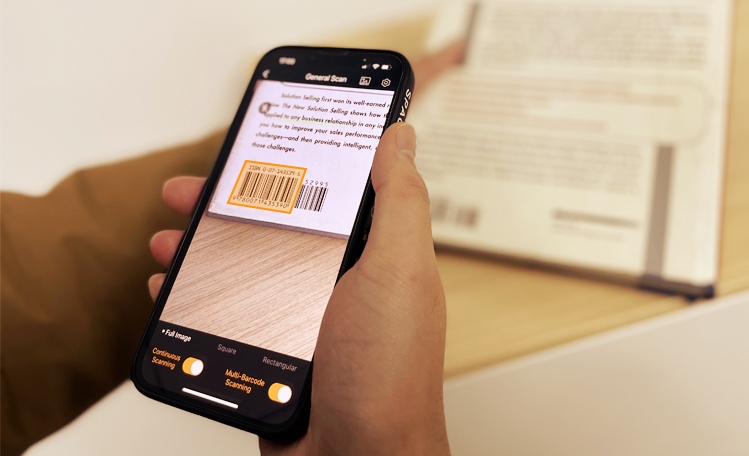
FAQ
How does the ISBN lookup tool extract the ISBN number from a barcode image?
The tool uses the Dynamsoft Barcode Reader JavaScript Edition, which runs entirely on your device. No images are uploaded to any server. When you open or drag and drop a barcode image, the SDK analyzes the pixel data in real time to locate, decode, and extract the ISBN.
The decoded ISBN is matched against the lookup database to retrieve book information such as title, author, and publisher.
Which barcode formats are supported for ISBN detection?
The tool supports the barcode formats most commonly used for ISBNs, including EAN-13 (ISBN-13) and EAN-10/ISBN-10.
The tool also supports a wide range of 1D and 2D barcode symbologies, enabling it to read various product and book barcodes beyond ISBNs.
Can the ISBN lookup tool read barcodes from low-quality images?
Yes. The Dynamsoft Barcode Reader SDK is designed for high accuracy, even with blurry, skewed, partially damaged, or low-resolution images. It uses advanced image-processing algorithms to enhance barcode detection before decoding, allowing it to read barcodes from photos taken in poor lighting or at challenging angles.
However, extremely degraded barcodes may still fail to scan. For best results, use a clear image.
Does the ISBN lookup tool support batch scanning of multiple barcodes?
The free online ISBN lookup tool is intended for single barcode lookups, either by manual entry or by scanning one barcode image at a time. For batch scanning of 100 or more barcodes, Dynamsoft offers a dedicated Batch Barcode Scanner solution.
Developers and businesses with high-volume needs can integrate the Dynamsoft Barcode Reader SDK into their workflows for bulk processing.
Can developers integrate ISBN barcode scanning into their own applications?
Yes. The ISBN lookup tool is built on the Dynamsoft Barcode Reader SDK, which is available for a wide range of platforms and languages, including JavaScript (web), iOS, Android, .NET, Python, Java, C++, and Node.js. Developers can use the SDK to embed fast, accurate ISBN scanning into retail apps, library systems, inventory tools, or other book-related applications.
A 30-day free trial is available. Dynamsoft provides full documentation, GitHub repositories, and developer support to help you get started quickly.
What happens if a scanned ISBN barcode is not found in the lookup database?
If the scanned or entered ISBN is not found in the database, the tool cannot return book details for that code. This may occur if the ISBN is new and not yet indexed, belongs to a niche or self-published title with limited data, or if the barcode was misread due to image quality.
In these cases, please verify the decoded number or try a clearer image. Dynamsoft's database is continually expanding, so titles not found today may be available in future updates.