




Configure the Scan Region Style
Visibility
After you call setScanRegion, the scan region is visible by default. You can hide it by calling setScanRegionMaskVisible.
- Java
- Kotlin
try {
   mCamera.setScanRegion(new DSRect(0.15f, 0.25f, 0.85f, 0.65f, true));
} catch (CameraEnhancerException e) {
   throw new RuntimeException(e);
}
cameraView.setScanRegionMaskVisible(false);
try { mCamera.setScanRegion(DSRect(0.15f, 0.25f, 0.85f, 0.65f, true)) } catch (e: CameraEnhancerException) { throw RuntimeException(e) } cameraView.setScanRegionMaskVisible(false)
Scan Region Mask Style
The scan region mask style includes the stroke color, stroke width, and mask color.
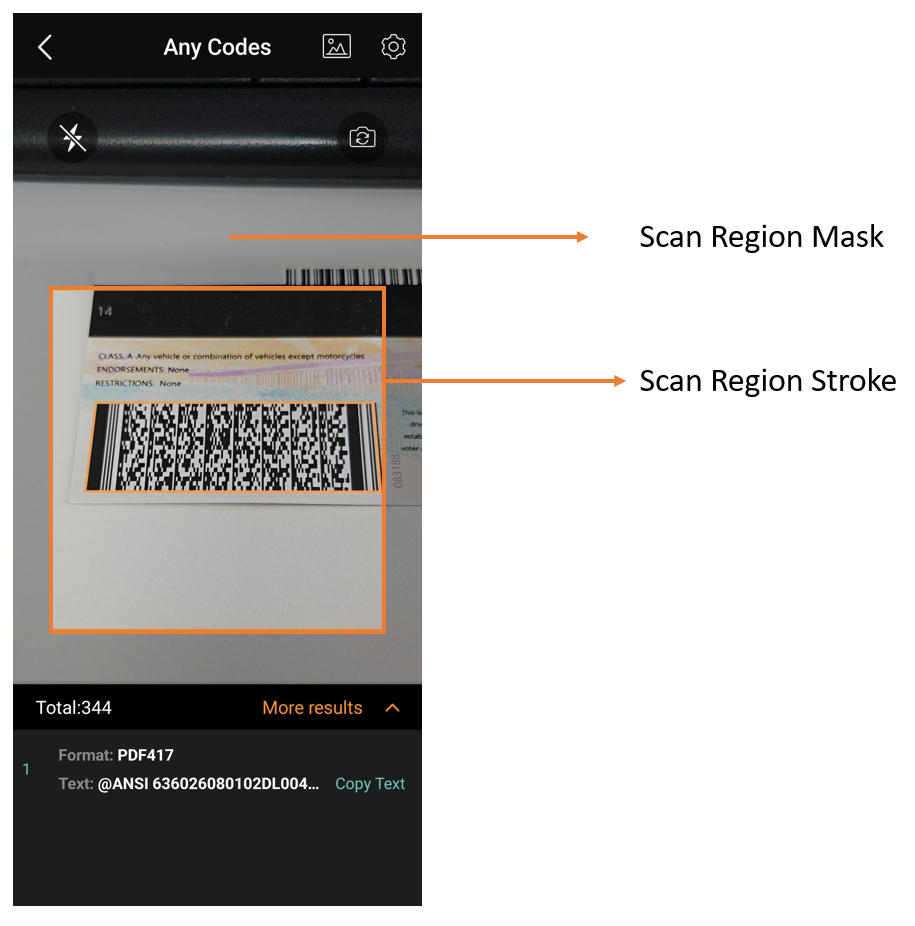
Scan Region Style
- Add your colors to
res/values/colors.xml.
<color name="teal_200">#FF03DAC5</color>
<color name="teal_200_transparent">#2003DAC5</color>
- Set colors to the scan region mask style.
- Java
- Kotlin
int teal_200_transparent = ResourcesCompat.getColor(MainActivity.this.getResources(), R.color.teal_200_transparent, null);
int teal_200 = ResourcesCompat.getColor(MainActivity.this.getResources(), R.color.teal_200, null);
cameraView.setScanRegionMaskStyle(teal_200, teal_200_transparent, 2.0f);
val teal_200_transparent = ResourcesCompat.getColor(this@MainActivity.getResources(), R.color.teal_200_transparent, null) val teal_200 = ResourcesCompat.getColor(this@MainActivity.getResources(), R.color.teal_200, null) cameraView.setScanRegionMaskStyle(teal_200, teal_200_transparent, 2.0f)
Laser
The scan laser is a light bar that moves up and down to indicate active scanning. It does not affect performance. It is hidden by default. When a scan region is set, the laser movement is limited to that region.
- Java
- Kotlin
cameraView.setScanLaserVisible(true);cameraView.setScanLaserVisible(true)
 Yes
Yes No
No