


 Blog
Blog
How QR Codes Enable Digital Product Passports (And Why They Matter)
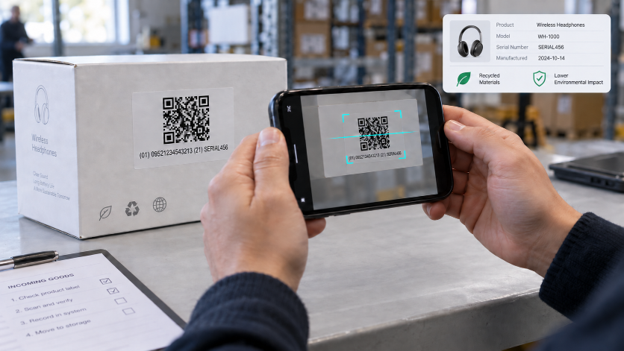
QR codes enable Digital Product Passports by linking physical products to their digital records. The QR code does not store passport data directly; instead, it encodes a unique product identifier, typically as a GS1 Digital Link URI, which a scanning application uses to retrieve passport data from the manufacturer.
This separation introduces a key challenge: the passport’s reliability depends on scan quality.
Key Takeaways
- The QR code on a digital product passport contains only an identifier, so the associated record can be updated without reprinting the packaging.
- GS1 Digital Link is the most widely used method for encoding passports because it incorporates a standard product identifier into a resolvable web URI.
- The device can decode a QR code without a connection, but retrieving the passport record requires connectivity.
- The main security vulnerability is code substitution, addressed by using unit-level serialization, employing HTTPS on a resolver you control, and implementing role-based access.
- Most passport programs fail due to scanning reliability rather than code generation, as real-world codes are often curved, faded, or small.
What constitutes a Digital Product Passport?
A Digital Product Passport is a structured digital file containing information about a product’s identity, the materials it is made from, its environmental impact, and the way in which it will be dealt with at the end of its life, and this information is made available via a machine-readable data carrier which is placed on the product, on its packaging or in its documentation. The EU’s Ecodesign for Sustainable Products Regulation (EU) 2024/1781 introduced the concept in July 2024, and the duties arise through product-specific delegated acts rather than a single deadline. Battery passports will apply from 18 February 2027,, and the product data will remain with the economic operator, not the Commission.
Why do QR codes carry most Digital Product Passports?

QR codes are the primary carrier for Digital Product Passports because they incur no per-unit cost, can be read by any smartphone camera without a dedicated app, and allow updates to linked data without reprinting. RFID and NFC tags are also valid carriers, but each adds per-unit hardware cost.
Why isn’t a plain URL QR code good enough?
A plain URL QR code is insufficient for Digital Product Passports because it identifies only a web page, not a specific product. As a result, retail, supply chain, and regulatory systems cannot extract standardized product identifiers, and batch- or serial-level tracking is lost, making targeted recalls impossible.
How does GS1 Digital Link make a QR code ready for use as a passport?
GS1 Digital Link prepares a QR code for passport use by encoding GS1 identifiers, such as the Global Trade Item Number, within a structured web URI. This allows a single symbol to function as both a resolvable link and a machine-readable product identifier. Identifiers are included as path segments keyed to GS1 Application Identifiers, for example: https://example.com/01/09521234543213/10/LOT123/21/SERIAL456, where 01 represents the GTIN and 21 the serial number.
| Attribute | Plain URL QR code | GS1 Digital Link QR code |
|---|---|---|
| What it identifies | A web page | A product, batch, or serialized unit |
| Machine-readable product ID | No | Yes, in the URI path |
| Usable at retail point of sale | No | Yes, where systems accept 2D |
In summary, a plain URL QR code identifies only a web page, does not expose a machine-readable product identifier, and cannot be used at the retail point of sale. In contrast, a GS1 Digital Link QR code identifies a specific product, batch, or serialized unit, includes the GTIN and other Application Identifiers in the URI path, and is compatible with point-of-sale systems that accept 2D codes.
Should the passport be read either online or offline?
A Digital Product Passport is typically accessed online, as the QR code contains only an identifier and the record is hosted on a server. Decoding the QR code occurs entirely on the device, while retrieving passport content requires connectivity. This distinction is important in environments with limited coverage, such as recycling facilities or repair vehicles, where local decoding can still queue identifiers.
What are the characteristics you should observe in a scanning layer?
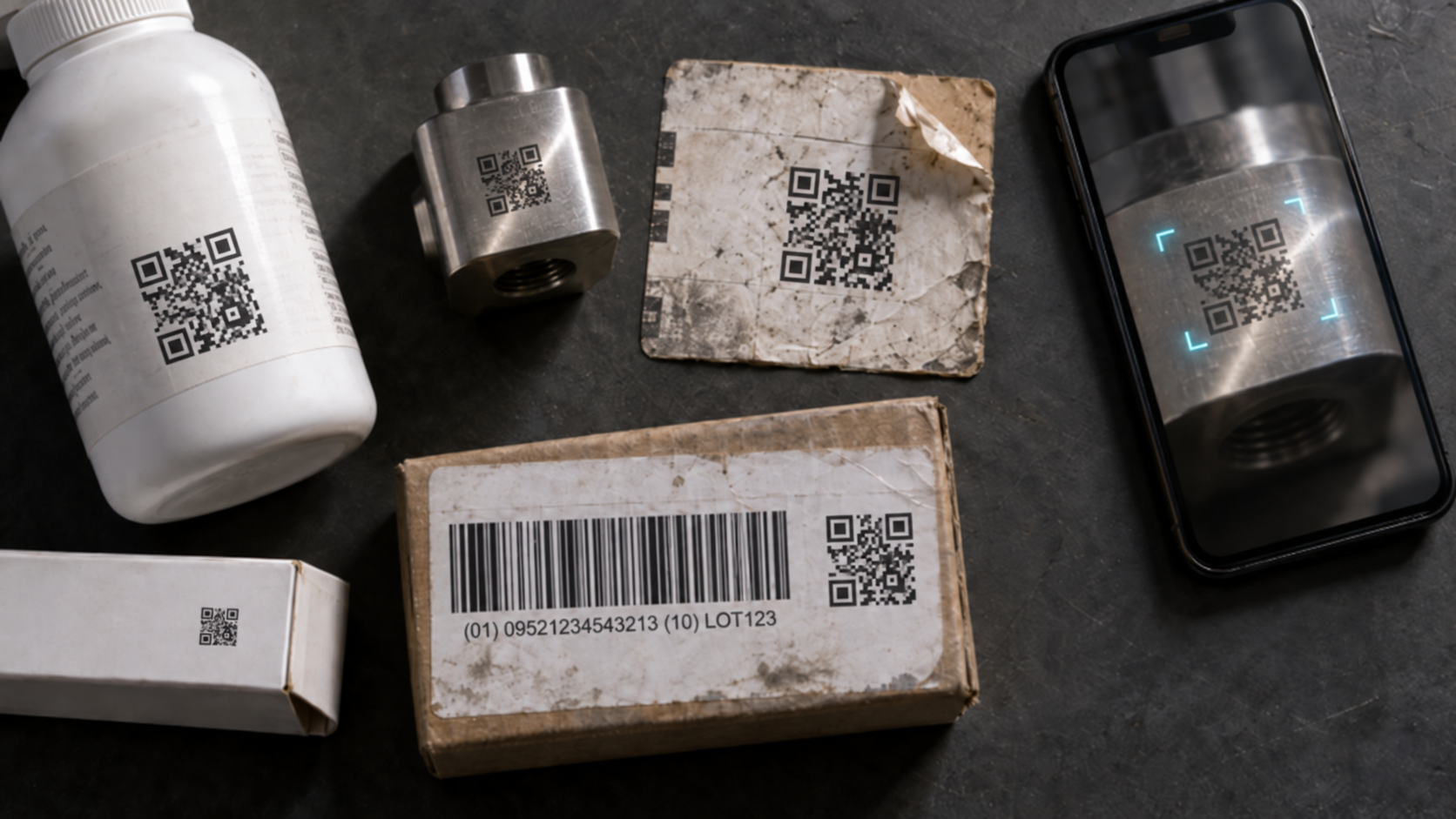
Assess a scanning layer based on five criteria: symbology and syntax coverage, tolerance for real-world print and lighting conditions, platform and browser compatibility, security and data handling, and deployment effort. Coverage is important because a single package may include a Digital Link QR code along with a GS1-128 or GS1 DataMatrix symbol.
What security risks are there in Digital Product Passport QR codes?
The primary security risk for a Digital Product Passport QR code is substitution, as the symbol is publicly visible and a counterfeiter can replace it with one that links to a fraudulent passport. Four controls mitigate this risk.
When serializing at the unit level, use Application Identifier 21 so each item creates a separate record and duplicate resolutions produce a detectable cloning signal. Run the resolver on a domain you control and provide it only via HTTPS with TLS so the destination cannot be quietly replaced. Check each scanned string against the GS1 Digital Link URI syntax before resolving it, thereby preventing redirects to hosts controlled by an attacker. Since passport data is not uniformly available, keep records intended for repairers, recyclers, and regulators behind role-based permissions tied to the same identifier.
A browser-based scanner using WebAssembly decodes camera frames locally, ensuring that images and decoded results remain on the user’s device. This approach addresses data-residency concerns related to cross-border transfers. For restricted networks, ensure the SDK supports offline licensing, as online license validation will fail without external connectivity.
Best practices for QR-based product passports
Implement GS1 Digital Link from the outset rather than retrofitting after a plain-URL pilot, as reprinting packaging is expensive. Also, print at the largest module size permitted by the packaging, verify scannability on the actual substrate, and version the resolver so link changes don’t require new packaging.
How Dynamsoft solutions can help

Dynamsoft Barcode Reader delivers the scanning layer required for these workflows, supporting all standard symbologies, including QR Code, Micro QR Code, Data Matrix, GS1 DataBar, and GS1 Composite Code across Windows, Linux, macOS, Android, iOS, and web platforms. The SDK uses AI-powered localization and image enhancement to decode curved, damaged, angled, dark, and direct part marking codes, with features such as auto-zoom and distance deblurring.
The JavaScript version also uses a WebAssembly core and decodes on the device, so camera frames never leave the device. It supports offline licensing for situations where reliable egress is not available, and the company has ISO 27001 and O-TTPS certifications.
Dynamsoft Code Parser translates GS1 Application Identifier element strings into named fields, supports version 24.0 of the GS1 AI definitions standard, and extracts fields such as 01 GTIN, 10 batch, 17 expiration date, 21 serial, and 414 GLN. Code Parser processes AI element strings, while Digital Link URIs use the same AI numbering in path segments. For high-volume sorting, Dynamsoft Batch Barcode Scanner can read hundreds of barcodes in a single pass.
You can test decoding with your own codes using the online barcode scanner demo or download a 30-day free trial.
Get Started
QR codes serve as the access layer for Digital Product Passports, and their quality determines the effectiveness of a passport program. If you are implementing capture workflows, consult a Dynamsoft solutions expert regarding symbology coverage and deployment constraints.
Frequently asked questions
Does the QR code of a digital product passport contain the product data?
A Digital Product Passport QR code does not store the product data. The code stores a unique product identifier that a scanning application resolves to a record hosted by the manufacturer.
What is the difference between a GS1 Digital Link QR code and a regular QR code?
A GS1 Digital Link QR code encodes GS1 identifiers, such as the GTIN, within a structured web URI, while a regular QR code encodes an arbitrary string. Standardized identifiers can be extracted from a Digital Link URI, but not from a standard link.
Is it possible to read a Digital Product Passport without being connected to the internet?
A Digital Product Passport cannot be fully accessed without an internet connection, as the record is hosted externally rather than embedded in the code. However, consumers can decode the QR code and extract its identifiers offline on the device.
Do people need a specific app to scan a Digital Product Passport QR code?
Consumers do not require a special app to scan a Digital Product Passport QR code, as native camera apps on current iOS and Android devices can read standard QR codes. Dedicated applications are available for recyclers and inspectors who need batch capture or access to restricted fields.
Does Digital Product Passport scanning work in Chrome, Safari, and on desktop browsers?
Digital Product Passport scanning is supported in modern desktop and mobile browsers, including Chrome, Safari, Edge, and Firefox, through a JavaScript scanning SDK. Browser camera APIs require HTTPS, so scanning pages must be served securely.
How do you prevent counterfeit or tampered Digital Product Passport QR codes?
Preventing counterfeit Digital Product Passport QR codes depends on layered controls rather than the symbol itself, as any printed code can be copied. Serializing each unit makes clones detectable, and validating scanned strings against GS1 Digital Link syntax prevents redirects to unauthorized hosts.
Is putting a QR code on a product enough for ESPR compliance?
Placing a QR code on a product alone does not ensure ESPR compliance. The code fulfills only the data carrier requirement; compliance also requires adherence to the data model, verified information, update responsibilities, role-based access, and identifier registration.