


 Blog
Blog
DotCode Scanning Failures: Common Issues, Challenges, and Solutions
For manufacturers handling thousands of products per minute, a single failed DotCode scan can halt production, waste inventory, and risk compliance penalties. DotCode is a reliable, machine-readable barcode that can be accurately printed and scanned, even under less-than-ideal printing conditions. It was developed by Dr. Andrew Longacre in 2007 for use in fast-paced industrial production lines, particularly with inkjet and laser printing. Today, it has become crucial for high-speed manufacturing in the tobacco, beverage, and pharmaceutical industries, enabling the processing of thousands of products per minute. However, DotCode’s unique diagonal dot structure creates scanning complexities that significantly impact business operations. This guide examines the causes of technical failures, their business implications, and proven solutions.
What is DotCode?
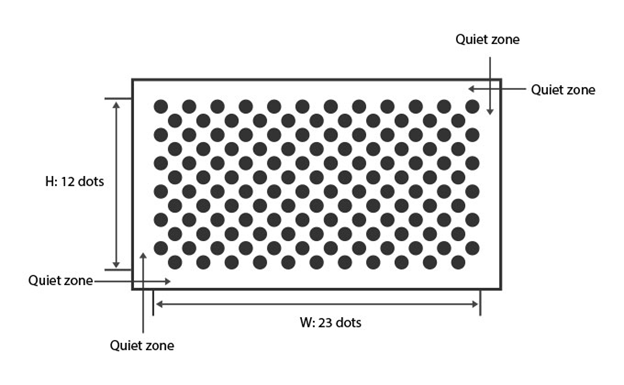
Before we discuss the challenges associated with DotCode scanning, let us first get acquainted with what DotCode is, what it looks like, and what makes it different from other barcode types.
DotCode is a 2-dimensional barcode symbology made of disconnected dots arranged diagonally. Here are its defining characteristics:
- Structure: A rectangular array of dots on a checkerboard-like grid, where the sum of the symbol’s width and height must be an odd number.
- Encoding: Data codewords are encoded using a 5-of-9 binary dot pattern, meaning each 9-dot segment contains 5 printed dots and 4 blank spaces.
- Error Correction: It utilizes Reed-Solomon error correction to ensure data integrity, even if a symbol is partially damaged. The standard recommends a minimum of three times the dot size for a quiet zone around the symbol.
- Applications: Primarily used for high-throughput applications requiring real-time data marking, such as regulatory compliance (e.g., EU tobacco traceability), product serialization, and anti-counterfeiting.
The Unique Challenges of DotCode Scanning: Common Failure Causes

DotCode’s unique design, while making it highly resilient to printing imperfections, introduces a specific set of technical hurdles for scanners that go beyond common issues like poor lighting or blurriness. These challenges are inherent to the symbology itself, causing many general-purpose scanners to fail. As noted by GS1, only a few deployed scanners are capable of scanning this symbology reliably.
- Lack of Finder Patterns & The Need for Complex Algorithms: Unlike QR Codes or Data Matrix, DotCode lacks dedicated finder patterns or solid borders. This absence of a clear starting point means scanners cannot use simple pattern recognition. Instead, they must employ complex, multi-step algorithms for dot localization, angular analysis, grid mapping, and direction determination. This is a computationally intensive process that is not required for other barcode types.
- The “Unlit Edge” Issue: A valid DotCode can be encoded with “blank” outer rows or columns. This feature, while technically correct, can cause standard decoding algorithms to fail, as they may not recognize the symbol as a complete code. This is a problem unique to DotCode’s structure and its encoding rules.
- High Computational Demand for High-Speed and Batch Scanning: The multi-step decoding process required for DotCodes demands significant computational power. In high-volume production lines where thousands of products are scanned per minute, this becomes a major bottleneck. Scanning multiple DotCodes in a single frame (batch scanning) is particularly challenging due to the heavy processing required for each individual symbol, making it difficult for scanners to keep up.
- Specialized Software Integration: DotCode is a specialized symbology that requires specific software settings and dedicated SDK support. Unlike ubiquitous barcodes like QR Codes, a developer must explicitly enable the DotCode format and correctly configure parameters for cases like inverted barcodes (light dots on a dark background). The lack of this specialized support is a key reason why many general-purpose scanners and off-the-shelf software solutions are not viable for DotCode applications.
DotCodes: Business Impact
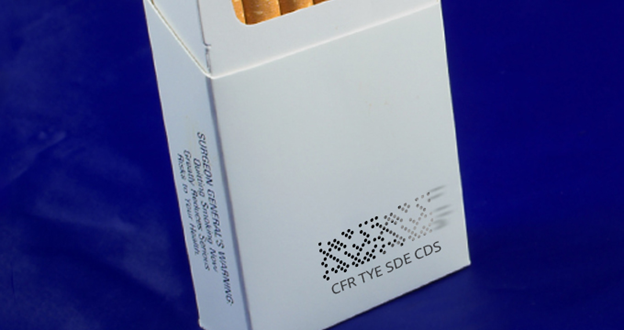
When scanning fails, the consequences create a ripple effect that extends beyond a single unit, hitting the bottom line and operational efficiency.
The table below outlines the primary operational consequences and their related financial implications.
| Operational Consequences | Financial Implications |
|---|---|
| Line Slowdowns & Manual Intervention: A single failed scan on a high-speed line can halt operations, requiring costly manual intervention. | Increased Labor Costs & Product Waste: Manual verification is expensive, and unscannable products may need to be scrapped or recalled, leading to significant financial losses. |
| Data & Traceability Gaps: Failures compromise real-time tracking, leading to inaccuracies in supply chain visibility and data, which can affect inventory management. | Poor Return on Investment: Investing in a high-speed production line is rendered inefficient without a compatible scanning solution, leading to a poor ROI on technology and equipment. |
| Compliance Violations: In highly regulated industries, a failed scan can constitute regulatory non-compliance, resulting in significant fines and potential legal action. | Stranded Technology Investment: The risk of investing in a high-speed production line without a reliable scanning solution can lead to a stranded investment. |
How Dynamsoft Barcode Reader SDK (DBR) Tackles DotCode Scanning Challenges
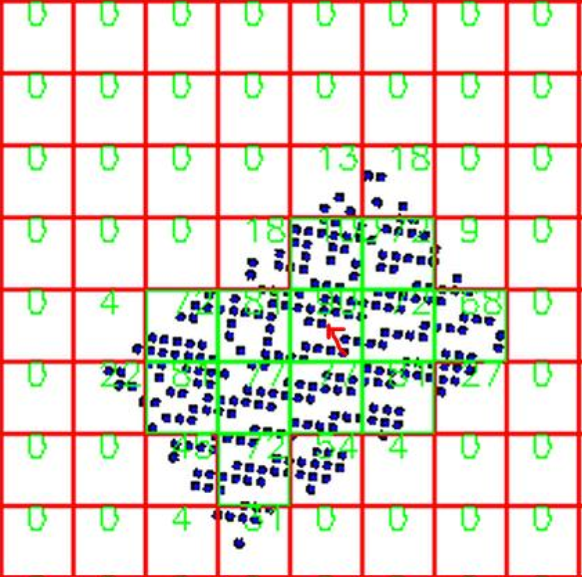
Dynamsoft Barcode Reader SDK is an enterprise-grade barcode scanning solution designed to scan the toughest barcodes at high speed and with remarkable accuracy. It is engineered to overcome these specific DotCode challenges through a combination of robust algorithms, flexible APIs, and dedicated developer support.
Here is how:
- Handling the Lack of Finder Patterns: DBR accurately detects and interprets diagonal dot arrangements without relying on a finder pattern. Its advanced multi-step algorithms, covering dot localization, angular analysis, and grid mapping, deliver a robust decoding process that ensures consistent and reliable performance, even with highly complex symbols.
- Solving the “Unlit Edge” Issue: DBR’s sophisticated algorithms are built to handle variations in DotCode symbols, including the “unlit edge” issue. The software can recognize and correctly decode DotCodes that have blank outer rows or columns, preventing common scan failures that trip up less-advanced decoders.
- Optimizing the High-Speed and Batch Scanning: DBR’s engine is designed for high-volume production. It’s optimized to process multiple DotCodes in a single frame and handle live video streams from high-speed production lines, ensuring fast and accurate decoding without becoming a bottleneck.
- Simplifying Integration and Configuration: DBR provides direct support to help developers avoid common pitfalls. This includes clear documentation and examples that guide developers to explicitly add “BF_DOTCODE” as a recognized format and enable GTM_INVERTED for inverted barcodes. This streamlined approach minimizes implementation errors and reduces development time.
Get Started with Dynamsoft Barcode Reader
Don’t let DotCode scanning failures slow you down. Leverage the prowess of Dynamsoft Barcode Reader to streamline your workflows.
Try its online demo or start your 30-day free trial to experience how our proven barcode recognition technology ensures reliable, high-speed performance in any production environment.
Connect with our technical support team of seasoned experts to learn more.