


How to Benchmark Barcode Reading in Python with ZXing-C++ and Dynamsoft Barcode Reader
This benchmark scores two pip-installable Python barcode readers — the open-source ZXing-C++ Python package (zxing-cpp 3.1.1) and Dynamsoft Barcode Reader (Capture Vision 3.6.1000 bundle, DBR engine 11.6.10.8373) — on 7,894 deduplicated images drawn from BarBeR, a public real-world barcode dataset. Every decode result ships with the project, so any reviewer can re-check the numbers. Because the run reuses the exact manifest from the C++ version of this benchmark, the two articles read as one controlled experiment: identical input, newer SDK releases, a different language binding.
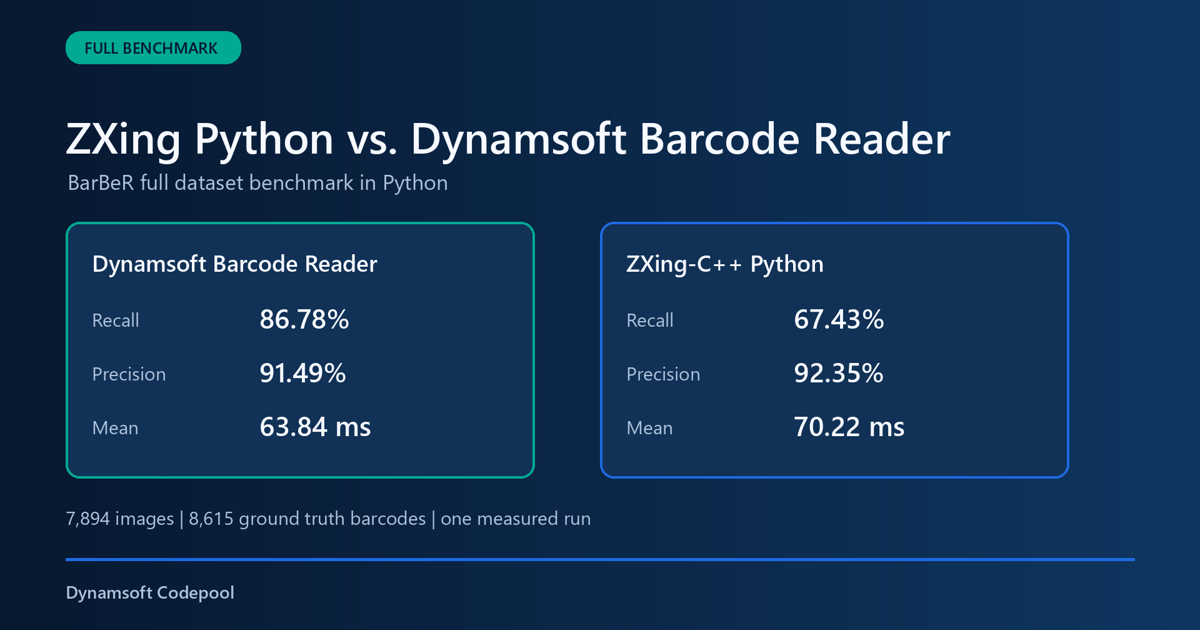
What you’ll build: A script-driven Python benchmark that audits BarBeR annotations into a scoring manifest, times zxingcpp and CaptureVisionRouter on identical images, validates the result records, and ships both the raw record stream and a combined JSON package for review.
This article is Part 2 in a 3-Part Series.
Key Takeaways
- The scoring manifest covers 7,894 deduplicated images with 8,615 audited ground truth values. Scoring excludes 204 unreliable
^placeholders, leaving 8,411 scored instances. - Each file is loaded once with OpenCV and handed to both readers as the same image object; only the decoder call is timed, so loading, matching, serialization, and reporting stay outside the clock.
- Before any decoder runs, the audit stage drops images whose payload ground truth is unreliable, plus one byte-identical duplicate.
- On a single full-dataset run with DBR’s
ReadBarcodes_Defaulttemplate, DBR reached 93.19% recall against 71.03% for ZXing-C++, with a mean decode time of 63.84 ms versus 70.22 ms. - The run reuses the manifest from the C++ benchmark, so these numbers can be diffed directly against the earlier ZXing-C++ 3.1.0 and DBR 11.4.20.7177 results.
Common Developer Questions
How do I benchmark ZXing-C++ against Dynamsoft Barcode Reader fairly in Python?
Keep the input, the format policy, and the scoring identical for both sides. The harness loads each file once with OpenCV, hands the same image object to zxingcpp.read_barcodes() and CaptureVisionRouter.capture(), enables every supported format without per-image hints, times only the decode call, and grades both output streams with one location-independent matcher.
Which barcode reader performed better on the BarBeR dataset in Python?
Dynamsoft Barcode Reader led on recall and speed in this run: it read 7,838 of 8,411 scored ground truth instances for 93.19% recall, versus 5,974 instances and 71.03% recall for ZXing-C++. DBR also held the precision edge, 95.92% against ZXing-C++’s 94.98%.
When should I choose Dynamsoft Barcode Reader instead of ZXing-C++ for a Python project?
Prefer Dynamsoft Barcode Reader when the cost of a missed scan outweighs the license fee — difficult images, mixed symbologies, or production workflows that need packaged templates and commercial support. Prefer zxing-cpp when you want an open-source baseline with inspectable source and no licensing fees, and your barcode input is controlled enough that lower recall is acceptable.
Do the Python results match the C++ benchmark on the same images?
Broadly yes on accuracy, with small version-driven deltas. On the identical manifest, the Python bundle’s DBR engine 11.6.10.8373 reached 93.19% recall against 92.78% for the C++ run’s DBR 11.4.20.7177, while ZXing-C++ 3.1.1 in Python scored 71.03% against 71.56% for release 3.1.0 in C++. Mean decode times shifted more — DBR went from 70.08 ms to 63.84 ms — so both the SDK release and the language binding move the numbers. The Python vs C++ section below breaks the comparison down.
Full BarBeR Benchmark Video
The recording walks through the dataset audit, the shared input path, and the final accuracy and timing numbers.
Prerequisites
- Python 3.9 or later
zxing-cpp3.1.1 from PyPI, used as the ZXing Python packagedynamsoft-capture-vision-bundle3.6.1000- OpenCV Python for image loading
- A valid Dynamsoft license key. Get a 30-day free trial license.
Install the dependencies:
python -m venv .venv
.\.venv\Scripts\Activate.ps1
pip install -r requirements.txt
Step 1: Audit the BarBeR Dataset Ground Truth
About the BarBeR Dataset
BarBeR is a public barcode dataset released by the DITTO lab at the University of Modena and Reggio Emilia. It contains real-world images captured in retail, logistics, and industrial settings, and its standardized VIA annotations were generated with assistance from proprietary Datalogic software. The dataset is organized into 12 annotation files, each contributed by a different collection, such as Deal Kaist, Muenster, InventBar, ParcelBar, Artelab, Dubska, ZVZ-real, Open Food Facts, and others.
The audit starts from 8,748 image records and 9,818 annotations, and lands on 7,894 unique images carrying 8,615 audited barcode instances. Scoring then excludes 204 ^ placeholders, leaving 8,411 scored instances:
| Stage | Count | Role in the run |
|---|---|---|
| Original image records | 8,748 | Every image referenced by the BarBeR VIA annotations |
| Original annotations | 9,818 | Every barcode annotation region before reliability checks |
| Images without reliable ground truth | 853 | Dropped: missing, generic, invalid, or unsafe-to-score payloads |
| Exact duplicate images | 1 | Dropped after SHA-256 byte comparison |
| Final unique images | 7,894 | What each decoder is scored against |
| Audited ground truth values | 8,615 | Reliable payload annotations after the BarBeR audit |
| Scored ground truth values | 8,411 | What recall is computed against after excluding ^ |
| Decoder records | 15,788 | 7,894 images × 2 decoders × 1 measured run |
The audit parses BarBeR’s twelve VGG JSON files, validates each payload structure, resolves overlapping annotation records, and SHA-256-hashes the image bytes to catch exact duplicates.
python benchmark.py audit `
  --images "D:/images/public-barcode-dataset/BarBeR - Dataset/dataset/images" `
  --annotations "D:/images/public-barcode-dataset/BarBeR - Dataset/Annotations/VIA" `
  --output manifests
Only images with reliable payload ground truth are included in the benchmark manifest. Alongside it, the source inventory records annotation file hashes, every exclusion, duplicate hits, and dataset counts, so a reviewer can re-derive the filtering.
Step 2: Decode Images with Both Python Readers
ZXing-C++ is reached through its PyPI package:
import zxingcpp

results = zxingcpp.read_barcodes(image)
for item in results:
    text = item.text
    barcode_format = item.format.name
Dynamsoft Barcode Reader is reached through the Capture Vision bundle’s barcode preset:
from dynamsoft_capture_vision_bundle import CaptureVisionRouter, EnumPresetTemplate

router = CaptureVisionRouter()
captured = router.capture(image, EnumPresetTemplate.PT_READ_BARCODES.value)
for item in captured.get_items():
    text = item.get_text()
    barcode_format = item.get_format_string()
Only the reader call is timed, recorded as decode_ns; OpenCV image loading is tracked separately as image_load_ns and never enters the decode statistics.
Step 3: Run the Benchmark
Point the runner at a Dynamsoft license: a local key file or the DYNAMSOFT_LICENSE_KEY environment variable.
python benchmark.py run `
  --images "D:/images/public-barcode-dataset/BarBeR - Dataset/dataset/images" `
  --manifest manifests/benchmark_manifest.jsonl `
  --output results/full `
  --license-key-file "../../../license-key.txt" `
  --dbr-template ReadBarcodes_Default `
  --repetitions 1
Runs are resumable: the runner detects sample, decoder, and repetition records already present in results.jsonl and skips them, so an interrupted pass picks up where it stopped instead of re-decoding.
Step 4: Validate Results
Every image-and-decoder pair appends one record to results.jsonl. The append-only stream keeps long runs resumable and lets a reviewer check the output line by line; for tools that expect a single document, the project also emits results.json, which wraps the summary together with the same raw records.
Validation covers the record schema, image and ground truth counts, repetition consistency, summary totals, and explicit decoder errors.
python tools/validate_results.py `
  --results results/full/results.jsonl `
  --summary results/full/summary.json `
  --expected-images 7894 `
  --expected-ground-truth 8615 `
  --expected-repetitions 1
Step 5: Inspect Accuracy and Decode Time
Each decoder made one timed pass over all 7,894 images, and accuracy is scored against the 8,411 scored ground truth instances after excluding 204 ^ placeholders. Test machine: Windows 11, a 13th-generation Intel CPU with 16 logical processors, Python 3.11.9, and one benchmark process.
| Decoder | Correct | Recall | Precision | Image all-read rate | Mean decode time | Median decode time | P95 decode time |
|---|---|---|---|---|---|---|---|
| Dynamsoft Barcode Reader 3.6.1000 | 7,838 / 8,411 | 93.19% | 95.92% | 93.17% | 63.84 ms | 44.87 ms | 173.80 ms |
| ZXing-C++ 3.1.1 | 5,974 / 8,411 | 71.03% | 94.98% | 70.89% | 70.22 ms | 42.49 ms | 233.48 ms |
The headline gap is recall: DBR matched 1,864 more ground truth instances than ZXing-C++ in this run, a lead of 22.16 percentage points. DBR also held a precision edge of 0.94 percentage points, while its mean decode call finished about 9.1% faster. Treat the three numbers as a measured trade-off on this dataset, not a universal ranking for every barcode workload.
Scoring normalizes UPC-A to its zero-prefixed EAN-13 equivalent, strips CODE_39 start/stop asterisks, strips CODE_128 / GS1-128 leading {GS}, {FNC1}, and ASCII GS markers, unescapes HTML entities, drops trailing newlines and a leading \000001 escape, excludes ground truth payload ^, and folds DBR’s CODE39EXTENDED results into CODE_39 whenever the payload matches. Reviewing every incorrect record confirmed that none of the errors resulted solely from a stray leading zero.
Disclosure: Dynamsoft, the developer of Dynamsoft Barcode Reader, built and published this benchmark. BarBeR itself is an independent public dataset whose standardized annotations were produced with help from proprietary Datalogic software. Source hashes, exclusion lists, configurations, raw records, and the generated report all ship with the project so anyone can re-check the comparison.
The generated HTML report embeds searchable per-image records, and its download directory carries the full JSONL stream, the combined JSON package, the summary, and the source inventory.
python tools/generate_html_report.py `
  --inventory manifests/barber_source_files.json `
  --environment configs/benchmark_environment.json `
  --results results/full/results.jsonl `
  --results-json results/full/results.json `
  --summary results/full/summary.json `
  --output report/index.html
Python vs C++: Same BarBeR Images, Different SDK Releases
The C++ benchmark article ran the identical 7,894-image BarBeR manifest with ZXing-C++ 3.1.0 and Dynamsoft Barcode Reader 11.4.20.7177. This Python project reuses that manifest — same image paths, same SHA-256 hashes — with ZXing-C++ 3.1.1 and the Dynamsoft Capture Vision 3.6.1000 bundle, whose barcode engine is Dynamsoft Barcode Reader 11.6.10.8373. Because the Python bundle is built from the latest C++ SDK, the two articles form a controlled before-and-after comparison of SDK releases on unchanged input.
| Decoder | Run | Correct | Recall | Precision | Mean decode time | Median decode time |
|---|---|---|---|---|---|---|
| Dynamsoft Barcode Reader | C++ 11.4.20.7177 | 7,804 / 8,411 | 92.78% | 95.86% | 70.08 ms | 44.99 ms |
| Dynamsoft Barcode Reader | Python 11.6.10.8373 | 7,838 / 8,411 | 93.19% | 95.92% | 63.84 ms | 44.87 ms |
| ZXing-C++ | C++ 3.1.0 | 6,019 / 8,411 | 71.56% | 95.78% | 74.09 ms | 44.34 ms |
| ZXing-C++ | Python 3.1.1 | 5,974 / 8,411 | 71.03% | 94.98% | 70.22 ms | 42.49 ms |
On the same BarBeR images, the newer DBR engine in the Python bundle improved recall by 0.41 percentage points and cut mean decode time by about 8.9% compared with the release used in the C++ article. ZXing-C++ 3.1.1 in Python read fewer barcodes than 3.1.0 did in C++ on this dataset, even as the newer revision and Python binding delivered a faster mean decode time. Both the SDK version and the language binding visibly move measured results on the same image set.
Accuracy Metrics
Recall measures how completely a reader covers the barcodes that actually exist; precision measures how trustworthy its answers are when it reports one:
Recall = correct ground truth matches / eligible ground truth instances
Precision = correct predictions / evaluated predictions
Evaluated predictions = correct + wrong_text + wrong_format + extra_result
A not_found or unsupported_format outcome means a known ground truth value went unread, so it pulls recall down without touching precision — the decoder reported nothing for that item. A wrong_text, wrong_format, or extra_result outcome means the decoder reported something matching no ground truth barcode, so it pulls precision down.
Matching Rules
- Ground truth and predictions are matched one to one as multisets.
- The key is canonical barcode format plus exact normalized payload.
- UPC-A and the equivalent zero-prefixed EAN-13 value are treated as equal.
- CODE_39 start/stop asterisks are stripped before scoring.
- CODE_128 / GS1-128 leading
{GS},{FNC1}, and ASCII GS markers are stripped before scoring. - HTML entities, trailing newlines, and a leading
\000001escape are normalized before scoring. - Ground truth payload
^is treated as an unreliable placeholder and excluded from scoring. - DBR
CODE39EXTENDEDoutput is treated asCODE_39when the payload matches. - Barcode location is not part of the score.
- Unsupported formats remain visible in coverage-adjusted metrics.
- Decoder errors and input pipeline errors are explicit outcomes.
Common Issues & Edge Cases
- The
zxingcpppackage is missing: Install it withpip install zxing-cpp. The benchmark reads its version from package metadata. - DBR fails during initialization: Supply a valid license through a local key file or the
DYNAMSOFT_LICENSE_KEYenvironment variable. - A BarBeR image has no reliable payload: Re-run the audit command to rebuild the manifest. The audit leaves out images whose payload is missing, generic, checksum-invalid, or otherwise unsafe to score — including negative PPE values and generic 1D labels.
- A run stops before completion: Launch the same command again. The runner recognizes finished sample, decoder, and repetition records and resumes past them instead of re-decoding.
When to Choose Dynamsoft Barcode Reader or ZXing-C++
If your Python pipeline cannot afford missed reads, Dynamsoft Barcode Reader is the stronger fit in this benchmark: it returned 1,864 more correct matches on the scored BarBeR set, and that margin matters most on damaged labels, crowded scenes, and mixed-symbology captures. It also brings configurable capture templates, packaged runtime assets, and commercial support — the pieces production deployments tend to need.
If you want an engine you can inspect, patch, and ship without license fees, zxing-cpp remains a solid option. Its 94.98% precision in this run shows its answers are trustworthy when it finds one, and for controlled inputs where a lower read rate is acceptable, the open-source stack may be all you need. Because both readers install with pip and run from the same script, the decision comes down to recall tolerance and licensing rather than integration effort.
Conclusion
This project shows that a Python benchmark can carry the same audit trail as the native build: the manifest audit, resumable JSONL records, combined JSON package, environment snapshot, and generated HTML report let any reviewer reproduce the accuracy and decode-time numbers above. Paired with the C++ run on the identical manifest, it also isolates how much a newer DBR engine and a Python binding move those numbers on unchanged input.