


How to Benchmark Barcode Reading in C++ with ZXing-C++ and Dynamsoft Barcode Reader
An auditable C++ barcode benchmark must give every reader the same pixels, ground truth, format policy, and timing boundary. This project compares ZXing-C++ with Dynamsoft Barcode Reader on 7,894 unique images from the public BarBeR dataset and preserves every raw result for independent review.
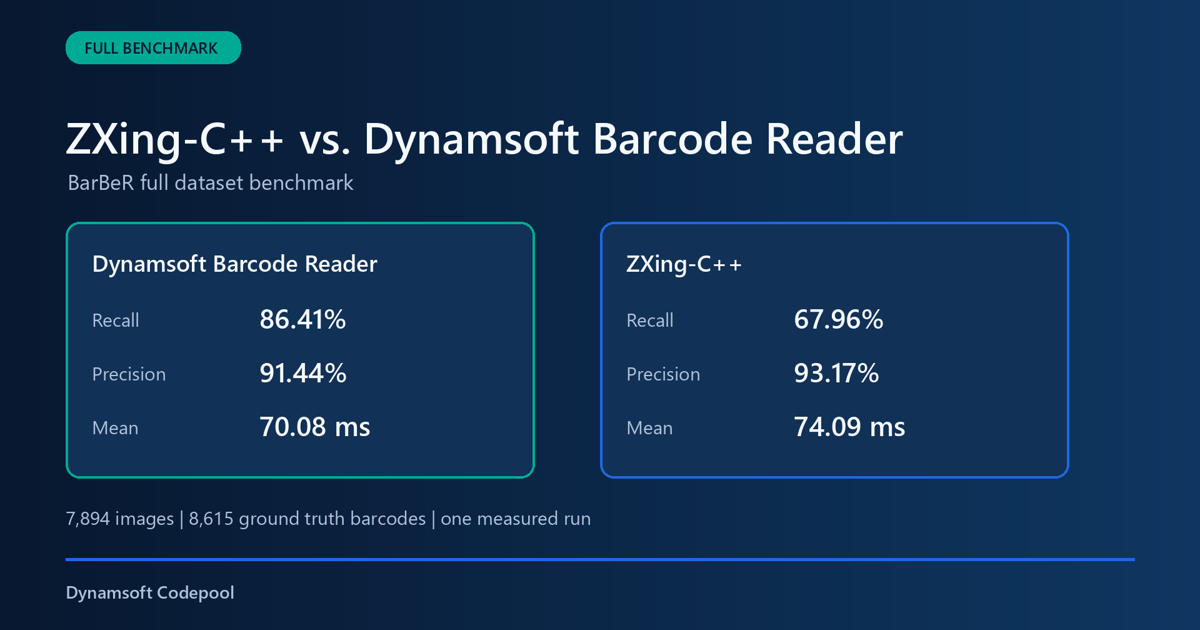
What you’ll build: A reproducible Windows C++ benchmark that builds ZXing-C++ from a Git submodule, runs both barcode readers on one RGB888 image buffer, validates BarBeR ground truth, and exports raw JSONL plus a complete JSON package.
This article is Part 1 in a 3-Part Series.
Key Takeaways
- The benchmark contains 7,894 unique images and 8,615 audited ground truth barcode instances. Scoring excludes 204 unreliable
^placeholders, leaving 8,411 scored instances. - ZXing-C++ and Dynamsoft Barcode Reader receive the same RGB888 pixel buffer for every image.
- Image loading, result matching, JSON serialization, and report generation are excluded from SDK decode timing.
- The BarBeR audit excludes 853 images without reliable payload ground truth and one exact duplicate image from the public dataset.
- On this single full-dataset run with DBR
ReadBarcodes_Default, DBR achieved 92.81% recall versus 71.70% for ZXing-C++, while averaging 57.09 ms versus 69.90 ms for ZXing-C++.
Common Developer Questions
How do I benchmark ZXing-C++ against Dynamsoft Barcode Reader fairly in C++?
A fair comparison loads each image once, passes the same immutable pixels to both SDKs, enables their supported formats without per-image hints, and measures only the decoder call. The project also uses one location-independent matching function for both result sets.
Which barcode reader performed better on the BarBeR dataset?
Dynamsoft Barcode Reader performed better on recall in this BarBeR run. DBR read 7,806 of 8,411 scored ground truth instances correctly for 92.81% recall, compared with 6,031 and 71.70% recall for ZXing-C++. Precision is 95.85% for DBR and 95.79% for ZXing-C++.
When should I choose Dynamsoft Barcode Reader instead of ZXing-C++ for a C++ project?
Choose Dynamsoft Barcode Reader when missed scans cost more than license cost, especially for difficult images, mixed symbologies, or production workflows that need packaged templates and commercial support. Choose ZXing-C++ when you need an open-source baseline, inspectable source, and a no-license option for controlled barcode inputs where lower recall is acceptable.
Full BarBeR Benchmark Video
The video summarizes the complete dataset audit, the shared input method, and the measured results.
Prerequisites
- Visual Studio 2022 with the C++ desktop workload
- CMake 3.16 or later
- Dynamsoft Barcode Reader SDK v11
- ZXing-C++ 3.1.1 from the project submodule
- Python 3 with Pillow for report media generation
- A valid Dynamsoft license key. Get a 30-day free trial license.
Step 1: Build ZXing-C++ with the Benchmark
The root repository records ZXing-C++ as a Git submodule, and CMake builds its core reader target with the benchmark.
set(ZXING_READERS ON CACHE BOOL "" FORCE)
set(ZXING_WRITERS OFF CACHE STRING "" FORCE)
set(ZXING_C_API OFF CACHE BOOL "" FORCE)
set(ZXING_EXAMPLES OFF CACHE BOOL "" FORCE)
set(ZXING_UNIT_TESTS OFF CACHE BOOL "" FORCE)
if(NOT EXISTS "${CMAKE_CURRENT_SOURCE_DIR}/zxing-cpp/CMakeLists.txt")
    message(FATAL_ERROR "ZXing-C++ submodule is missing. Run: git submodule update --init --recursive")
endif()
add_subdirectory(zxing-cpp EXCLUDE_FROM_ALL)
Initialize the submodule and build the executable.
git submodule update --init --recursive
cmake -S . -B build -G "Visual Studio 17 2022" -A x64
cmake --build build --config Release --target barcode_benchmark benchmark_tests
ctest --test-dir build -C Release --output-on-failure
Step 2: Give Both Readers the Same Pixels
The benchmark loads every image once into a shared three-channel RGB buffer. The buffer remains unchanged while both decoder adapters read it, so the comparison does not depend on separate image-loading paths.
ZXing-C++ receives an ImageView over that buffer.
const ZXing::ImageView view(image.rgb.data(), image.width, image.height,
                            ZXing::ImageFormat::RGB, image.stride);
const auto begin = std::chrono::steady_clock::now();
const auto barcodes = ZXing::ReadBarcodes(view, options_);
run.decode_time = std::chrono::steady_clock::now() - begin;
Dynamsoft Barcode Reader receives a CImageData object over the same bytes.
CImageData input(static_cast<int>(image.rgb.size()), image.rgb.data(), image.width, image.height,
                 image.stride, IPF_RGB_888);
const auto begin = std::chrono::steady_clock::now();
CCapturedResult* captured = router_->Capture(&input, template_name_.c_str());
run.decode_time = std::chrono::steady_clock::now() - begin;
Step 3: Audit BarBeR Ground Truth
The audit reads all 12 VGG JSON files from the public BarBeR dataset, validates payload structures, resolves overlapping annotations, and deduplicates image bytes by SHA-256.
build/Release/barcode_benchmark.exe audit `
  --images "D:/images/public-barcode-dataset/BarBeR - Dataset/dataset/images" `
  --annotations "D:/images/public-barcode-dataset/BarBeR - Dataset/Annotations/VIA" `
  --output manifests
The audited source contains 8,748 image records and 9,818 annotations. The benchmark manifest contains 7,894 unique images and 8,615 audited barcode instances after exclusions. Scoring then excludes 204 ^ placeholders, leaving 8,411 scored instances.
| Dataset stage | Count | How it relates to the run |
|---|---|---|
| Original image records | 8,748 | All image records referenced by the BarBeR VIA annotations |
| Original annotations | 9,818 | All barcode annotation regions before reliability filtering |
| Images without reliable ground truth | 853 | Removed because the payload was missing, generic, invalid, or not safely scorable |
| Exact duplicate images | 1 | Removed by SHA-256 byte identity |
| Final unique images | 7,894 | The image denominator used by each decoder |
| Audited ground truth values | 8,615 | Reliable payload annotations after the BarBeR audit |
| Scored ground truth values | 8,411 | Accuracy denominator after excluding 204 ^ placeholders |
| Decoder records | 15,788 | 7,894 images multiplied by two decoders and one measured run |
This connection matters because the benchmark does not score every original BarBeR image. It scores only images with reliable payload ground truth, then verifies that image count, ground truth count, SHA-256 identity, and decoder record count agree before publishing the report.
Step 4: Run and Validate the Complete Dataset
The benchmark writes one resumable result record per image and decoder. results.jsonl is used for the append-only raw stream, which makes long runs easier to resume and validate one line at a time. The project also writes results.json, which packages the summary and the same raw records into one JSON document for consumers that expect a single JSON file.
build/Release/barcode_benchmark.exe run `
  --images "D:/images/public-barcode-dataset/BarBeR - Dataset/dataset/images" `
  --manifest manifests/benchmark_manifest.jsonl `
  --output results/full `
  --dbr-template ReadBarcodes_Default `
  --zxing-config configs/zxing_all_supported.json `
  --license-key-file "../../license-key.txt" `
  --repetitions 1
The validator checks record keys, image counts, ground truth consistency, repetitions, summary totals, and explicit decoder errors.
python tools/validate_results.py `
  --results results/full/results.jsonl `
  --summary results/full/summary.json `
  --expected-images 7894 `
  --expected-ground-truth 8615 `
  --expected-repetitions 1
Step 5: Inspect Accuracy and Decode Time
This benchmark ran each decoder once on every one of the 7,894 unique images. The audited annotation count is 8,615. Scoring excludes 204 ^ placeholders, so the accuracy denominator is 8,411 scored ground truth instances. The measured machine used Windows 11 Pro, an Intel Core i5-13400F, 31.8 GB of memory, a Release x64 build, and one thread per decoder task.
Recall and precision answer different questions. Recall measures how many known barcodes were found. Precision measures how many reported barcode results were correct.
Recall = correct ground truth matches / eligible ground truth instances
Precision = correct predictions / evaluated predictions
Evaluated predictions = correct + wrong_text + wrong_format + extra_result
In this benchmark, not_found and unsupported_format lower recall because they are missed ground truth instances. They do not lower precision because no decoded value was reported for those ground truth items. extra_result, wrong_text, and wrong_format lower precision because the decoder returned a result that did not match a ground truth barcode.
| Decoder | Correct | Recall | Precision | Wrong reads | No read | Mean decode time | Median decode time | P95 decode time |
|---|---|---|---|---|---|---|---|---|
| Dynamsoft Barcode Reader 11.6.50.9329 | 7,806 / 8,411 | 92.81% | 95.85% | 92 (1.09%) | 513 (6.10%) | 57.09 ms | 39.52 ms | 157.41 ms |
| ZXing-C++ 3.1.1 | 6,031 / 8,411 | 71.70% | 95.79% | 100 (1.19%) | 2,280 (27.11%) | 69.90 ms | 44.73 ms | 227.58 ms |
Failures are split into wrong reads (a result was returned but did not match the ground truth) and no read (no result for that ground-truth barcode, including unsupported formats), so correct + wrong reads + no read equals the 8,411 scored instances. Extra results returned beyond the ground truth are counted in precision, not in this split.
DBR produced 1,775 more correct ground truth matches and a 21.10 percentage point recall lead in this run. Precision is 95.85% for DBR against 95.79% for ZXing-C++. DBR’s mean decoder call was 57.09 ms versus 69.90 ms for ZXing-C++, about 18.3% lower in this run. These results show a recall, precision, and latency trade-off on this dataset rather than a universal ranking.
The matcher normalizes UPC-A against the equivalent zero-prefixed EAN-13 payload, strips CODE_39 start/stop asterisks, strips CODE_128 / GS1-128 leading {GS}, {FNC1}, and ASCII GS markers, unescapes HTML entities, drops trailing newlines and a leading \000001 escape, and excludes ground truth payload ^ before scoring. A full scan of the incorrect records found no remaining cases where a result was wrong only because one side had an extra leading zero. The canonical format normalizer also treats CODE39EXTENDED as CODE_39 when the decoded payload is the same.
This benchmark was implemented and published by Dynamsoft, the developer of Dynamsoft Barcode Reader. BarBeR is a public third-party dataset, and its standardized annotations were generated with assistance from proprietary Datalogic software. The source hashes, exclusions, configurations, raw records, and report are preserved so the comparison can be audited.
The static report embeds searchable per-image records and copies the complete JSONL, complete JSON package, summary, matching analysis, and source inventory into its download directory.
python tools/generate_html_report.py `
  --inventory manifests/barber_source_files.json `
  --environment configs/benchmark_environment.json `
  --results results/full/results.jsonl `
  --results-json results/full/results.json `
  --matching-analysis results/full/matching_analysis.json `
  --summary results/full/summary.json `
  --output report/index.html
Common Issues & Edge Cases
- The ZXing-C++ directory is empty: Run
git submodule update --init --recursivebefore configuring CMake. - DBR fails during initialization: Provide a valid license and confirm that CMake copied the DBR templates, models, and runtime libraries into
build/Release. - A BarBeR image has no reliable payload: Regenerate the manifest with the audit command. Images with missing payloads, negative PPE values, invalid GTIN checksums, or generic 1D labels are not scored.
- A run stops before completion: Run the same command again. Existing sample, decoder, and repetition keys are skipped.
When to Choose Dynamsoft Barcode Reader or ZXing-C++
Choose Dynamsoft Barcode Reader when your C++ workflow is recall-sensitive and the business cost of a missed scan is high. This benchmark shows DBR returning 1,775 more correct matches on the scored BarBeR set, which makes it the stronger fit for damaged labels, dense scenes, and production pipelines that need configurable templates, packaged runtime assets, and vendor support.
Choose ZXing-C++ when you need an open-source engine that is easy to inspect, embed, and ship without license cost. Its 95.79% precision in this run shows that it remains valuable as a transparent baseline, a research harness, or a good-enough decoder for controlled inputs where engineering teams can accept lower recall in exchange for an open-source stack.
The practical decision is workload-driven rather than ideological. If your application must minimize misses across real-world barcode images, DBR brings more value. If your priority is source-level control, budget flexibility, and a reproducible open-source baseline, ZXing-C++ still has clear value.
Conclusion
The Python and JavaScript companions run the identical 7,894-image manifest on the same Dynamsoft Barcode Reader 11.6.5000 release, so the three articles isolate the language/runtime binding rather than the SDK version.
This C++ project produces an auditable comparison of ZXing-C++ and Dynamsoft Barcode Reader from 7,894 real BarBeR images. The shared pixel pipeline, explicit exclusions, raw records, complete JSON package, and generated report make the measured accuracy and decode time reproducible.