


Build a Dual-Engine Barcode Annotation Tool in Python to Create Ground-Truth Datasets
Evaluating the accuracy of a barcode SDK requires clean, human-verified ground-truth data — but building that dataset by hand is slow and error-prone. Running two independent engines in parallel, comparing their outputs automatically, and letting a developer resolve discrepancies is a far more efficient approach. This tutorial shows how to build exactly that: a PySide6 desktop annotation tool driven by Dynamsoft Barcode Reader Bundle and ZXing-C++, capable of producing a barcode-benchmark/1.0 JSON dataset in minutes.
What you’ll build: A Python desktop annotation application that loads image folders, auto-detects barcodes with dual engines (Dynamsoft DBR + ZXing-C++), highlights cross-engine mismatches for human review, supports manual quad drawing and crop-and-detect, and exports a portable ground-truth JSON dataset.
Key Takeaways
- A single PySide6 application can orchestrate two independent barcode engines side-by-side, cross-validating results and surfacing only the images that need human attention.
- Dynamsoft Barcode Reader Bundle’s
CaptureVisionRouteraccepts both file paths and custom JSON templates, making it straightforward to integrate advanced decoding settings without code changes. - Running detection on a
QThreadkeeps the UI responsive even when processing hundreds of high-resolution images in a single batch. - The
barcode-benchmark/1.0JSON schema produced by this tool is compact and self-describing, making it reusable as input for any downstream accuracy benchmarking pipeline.
Common Developer Questions
How do I run Dynamsoft Barcode Reader and ZXing-C++ on the same image and compare results in Python?
Run both engines inside the same worker thread for each image, normalize their outputs into a shared structure, and then match results by decoded text so disagreements can be flagged for review. That lets the tool automatically separate verified images from mismatches and no-result cases.
How do I keep a PySide6 UI responsive while detecting barcodes in a background thread?
Move barcode detection into a QThread, emit progress and per-file signals back to the main window, and update the lists or preview only from those signals. That keeps the PySide6 UI responsive even when a batch contains hundreds of large images.
How do I load a custom DBR template JSON file at runtime and apply it to all subsequent captures?
Pass the selected template path into the detection worker and call router.init_settings_from_file() before processing the image batch. Once loaded, the same router instance can reuse those advanced decoding settings for every subsequent capture in that run.
How do I draw and edit barcode quad polygons interactively on a QGraphicsView canvas?
Render the image inside a QGraphicsView, place editable polygon overlays on top of it, and update the stored annotation points whenever the user drags handles or draws a new quad. This article also supports crop-and-detect plus manual quad entry so unresolved images can still become ground truth.
Demo Video: Dual-Engine Barcode Annotation Tool in Action
Prerequisites
- Python 3.9 or later
pip install PySide6>=6.5 opencv-python>=4.8 numpy>=1.24 zxing-cpp>=3.0.0 dynamsoft-barcode-reader-bundle>=11.6.4000- A Dynamsoft Barcode Reader license key (a 30-day trial key is bundled in the sample; replace it for production use)
Get a 30-day free trial license at dynamsoft.com/customer/license/trialLicense
Install all dependencies at once:
pip install -r requirements.txt
Then launch the annotation tool:
python main.py
Step 1: Initialise the Dynamsoft License
The SDK must be activated once at module level before any CaptureVisionRouter instance is created. The call is synchronous and caches the result, so subsequent launches work even without a network connection.
from dynamsoft_barcode_reader_bundle import (
    LicenseManager, CaptureVisionRouter, EnumPresetTemplate, EnumErrorCode
)

LICENSE_KEY = "LICENSE-KEY"

err, msg = LicenseManager.init_license(LICENSE_KEY)
if err not in (EnumErrorCode.EC_OK, EnumErrorCode.EC_LICENSE_CACHE_USED):
    print(f"[DBR] License warning: {msg}")
EC_LICENSE_CACHE_USED is a non-fatal status returned when the SDK uses its locally cached license after a successful prior activation, so both codes are treated as success.
Step 2: Run Dual-Engine Detection in a Background Thread
A QThread subclass runs both Dynamsoft DBR and ZXing-C++ on every image. The engines operate independently; their results are then merged by matching decoded text values. When both agree on the same text, the annotation is flagged match=True and routed to the Verified list automatically.
import zxingcpp
from PySide6.QtCore import QThread, Signal

class DetectionWorker(QThread):
    progress = Signal(int, int)    # done, total
    file_done = Signal(str, list)  # abs_path, annotations

    def __init__(self, file_paths, template_path=None, template_name=None, parent=None):
        super().__init__(parent)
        self._files = list(file_paths)
        self._template_path = template_path
        self._template_name = template_name or EnumPresetTemplate.PT_READ_BARCODES.value

    def run(self):
        router = CaptureVisionRouter()
        if self._template_path:
            err, msg = router.init_settings_from_file(self._template_path)
            if err != 0:
                print(f"[DBR] Template load failed ({err}): {msg}")
        total = len(self._files)
        for i, path in enumerate(self._files):
            anns = self._detect(router, path)
            self.file_done.emit(path, anns)
            self.progress.emit(i + 1, total)

    def _detect(self, router, path):
        # --- Dynamsoft DBR ---
        dbr_items = []
        try:
            result = router.capture(path, self._template_name)
            if result:
                dbr_r = result.get_decoded_barcodes_result()
                if dbr_r:
                    for item in (dbr_r.get_items() or []):
                        pts = item.get_location().points
                        dbr_items.append({
                            "text":   item.get_text(),
                            "format": item.get_format_string(),
                            "points": [(p.x, p.y) for p in pts],
                        })
        except Exception as exc:
            print(f"[DBR] {exc}")

        # --- ZXing-C++ ---
        zxing_items = []
        try:
            img = cv2.imread(path)
            if img is not None:
                for zx in zxingcpp.read_barcodes(img):
                    pos = zx.position
                    zxing_items.append({
                        "text":   zx.text,
                        "format": zx.format.name,
                        "points": [
                            (pos.top_left.x,     pos.top_left.y),
                            (pos.top_right.x,    pos.top_right.y),
                            (pos.bottom_right.x, pos.bottom_right.y),
                            (pos.bottom_left.x,  pos.bottom_left.y),
                        ],
                    })
        except Exception as exc:
            print(f"[ZXing] {exc}")

        # Merge: pair results by decoded text value
        zxing_text_set = {r["text"] for r in zxing_items}
        zxing_by_text  = {}
        for r in zxing_items:
            zxing_by_text.setdefault(r["text"], []).append(r)

        anns = []
        for r in dbr_items:
            match = r["text"] in zxing_text_set
            zxing_pair = zxing_by_text[r["text"]].pop(0) if match and zxing_by_text.get(r["text"]) else None
            anns.append({
                **r,
                "match":  match,
                "source": "dbr",
                "dbr":    {"text": r["text"], "format": r["format"], "points": r["points"]},
                "zxing":  {"text": zxing_pair["text"], "format": zxing_pair["format"],
                           "points": zxing_pair["points"]} if zxing_pair else None,
            })
        for r in zxing_items:
            if r["text"] not in {i["text"] for i in dbr_items}:
                anns.append({**r, "match": False, "source": "zxing", "dbr": None,
                             "zxing": {"text": r["text"], "format": r["format"], "points": r["points"]}})
        return anns
The worker is started from the main thread and its file_done signal is connected to the UI:
self._worker = DetectionWorker(
    paths,
    template_path=self._active_template_path,
    template_name=self._active_template_name,
)
self._worker.file_done.connect(self._on_file_detected)
self._worker.progress.connect(self._on_progress)
self._worker.finished.connect(self._on_detection_done)
self._worker.start()
Step 3: Classify and Display Results in Three Lists
Each image is classified as soon as its detection completes, without waiting for the full batch to finish. Images where every barcode was agreed on by both engines go straight to Verified (green), those with any mismatch go to Needs Review (red), and images where nothing was detected go to No Result (grey).
def _on_file_detected(self, path, annotations):
    self._files[path]["annotations"] = annotations
    filename = os.path.basename(path)

    item = QListWidgetItem(filename)
    item.setData(Qt.UserRole, path)
    if len(annotations) == 0:
        item.setForeground(QColor(120, 120, 120))
        self._list_noresult.addItem(item)
    elif all(a.get("match") for a in annotations):
        item.setForeground(QColor(0, 130, 0))
        self._list_verified.addItem(item)
    else:
        item.setForeground(QColor(180, 0, 0))
        self._list_review.addItem(item)

    self._grp_verified.setTitle(f"Verified ({self._list_verified.count()})")
    self._grp_review.setTitle(f"Needs Review ({self._list_review.count()})")
    self._grp_noresult.setTitle(f"No Result ({self._list_noresult.count()})")

    if self._current_path is None:
        self._select_file(path)
Step 4: Add and Edit Annotations Manually
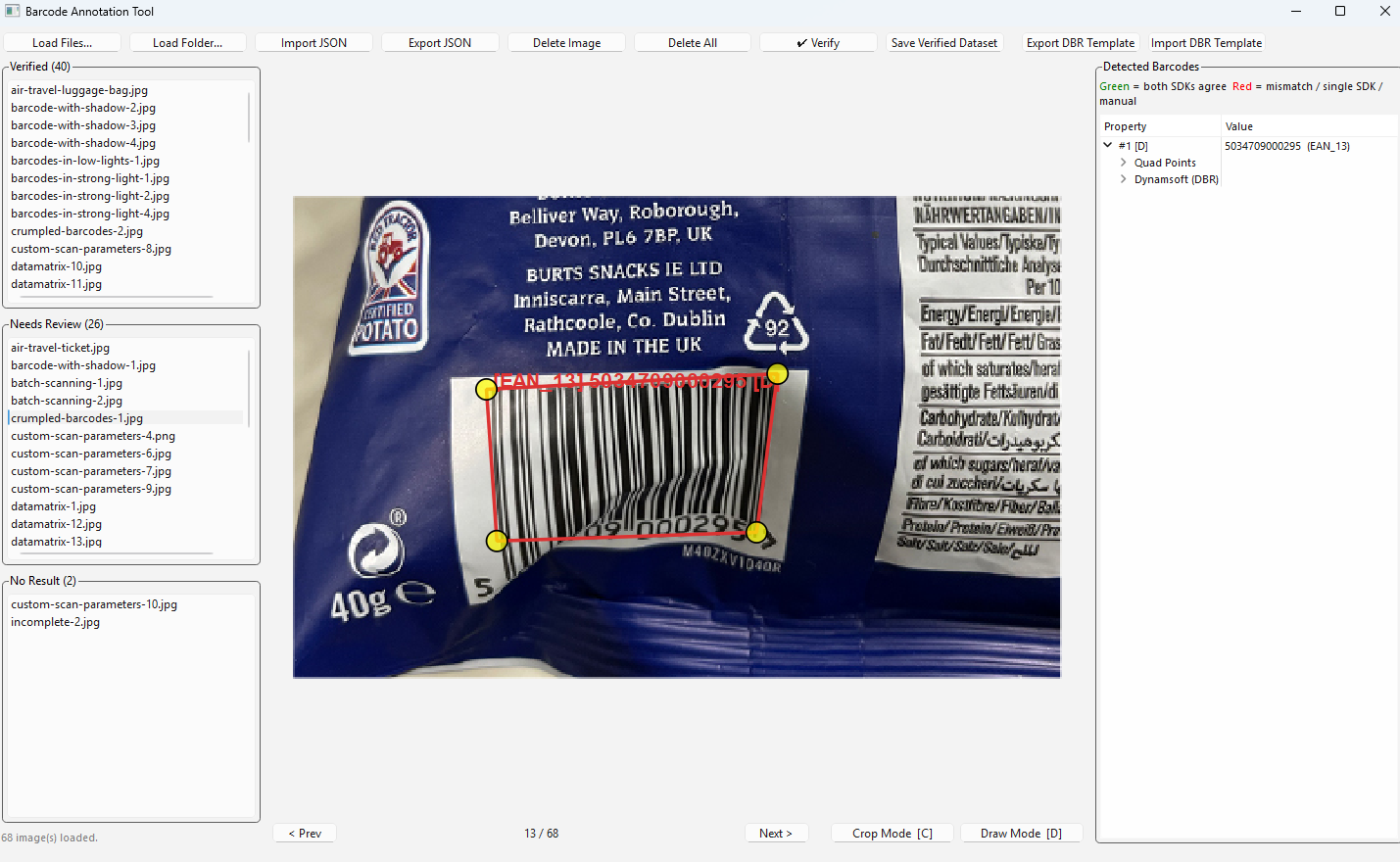
Two complementary annotation modes handle cases where automatic detection fails.
Crop Mode — drag a rectangle over a region and both engines attempt to decode only that cropped area. Coordinates are translated back to the full image space before being stored:
def _decode_quad_region(self, path, quad_points):
    cv_img = load_image_cv(path)
    xs = [p[0] for p in quad_points]
    ys = [p[1] for p in quad_points]
    x1, y1 = max(0, int(min(xs))), max(0, int(min(ys)))
    x2, y2 = min(cv_img.shape[1], int(max(xs)) + 1), min(cv_img.shape[0], int(max(ys)) + 1)
    crop = cv_img[y1:y2, x1:x2]

    # Run DBR on the cropped region via a temp file
    import tempfile
    with tempfile.NamedTemporaryFile(suffix=".png", delete=False) as tmp:
        tmp_path = tmp.name
    cv2.imwrite(tmp_path, crop)
    router = CaptureVisionRouter()
    result = router.capture(tmp_path, self._active_template_name)
    os.unlink(tmp_path)
    # ... ZXing pass and coordinate offset back to full image omitted for brevity
Draw Mode — press D, click four corners of the barcode quad to draw a custom polygon, then enter the text and format in the BarcodeEditDialog. The annotation is stored with source="manual":
def _on_quad_drawn(self, quad_points):
    dlg = BarcodeEditDialog(text="", fmt="Unknown")
    if dlg.exec() != QDialog.Accepted:
        return
    ann = {
        "text":   dlg.text_edit.text(),
        "format": dlg.fmt_combo.currentText(),
        "points": quad_points,
        "match":  False,
        "source": "manual",
        "dbr":    None,
        "zxing":  None,
    }
    self._files[self._current_path]["annotations"].append(ann)
    self._redraw(self._current_path)
Every polygon corner is also a draggable DraggableVertex handle, so fine-tuning positions requires no mode switching — just click and drag.
Step 5: Export and Re-Import the Ground-Truth Dataset
Click Export JSON to save all loaded images and their annotations to a barcode-benchmark/1.0 JSON file. The schema is self-describing:
def _export_json(self):
    images_out = []
    total_barcodes = 0
    for path in self._all_paths:
        filename = os.path.basename(path)
        anns = (self._files.get(path) or {}).get("annotations") or []
        barcodes = [
            {"text": a["text"], "format": a["format"], "points": a["points"]}
            for a in anns
        ]
        total_barcodes += len(barcodes)
        images_out.append({"file": filename, "barcodes": barcodes})

    out = {
        "format":        "barcode-benchmark/1.0",
        "dataset":       "Annotated Collection",
        "total_images":  len(images_out),
        "total_barcodes": total_barcodes,
        "images":         images_out,
    }
    save_path, _ = QFileDialog.getSaveFileName(
        self, "Save Annotations", "annotations.json", "JSON (*.json)"
    )
    if save_path:
        with open(save_path, "w", encoding="utf-8") as f:
            json.dump(out, f, indent=2, ensure_ascii=False)
In a later session, click Import JSON to reload exported annotations directly onto the same image set — no re-detection is needed. Every imported barcode is immediately flagged as verified and appears in the Verified list:
annotations = [
    {
        "text":   bc.get("text", ""),
        "format": bc.get("format", "Unknown"),
        "points": [tuple(p) for p in bc.get("points", [])],
        "match":  True,
        "source": "imported",
        "dbr":    None,
        "zxing":  None,
    }
    for bc in raw_barcodes
]
Step 6: Use the Lightweight Read-Only Viewer
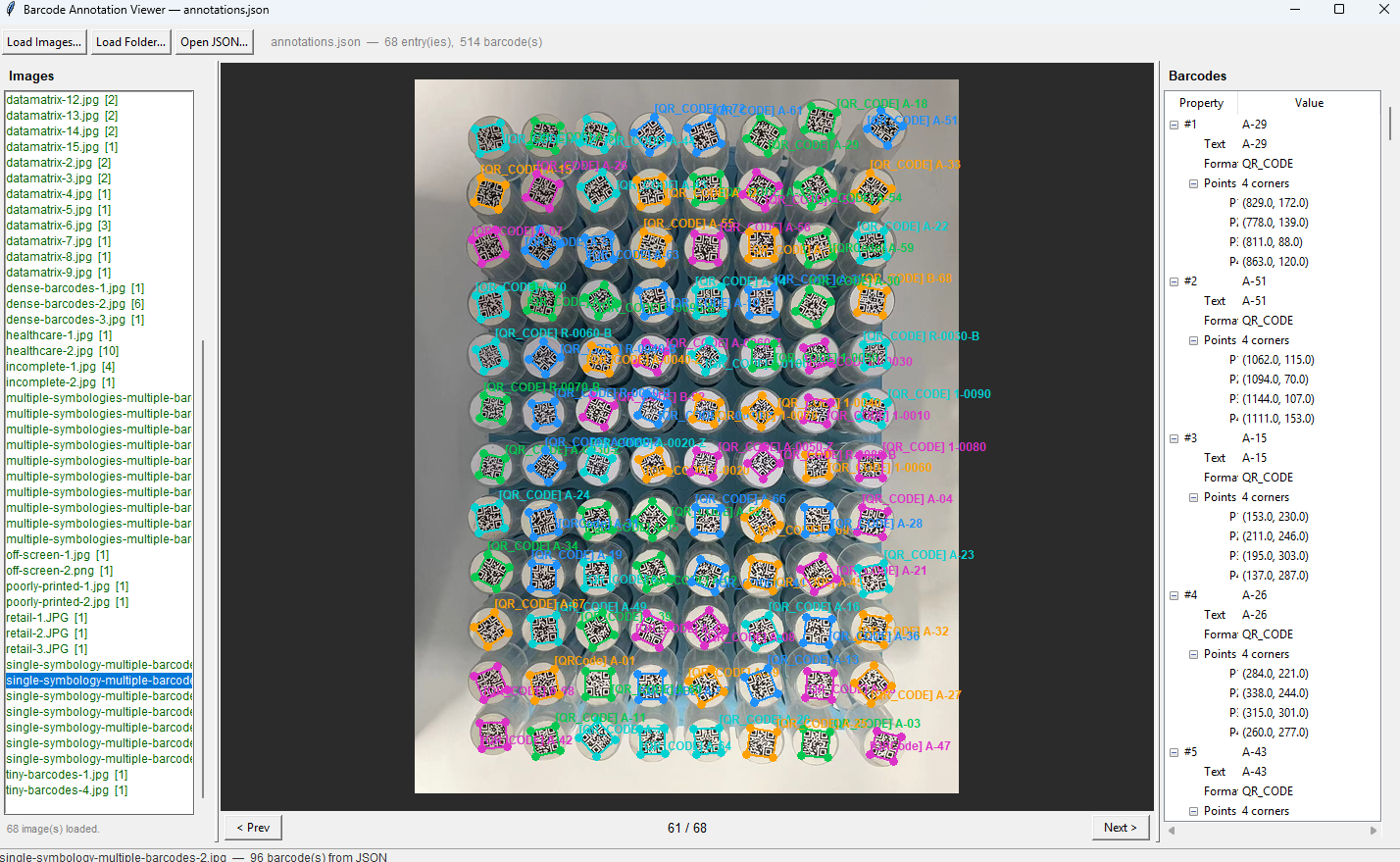
The companion viewer.py depends only on tkinter (Python built-in) and Pillow — no PySide6 or OpenCV required — making it easy to pass to teammates or testers who don’t need to run the full annotation tool.
pip install Pillow
python viewer.py
Drop a JSON file onto the window to load annotations, then drop an image folder to display overlays. Images matched by filename show color-coded barcode polygons and a details tree; unmatched images display without overlays. The viewer supports scroll-wheel zoom and click-drag pan, and the optional tkinterdnd2 package enables OS-level drag-and-drop:
pip install tkinterdnd2
Common Issues & Edge Cases
- No Result images after initial detection: The No Result list re-runs detection automatically whenever you click an image in that list. If detection still fails, switch to Crop Mode to isolate the barcode region, or press D to draw the quad manually and enter the barcode text directly.
- DBR license error on first run: If
LicenseManager.init_license()returns an error other thanEC_LICENSE_CACHE_USED, the license key is missing or expired. ReplaceLICENSE_KEYwith a valid trial key from the Dynamsoft portal; the SDK caches it locally so subsequent offline runs still succeed. - Mismatched quad coordinates after crop-and-detect: Coordinates returned by DBR and ZXing on a cropped image are relative to the crop origin, not the full image. Always add the crop’s
(x1, y1)offset back to each point when storing the annotation, or the polygon will appear in the wrong position when overlaid on the full image.
Conclusion
This tutorial demonstrated how to combine Dynamsoft Barcode Reader Bundle with ZXing-C++ inside a PySide6 desktop application to produce verified, human-reviewed barcode ground-truth datasets efficiently. The dual-engine cross-validation dramatically reduces the manual review burden, while draw mode and crop mode ensure that even the most challenging images can be annotated correctly. To take the dataset further, explore the Dynamsoft Barcode Reader documentation to learn how to run a formal accuracy benchmark against your newly created ground truth.