


How to Scan Barcodes and Extract OCR Text Labels in C++ on Windows and Linux
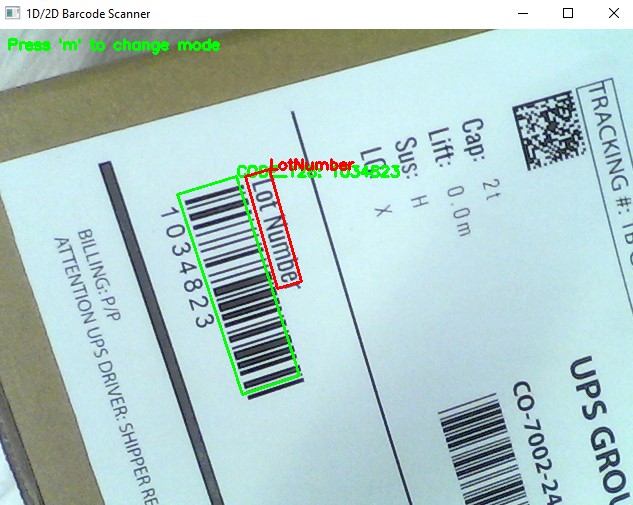
This tutorial builds a cross-platform C++ parcel scanning application for Windows and Linux that captures live camera frames with OpenCV and runs both barcode decoding and OCR text recognition through the Dynamsoft Capture Vision SDK.
What you’ll build: A C++ application that captures live camera frames with OpenCV and simultaneously decodes 1D barcodes and recognizes nearby OCR text labels using the Dynamsoft Capture Vision SDK on Windows and Linux.
Key Takeaways
- Dynamsoft Capture Vision SDK combines barcode reading (Dynamsoft Barcode Reader) and OCR text recognition (Dynamsoft Label Recognizer) in a single C++ pipeline using
CCaptureVisionRouter. - The SDK’s
CImageSourceAdapterand asynchronousCCapturedResultReceiverpattern lets you process live camera frames without blocking the UI thread. - A single JSON template controls both barcode and OCR tasks, including ROI offsets that locate text labels relative to detected barcodes.
- The same CMake project compiles and runs on both Windows (MSVC/MinGW) and Linux with no code changes.
Common Developer Questions
How do I scan barcodes and OCR text from a webcam in C++ on Windows and Linux?
Capture frames with OpenCV, pass them into CCaptureVisionRouter, and let a combined template run barcode decoding and OCR label recognition on the same image. The live results can then be drawn back onto the preview without splitting the pipeline into separate tools.
How do I combine Dynamsoft Barcode Reader and Label Recognizer in one C++ project?
Merge the Barcode Reader and Label Recognizer SDK packages into one shared SDK directory, then reference the combined headers, libraries, templates, and models from a single C++ build. That gives one project access to both barcode and OCR capabilities through the same Capture Vision router.
How do I configure CMake to link Dynamsoft Capture Vision SDK libraries on both Windows and Linux?
Add the platform-specific include and library directories in CMakeLists.txt, link the required Dynamsoft libraries plus OpenCV, and copy the runtime resources after build. The article’s CMake setup keeps the source code unchanged while swapping only the link paths per platform.
This article is Part 2 in a 2-Part Series.
Prerequisites
-
Get a 30-day free trial license for Dynamsoft Capture Vision.
-
Download Dynamsoft Barcode Reader C++ Package
-
Download Dynamsoft Label Recognizer C++ Package.
The Dynamsoft Barcode Reader and Dynamsoft Label Recognizer are integral parts of the Dynamsoft Capture Vision Framework. The Barcode Reader is designed for barcode scanning, while the Label Recognizer focuses on OCR text recognition. These tools share several common components and header files. To utilize both tools together efficiently, simply merge the two packages into a single directory. Below is the final directory structure for your setup.
|- SDK
    |- include
        |- DynamsoftBarcodeReader.h
        |- DynamsoftCaptureVisionRouter.h
        |- DynamsoftCodeParser.h
        |- DynamsoftCore.h
        |- DynamsoftDocumentNormalizer.h
        |- DynamsoftImageProcessing.h
        |- DynamsoftLabelRecognizer.h
        |- DynamsoftLicense.h
        |- DynamsoftUtility.h
    |- platforms
        |- linux
            |- libDynamicImage.so
            |- libDynamicPdf.so
            |- libDynamicPdfCore.so
            |- libDynamsoftBarcodeReader.so
            |- libDynamsoftCaptureVisionRouter.so
            |- libDynamsoftCore.so
            |- libDynamsoftImageProcessing.so
            |- libDynamsoftLabelRecognizer.so
            |- libDynamsoftLicense.so
            |- libDynamsoftNeuralNetwork.so
            |- libDynamsoftUtility.so
        |- win
            |- bin
                |- DynamicImagex64.dll
                |- DynamicPdfCorex64.dll
                |- DynamicPdfx64.dll
                |- DynamsoftBarcodeReaderx64.dll
                |- DynamsoftCaptureVisionRouterx64.dll
                |- DynamsoftCorex64.dll
                |- DynamsoftImageProcessingx64.dll
                |- DynamsoftLabelRecognizerx64.dll
                |- DynamsoftLicensex64.dll
                |- DynamsoftNeuralNetworkx64.dll
                |- DynamsoftUtilityx64.dll
                |- vcomp140.dll
            |- lib
                |- DynamsoftBarcodeReaderx64.lib
                |- DynamsoftCaptureVisionRouterx64.lib
                |- DynamsoftCorex64.lib
                |- DynamsoftImageProcessingx64.lib
                |- DynamsoftLabelRecognizerx64.lib
                |- DynamsoftLicensex64.lib
                |- DynamsoftNeuralNetworkx64.lib
                |- DynamsoftUtilityx64.lib
    |- CharacterModel
    |- DBR-PresetTemplates.json
    |- DLR-PresetTemplates.json
Configure CMakeLists.txt to Build the Barcode and OCR Project
The target project relies on header files, shared libraries, JSON-formatted templates, and neural network models. To simplify the build process, we can use CMake to manage dependencies and generate project files for different platforms.
-
Specify the directories for header files and shared libraries:
if(WINDOWS) if(CMAKE_CXX_COMPILER_ID STREQUAL "GNU") link_directories("${PROJECT_SOURCE_DIR}/../sdk/platforms/win/bin/") else() link_directories("${PROJECT_SOURCE_DIR}/../sdk/platforms/win/lib/") endif() elseif(LINUX) if (CMAKE_SYSTEM_PROCESSOR STREQUAL x86_64) MESSAGE( STATUS "Link directory: ${PROJECT_SOURCE_DIR}/../sdk/platforms/linux/" ) link_directories("${PROJECT_SOURCE_DIR}/../sdk/platforms/linux/") endif() endif() include_directories("${PROJECT_BINARY_DIR}" "${PROJECT_SOURCE_DIR}/../sdk/include/") -
Link the required libraries:
add_executable(${PROJECT_NAME} main.cxx) if(WINDOWS) if(CMAKE_CL_64) target_link_libraries (${PROJECT_NAME} "DynamsoftCorex64" "DynamsoftLicensex64" "DynamsoftCaptureVisionRouterx64" "DynamsoftUtilityx64" ${OpenCV_LIBS}) endif() else() target_link_libraries (${PROJECT_NAME} "DynamsoftCore" "DynamsoftLicense" "DynamsoftCaptureVisionRouter" "DynamsoftUtility" pthread ${OpenCV_LIBS}) endif() -
Copy the required shared libraries, JSON files and neural network models to the output directory:
 if(WINDOWS)
     add_custom_command(TARGET ${PROJECT_NAME} POST_BUILD
     COMMAND ${CMAKE_COMMAND} -E copy_directory
     "${PROJECT_SOURCE_DIR}/../sdk/platforms/win/bin/"
     $<TARGET_FILE_DIR:main>)
 endif()

 add_custom_command(TARGET ${PROJECT_NAME} POST_BUILD
 COMMAND ${CMAKE_COMMAND} -E copy
 "${PROJECT_SOURCE_DIR}/../sdk/DBR-PresetTemplates.json"
 $<TARGET_FILE_DIR:main>/DBR-PresetTemplates.json)

 add_custom_command(TARGET ${PROJECT_NAME} POST_BUILD
 COMMAND ${CMAKE_COMMAND} -E copy
 "${PROJECT_SOURCE_DIR}/../sdk/DLR-PresetTemplates.json"
 $<TARGET_FILE_DIR:main>/DLR-PresetTemplates.json)

 add_custom_command(TARGET ${PROJECT_NAME} POST_BUILD
 COMMAND ${CMAKE_COMMAND} -E make_directory $<TARGET_FILE_DIR:main>/CharacterModel
 COMMAND ${CMAKE_COMMAND} -E copy_directory
 "${PROJECT_SOURCE_DIR}/../sdk/CharacterModel"
 $<TARGET_FILE_DIR:main>/CharacterModel)
Implement Barcode Scanning and OCR Text Extraction in C++
To quickly get started with the API, we can refer to the barcode sample code VideoDecoding.cpp provided by Dynamsoft. The sample code demonstrates how to decode barcodes from video frames using OpenCV. Based on this sample code, we can add OCR text extraction functionality using the Dynamsoft Label Recognizer. Let’s take the steps to implement barcode scanning and OCR text extraction in C++.
Step 1: Include the SDK Header Files for Barcode and OCR
To use the Dynamsoft Barcode Reader and Dynamsoft Label Recognizer together, we need to include two header files: DynamsoftCaptureVisionRouter.h and DynamsoftUtility.h, which contain all the necessary classes and functions. The OpenCV header files may vary depending on the version you are using. The following code snippet shows the header files and namespaces used in the sample code:
#include "opencv2/core.hpp"
#include "opencv2/imgproc.hpp"
#include "opencv2/highgui.hpp"
#include "opencv2/videoio.hpp"
#include "opencv2/core/utility.hpp"
#include "opencv2/imgcodecs.hpp"
#include <iostream>
#include <vector>
#include <chrono>
#include <iostream>
#include <string>

#include "DynamsoftCaptureVisionRouter.h"
#include "DynamsoftUtility.h"

using namespace std;
using namespace dynamsoft::license;
using namespace dynamsoft::cvr;
using namespace dynamsoft::dlr;
using namespace dynamsoft::dbr;
using namespace dynamsoft::utility;
using namespace dynamsoft::basic_structures;
using namespace cv;
Step 2: Activate the SDK with Your License Key
When requesting a trial license key, you can either choose a single product key or a combined key for multiple products. In this example, we need to set a combined license key for activating both SDK modules:
int iRet = CLicenseManager::InitLicense("LICENSE-KEY");
Step 3: Create a Video Frame Buffer with CImageSourceAdapter
The CImageSourceAdapter class is used for fetching and buffering image frames. We can create a custom class that inherits from CImageSourceAdapter.
class MyVideoFetcher : public CImageSourceAdapter
{
public:
    MyVideoFetcher(){};
    ~MyVideoFetcher(){};
    bool HasNextImageToFetch() const override
    {
        return true;
    }
    void MyAddImageToBuffer(const CImageData *img, bool bClone = true)
    {
        AddImageToBuffer(img, bClone);
    }
};

MyVideoFetcher *fetcher = new MyVideoFetcher();
fetcher->SetMaxImageCount(4);
fetcher->SetBufferOverflowProtectionMode(BOPM_UPDATE);
fetcher->SetColourChannelUsageType(CCUT_AUTO);
Step 4: Set Up Asynchronous Image Processing and Result Callbacks
The CCaptureVisionRouter class is the core class for image processing. It provides a built-in thread pool for asynchronously processing images that are fetched by the CImageSourceAdapter object.
CCaptureVisionRouter *cvr = new CCaptureVisionRouter;
cvr->SetInput(fetcher);
To handle the barcode and OCR text results, we need to register a custom class that inherits from CCapturedResultReceiver with the CCaptureVisionRouter object.
class MyCapturedResultReceiver : public CCapturedResultReceiver
{
    virtual void OnRecognizedTextLinesReceived(CRecognizedTextLinesResult *pResult) override
    {

    }

    virtual void OnDecodedBarcodesReceived(CDecodedBarcodesResult *pResult) override
    {
    }
};

CCapturedResultReceiver *capturedReceiver = new MyCapturedResultReceiver;
cvr->AddResultReceiver(capturedReceiver);
Step 5: Stream Camera Frames and Start the Capture Pipeline
OpenCV provides a simple way to capture video frames from a camera. We can use the VideoCapture class to open a camera and fetch frames continuously. In the meantime, we call the StartCapturing() and StopCapturing() methods of the CCaptureVisionRouter object to switch the processing task on and off.
string settings = R"(
{
    "CaptureVisionTemplates": [
        {
            "Name": "ReadBarcode&AccompanyText",
            "ImageROIProcessingNameArray": [
                "roi-read-barcodes-only", "roi-read-text"
            ]
        }
    ],
    "TargetROIDefOptions": [
        {
            "Name": "roi-read-barcodes-only",
            "TaskSettingNameArray": ["task-read-barcodes"]
        },
        {
            "Name": "roi-read-text",
            "TaskSettingNameArray": ["task-read-text"],
            "Location": {
                "ReferenceObjectFilter": {
                    "ReferenceTargetROIDefNameArray": ["roi-read-barcodes-only"]
                },
                "Offset": {
                    "MeasuredByPercentage": 1,
                    "FirstPoint": [-20, -50],
                    "SecondPoint": [150, -50],
                    "ThirdPoint": [150, -5],
                    "FourthPoint": [-20, -5]
                }
            }
        }
    ],
    "CharacterModelOptions": [
        {
            "Name": "Letter"
        }
    ],
    "ImageParameterOptions": [
        {
            "Name": "ip-read-text",
            "TextureDetectionModes": [
                {
                    "Mode": "TDM_GENERAL_WIDTH_CONCENTRATION",
                    "Sensitivity": 8
                }
            ],
            "TextDetectionMode": {
                "Mode": "TTDM_LINE",
                "CharHeightRange": [
                    20,
                    1000,
                    1
                ],
                "Direction": "HORIZONTAL",
                "Sensitivity": 7
            }
        }
    ],
    "TextLineSpecificationOptions": [
        {
            "Name": "tls-11007",
            "CharacterModelName": "Letter",
            "StringRegExPattern": "(SerialNumber){(12)}|(LotNumber){(9)}",
			"StringLengthRange": [9, 12],
			"CharHeightRange": [5, 1000, 1],
            "BinarizationModes": [
                {
                    "BlockSizeX": 30,
                    "BlockSizeY": 30,
                    "Mode": "BM_LOCAL_BLOCK",
                    "MorphOperation": "Close"
                }
            ]
        }
    ],
    "BarcodeReaderTaskSettingOptions": [
        {
            "Name": "task-read-barcodes",
            "BarcodeFormatIds": ["BF_ONED"]
        }
    ],
    "LabelRecognizerTaskSettingOptions": [
        {
            "Name": "task-read-text",
            "TextLineSpecificationNameArray": [
                "tls-11007"
            ],
            "SectionImageParameterArray": [
                {
                    "Section": "ST_REGION_PREDETECTION",
                    "ImageParameterName": "ip-read-text"
                },
                {
                    "Section": "ST_TEXT_LINE_LOCALIZATION",
                    "ImageParameterName": "ip-read-text"
                },
                {
                    "Section": "ST_TEXT_LINE_RECOGNITION",
                    "ImageParameterName": "ip-read-text"
                }
            ]
        }
    ]
})";

VideoCapture capture(0);

bool use_ocr = false;
if (use_ocr)
{
    cvr->InitSettings(settings.c_str(), errorMsg, 512);
    errorCode = cvr->StartCapturing("ReadBarcode&AccompanyText", false, errorMsg, 512);
}
else
{
    errorCode = cvr->StartCapturing(CPresetTemplate::PT_READ_BARCODES, false, errorMsg, 512);
}

int width = (int)capture.get(CAP_PROP_FRAME_WIDTH);
int height = (int)capture.get(CAP_PROP_FRAME_HEIGHT);

for (int i = 1;; ++i)
{
    Mat frame;
    capture.read(frame);
    if (frame.empty())
    {
        cerr << "ERROR: Can't grab camera frame." << endl;
        break;
    }
    CFileImageTag tag(nullptr, 0, 0);
    tag.SetImageId(i);
    CImageData data(frame.rows * frame.step.p[0],
                    frame.data,
                    width,
                    height,
                    frame.step.p[0],
                    IPF_RGB_888,
                    0,
                    &tag);
    fetcher->MyAddImageToBuffer(&data);

    imshow("1D/2D Barcode Scanner", frame);
    int key = waitKey(1);
    if (key == 27 /*ESC*/)
        break;
}
cvr->StopCapturing(false, true);
The image processing tasks support preset templates and custom settings. If we only need to scan 1D and 2D barcodes, we can use the CPresetTemplate::PT_READ_BARCODES template. If we want to extract OCR text labels along with barcodes, a highly customized template is required.
Step 6: Draw Barcode and OCR Results on the Video Feed
Since the results are returned from a worker thread, to display them on the video frames in the main thread, we create a vector to store them and use a mutex to protect the shared resource.
struct BarcodeResult
{
	std::string type;
	std::string value;
	std::vector<cv::Point> localizationPoints;
	int frameId;
	string line;
	std::vector<cv::Point> textLinePoints;
};

std::vector<BarcodeResult> barcodeResults;
std::mutex barcodeResultsMutex;
Here is the implementation of the OnRecognizedTextLinesReceived and OnDecodedBarcodesReceived callback functions:
virtual void OnRecognizedTextLinesReceived(CRecognizedTextLinesResult *pResult) override
{
    std::lock_guard<std::mutex> lock(barcodeResultsMutex);
    barcodeResults.clear();

    const CFileImageTag *tag = dynamic_cast<const CFileImageTag *>(pResult->GetOriginalImageTag());

    if (pResult->GetErrorCode() != EC_OK)
    {
        cout << "Error: " << pResult->GetErrorString() << endl;
    }
    else
    {
        int lCount = pResult->GetItemsCount();
        for (int li = 0; li < lCount; ++li)
        {
            BarcodeResult result;

            const CTextLineResultItem *textLine = pResult->GetItem(li);
            CPoint *points = textLine->GetLocation().points;
            result.line = textLine->GetText();
            result.textLinePoints.push_back(cv::Point(points[0][0], points[0][1]));
            result.textLinePoints.push_back(cv::Point(points[1][0], points[1][1]));
            result.textLinePoints.push_back(cv::Point(points[2][0], points[2][1]));
            result.textLinePoints.push_back(cv::Point(points[3][0], points[3][1]));

            CBarcodeResultItem *barcodeResultItem = (CBarcodeResultItem *)textLine->GetReferenceItem();

            points = barcodeResultItem->GetLocation().points;

            result.type = barcodeResultItem->GetFormatString();
            result.value = barcodeResultItem->GetText();
            result.frameId = tag->GetImageId();
            result.localizationPoints.push_back(cv::Point(points[0][0], points[0][1]));
            result.localizationPoints.push_back(cv::Point(points[1][0], points[1][1]));
            result.localizationPoints.push_back(cv::Point(points[2][0], points[2][1]));
            result.localizationPoints.push_back(cv::Point(points[3][0], points[3][1]));

            barcodeResults.push_back(result);
        }
    }
}

virtual void OnDecodedBarcodesReceived(CDecodedBarcodesResult *pResult) override
{
    std::lock_guard<std::mutex> lock(barcodeResultsMutex);

    if (pResult->GetErrorCode() != EC_OK)
    {
        cout << "Error: " << pResult->GetErrorString() << endl;
    }
    else
    {
        auto tag = pResult->GetOriginalImageTag();
        if (tag)
            cout << "ImageID:" << tag->GetImageId() << endl;
        int count = pResult->GetItemsCount();

        barcodeResults.clear();
        for (int i = 0; i < count; i++)
        {
            const CBarcodeResultItem *barcodeResultItem = pResult->GetItem(i);
            if (barcodeResultItem != NULL)
            {
                CPoint *points = barcodeResultItem->GetLocation().points;

                BarcodeResult result;
                result.type = barcodeResultItem->GetFormatString();
                result.value = barcodeResultItem->GetText();
                result.frameId = tag->GetImageId();
                result.localizationPoints.push_back(cv::Point(points[0][0], points[0][1]));
                result.localizationPoints.push_back(cv::Point(points[1][0], points[1][1]));
                result.localizationPoints.push_back(cv::Point(points[2][0], points[2][1]));
                result.localizationPoints.push_back(cv::Point(points[3][0], points[3][1]));

                barcodeResults.push_back(result);
            }
        }
    }
}
The following code snippet shows how to draw the barcode and OCR text results on the video frames:
{
    std::lock_guard<std::mutex> lock(barcodeResultsMutex);
    for (const auto &result : barcodeResults)
    {
        // Draw the bounding box
        if (result.localizationPoints.size() == 4)
        {
            for (size_t i = 0; i < result.localizationPoints.size(); ++i)
            {
                cv::line(frame, result.localizationPoints[i],
                            result.localizationPoints[(i + 1) % result.localizationPoints.size()],
                            cv::Scalar(0, 255, 0), 2);
            }
        }

        // Draw the barcode type and value
        if (!result.localizationPoints.empty())
        {
            cv::putText(frame, result.type + ": " + result.value,
                        result.localizationPoints[0], cv::FONT_HERSHEY_SIMPLEX,
                        0.5, cv::Scalar(0, 255, 0), 2);
        }

        if (!result.line.empty() && !result.textLinePoints.empty())
        {
            for (size_t i = 0; i < result.textLinePoints.size(); ++i)
            {
                cv::line(frame, result.textLinePoints[i],
                            result.textLinePoints[(i + 1) % result.textLinePoints.size()],
                            cv::Scalar(0, 0, 255), 2);
            }

            cv::putText(frame, result.line,
                        result.textLinePoints[0], cv::FONT_HERSHEY_SIMPLEX,
                        0.5, cv::Scalar(0, 0, 255), 2);
        }
    }
}
Build and Run on Windows and Linux
Windows
mkdir build
cd build
cmake -DCMAKE_GENERATOR_PLATFORM=x64 ..
cmake --build . --config Release
Release\main.exe
Linux
mkdir build
cd build
cmake ..
cmake --build . --config Release
./main
Common Issues and Edge Cases
- Camera fails to open (
VideoCapture(0)returns empty frames): On Linux, ensure your user has permissions to access/dev/video0. On headless servers, OpenCV’sVideoCapturewill not find a device — use a video file path or an RTSP URL instead. - License activation fails with error code: Verify your license key is valid and that the machine has outbound HTTPS access to the Dynamsoft license server. Offline activation is available for air-gapped environments.
- OCR recognizes garbled text or returns empty results: Check the
CharHeightRangeandStringRegExPatternsettings in the JSON template. If the text labels on your parcels use a different format than the sample’s serial/lot number patterns, adjust these fields accordingly.