


How to Generate a Boarding Pass Barcode in JavaScript (IATA BCBP)
The barcode on a boarding pass carries a payload defined by IATA Resolution 792 — an IATA Bar Coded Boarding Pass (BCBP). It is a fixed-order layout with mandatory and conditional sections, strictly sized fields, and two nested hexadecimal size fields that a reader has to follow to find where anything ends.
That structure is what makes a boarding pass worth generating rather than typing text into a generic QR generator. A payload is only useful as a test case if it is well formed — correct widths, correct padding, consistent size fields — and if you know what the scanner should return, so that a wrong or missing field stands out.
This article builds that generator: it composes a BCBP payload, signs the security section (items 25–30) with WebCrypto so an edited field can be caught later, renders the result as PDF417, Aztec Code, QR Code or Data Matrix on a printed or mobile pass preview, and prints the field-by-field result a conformant scanner should return.
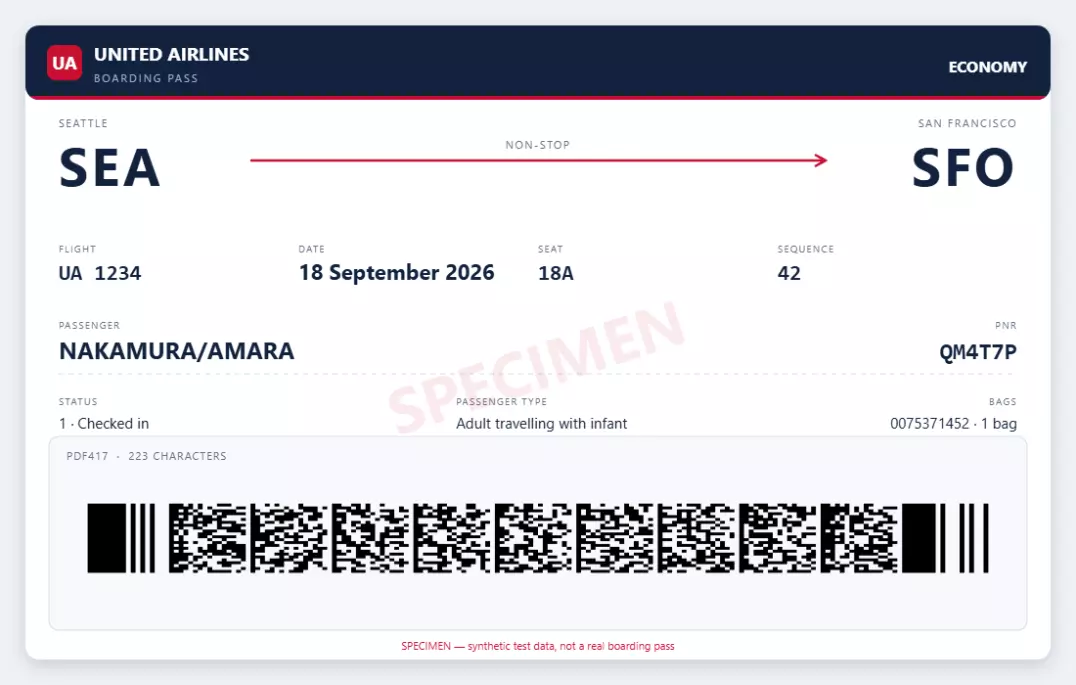
What you’ll build: a browser-side BCBP generator — the Resolution 792 encoder, the nested size fields, one-to-four flight legs, four symbologies, a security section that re-signs itself whenever a field changes, a canvas pass preview that marks what Randomise changed, and a self-check that parses the page’s own output.
Online demo
https://www.dynamsoft.com/codepool/demos/boarding-pass-generator/
Demo Video
Key Takeaways
- BCBP is a fixed layout, not a key-value format. There are no field tags. Items are written in a fixed order inside a block, and only trailing optional items may be omitted.
item 6is the byte count of everything that follows it in that leg’s variable field. It is the two hex digits after each leg’s fixed block, and it counts the two nested size fields as well as the data. Computing it from the assembled bytes is the one definition that cannot drift out of step.- Padding is part of the format. The check-in sequence is four digits plus a trailing blank (
0025), and the seat is a three-digit zero-padded row plus a letter (018A). A scanner expects that exact spelling. - PDF417 is the printed-pass default; Aztec, QR Code and Data Matrix only became standard for printed passes with version 7 (2018). Mobile passes have used the 2D symbologies since version 2.
- The flight date has no year in it. BCBP stores a Julian day of the year (
001–366), so the year has to be inferred from the issue date or the current date. - BCBP never verifies a signature for you — but a pass can carry one. The security section (items 25–30) holds a signature over the payload; this generator writes it automatically with WebCrypto (ECDSA P-256), and checking it is the reader’s job. A signature proves the bytes were not edited, never that a reservation exists.
- Sign first, append second. Item 30 lives inside the payload it would sign, so the signature covers everything up to the end of the last leg and items 25–30 are appended afterwards — the verifier strips that same section off before checking, so both sides always compare the same bytes.
- Mark what a bulk action changed. A button that rewrites a dozen fields at once needs to show which ones moved, or a value you set deliberately is indistinguishable from one that was overwritten.
Common Developer Questions
How do I generate a boarding pass barcode in JavaScript?
Compose the IATA BCBP payload as a string, then hand that string to a barcode encoder. The payload is plain ASCII: a 23-character unique mandatory section, a 35-character block that repeats per leg, a two-character hexadecimal size field, and the leg’s variable field with two more nested size fields inside it. In the browser, bwip-js renders the string as PDF417, Aztec Code, QR Code or Data Matrix on a canvas, which you can export as a PNG.
What is the difference between IATA BCBP and a QR code?
QR Code is one of the symbologies a BCBP payload can be carried in; BCBP is the data format. Since Resolution 792 version 7, a printed pass may use Aztec Code, QR Code or Data Matrix as well as the original PDF417, and a mobile pass has used the 2D symbologies since version 2. The same payload string can be encoded in any of them, so the format and the symbology are independent choices.
Which barcode format is used on a boarding pass?
PDF417 is the format Resolution 792 originally specified and still the default on paper passes. From version 7 (2018), printed passes may also use Aztec Code, QR Code or Data Matrix. Mobile boarding passes typically carry the same payload in one of those 2D symbologies because they render more compactly on a phone screen.
How long is a BCBP payload?
The fixed part of a single-leg pass is 60 characters: 23 characters of unique mandatory section, 35 characters of per-leg mandatory data, and a 2-character hexadecimal size field. The variable field that follows adds between 0 and 255 bytes, so a complete single-leg payload is 60 characters plus whatever conditional data you include. Each further leg adds another 35-character block and its own size field.
Why does the flight date in my payload not have a year?
The standard stores a day of the year, not a date. Item 46 is a three-digit Julian day, so 261 means the 261st day — 18 September, with no year attached. A reader has to infer the year from the date of issue (item 22, which stores the last digit of the year) or from the current date. This is why a boarding pass issued at the turn of the year can be genuinely ambiguous.
Does the generated boarding pass include a digital signature?
Yes. Item 30 holds an 88-character base64 ECDSA P-256 signature over the payload — everything up to the end of the last leg — and the page re-signs it every time any field changes, using WebCrypto entirely in the browser. Editing the signature field by hand latches the value so you can build a deliberate failure case, clearing it omits items 25–30 entirely, and the Re-sign button puts a valid signature back. The companion scanner article verifies those same bytes against the public half of the key pair.
Can I use a generated boarding pass barcode to travel?
No. The pass is signed with a demo key that ships in the page source, and every other field is whatever the form was filled with — the payload carries no proof of a booking behind it. Real carriers sign on their issuing server with a key that never leaves it, verified against a public key the reader already trusts. A synthetic pass exists to test a scanner, not to board a flight.
Prerequisites
- Node.js or any static file server for local development. The page itself has no build step.
- A browser with an HTML5 canvas — the symbol and the preview are both drawn client-side.
- bwip-js (BWIPP compiled to JavaScript), loaded from a CDN. It is the only third-party dependency.
- To read the symbols back with Dynamsoft Barcode Reader, you need a license key. A 30-day free trial license covers development and testing.
Step 1: Lay out the BCBP field table
Start by writing down the layout, because every later step depends on these widths. The unique mandatory section is 23 characters:
| Pos | Len | Item | Field |
|---|---|---|---|
| 1 | 1 | 1 | Format code, always M |
| 2 | 1 | 5 | Number of legs encoded (1–4) |
| 3 | 20 | 11 | Passenger name, SURNAME/GIVEN NAME, left-justified |
| 23 | 1 | 253 | Electronic ticket indicator, E or blank |
Then a 35-character block that repeats for every leg:
| Pos | Len | Item | Field |
|---|---|---|---|
| 24 | 7 | 7 | Operating carrier PNR |
| 31 | 3 | 26 | From airport (IATA) |
| 34 | 3 | 38 | To airport (IATA) |
| 37 | 3 | 42 | Operating carrier designator |
| 40 | 5 | 43 | Flight number, 4 digits + optional letter |
| 45 | 3 | 46 | Date of flight, Julian day of year |
| 48 | 1 | 71 | Compartment code |
| 49 | 4 | 104 | Seat number, 3-digit row + letter |
| 53 | 5 | 107 | Check-in sequence number |
| 58 | 1 | 113 | Passenger status |
Positions 59–60 are item 6, the size field. Encode the fixed part first, with the padding rules spelled out:
function encodeMandatory(r, leg, index, variableSize) {
  var out = '';
  if (index === 0) {
    out += FORMAT_CODE;                                 // item 1
    out += String(r.legs.length);                       // item 5
    out += padRight(r.passengerName, SIZE.passengerName, ' '); // item 11
    out += r.electronicTicket ? 'E' : ' ';              // item 253
  }
  out += padRight(leg.pnr, 7, ' ');                     // item 7
  out += padRight(leg.from, 3, ' ');                    // item 26
  out += padRight(leg.to, 3, ' ');                      // item 38
  out += padRight(leg.carrier, 3, ' ');                 // item 42
  out += encodeFlightNumber(leg.flightNumber);          // item 43
  out += padLeft(leg.julianDate, 3, '0');               // item 46
  out += padRight(leg.compartment, 1, ' ');             // item 71
  out += encodeSeat(leg.seat);                          // item 104
  out += encodeSequence(leg.sequence);                  // item 107
  out += padRight(leg.passengerStatus, 1, ' ');         // item 113
  out += hex2(variableSize);                            // item 6
  return out;
}
The padding rules are the part that catches people out. Alphanumeric items are left-justified with trailing blanks; numeric items carry leading zeros. The seat and the sequence number look similar but pad differently:
function encodeSeat(value) {
  var v = upper(value).replace(/\s+/g, '');
  if (!v) return '    ';
  if (v === 'INF') return 'INF ';
  var m = /^(\d{1,3})([A-Z]{1,2})$/.exec(v);
  if (!m) {
    throw new Error('Seat "' + value
      + '" is not valid: use a row and a letter (18A), or INF for an infant on a separate pass.');
  }
  return m[1].padStart(3, '0') + m[2];
}

function encodeSequence(value) {
  var d = digitsOnly(value);
  if (!d) return '     ';
  if (d.length >= 5) return d.slice(0, 5);
  /* The IATA examples print four digits followed by a blank, so pad to four
     and leave the fifth position as the guide's trailing space. */
  return padRight(d.padStart(4, '0'), 5, ' ');
}
Seat 18A becomes 018A — leading zeros. Sequence 42 becomes 0042 — leading zeros and a trailing blank. The official Resolution 792 examples spell it that way (0025 , 0027 ), and a scanner has to cope with that exact spelling, so the generator reproduces it rather than choosing the tidier-looking right-aligned form.
Step 2: Pack the conditional sections in fixed order
The variable field holds three things, one after another: the once-per-pass data, the once-per-leg data, and the carrier’s own space. Both conditional blocks are a fixed sequence of slots with known widths, which is what lets a reader parse them without tags:
var UNIQUE_SLOTS = [
  { code: 'passengerDescription', label: 'Passenger description', item: 15, len: 1 },
  { code: 'checkinSource', label: 'Source of check-in', item: 12, len: 1 },
  // ... the rest, in the order listed below
];

var REPEATED_SLOTS = [
  { code: 'airlineNumericCode', label: 'Airline numeric code', item: 142, len: 3, numeric: true },
  // ... the rest, in the order listed below
];
The complete once-per-pass block (item 10):
| Item | Len | Field |
|---|---|---|
| 15 | 1 | Passenger description |
| 12 | 1 | Source of check-in |
| 14 | 1 | Source of issuance |
| 22 | 4 | Date of issue — last digit of the year plus the Julian day |
| 16 | 1 | Document type |
| 21 | 3 | Airline designator of the issuer |
| 23 | 13 | Baggage tag; up to three, so up to 39 characters |
| 31 | 13 | Non-consecutive baggage tag |
| 32 | 13 | Second non-consecutive baggage tag |
And the once-per-leg block (item 17):
| Item | Len | Field |
|---|---|---|
| 142 | 3 | Airline numeric code |
| 143 | 10 | Document form / serial number |
| 18 | 1 | Selectee indicator |
| 108 | 1 | International documentation verification |
| 19 | 3 | Marketing carrier designator |
| 20 | 3 | Frequent flyer airline |
| 236 | 16 | Frequent flyer number |
| 89 | 1 | ID / AD indicator |
| 118 | 3 | Free baggage allowance |
| 254 | 1 | Fast track |
Packing then means concatenating slots until the last non-empty one, and dropping only the trailing empties:
function packSlots(slots, values) {
  var last = -1;
  for (var i = 0; i < slots.length; i++) {
    if (str(values[slots[i].code]).trim() !== '') last = i;
  }
  if (last === -1) return '';
  var out = '';
  for (var j = 0; j <= last; j++) {
    var slot = slots[j];
    var value = str(values[slot.code]);
    out += slot.numeric ? padLeft(value, slot.len, '0') : padRight(value, slot.len, ' ');
  }
  return out;
}
Because the block is positional, a field can only be present if every field before it is present too. One consequence is worth surfacing in the UI: if a user fills in a later item and leaves an earlier one blank, that blank still gets packed, with its own padding character — data the user never entered. Writing a frequent flyer number therefore forces the free baggage allowance in front of it to appear as blanks.
The validator looks for that gap and reports it instead of silently inventing the filler:
    /* Interior gaps: the packed block will contain a filler the user did not
       type. Report it instead of silently inventing data. */
    var filled = firstInteriorGap(UNIQUE_SLOTS, {
      passengerDescription: r.passengerDescription,
      checkinSource: r.checkinSource,
      // ... one entry per slot, in the same order as UNIQUE_SLOTS
    });
    if (filled) {
      problems.push('The optional fields are written in a fixed order, so "' + filled
        + '" cannot be included while an earlier optional field is left out.');
    }
One block remains at the very end of the variable field: the security section, items 25–30. It is not typed into the form — it is signed — and Step 8 covers it.
Step 3: Write the size fields
This is the step that breaks generated passes. The variable field is not self-delimiting; it is measured by the field in front of it, and it contains two smaller size fields of its own.
Writing it is easiest if you assemble the bytes first and then take their length:
var blocks = r.legs.map(function (leg, index) {
  var repeated = encodeRepeated(leg);
  var airlineUse = leg.airlineUse;
  var body;
  if (index === 0) {
    /* A "version 0" pass predates the version marker. Item 6 is then 00 and
       nothing at all follows it — not even the item 17 size field. */
    if (r.version === '0') {
      body = '';
    } else {
      var unique = encodeUnique(r);
      body = '>' + r.version + hex2(unique.length) + unique
        + hex2(repeated.length) + repeated + airlineUse;
    }
  } else {
    body = hex2(repeated.length) + repeated + airlineUse;
  }
  /* item 6 counts everything that follows it, including the nested size
     fields: item 8 + item 9 (2), item 10's two hex digits (2) and item 17's
     two hex digits (2). Taking the length of the assembled block is the one
     definition that cannot drift out of step with the bytes. */
  return { size: body.length, body: body };
});
Reading the assembled block back makes the arithmetic self-evident:
>plus the version digit — 2 bytes (items 8 and 9)- the item 10 size field — 2 bytes
- the unique conditional data
- the item 17 size field — 2 bytes
- the repeated conditional data
- the airline’s own data (item 4), which is whatever remains
For the official single-leg example with no conditional data, that gives item 6 = 06:
M1DESMARAIS/LUC       EABC123 YULFRAAC 0834 226F001A0025 106>60000
                                                              ^^ item 6 = 6 bytes
                                                                >60000  ->  '>', '6', item10='00', item17='00'
A later leg has no unique block, so its size field is just the repeated size plus the carrier data:
body = hex2(repeated.length) + repeated + airlineUse;
The page shows the assembled payload so you can count the bytes yourself:

Step 4: Support more than one leg
The mandatory block repeats per leg, but the 23-character header does not — the passenger name is written once. The PNR, however, sits inside the repeating block, so a two-leg pass can carry a different locator on each leg. The official Resolution 792 two-leg example does exactly that:
M2DESMARAIS/LUC       EAB12C3 YULFRAAC 0834 326J003A0027 167>5321WW1325BAC ... 4PCYLX58ZDEF456 FRAGVALH 3664 327C012C0002 12E2A0140987654321 ...
                     ^^^^^^ PNR on leg 1                                 ^^^^^^ PNR on leg 2
So the record keeps the PNR per leg, and the form propagates an edit to every leg that is still carrying the previous value:
els.pnr.addEventListener('input', function () {
  var previous = state.lastRecordPnr || '';
  var next = els.pnr.value;
  legEditors().forEach(function (editor) {
    var el = editor.querySelector('[data-field="pnr"]');
    if (el && (el.value === previous || el.value === '')) el.value = next;
  });
  state.lastRecordPnr = next;
  schedule();
});
One thing to watch: the free baggage allowance (item 118) is also per leg, so a second leg with no allowance omits it — while the PNR, in the same block, still appears. A two-leg pass is a good test of your size fields, because there are three of them to get wrong instead of one.
Step 5: Render the symbol with bwip-js
The payload is a plain string, so rendering is the easy part. Map each symbology to its BWIPP encoder name and a module size:
var FORMATS = {
  pdf417:     { bcid: 'pdf417',     label: 'PDF417',      scale: 5, rowHeight: 5, linear: true, minVersion: 1 },
  azteccode:  { bcid: 'azteccode',  label: 'Aztec Code',  scale: 7, minVersion: 7 },
  qrcode:     { bcid: 'qrcode',     label: 'QR Code',     scale: 7, minVersion: 7 },
  datamatrix: { bcid: 'datamatrix', label: 'Data Matrix', scale: 7, minVersion: 7 }
};

function renderSymbol(payload, formatId) {
  var format = FORMATS[formatId];
  var options = {
    bcid: format.bcid,
    text: payload,
    scale: format.scale,
    includetext: false,
    /* A quiet zone is part of the specification: a symbol that touches its
       own border is materially harder for a scanner to lock onto. */
    paddingwidth: 4,
    paddingheight: 4
  };
  if (format.linear) options.height = format.rowHeight;

  var canvas = document.createElement('canvas');
  return new Promise(function (resolve, reject) {
    var pending;
    try {
      pending = window.bwipjs.toCanvas(canvas, options);
    } catch (error) {
      reject(error);
      return;
    }
    if (pending && typeof pending.then === 'function') {
      pending.then(function () { resolve(canvas); }, reject);
    } else {
      resolve(canvas);
    }
  });
}
minVersion is not cosmetic. Aztec Code, QR Code and Data Matrix were only added to the standard for printed passes in version 7, so picking one of them silently sets the version field to 7. A payload that claims version 6 while travelling in a QR Code claims a combination the standard did not allow.
Also worth knowing: a symbol exported from a canvas is transparent by default. toCanvas leaves the background unset, so a PNG saved straight from it carries an alpha channel. Handed those pixels as RGBA, a reader treats (0,0,0,0) as black, which floods the quiet zone with ink and hides the symbol. Fill the canvas white first, or pass backgroundcolor: 'FFFFFF' to the encoder.
Step 6: Draw a pass preview
A preview that looks like a boarding pass is easier to sanity-check than a bare symbol: you can see at a glance that the name, route and seat are the ones you typed. The drawing is ordinary Canvas 2D; the parts worth calling out are the watermark and the symbol panel:
function drawSpecimen(ctx, x, y, size) {
  ctx.save();
  ctx.translate(x, y);
  ctx.rotate(-Math.PI / 10);
  ctx.font = 'bold ' + size + 'px ' + FONT;
  ctx.fillStyle = 'rgba(200, 16, 46, 0.09)';
  ctx.textAlign = 'center';
  ctx.textBaseline = 'middle';
  ctx.fillText('SPECIMEN', 0, 0);
  ctx.restore();
}
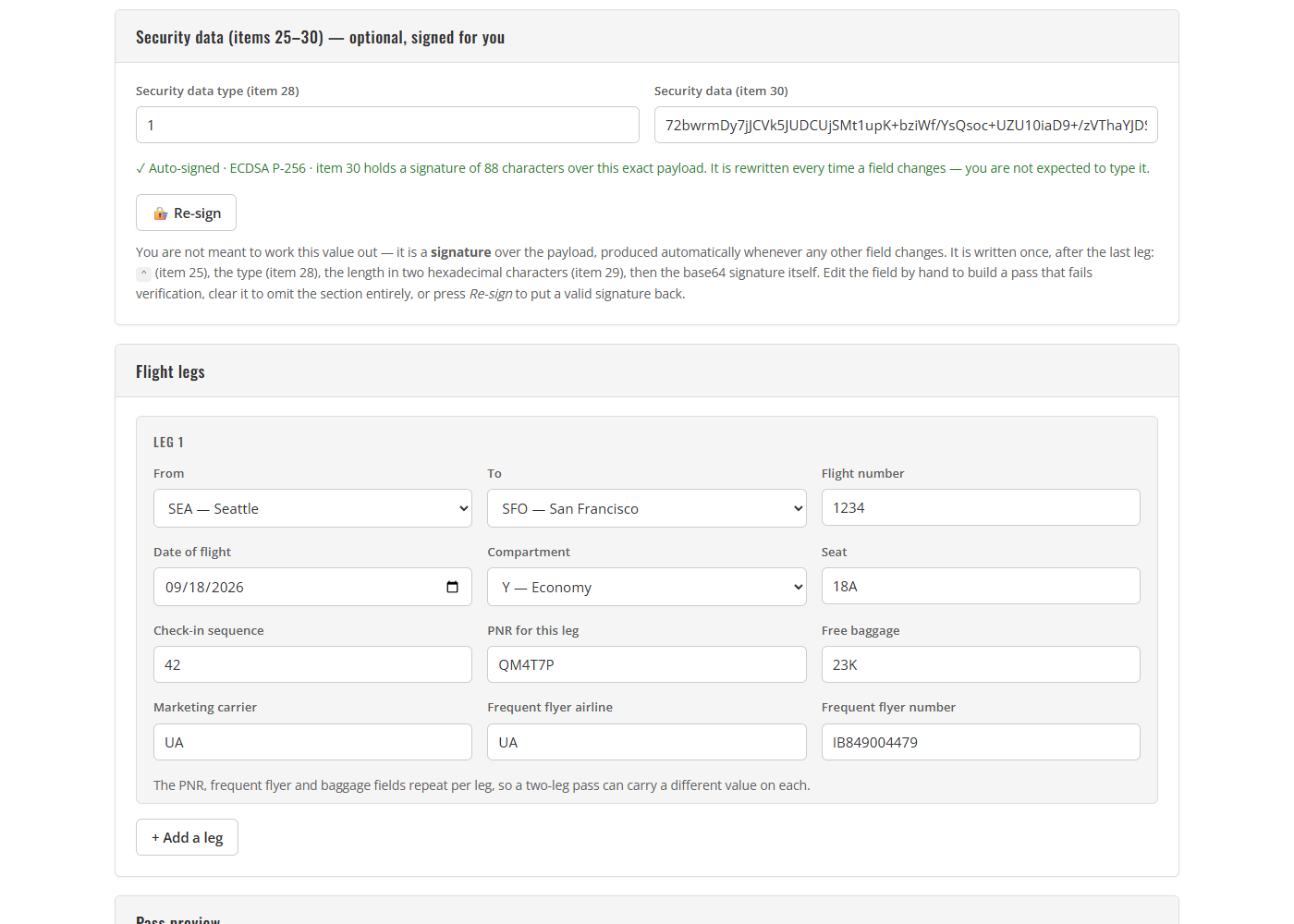
The symbol is drawn into a tinted panel and scaled to fit, which keeps it away from the pass border — the same quiet-zone reasoning as paddingwidth above:
var availW = panelW - inner * 2;
var availH = (panelBottom - panelTop) - labelH - inner;
var scale = Math.min(availW / symbol.width, availH / symbol.height, 1);
var drawW = Math.max(1, Math.round(symbol.width * scale));
var drawH = Math.max(1, Math.round(symbol.height * scale));
ctx.imageSmoothingEnabled = scale < 1;
ctx.drawImage(symbol,
  panelX + (panelW - drawW) / 2,
  panelTop + labelH + (availH - drawH) / 2,
  drawW, drawH);
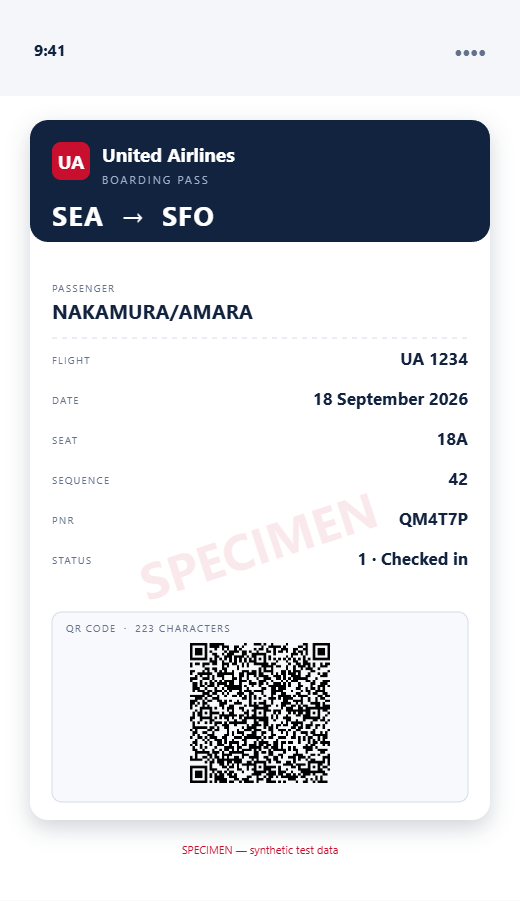
The same payload also renders as a mobile wallet pass, which is the layout a phone would show:
Marking what Randomise changed
A button that rewrites a dozen controls at once is disorienting: nothing tells you which values moved, so a field you had set deliberately looks the same as one that was overwritten. Snapshotting the form before the rewrite and comparing after fixes that in a few lines:
function highlightChanges(before) {
  if (!before) return 0;
  var changed = 0;

  function mark(el, previous) {
    if (!el || previous === undefined) return;
    if (previous === el.value) {
      el.classList.remove('just-changed');
      return;
    }
    flash(el);
    changed++;
  }

  HIGHLIGHT_FIELDS.forEach(function (id) { mark(els[id], before[id]); });
  legEditors().forEach(function (editor, index) {
    HIGHLIGHT_LEG_FIELDS.forEach(function (name) {
      mark(editor.querySelector('[data-field="' + name + '"]'),
        before['leg' + index + '.' + name]);
    });
  });

  return changed;
}

function flash(el) {
  el.classList.remove('just-changed');
  /* Reading offsetWidth flushes the removal, so the animation replays even
     when the same control changes on two consecutive clicks. */
  void el.offsetWidth;
  el.classList.add('just-changed');
}
Two details are worth keeping:
- The reflow. Removing and re-adding the class in the same frame does not restart a CSS animation — the browser coalesces the two mutations. Reading
offsetWidthbetween them forces a style recalculation, which is the cheapest way to make the animation replay on every click. - The reduced-motion fallback. Skipping the animation entirely would remove the information, not just the motion, so the media query keeps a static colour instead:
@media (prefers-reduced-motion: reduce) {
    .form-control.just-changed {
        animation: none;
        background-color: #fff3e2;
        border-color: var(--dy-orange);
    }
}
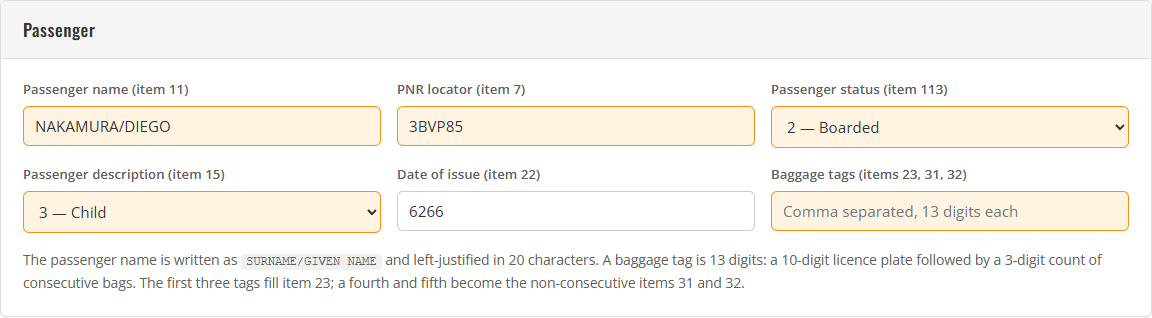
The count of changed controls is worth reporting too — it turns “did that do anything?” into a number:
analytics.action('randomise', {
  style: state.style,
  format: state.format,
  legs: legs,
  changed: changed
});
Step 7: Prove the payload by parsing it back
Testing a scanner needs a generator you can verify. The most direct check is to parse your own output with the same code the scanner will use: write the decoder alongside the encoder, and treat the parse result as the test oracle rather than restating the form.
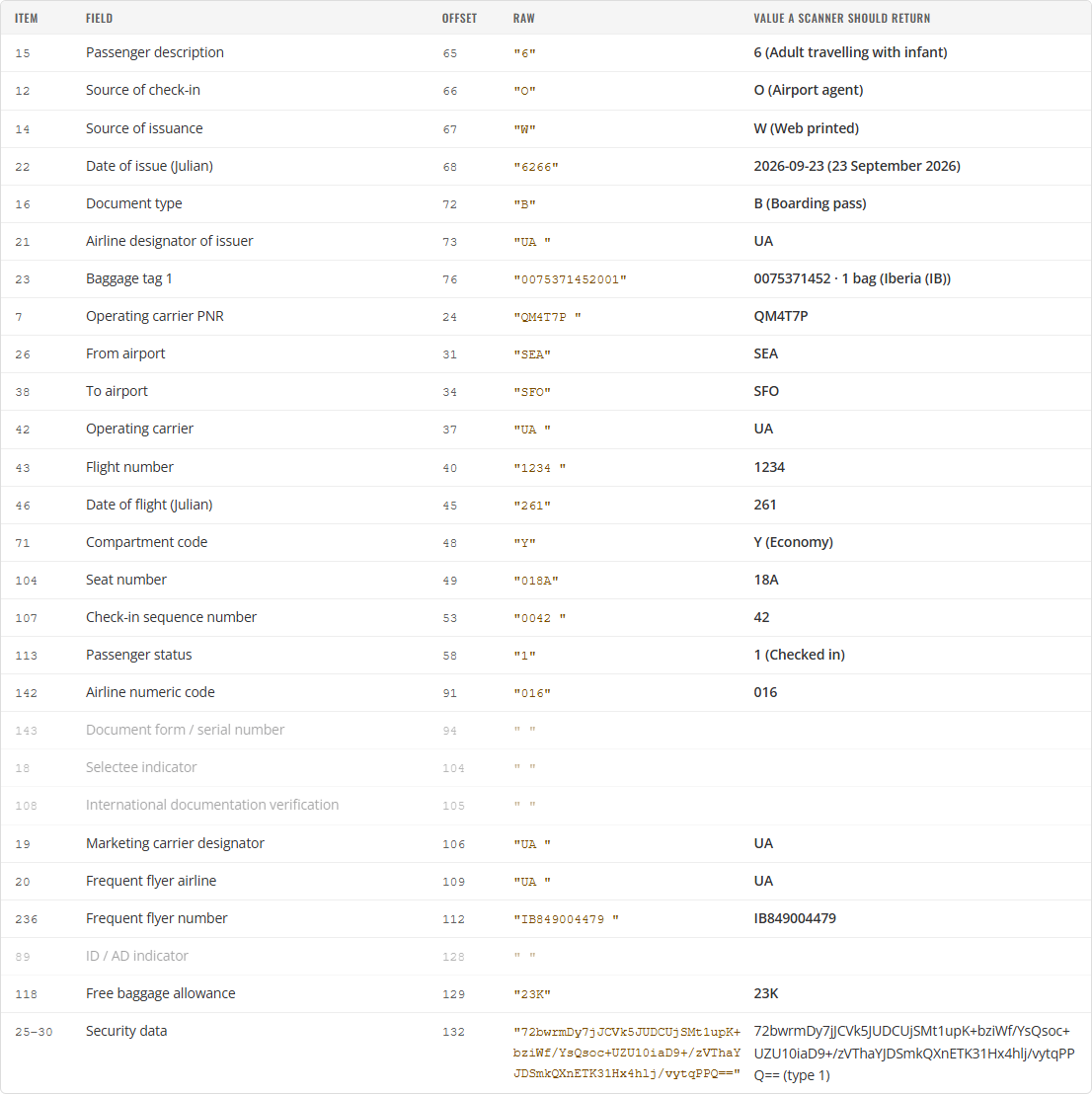
Because the two directions share one field table, the table above is read back from the bytes. That also makes a round-trip test possible: parse a payload, rebuild the record, re-encode, and require the bytes to come back identical.
function selfTest() {
  var results = SELF_TEST_VECTORS.map(function (vector) {
    var decoded = decode(vector.payload);
    var problems = [];
    if (!decoded.ok) {
      problems.push(decoded.error);
    } else {
      /* The round trip has to hold for the examples too: parse, rebuild the
         record, re-encode, and the bytes must come back identical. */
      try {
        var reencoded = encode(toRecord(decoded));
        if (reencoded !== vector.payload) {
          problems.push('re-encode differs from the original payload');
        }
      } catch (error) {
        problems.push('re-encode failed: ' + error.message);
      }
    }
    return { name: vector.name, passed: problems.length === 0, problems: problems };
  });
  return {
    passed: results.filter(function (r) { return r.passed; }).length,
    failed: results.filter(function (r) { return !r.passed; }).length,
    results: results
  };
}
Running that against the official Resolution 792 examples is what turns “it looks right” into a check. On page load the demo logs:
[boarding-pass] BCBP codec self-test: 4/4 IATA Resolution 792 examples round-trip
The four vectors cover the awkward cases rather than the happy path: a single leg with no conditional data (where item 6 is 00 and nothing follows it — not even the item 17 size field), a single leg with unique, repeated and security data, a two-leg pass with a different PNR per leg, and a version 6 pass whose size fields are present but zero.
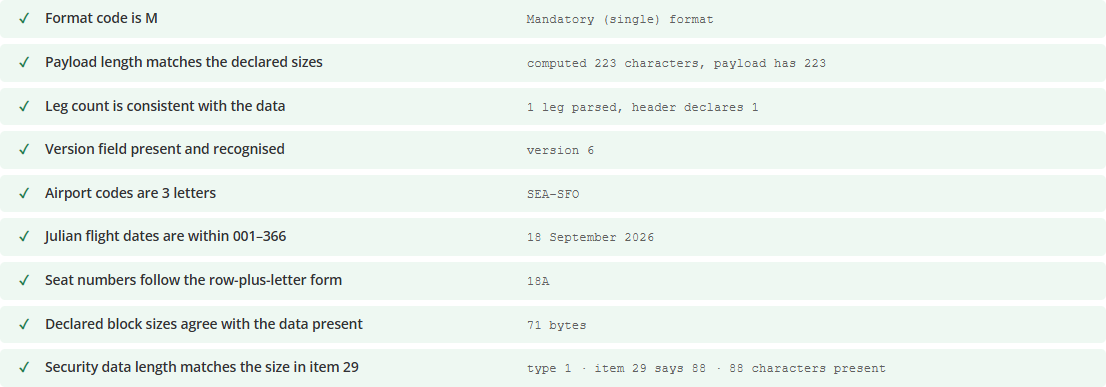
The structural checks report the same thing to the user:
Step 8: Sign the security section automatically
The final block of the variable field is the security section — items 25–30, written once after the last leg. ^ marks the beginning (item 25), one character carries the type of security data (item 28), two hexadecimal characters carry the byte length of item 30 (item 29), and everything after that is the data itself:
...0025 106>60000^158iTRJaYu4CyZpYnRlKocV5gzDJEwsyeDmxpRo4d2gUl99ymfpHkIKySSyj8H1gv0RqVtBV5PzRhMP9XuYGILrZA==
                  ^ item 25: '^' marks the beginning of the security section
                   1 item 28: type of security data
                    58 item 29: two hex digits — 58 = 88 bytes of item 30
                      iTRJ… item 30: the signature itself, 88 base64 characters
Signing it raises one structural problem: item 30 is inside the payload it would sign, and a signature cannot cover itself. The fix is to sign everything up to the end of the last leg, then append items 25–30 afterwards — and for the verifier to strip that same section off before checking, so both sides always compare the same bytes. One helper does the trimming for both directions:
/** The payload with its security section removed — the bytes that get signed. */
function securityBase(payload) {
  var text = str(payload);
  var parsed = decode(text);
  if (!parsed.ok || !parsed.security) return text;
  /* decoded.security.offset points at the type character (item 28); the '^'
     marking item 25 sits immediately before it. */
  return text.slice(0, parsed.security.offset - 1);
}
The second problem is encoding. ECDSA P-256 returns a raw 64-byte r‖s signature; hex-encoded that is 128 characters, and validate() puts a 100-character ceiling on item 30 — a hex signature is rejected before any key is involved. Base64 of the same bytes is 88 characters, comfortably inside the limit, so that is what item 30 carries. The signing itself is WebCrypto:
function signSecurityData(payload, privateKeyBase64) {
  var subtle = subtleCrypto();
  if (!subtle) return Promise.resolve(null);
  var data = new TextEncoder().encode(securityBase(payload));
  return importSigningKey('pkcs8', privateKeyBase64, ['sign'])
    .then(function (key) { return subtle.sign(SIGN_PARAMS, key, data); })
    .then(function (signature) { return base64FromBytes(new Uint8Array(signature)); })
    .catch(function () { return null; });
}
generate() then signs on every pass: encode the record with security: null, sign those bytes with the demo private key, and write the result back into the two security fields:
function autoSign(record) {
  var base;
  try {
    base = window.Bcbp.encode(Object.assign({}, record, { security: null }));
  } catch (error) {
    return Promise.resolve(null); /* renderPayload() reports the real error */
  }
  return window.Bcbp.signSecurityData(base, DEMO_PRIVATE_KEY).then(function (signature) {
    if (!signature) return null;
    els.security_type.value = SECURITY_TYPE;
    els.security_data.value = signature;
    return signature;
  });
}
The demo private key ships with the page, which is the one thing a production issuer must never do: that key belongs on the issuing server, only the signature travels, and readers get the public half — exactly what the companion scanner verifies against. WebCrypto also needs a secure context, so the page must be served from http://localhost or https; when it is not, the pass is left unsigned as typed and the hint under the field says so.
Because signing runs on every change, a keystroke in either security field would be overwritten immediately — so that keystroke latches manual mode instead: the value stays exactly as typed and nothing re-signs until Re-sign or Randomise is pressed.
/* Item 30 is machine-filled, so a keystroke in either security field is a
   deliberate hand edit: latch manual mode, keep the value as typed (even
   if it is empty) and stop re-signing until Re-sign or Randomise. */
function securityEdited() {
  state.securityManual = true;
  schedule();
}
els.security_type.addEventListener('input', securityEdited);
els.security_type.addEventListener('change', securityEdited);
els.security_data.addEventListener('input', securityEdited);
els.security_data.addEventListener('change', securityEdited);
After each render the page verifies its own output against the public key and reports the verdict in the hint: green for a signature that matches, red for one that does not (calling out the hand edit), plain when items 25–30 are absent. Re-signing without changing anything still produces a different value — ECDSA draws a fresh random nonce for every signature — but verification always strips back to the same base, so every one of those signatures checks out.
Common Issues and Edge Cases
The payload is two bytes shorter than the scanner expects. item 6 must count the two nested size fields as well as the data. The trap is computing it as “unique length + repeated length” and forgetting that '>' + version and the two 2-character size fields are inside the block too. Assemble the bytes first and take their length.
item 6 = 00 but data follows. A pre-2008 pass has no version marker and no variable field at all. If you write 00 and then append conditional data, you have produced a contradictory payload. Either write a version or write no conditional data.
The check-in sequence does not round trip. 42 encodes as 0042 , and reading it back gives 42 again — but if you pad it as ` 042` a scanner that compares raw strings will disagree with you. Match the examples: leading zeros, trailing blank.
A name without a slash. The passenger name is SURNAME/GIVEN NAME; item 11 is 20 characters wide and left-justified. A name with no slash is not a BCBP name, so the generator rejects it rather than guessing where the split goes.
A transparent PNG of the symbol will not scan. Covered in Step 5, but it is a common “the generator is broken” report that turns out to be the export. Fill the background white.
More than four legs. The standard allows at most four, even though the leg count field could hold more.
Optional fields out of order. Because the blocks are positional, “item 9 present, item 4 absent” is not expressible. The validator says so rather than silently emitting filler.
Item 30 is refused as too long. validate() caps item 30 at 100 characters. A P-256 signature hex-encoded is 128 and is rejected before anything is verified; base64 of the same 64 raw bytes is 88 characters, which is why that is what the generator writes. Change the signature algorithm and this ceiling is the first thing to re-check.
The signature changes even when nothing else did. That is ECDSA being randomized: every signature draws a fresh nonce, so signing identical bytes again produces a different — equally valid — value. Verification strips items 25–30 first, so any signature over that same base still checks out; only an edit to the payload before ^ invalidates one.
Conclusion
Building a BCBP generator is mostly a formatting exercise, with one piece of real arithmetic: the nested size fields. If the widths, the padding and all three size fields are right, a scanner reads back every field; if any of them is wrong, it returns a partial or misread set, or a length check reports a mismatch. Writing the decoder alongside the encoder is what makes the result checkable, and running that decoder against the official Resolution 792 examples — re-encoding them and comparing bytes — is what confirms it. The security section then adds the one piece of cryptography on top: sign what you wrote, and any field edited afterwards fails to verify.
The companion article covers the other half of the loop: how to read a boarding pass barcode in JavaScript with Dynamsoft Barcode Reader and the same parser.