


How to Read a Boarding Pass Barcode in JavaScript (IATA BCBP)
Reading a boarding pass barcode is two problems, not one. The first is decoding the symbol: a printed pass carries PDF417, while Aztec Code, QR Code and Data Matrix appear on mobile passes and on printed passes from version 7 — and whichever symbol it is, it is often curved, glared or photographed at an angle. The second is understanding what came out: an IATA BCBP payload is a fixed-order binary layout, not a string you can split on commas.
Dynamsoft Barcode Reader handles the first problem, including the symbologies and the difficult captures. The second is a parsing job with real substance to it: the payload is positional, and its optional sections are measured by three nested size fields. This article therefore pairs the two — the Reader finds and decodes the symbol, and bcbp.js, a small standalone parser that ships with the demo, turns the resulting string into named fields and verifies the security section’s signature when the pass carries one.
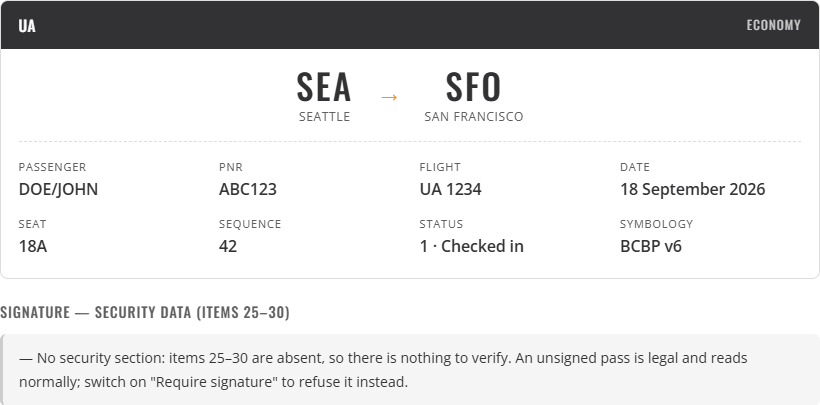
What you’ll build: a browser-side boarding pass scanner — camera and image input, BCBP parsing across all four boarding pass symbologies, readable labels for the code lists, the scanned image shown beside the parsed fields, nine structural checks, signature verification with a Require signature switch, and a JSON export.
Online Demo
https://www.dynamsoft.com/codepool/demos/boarding-pass-scanner/
Demo Video
Key Takeaways
- Two jobs, two tools. Dynamsoft Barcode Reader locates and decodes the symbol; the BCBP field layout is read by
bcbp.js, a standalone Resolution 792 parser shared with the companion generator. - A boarding pass carries a 2D symbol. PDF417 and MicroPDF417 on printed passes, plus Aztec Code, QR Code, Micro QR and Data Matrix on mobile and version-7 printed passes. Restrict the format mask to those and the reader stops reporting unrelated codes.
Dynamsoft.DBR.EnumBarcodeFormatvalues are BigInt in 11.x.var mask = 0; mask |= vthrowsCannot mix BigInt and other types; the accumulator has to start at0n.- The Aztec enum member is
BF_AZTEC, notBF_AZTEC_CODE. A misspelled name narrows the mask silently and that symbology simply never matches. - The variable field is not self-delimiting. Each leg ends with a two-hex-digit byte count (item 6), and inside that field two more counters (items 10 and 17) size the conditional blocks — so a parser follows three nested counters rather than looking for a terminator.
- A transparent PNG can fail to decode. Canvas-exported symbols carry an alpha channel, and
(0,0,0,0)read as RGBA is black — which fills the quiet zone with ink. Composite onto white first. - Show the source image beside the parse. Parsed fields are hard to trust on their own; with the picture next to them, a wrong value is immediately attributable to a bad crop or a bad encode rather than to the reader.
- A signature is evidence, not identity — and requiring one is the reader’s policy. The security section (items 25–30) can carry an ECDSA P-256 signature; this scanner verifies it against the generator’s demo public key (green when it matches, red when it does not), and a Require signature switch turns an unsigned pass into a refusal. BCBP itself never demands any of it: a payload that parses proves the data is well formed, not that the reservation is real.
- Verification strips the signature before checking it. Items 25–30 are cut off back to the end of the last leg, and the remaining bytes are what the public key is checked against — otherwise item 30 would be part of the message it signs.
Common Developer Questions
How do I read a boarding pass barcode in JavaScript?
Decode the 2D symbol with a barcode SDK to get the payload string, then parse that string against the IATA Resolution 792 layout. In the browser, Dynamsoft Barcode Reader decodes PDF417, Aztec Code, QR Code and Data Matrix from a camera stream or an uploaded image; the payload is then split by fixed field widths, with three nested hexadecimal size fields telling you where each optional block ends.
How do I turn the decoded BCBP payload into named fields?
Use a Resolution 792 parser. Once the Reader has returned the payload string, the fields are fixed widths inside ordered blocks, and the optional sections are delimited by three nested hexadecimal size fields rather than by separators — so the parser walks the counters and slices each item. This article uses bcbp.js, the standalone parser the demo ships with, which also resolves the code lists (compartment J to Business (premium), status 1 to Checked in) and runs nine structural checks on the result.
Which barcode symbologies appear on a boarding pass?
Printed passes use PDF417, and since Resolution 792 version 7 (2018) may also use Aztec Code, QR Code or Data Matrix. Mobile passes have used the 2D symbologies since version 2. Restricting the Reader to BF_PDF417, BF_MICRO_PDF417, BF_AZTEC, BF_QR_CODE, BF_MICRO_QR and BF_DATAMATRIX covers every boarding pass and avoids reporting unrelated codes in the same frame.
Why does my code throw “Cannot mix BigInt and other types”?
Dynamsoft.DBR.EnumBarcodeFormat values are BigInt in 11.x, because the format mask spans more than 32 bits and a JavaScript number cannot hold it. Build the mask with a BigInt accumulator:
    var mask = 0n;
    names.forEach(function (name) {
      if (table[name] === undefined) {
        missing.push(name);
        return;
      }
      mask |= table[name];
    });
What does the scanner check besides decoding the barcode?
Nine structural checks on the payload: the format code is M, the computed length equals the actual length, the leg count matches the data, a version marker is present and recognised, each airport code is three letters, each Julian date is within 001–366, each seat follows the row-plus-letter form, each leg’s declared block size agrees with the data present, and — when a security section is present — the byte count item 29 declares matches the item 30 data actually in the payload. These catch a payload that decoded correctly but was not written correctly. The signature verdict reported in Step 8 is a separate question: it answers whether the bytes were edited, not whether they are well formed.
How do you verify a boarding pass signature in JavaScript?
Import the issuer’s public key with WebCrypto (crypto.subtle.importKey('spki', ...) for an ECDSA P-256 key), cut items 25–30 off the payload back to the end of the last leg, decode item 30 from base64 into its raw 64 bytes, and call crypto.subtle.verify() over those stripped bytes — the same trimming on both sides is what makes the comparison meaningful. In this demo the whole thing is Bcbp.verifySecurityData(payload, DEMO_PUBLIC_KEY), which resolves to one of five states: ok (signature matches), bad (edited, truncated or signed with another key), none (no security section — nothing to verify, not an error), unsupported (WebCrypto unavailable) or error (the payload did not decode at all).
Prerequisites
- A Dynamsoft Barcode Reader license key. The 24-hour trial key works for a first run; a 30-day free trial license covers development and testing.
- A browser with camera access for live scanning, or any browser for image upload.
- A local web server. The page loads sibling folders, so
file://will not do. - Some boarding pass images. The demo ships seven with known payloads, produced by the boarding pass generator.
Step 1: Load the SDK and restrict the symbologies
Activate the license before creating any component, then load only the module you need:
function initSDK(licenseKey) {
  /* The license must be activated before any component is created, otherwise
     CaptureVisionRouter.createInstance() throws. */
  return Dynamsoft.License.LicenseManager.initLicense(licenseKey, true)
    .then(function () {
      /* The barcode module is all this page needs: it decodes the symbol, and
         the IATA BCBP layout is then read by bcbp.js. */
      return Dynamsoft.Core.CoreModule.loadWasm(['DBR']);
    })
    .then(function () {
      return Dynamsoft.DCE.CameraView.createInstance();
    })
    .then(function (view) {
      cameraView = view;
      return Dynamsoft.DCE.CameraEnhancer.createInstance(cameraView);
    })
    .then(function (enhancer) {
      cameraEnhancer = enhancer;
      return Dynamsoft.CVR.CaptureVisionRouter.createInstance();
    })
    .then(function (router) {
      cvRouter = router;
      /* Consecutive frames see the same symbol; without deduplication the
         results panel would re-open dozens of times a second. */
      var filter = new Dynamsoft.Utility.MultiFrameResultCrossFilter();
      filter.enableResultDeduplication('barcode', true);
      return cvRouter.addResultFilter(filter);
    })
    .then(function () {
      els.cameraView.replaceChildren(cameraView.getUIElement());
      state.sdkReady = true;
      return applySettings(true);
    });
}
The format mask is where both traps live — the BigInt accumulator and the enum member name — so it is worth writing defensively:
var BOARDING_FORMATS = [
  'BF_PDF417', 'BF_MICRO_PDF417', 'BF_AZTEC', 'BF_QR_CODE', 'BF_DATAMATRIX', 'BF_MICRO_QR'
];

/* The format mask spans more than 32 bits, so this SDK build exposes the enum
   values as BigInt. A plain `var mask = 0` throws "Cannot mix BigInt and other
   types" on the first `|=`, which is why the accumulator starts at 0n. */
function scopeMask() {
  var table = formatEnum();
  if (!table) return null;

  var names = state.scope === 'boarding' ? BOARDING_FORMATS : ALL_2D_FORMATS;
  var mask = 0n;
  var missing = [];
  names.forEach(function (name) {
    if (table[name] === undefined) {
      missing.push(name);
      return;
    }
    mask |= table[name];
  });
  if (missing.length) console.warn('Barcode formats missing from this SDK build:', missing);
  return mask || null;
}
The missing list is worth keeping. BF_AZTEC_CODE looks plausible but is not the real member name, and a name that does not exist on the enum is undefined — which ORs to nothing and excludes that symbology without raising anything. With the check in place the console says exactly what is wrong:
Barcode formats missing from this SDK build: ["BF_AZTEC_CODE"]
Applying the mask goes through the simplified settings of the preset template:
function applySettings(force) {
  if (!state.sdkReady && !force) return Promise.resolve();
  if (!cvRouter) return Promise.resolve();
  if (!force && state.configuredScope === state.scope) return Promise.resolve();

  return cvRouter.getSimplifiedSettings(PRESET_TEMPLATE).then(function (settings) {
    var mask;
    try {
      mask = scopeMask();
    } catch (error) {
      /* Narrowing the symbologies is an optimisation, not a requirement. If
         the mask cannot be built, scan with the preset's own default rather
         than failing to start. */
      console.warn('Could not build the format mask; using the preset default:', error);
      mask = null;
    }
    if (mask !== null) settings.barcodeSettings.barcodeFormatIds = mask;
    return cvRouter.updateSettings(PRESET_TEMPLATE, settings);
  }).then(function () {
    state.configuredScope = state.scope;
  });
}
Note the try/catch. Narrowing the symbologies makes the reader faster and cuts spurious detections, but it is not required for correctness, so a failure to build the mask should degrade to the preset default instead of taking the whole page down.
Step 2: Decode from an image, and composite onto white
Camera frames flow through the router continuously. An uploaded image is different: it is decoded on demand with capture(), which takes an image object rather than a file. The shape matters — it must be the same one the SDK builds internally when its own image view hands over a picked file:
var pixels = ctx.getImageData(0, 0, width, height);
/* This is exactly the shape CaptureVisionRouter.capture() expects: an RGBA
   buffer straight out of getImageData(), stride 4 x width, format 10
   (IPF_ABGR_8888). A Blob or canvas takes a different internal path and
   silently returns no results. */
return {
  bytes: new Uint8Array(pixels.data.buffer, pixels.data.byteOffset, pixels.data.length),
  width: width,
  height: height,
  stride: 4 * width,
  format: 10
};
Before getImageData, fill the canvas white:
var ctx = canvas.getContext('2d', { willReadFrequently: true });
/* Composite onto white before drawing. A PNG may carry an alpha channel —
   anything exported from a canvas usually does — and a transparent pixel
   drawn onto a blank canvas stays (0,0,0,0). Passed to the SDK as RGBA that
   reads as black, so the quiet zone becomes ink and the symbol disappears. */
ctx.fillStyle = '#ffffff';
ctx.fillRect(0, 0, width, height);
ctx.drawImage(img, 0, 0, width, height);
That last comment is not hypothetical. A symbol exported from an HTML canvas has a transparent background unless you filled it. The demo’s own sample images originally failed to decode for exactly this reason: the file looked right in an image viewer, and the reader saw a solid black rectangle. Every “transparent” pixel is (0,0,0,0), and the alpha channel is ignored on the path into the SDK.
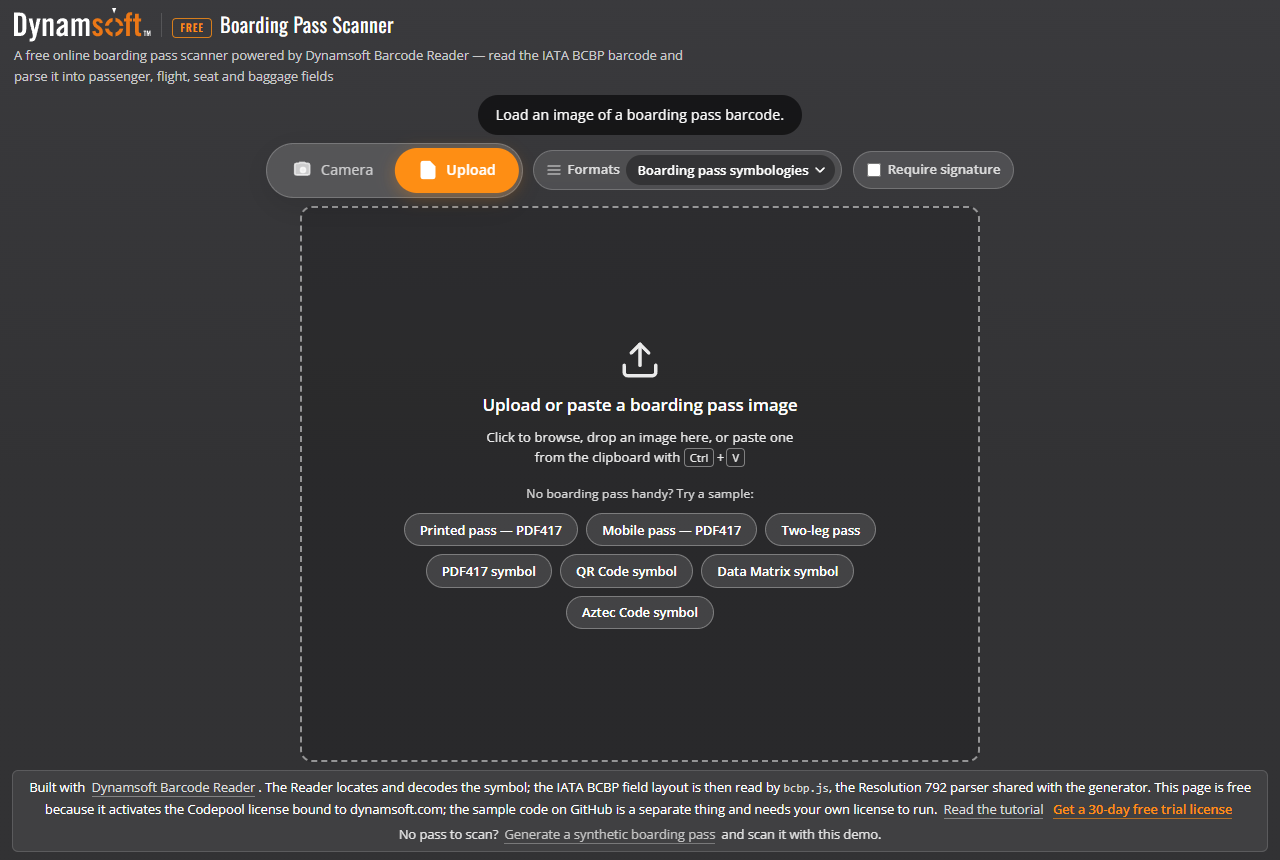
The scanner takes either input. Upload mode accepts a file, a drop or a clipboard paste, and ships the seven generated samples so you can try it without a boarding pass to hand:
Showing the image next to the parse
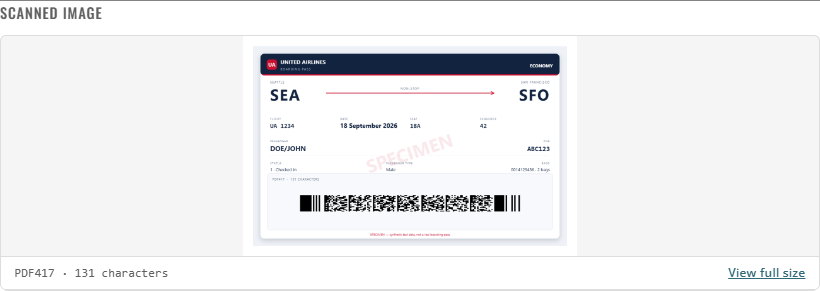
Parsed fields on their own are hard to trust. When the panel also shows the picture the barcode came from, a wrong field is immediately attributable — a blurry crop, the wrong half of the pass, or a genuinely misencoded symbol. The image path already has the source, so passing it through is one extra argument; the camera path can produce one too by snapshotting the viewfinder:
/* A still of what the viewfinder is showing, so camera results carry an image
   too. getUserMedia frames are same-origin, so the canvas stays readable. */
function currentCameraFrame() {
  var video = document.querySelector('#camera-view video');
  if (!video || !video.videoWidth) return null;
  try {
    var canvas = document.createElement('canvas');
    canvas.width = video.videoWidth;
    canvas.height = video.videoHeight;
    canvas.getContext('2d').drawImage(video, 0, 0);
    return canvas.toDataURL('image/jpeg', 0.85);
  } catch (error) {
    console.warn('Could not snapshot the camera frame:', error);
    return null;
  }
}
The image is bounded by its own aspect ratio rather than stretched, so a tall paper pass and a wide bare symbol both stay readable, and clicking it opens the full-size view:
.scan-image {
    display: block;
    /* Sized by its own aspect ratio up to these bounds, then centred, so a tall
       pass and a wide symbol both read well and neither gets cropped. */
    width: auto;
    height: auto;
    max-width: 100%;
    max-height: 220px;
    margin: 0 auto;
    padding: 10px;
    background: #fff;
    cursor: zoom-in;
}
Step 3: Split the work between the Reader and the parser
It is worth being precise about who does what, because the division shapes the whole demo:
| Step | Who does it |
|---|---|
| Locate and decode the symbol, whatever the capture conditions | Dynamsoft Barcode Reader |
| Split the string into items, follow the nested size fields, decode the code lists | bcbp.js |
The Reader’s job is the hard imaging one, and it is the part a generic decoder struggles with: finding and reading a 2D symbol that is small, curved, glared or photographed at an angle. The parsing job is a different kind of problem — positional, with nested length counters — and it belongs in a parser that you can read, test against known payloads and reuse. bcbp.js is that parser: one dependency-free file that the generator encodes with and the scanner decodes with, so the two cannot drift apart.
That also keeps the parser testable in isolation. It is checked against the official Resolution 792 example payloads, which is a test you can run without a camera or a browser.
Step 4: Read the mandatory section
The fixed part is 58 characters plus a 2-character size field. Because the widths are fixed, reading it is a sequence of slices:
var nameRaw = raw.substr(2, SIZE.passengerName);
var passengerName = nameRaw.trim();
var nameParts = passengerName.split('/');
var surname = (nameParts[0] || '').trim();
var givenNames = (nameParts[1] || '').trim();

var eti = raw.charAt(22);
Then each leg reads its 35 characters in order. Most fields only need trimming, but the seat, the flight number and the check-in sequence are stored padded for the scanner’s benefit, not for display:
function decodeSeat(raw) {
  var v = str(raw);
  if (!v.trim()) return '';
  if (v.trim().toUpperCase() === 'INF') return 'INF';
  var m = /^0*(\d+)([A-Z]+)\s*$/.exec(v);
  if (!m) return v.trim();
  return m[1] + m[2];
}

function decodeSequence(raw) {
  var v = str(raw).trim();
  if (!v) return '';
  var n = parseInt(v, 10);
  return isNaN(n) ? v : String(n);
}
018A reads back as 18A, 0025 as 25, 0834 as 834. Displaying the padded form is a common way to make a scanner look wrong when it is in fact right.
Step 5: Follow the nested size fields
This is the core of the parser. A BCBP variable field is not terminated by a delimiter; it is measured by the field in front of it, three counters deep:
      var sizeRaw = raw.substr(pos, SIZE.variableSize);
      pos += SIZE.variableSize;
      var declaredSize = parseHex(sizeRaw);
      leg.blockSize = declaredSize;
      leg.blockSizeRaw = sizeRaw;

      var available = Math.min(declaredSize, Math.max(0, raw.length - pos));
      var block = raw.substr(pos, available);
      var blockStart = pos;

      var body = block;
      if (isFirst && body.charAt(0) === '>') {
        result.version = body.charAt(1);
        var p = 2;
        leg.uniqueSize = parseHex(body.substr(p, 2));
        p += 2;
        result.unique = parseSlotBlock(UNIQUE_SLOTS, body.substr(p, leg.uniqueSize),
          blockStart + p, null);
        p += leg.uniqueSize;
        leg.repeatedSize = parseHex(body.substr(p, 2));
        p += 2;
        leg.fields = leg.fields.concat(parseSlotBlock(REPEATED_SLOTS, body.substr(p, leg.repeatedSize),
          blockStart + p, i + 1));
        p += leg.repeatedSize;
        leg.airlineUse = body.slice(p);
      } else {
        leg.repeatedSize = parseHex(body.substr(0, 2));
        var q = 2;
        leg.fields = leg.fields.concat(parseSlotBlock(REPEATED_SLOTS, body.substr(q, leg.repeatedSize),
          blockStart + q, i + 1));
        q += leg.repeatedSize;
        leg.airlineUse = body.slice(q);
      }
Three details carry most of the weight here:
- The unique block appears only on the first leg. It is preceded by
>and the version digit, so the check forbody.charAt(0) === '>'is also what tells you which layout you are reading. - A later leg starts straight at the item 17 size field. It has no version marker and no unique block, so its variable field is
item 17 hex + repeated data + item 4. - Whatever is left after the repeated block is item 4, the carrier’s own data. It is free-form and should be preserved rather than discarded — the round trip depends on it.
A pre-2008 payload has item 6 = 00 and no variable field at all — not even the item 17 size field. Treating that as “a zero-length block” is right; treating it as “then read the item 17 size field” is not.
Keeping the raw content visible makes the result auditable rather than merely plausible:

Step 6: Decode the conditional items
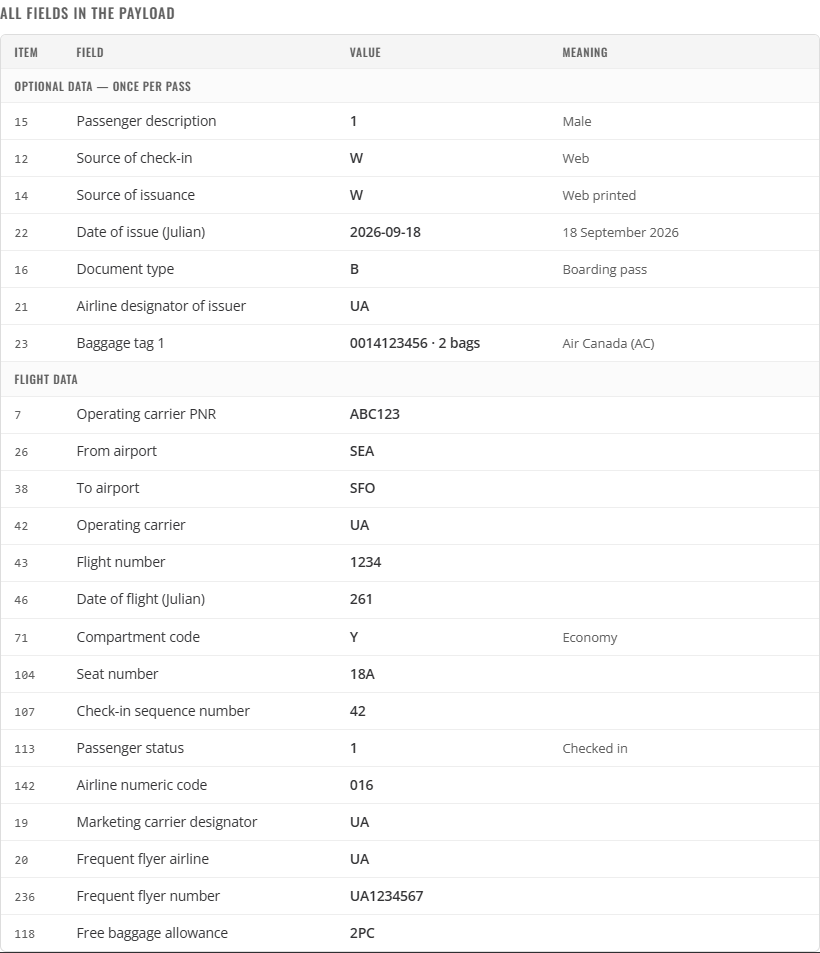
Once you have the two blocks as substrings, each item is a fixed-width slice, and the code lists turn the single-character values into something readable:
var REPEATED_SLOTS = [
  { code: 'airlineNumericCode', label: 'Airline numeric code', item: 142, len: 3, numeric: true },
  { code: 'docFormSerial', label: 'Document form / serial number', item: 143, len: 10 },
  { code: 'selectee', label: 'Selectee indicator', item: 18, len: 1 },
  { code: 'intlDocVerification', label: 'International documentation verification', item: 108, len: 1 },
  // ... six more, one per repeated conditional item
];
Two of these deserve a second look, because both are counter-intuitive:
The baggage tag is structured, not an opaque number. Thirteen digits: a 10-digit licence plate followed by a 3-digit count of consecutive bags. The plate itself starts with a leading zero, then the carrier’s three-digit numeric code:
function describeBagTag(raw) {
  var v = str(raw).trim();
  if (!v || v.length < 13 || !/^\d{13}$/.test(v)) return null;
  var carrier = airlineByNumeric(v.slice(1, 4));
  return {
    plate: v.slice(0, 10),
    count: parseInt(v.slice(10, 13), 10),
    airline: carrier ? carrier.name : '',
    designator: carrier ? carrier.iata : ''
  };
}
So 0014123456002 is Air Canada (numeric code 014) with 2 bags — which is more useful to display than the raw digits.
The date of issue stores only the last digit of the year. Item 22 is four characters: one digit of year plus a Julian day. 6261 means “year ending in 6, day 261” — which could be 2006, 2016 or 2026. Resolving it against the reference year used for the flight date is the only reading that works:
/* The date of issue stores the last digit of the year only. Given a reference
   year, pick the most recent year ending in that digit that is not in the
   future — the same inference a scanner has to make, made explicit. */
function resolveYear(lastDigit, referenceYear) {
  if (isNaN(lastDigit)) return referenceYear;
  var candidate = Math.floor(referenceYear / 10) * 10 + lastDigit;
  if (candidate > referenceYear) candidate -= 10;
  return candidate;
}
Hard-coding 2000 + digit is the obvious shortcut, and it is wrong: it reports a pass issued in 2026 as 2006. Resolving against the reference year fixes that — and it also makes the official example correct. Its issue date is 1325, a year ending in 1:
| Reference year | Resolved issue date |
|---|---|
| 2026 (today) | 2021-11-21 |
| 2012 | 2011-11-21, the date the example was actually issued |
Step 7: Report structural checks, not just fields
Fields alone do not tell you whether a payload is well formed. Nine checks do, and each one comes with its evidence so a disagreement is actionable:
add('length', 'Payload length matches the declared sizes', expected === raw.length,
  'computed ' + expected + ' characters, payload has ' + raw.length);

add('item6', 'Declared block sizes agree with the data present', sizesOk && !result.warnings.length,
  sizesOk ? result.legs.map(function (l) { return l.blockSize + ' bytes'; }).join(', ')
    : 'see the warnings below');
The length check is computed from the payload’s own declarations rather than from the actual length, which is what makes it a check at all:
var expected = SIZE.uniqueMandatory;
result.legs.forEach(function (leg) {
  expected += SIZE.perLeg + SIZE.variableSize + leg.blockSize;
});
if (result.security) expected += 4 + result.security.size;
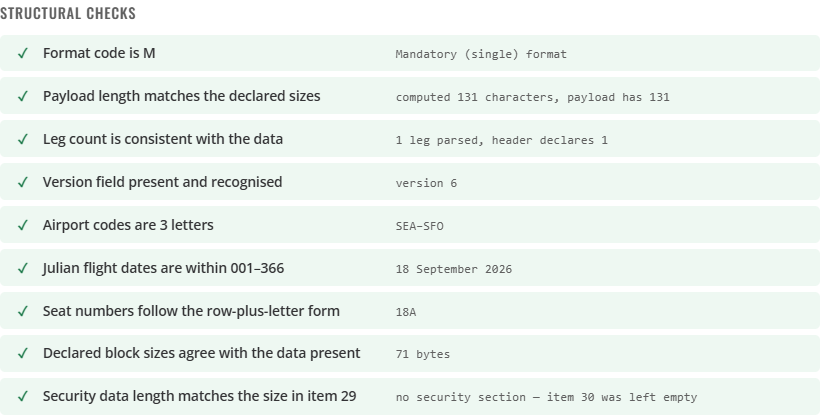
This matters for real-world data, because not every boarding pass in the wild is conformant. A payload can declare four legs and carry three, declare a 103-byte block and provide 90, or omit the version marker while still carrying conditional data. The checks surface those instead of letting the UI present a half-parsed pass as if it were clean.
Step 8: Verify the security section’s signature (items 25–30)
Parsing and checking length say the payload is well formed; they say nothing about whether the bytes were edited after issue. A payload can end with a security section — ^ (item 25), one character of security data type (item 28), two hexadecimal characters of byte length (item 29), then the data itself — and the companion generator writes one automatically with ECDSA P-256. A reader needs only the public half of the key pair.
verifySecurityData() imports that key once (SPKI format), strips items 25–30 with the same securityBase() helper the generator signed with, and hands the remaining bytes to WebCrypto. A value that is not even base64 fails before any key is involved:
    var signature;
    try {
      signature = bytesFromBase64(parsed.security.data);
    } catch (error) {
      return Promise.resolve({
        state: 'bad', ok: false,
        message: 'Item 30 is not valid base64, so it is not a signature this reader understands.'
      });
    }
    var data = new TextEncoder().encode(securityBase(text));
    return importSigningKey('spki', publicKeyBase64, ['verify'])
      .then(function (key) { return subtle.verify(SIGN_PARAMS, key, signature, data); })
      .then(function (valid) {
        return valid
          ? { state: 'ok', ok: true, message: 'Signature matches this payload (ECDSA P-256).' }
          : {
            state: 'bad', ok: false,
            message: 'The signature does not match this payload \u2014 it was changed '
              + 'after signing, or it was signed with a different key.'
          };
      })
      .catch(function (error) {
        return { state: 'error', ok: false, message: error.message };
      });
Verification is asynchronous, so the signature box renders first with Verifying… and fills in when the promise resolves. The five states map onto three colours:
ok— green: the signature matches the bytes that remain after stripping.bad— red: present but does not verify — the payload was edited after signing, signed with a different key, truncated so item 29’s declared length disagrees with the data, or not base64.none— neutral: items 25–30 are absent. An unsigned pass is legal in BCBP, so nothing is wrong with it — unless this reader has been told otherwise.unsupported/error— amber: WebCrypto is unavailable, or the payload did not decode, so no verdict is possible at all.
Whether none is acceptable is policy, not format, so it lives in a switch rather than in the parser. Turning on Require signature re-reads whatever is already on screen — no second scan needed — and the none branch flips from an informative note to a refusal:
    window.Bcbp.verifySecurityData(payload, DEMO_PUBLIC_KEY).then(function (result) {
      var text;
      var kind;

      if (result.state === 'ok') {
        kind = 'ok';
        text = '\u2713 ' + result.message + (state.requireSignature
          ? ' This reader requires a signature, and this pass carries a valid one.'
          : '');
      } else if (result.state === 'none') {
        if (state.requireSignature) {
          kind = 'error';
          text = '\u2717 No security section \u2014 items 25\u201330 are absent, and this reader is '
            + 'set to require a signature, so the pass is refused.';
        } else {
          kind = 'info';
          text = '\u2014 No security section: items 25\u201330 are absent, so there is nothing to '
            + 'verify. An unsigned pass is legal and reads normally; switch on "Require signature"'
            + ' to refuse it instead.';
        }
      } else if (result.state === 'bad') {
        kind = 'error';
        text = '\u2717 ' + result.message;
      } else {
        kind = 'warn';
        text = '\u26a0 ' + result.message;
      }

      line.className = 'note ' + kind;
      line.textContent = text;
The verdict also lands in the JSON export as signature.state and signature.accepted, so a test harness can assert on it: an unsigned pass counts as accepted only while Require signature is off.
Common Issues and Edge Cases
Aztec symbols are never detected. The enum member is BF_AZTEC. Using BF_AZTEC_CODE produces undefined, and mask |= undefined contributes nothing, so Aztec is silently excluded. Log any name the enum does not define.
Cannot mix BigInt and other types when building the mask. The format enum is BigInt in 11.x. Start the accumulator at 0n.
A transparent PNG of a symbol does not decode. Canvas-exported symbols have an alpha channel and a transparent pixel is (0,0,0,0); read as RGBA that is black, so the quiet zone fills with ink. Composite the image onto white before getImageData.
The results panel re-opens dozens of times a second in camera mode. Consecutive frames see the same symbol. Add a MultiFrameResultCrossFilter with enableResultDeduplication('barcode', true), and guard the receiver with an “already showing results” flag.
Passing a Blob or a canvas to capture() returns no results. The router expects a byte buffer in the getImageData() shape — RGBA, stride = 4 × width, format: 10. Building that object explicitly is the difference between zero barcodes and a correct decode.
stopCapturing() may return undefined. It is safe to await, but not safe to chain .then() onto. Wrap it: Promise.resolve(cvRouter.stopCapturing()).then(...).
Sample chips inside the drop zone open the file picker as well as scanning. The drop zone’s own click handler fires too. Call event.stopPropagation() in the chip handler.
The flight date can be out by a year. There is no year in the payload. Item 46 is a Julian day of the year, so a pass read in January for a December flight, or read five years later, can only be resolved by inference — and it will be wrong at the boundary. Report the Julian day alongside the resolved date so the ambiguity is visible.
A signature that verified a moment ago turns red after editing one field. The signature covers the payload up to the end of the last leg, so changing the name, flight or seat changes those bytes and the old signature stops matching — that is the feature working, not a bug. Regenerate the pass with Re-sign in the companion generator rather than expecting a signature to survive an edit.
“Item 29 declares 88 bytes but only 78 are present.” Item 29 counts the bytes of item 30, so a truncated signature fails its own length check before any key is involved. The fix is on the writer’s side: re-sign so item 29 and item 30 agree again.
Conclusion
The split matters. A barcode SDK solves the imaging problem: finding and decoding a 2D symbol on a curved, glared or poorly-lit boarding pass. The BCBP layout is a separate parsing problem, with three nested size fields and a positional item order. Keeping the two apart makes both testable, and writing the parser against the official Resolution 792 examples is what keeps it honest. Signature verification rides along in the parser rather than the SDK: the reader’s job ends at the string, and WebCrypto answers the separate question of whether the bytes were edited after issue.
The companion article builds the other half of the loop: how to generate a boarding pass barcode in JavaScript, which is also where the sample images in this demo come from.