


C++ Passport MRZ Scanner: Recognize and Parse Travel Documents on Windows and Linux
Need to extract passport, ID, or visa data from the Machine Readable Zone (MRZ) in C++? The MRZ encodes the holder’s name, nationality, document number, date of birth, gender, and expiration date in a standardized format that machines can parse reliably. This tutorial walks you through building a cross-platform desktop MRZ scanner using the Dynamsoft Capture Vision C++ SDK — from CMake project setup to real-time webcam recognition — with full source code for Windows and Linux.
This article is Part 1 in a 2-Part Series.
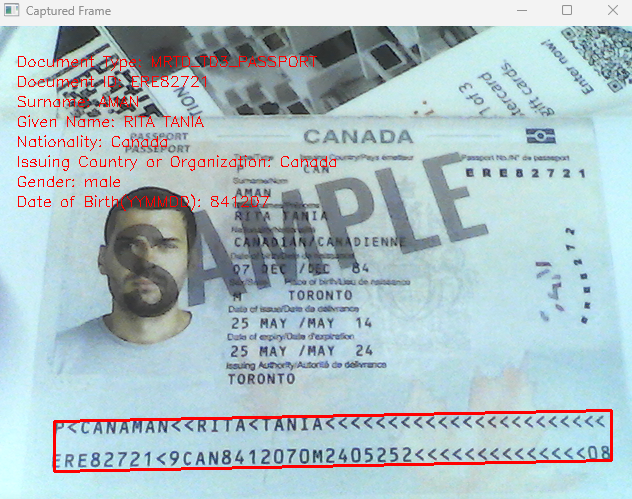
See the C++ MRZ Scanner in Action
What you’ll build: A cross-platform desktop MRZ scanner in C++ that reads and parses passport, ID, and visa machine-readable zones from image files or a live camera stream using the Dynamsoft Capture Vision SDK on Windows and Linux.
Key Takeaways
- The Dynamsoft Capture Vision C++ SDK provides end-to-end MRZ recognition and parsing for TD1 (ID cards), TD2, and TD3 (passports) document types on both Windows and Linux.
- A single
CCaptureVisionRouter::Capture()call handles image loading, text-line detection, and MRZ field extraction — no manual OCR pipeline is needed. - OpenCV integration enables real-time MRZ scanning from a webcam with bounding-box overlay and parsed-field display.
- The same CMake project compiles on Windows (MSVC/MinGW) and Linux (GCC) without platform-specific code changes.
Common Developer Questions
How do I read passport MRZ data from an image in C++ on Windows and Linux?
Initialize the Dynamsoft Capture Vision SDK in a CMake project, load the passport or ID image, and call CCaptureVisionRouter::Capture() with the MRZ template to receive parsed fields. The same C++ logic works on both Windows and Linux once the SDK libraries and resource files are copied into the build output.
What C++ SDK supports real-time MRZ recognition from a webcam stream?
The Dynamsoft Capture Vision C++ SDK is the SDK used here for live MRZ recognition, while OpenCV supplies the webcam frames and display loop. That combination is what enables real-time passport scanning with bounding boxes and parsed results shown on screen.
How do I parse TD1, TD2, and TD3 machine-readable zone fields using the Dynamsoft Capture Vision SDK?
Use the MRZ template and the parsed result objects returned by the SDK to extract document type, holder name, document number, nationality, dates, and other MRZ fields. The SDK already understands TD1, TD2, and TD3 structures, so your C++ code only needs to read the parsed output rather than implement the format rules manually.
Prerequisites
- CMake
- OpenCV 4.5.0
- Get a 30-day free trial license for Dynamsoft Capture Vision
Step 1: Set Up the CMake Project for Cross-Platform MRZ Recognition
This section will guide you through setting up a CMake project to implement MRZ recognition using the Dynamsoft Capture Vision SDK in C++ on both Windows and Linux. We will cover two examples: the first demonstrates loading images from files, and the second shows capturing and processing images from a camera. Both examples include recognizing MRZ data and extracting relevant information.
To get started, create two source files: main.cpp for loading images from files, and maincv.cpp for capturing images from a camera. Then, create a CMakeLists.txt file in your project directory with the following configuration:
cmake_minimum_required (VERSION 3.8)
project (main)
MESSAGE( STATUS "PROJECT_NAME: " ${PROJECT_NAME} )

option(ENABLE_OPENCV "Build with OpenCV" OFF)
MESSAGE(STATUS "Build with OpenCV: ${ENABLE_OPENCV}")

if (CMAKE_HOST_WIN32)
    set(WINDOWS 1)
elseif(CMAKE_HOST_UNIX)
    set(LINUX 1)
endif()

# Set RPATH
if(CMAKE_HOST_UNIX)
    SET(CMAKE_CXX_FLAGS "-std=c++11 -O3 -Wl,-rpath=$ORIGIN")
    SET(CMAKE_INSTALL_RPATH "$ORIGIN")
    SET(CMAKE_INSTALL_RPATH_USE_LINK_PATH TRUE)
endif()

# Add search path for include and lib files
MESSAGE( STATUS "CPU architecture ${CMAKE_SYSTEM_PROCESSOR}" )
if(WINDOWS)
    if(CMAKE_CXX_COMPILER_ID STREQUAL "GNU")
        link_directories("${PROJECT_SOURCE_DIR}/../sdk/platforms/win/bin/")
    else()
        link_directories("${PROJECT_SOURCE_DIR}/../sdk/platforms/win/lib/")
    endif()
elseif(LINUX)
    if (CMAKE_SYSTEM_PROCESSOR STREQUAL x86_64)
        MESSAGE( STATUS "Link directory: ${PROJECT_SOURCE_DIR}/../sdk/platforms/linux/" )
        link_directories("${PROJECT_SOURCE_DIR}/../sdk/platforms/linux/")
    endif()
endif()
include_directories("${PROJECT_BINARY_DIR}" "${PROJECT_SOURCE_DIR}/../sdk/include/")

# Add the executable
if (ENABLE_OPENCV)
    find_package(OpenCV REQUIRED)
    add_executable(${PROJECT_NAME} maincv.cpp)
    if(WINDOWS)
        if(CMAKE_CL_64)
            target_link_libraries (${PROJECT_NAME} "DynamsoftCorex64" "DynamsoftLicensex64" "DynamsoftCaptureVisionRouterx64" "DynamsoftUtilityx64" ${OpenCV_LIBS})
        endif()
    else()
        target_link_libraries (${PROJECT_NAME} "DynamsoftCore" "DynamsoftLicense" "DynamsoftCaptureVisionRouter" "DynamsoftUtility" pthread ${OpenCV_LIBS})
    endif()
else()
    add_executable(${PROJECT_NAME} main.cpp)
    if(WINDOWS)
        if(CMAKE_CL_64)
            target_link_libraries (${PROJECT_NAME} "DynamsoftCorex64" "DynamsoftLicensex64" "DynamsoftCaptureVisionRouterx64" "DynamsoftUtilityx64" )
        endif()
    else()
        target_link_libraries (${PROJECT_NAME} "DynamsoftCore" "DynamsoftLicense" "DynamsoftCaptureVisionRouter" "DynamsoftUtility"  pthread)
    endif()
endif()

if(WINDOWS)
    add_custom_command(TARGET ${PROJECT_NAME} POST_BUILD
    COMMAND ${CMAKE_COMMAND} -E copy_directory
    "${PROJECT_SOURCE_DIR}/../sdk/platforms/win/bin/"
    $<TARGET_FILE_DIR:main>)
else()
    add_custom_command(TARGET ${PROJECT_NAME} POST_BUILD
    COMMAND ${CMAKE_COMMAND} -E copy_directory
    "${PROJECT_SOURCE_DIR}/../sdk/platforms/linux/"
    $<TARGET_FILE_DIR:main>)
endif()

add_custom_command(TARGET ${PROJECT_NAME} POST_BUILD
COMMAND ${CMAKE_COMMAND} -E copy
"${PROJECT_SOURCE_DIR}/../sdk/DLR-PresetTemplates.json"
$<TARGET_FILE_DIR:main>/DLR-PresetTemplates.json)

add_custom_command(TARGET ${PROJECT_NAME} POST_BUILD
COMMAND ${CMAKE_COMMAND} -E copy
"${PROJECT_SOURCE_DIR}/../sdk/MRZ.json"
$<TARGET_FILE_DIR:main>/MRZ.json)

add_custom_command(TARGET ${PROJECT_NAME} POST_BUILD
COMMAND ${CMAKE_COMMAND} -E copy
"${PROJECT_SOURCE_DIR}/../sdk/ConfusableChars.data"
$<TARGET_FILE_DIR:main>/ConfusableChars.data)

add_custom_command(TARGET ${PROJECT_NAME} POST_BUILD
COMMAND ${CMAKE_COMMAND} -E make_directory $<TARGET_FILE_DIR:main>/CharacterModel
COMMAND ${CMAKE_COMMAND} -E copy_directory
"${PROJECT_SOURCE_DIR}/../sdk/CharacterModel"
$<TARGET_FILE_DIR:main>/CharacterModel)


add_custom_command(TARGET ${PROJECT_NAME} POST_BUILD
COMMAND ${CMAKE_COMMAND} -E make_directory $<TARGET_FILE_DIR:main>/ParserResources
COMMAND ${CMAKE_COMMAND} -E copy_directory
"${PROJECT_SOURCE_DIR}/../sdk/ParserResources"
$<TARGET_FILE_DIR:main>/ParserResources)
Explanation
- CMake Configuration: The CMakeLists.txt file configures the build environment for both Windows and Linux, detecting the operating system and setting paths for libraries and includes accordingly.
-
Enabling OpenCV: The
ENABLE_OPENCVoption toggles the inclusion of OpenCV support. When enabled, the project compilesmaincv.cppfor camera capture. Otherwise, it compilesmain.cppfor loading images from files. -
Library Linking: The project links with necessary Dynamsoft libraries (
DynamsoftCore,DynamsoftLicense,DynamsoftCaptureVisionRouter, andDynamsoftUtility). - Resource Copying: After building, required DLLs and resource files (e.g., templates, models) are copied to the output directory using
add_custom_commandto ensure the application has all necessary assets.
Step 2: Implement MRZ Recognition and Data Parsing
Define a Class to Store and Parse MRZ Fields
Define an MRZResult class to store and parse the MRZ data from recognized results:
class MRZResult
{
public:
  string docId;
  string docType;
  string nationality;
  string issuer;
  string dateOfBirth;
  string dateOfExpiry;
  string gender;
  string surname;
  string givenname;

  vector<string> rawText;

  MRZResult FromParsedResultItem(const CParsedResultItem *item)
  {
    docType = item->GetCodeType();

    if (docType == "MRTD_TD3_PASSPORT")
    {
      if (item->GetFieldValidationStatus("passportNumber") != VS_FAILED && item->GetFieldValue("passportNumber") != NULL)
      {
        docId = item->GetFieldValue("passportNumber");
      }
    }
    else if (item->GetFieldValidationStatus("documentNumber") != VS_FAILED && item->GetFieldValue("documentNumber") != NULL)
    {
      docId = item->GetFieldValue("documentNumber");
    }

    string line;
    if (docType == "MRTD_TD1_ID")
    {
      if (item->GetFieldValue("line1") != NULL)
      {
        line = item->GetFieldValue("line1");
        if (item->GetFieldValidationStatus("line1") == VS_FAILED)
        {
          line += ", Validation Failed";
        }
        rawText.push_back(line);
      }

      if (item->GetFieldValue("line2") != NULL)
      {
        line = item->GetFieldValue("line2");
        if (item->GetFieldValidationStatus("line2") == VS_FAILED)
        {
          line += ", Validation Failed";
        }
        rawText.push_back(line);
      }

      if (item->GetFieldValue("line3") != NULL)
      {
        line = item->GetFieldValue("line3");
        if (item->GetFieldValidationStatus("line3") == VS_FAILED)
        {
          line += ", Validation Failed";
        }
        rawText.push_back(line);
      }
    }
    else
    {
      if (item->GetFieldValue("line1") != NULL)
      {
        line = item->GetFieldValue("line1");
        if (item->GetFieldValidationStatus("line1") == VS_FAILED)
        {
          line += ", Validation Failed";
        }
        rawText.push_back(line);
      }

      if (item->GetFieldValue("line2") != NULL)
      {
        line = item->GetFieldValue("line2");
        if (item->GetFieldValidationStatus("line2") == VS_FAILED)
        {
          line += ", Validation Failed";
        }
        rawText.push_back(line);
      }
    }

    if (item->GetFieldValidationStatus("nationality") != VS_FAILED && item->GetFieldValue("nationality") != NULL)
    {
      nationality = item->GetFieldValue("nationality");
    }
    if (item->GetFieldValidationStatus("issuingState") != VS_FAILED && item->GetFieldValue("issuingState") != NULL)
    {
      issuer = item->GetFieldValue("issuingState");
    }
    if (item->GetFieldValidationStatus("dateOfBirth") != VS_FAILED && item->GetFieldValue("dateOfBirth") != NULL)
    {
      dateOfBirth = item->GetFieldValue("dateOfBirth");
    }
    if (item->GetFieldValidationStatus("dateOfExpiry") != VS_FAILED && item->GetFieldValue("dateOfExpiry") != NULL)
    {
      dateOfExpiry = item->GetFieldValue("dateOfExpiry");
    }
    if (item->GetFieldValidationStatus("sex") != VS_FAILED && item->GetFieldValue("sex") != NULL)
    {
      gender = item->GetFieldValue("sex");
    }
    if (item->GetFieldValidationStatus("primaryIdentifier") != VS_FAILED && item->GetFieldValue("primaryIdentifier") != NULL)
    {
      surname = item->GetFieldValue("primaryIdentifier");
    }
    if (item->GetFieldValidationStatus("secondaryIdentifier") != VS_FAILED && item->GetFieldValue("secondaryIdentifier") != NULL)
    {
      givenname = item->GetFieldValue("secondaryIdentifier");
    }

    return *this;
  }

  string ToString()
  {
    string msg = "Raw Text:\n";
    for (size_t idx = 0; idx < rawText.size(); ++idx)
    {
      msg += "\tLine " + to_string(idx + 1) + ": " + rawText[idx] + "\n";
    }
    msg += "Parsed Information:\n";
    msg += "\tDocument Type: " + docType + "\n";
    msg += "\tDocument ID: " + docId + "\n";
    msg += "\tSurname: " + surname + "\n";
    msg += "\tGiven Name: " + givenname + "\n";
    msg += "\tNationality: " + nationality + "\n";
    msg += "\tIssuing Country or Organization: " + issuer + "\n";
    msg += "\tGender: " + gender + "\n";
    msg += "\tDate of Birth(YYMMDD): " + dateOfBirth + "\n";
    msg += "\tExpiration Date(YYMMDD): " + dateOfExpiry + "\n";

    return msg;
  }
};
Recognize MRZ Fields from Image Files
-
Initialize the SDK with a valid license key.
#include <stdio.h> #include <string> #include <vector> #if defined(_WIN32) || defined(_WIN64) #include <windows.h> #include <conio.h> #include <io.h> #else #include <cstring> #include <dirent.h> #include <sys/time.h> #endif #include <fstream> #include <streambuf> #include <iostream> #include <sstream> #include "DynamsoftCaptureVisionRouter.h" #include "DynamsoftUtility.h" using namespace std; using namespace dynamsoft::cvr; using namespace dynamsoft::dlr; using namespace dynamsoft::dcp; using namespace dynamsoft::license; using namespace dynamsoft::basic_structures; using namespace dynamsoft::utility; int main(int argc, char *argv[]) { printf("*************************************************\r\n"); printf("Welcome to Dynamsoft MRZ Demo\r\n"); printf("*************************************************\r\n"); printf("Hints: Please input 'Q' or 'q' to quit the application.\r\n"); int iRet = -1; char szErrorMsg[256]; // Initialize license. // Request a trial from https://www.dynamsoft.com/customer/license/trialLicense/?product=dcv&package=cross-platform iRet = CLicenseManager::InitLicense("LICENSE-KEY", szErrorMsg, 256); if (iRet != EC_OK) { cout << szErrorMsg << endl; } } -
Load the MRZ recognition template file.
int errorCode = 1; char errorMsg[512] = {0}; CCaptureVisionRouter *cvr = new CCaptureVisionRouter; errorCode = cvr->InitSettingsFromFile("MRZ.json", errorMsg, 512); if (errorCode != EC_OK) { cout << "error:" << errorMsg << endl; return -1; } -
Load images from files and recognize MRZ data in an infinite loop. Press
Qorqto quit the application.bool GetImagePath(char *pImagePath) { std::string input; while (true) { std::cout << "\n>> Step 1: Input your image file's full path:\n"; std::getline(std::cin, input); input.erase(0, input.find_first_not_of(" \t\n\r\"\'")); input.erase(input.find_last_not_of(" \t\n\r\"\'") + 1); if (input == "q" || input == "Q") { return true; } std::strncpy(pImagePath, input.c_str(), 511); pImagePath[511] = '\0'; std::ifstream file(pImagePath); if (file.good()) { file.close(); return false; } std::cout << "Please input a valid path.\n"; } } char pszImageFile[512] = {0}; bool bExit = false; while (1) { bExit = GetImagePath(pszImageFile); if (bExit) break; float costTime = 0.0; int errorCode = 0; CCapturedResult *captureResult = cvr->Capture(pszImageFile); if (captureResult) { CParsedResult *parsedResult = captureResult->GetParsedResult(); if (parsedResult) { for (int i = 0; i < parsedResult->GetItemsCount(); i++) { const CParsedResultItem *item = parsedResult->GetItem(i); MRZResult result; result.FromParsedResultItem(item); cout << result.ToString() << endl; } parsedResult->Release(); } captureResult->Release(); } } delete cvr, cvr = NULL; return 0;
Recognize MRZ Fields from a Live Camera Stream with OpenCV
-
Initialize the Capture Vision SDK and open the camera with OpenCV.
#include "opencv2/core.hpp" #include "opencv2/imgproc.hpp" #include "opencv2/highgui.hpp" #include "opencv2/videoio.hpp" #include "opencv2/core/utility.hpp" #include "opencv2/imgcodecs.hpp" #include <iostream> #include <vector> #include <chrono> #include <iostream> #include <string> #include "DynamsoftCaptureVisionRouter.h" #include "DynamsoftUtility.h" using namespace std; using namespace cv; using namespace dynamsoft::cvr; using namespace dynamsoft::dlr; using namespace dynamsoft::dcp; using namespace dynamsoft::license; using namespace dynamsoft::basic_structures; using namespace dynamsoft::utility; int main(int argc, char *argv[]) { bool captured = false; cout << "Opening camera..." << endl; VideoCapture capture(0); // open the first camera if (!capture.isOpened()) { cerr << "ERROR: Can't initialize camera capture" << endl; cout << "Press any key to quit..." << endl; cin.ignore(); return 1; } int iRet = -1; char szErrorMsg[256]; // Initialize license. // Request a trial from https://www.dynamsoft.com/customer/license/trialLicense/?product=dcv&package=cross-platform iRet = CLicenseManager::InitLicense("LICENSE-KEY", szErrorMsg, 256); if (iRet != EC_OK) { cout << szErrorMsg << endl; } } -
Register callback functions for appending camera frames and receiving MRZ recognition results.
class MyCapturedResultReceiver : public CCapturedResultReceiver { virtual void OnRecognizedTextLinesReceived(CRecognizedTextLinesResult *pResult) override { std::lock_guard<std::mutex> lock(textResultsMutex); textResults.clear(); const CImageTag *tag = pResult->GetOriginalImageTag(); if (pResult->GetErrorCode() != EC_OK) { cout << "Error: " << pResult->GetErrorString() << endl; } else { int lCount = pResult->GetItemsCount(); for (int li = 0; li < lCount; ++li) { TextResult result; const CTextLineResultItem *textLine = pResult->GetItem(li); CPoint *points = textLine->GetLocation().points; result.textLinePoints.push_back(cv::Point(points[0][0], points[0][1])); result.textLinePoints.push_back(cv::Point(points[1][0], points[1][1])); result.textLinePoints.push_back(cv::Point(points[2][0], points[2][1])); result.textLinePoints.push_back(cv::Point(points[3][0], points[3][1])); result.id = tag->GetImageId(); textResults.push_back(result); } } } virtual void OnParsedResultsReceived(CParsedResult *pResult) { if (pResult == nullptr) { return; } const CImageTag *tag = pResult->GetOriginalImageTag(); if (pResult->GetErrorCode() != EC_OK) { cout << "Error: " << pResult->GetErrorString() << endl; } else { int lCount = pResult->GetItemsCount(); for (int i = 0; i < lCount; i++) { const CParsedResultItem *item = pResult->GetItem(i); MRZResult result; result.FromParsedResultItem(item); cout << result.ToString() << endl; if (textResults[0].id == tag->GetImageId()) { std::lock_guard<std::mutex> lock(textResultsMutex); textResults[0].info = result; } } } pResult->Release(); } }; class MyVideoFetcher : public CImageSourceAdapter { public: MyVideoFetcher() {}; ~MyVideoFetcher() {}; bool HasNextImageToFetch() const override { return true; } void MyAddImageToBuffer(const CImageData *img, bool bClone = true) { AddImageToBuffer(img, bClone); } }; int errorCode = 1; char errorMsg[512] = {0}; CCaptureVisionRouter *cvr = new CCaptureVisionRouter; MyVideoFetcher *fetcher = new MyVideoFetcher(); fetcher->SetMaxImageCount(4); fetcher->SetBufferOverflowProtectionMode(BOPM_UPDATE); fetcher->SetColourChannelUsageType(CCUT_AUTO); cvr->SetInput(fetcher); CCapturedResultReceiver *capturedReceiver = new MyCapturedResultReceiver; cvr->AddResultReceiver(capturedReceiver); -
Set the MRZ template and start the MRZ recognition process. Press the
Ckey to capture the recognized frame and display the MRZ data.errorCode = cvr->InitSettingsFromFile("MRZ.json", errorMsg, 512); if (errorCode != EC_OK) { cout << "error:" << errorMsg << endl; } errorCode = cvr->StartCapturing("", false, errorMsg, 512); if (errorCode != EC_OK) { cout << "error:" << errorMsg << endl; } else { int width = (int)capture.get(CAP_PROP_FRAME_WIDTH); int height = (int)capture.get(CAP_PROP_FRAME_HEIGHT); for (int i = 1;; ++i) { Mat frame; capture.read(frame); if (frame.empty()) { cerr << "ERROR: Can't grab camera frame." << endl; break; } CFileImageTag tag(nullptr, 0, 0); tag.SetImageId(i); CImageData data(frame.rows * frame.step.p[0], frame.data, width, height, frame.step.p[0], IPF_RGB_888, 0, &tag); fetcher->MyAddImageToBuffer(&data); { std::lock_guard<std::mutex> lock(textResultsMutex); for (const auto &result : textResults) { if (!result.textLinePoints.empty()) { for (size_t i = 0; i < result.textLinePoints.size(); ++i) { cv::line(frame, result.textLinePoints[i], result.textLinePoints[(i + 1) % result.textLinePoints.size()], cv::Scalar(0, 0, 255), 2); } int x = 20; int y = 40; MRZResult mrzResult = result.info; string msg = "Document Type: " + mrzResult.docType; drawText(frame, msg.c_str(), x, y); y += 20; msg = "Document ID: " + mrzResult.docId; drawText(frame, msg.c_str(), x, y); y += 20; msg = "Surname: " + mrzResult.surname; drawText(frame, msg.c_str(), x, y); y += 20; msg = "Given Name: " + mrzResult.givenname; drawText(frame, msg.c_str(), x, y); y += 20; msg = "Nationality: " + mrzResult.nationality; drawText(frame, msg.c_str(), x, y); y += 20; msg = "Issuing Country or Organization: " + mrzResult.issuer; drawText(frame, msg.c_str(), x, y); y += 20; msg = "Gender: " + mrzResult.gender; drawText(frame, msg.c_str(), x, y); y += 20; msg = "Date of Birth(YYMMDD): " + mrzResult.dateOfBirth; drawText(frame, msg.c_str(), x, y); y += 20; msg = "Expiration Date(YYMMDD): " + mrzResult.dateOfExpiry; if (captured) { captured = false; imshow("Captured Frame", frame); } } } } cv::putText(frame, "Press 'ESC' to quit. Press 'C' to capture.", cv::Point(10, 20), cv::FONT_HERSHEY_SIMPLEX, 0.5, cv::Scalar(0, 255, 0), 2); imshow("MRZ Scanner", frame); int key = waitKey(1); if (key == 27 /*ESC*/) break; else if (key == char('c')) { captured = true; } } cvr->StopCapturing(false, true); } delete cvr, cvr = NULL; delete fetcher, fetcher = NULL; delete capturedReceiver, capturedReceiver = NULL; return 0;
Step 3: Build and Run the MRZ Scanner on Windows and Linux
mkdir build
cd build
cmake ..
cmake --build .
Common Issues and Edge Cases When Building a C++ MRZ Scanner
- License initialization fails at runtime: Ensure the license key string passed to
CLicenseManager::InitLicense()is valid and not expired. A network connection is required for online license validation; offline activation requires a different workflow. - MRZ not detected on low-resolution or skewed images: The SDK expects a reasonably clear view of the MRZ zone. If recognition accuracy drops, pre-process the image with OpenCV (e.g., deskew, increase contrast) before passing it to
CCaptureVisionRouter::Capture(). - Missing model files cause silent failures: The build copies
CharacterModel/,ParserResources/, andMRZ.jsonto the output directory. If any are missing, MRZ parsing returns zero results without an explicit error — verify these files exist next to the executable.