


How to Extract Raw Binary Data from QR Codes in JavaScript
A barcode or bar code is a method of representing data in a visual, machine-readable form. There are all kinds of barcodes and mainly, they can be divided into 1D barcodes and 2D barcodes.
We can get binary data from barcodes and there are different ways to interpret the data. For example, in EAN-13, code 1110010 in the right hand represents the digit 0. As for QR code, which is two-dimensional and can store more data, has several modes to represent data:
| Input mode | Mode indicator | Max. characters | Possible characters, default encoding |
|---|---|---|---|
| Numeric only | 1 | 7,089 | 0, 1, 2, 3, 4, 5, 6, 7, 8, 9 |
| Alphanumeric | 2 | 4,296 | 0–9, A–Z (upper-case only), space, $, %, *, +, -, ., /, : |
| Binary/byte | 4 | 2,953 | ISO/IEC 8859-1 |
| Kanji/kana | 8 | 1,817 | Shift JIS X 0208 |
| Structured Append | 3 | unlimited | Not specific |
PS: structured append is a mode in which the data is divided into several barcodes.
In this article, we are going to create a JavaScript library for reading the binary data of a barcode, with a special focus on QR code as this format has multiple modes.
What you’ll build: A reusable TypeScript library that extracts raw binary data from QR codes and other barcodes, handling all five QR encoding modes (numeric, alphanumeric, byte, Kanji, structured append), powered by Dynamsoft Barcode Reader.
Key Takeaways
- QR codes support five data encoding modes — numeric, alphanumeric, binary/byte, Kanji, and structured append — each requiring different decoding logic to extract raw bytes.
- The
Uint8Arrayfrom Dynamsoft Barcode Reader’sitem.bytesproperty contains the raw binary payload, which can be decoded as text, rendered as an image, or saved as a blob. - Structured append mode splits data across multiple QR codes; the reader must sort by page number and concatenate byte arrays before interpreting the result.
- This library is packaged as an NPM module with Vite, making it reusable in any JavaScript or TypeScript project.
Common Developer Questions
How do I extract raw byte array data from a QR code in JavaScript?
Read the Uint8Array payload returned by Dynamsoft Barcode Reader, inspect the QR mode metadata, and then decode the bytes with the correct logic for numeric, alphanumeric, byte, Kanji, or structured append data. That is the purpose of the TypeScript library built in this article.
How do I decode binary-encoded images or files stored inside QR codes?
Treat the byte-mode payload as raw binary, convert it into a Blob, and then decide whether to expose it as text, an image element, or a downloadable file. The implementation here also calls out the need to revoke blob URLs after use in long-running applications.
How do I read and merge structured append QR codes in TypeScript?
Sort the QR segments by their structured-append page number, concatenate the byte arrays in order, and only then decode the combined payload into text or binary output. Without that merge step, multi-symbol QR data will remain incomplete.
Prerequisites
Dynamsoft Barcode Reader is used for reading the barcodes. Get a 30-day free trial license to follow along.
You also need Node.js installed to scaffold the project with Vite.
Step 1: Create a New TypeScript Project
Create a new project with Vite and the typescript template:
npm create vite@latest BarcodeDataReader -- --template vanilla-ts
Step 2: Define Barcode Data Interfaces
Define several interfaces and an enum for reading the binary data of barcodes.
-
Define a
BarcodeDetailinterface:export interface BarcodeDetail { mode?:number; //The data encoding mode model?:number; //Number of models errorCorrectionLevel?:number; columns?:number; //The column count rows?:number; //The row count page?:number; //Position of the particular code in structured append codes totalPage?:number; //Total number of structured append codes parityData?:number; //A value obtained by XORing byte by byte the ASCII/JIS values of all the original input data before division into symbol blocks. version?:number; //The version of the code. } -
Define a
Barcodeinterface:export interface Barcode { bytes:Uint8Array; details:BarcodeDetail; barcodeType?:string; }The binary data is stored as
Uint8Array. -
Define a
ReadingResultinterface:export interface ReadingResult { text?:string; img?:HTMLImageElement; blob?:Blob; }We can get the result as plain text, an HTML image element or blob.
The type is decided by the
DataTypepassed to the binary data reader.export enum DataType { text = 0, image = 1, unknown = 2 }
Step 3: Build the Binary Data Reader Class
-
Create a new
BarcodeDataReader.tsfile with the following template:export class BarcodeDataReader{ async read(barcodes:Barcode[],dataType:DataType):Promise<ReadingResult[]>{ if (barcodes.length == 0) { throw new Error("No barcodes given"); } let results:ReadingResult[] = []; return results; } } -
Read the binary data based on different modes.
async read(barcodes:Barcode[],dataType:DataType):Promise<ReadingResult[]>{ if (barcodes.length == 0) { throw new Error("No barcodes given"); } let results:ReadingResult[] = []; const mode = barcodes[0].details.mode; if (mode == 1) { results = this.readNumericBarcodes(barcodes); }else if (mode == 2) { results = this.readAlphaNumericBarcodes(barcodes); }else if (mode == 4) { results = await this.readByteEncodingBarcodes(barcodes,dataType); }else if (mode == 8) { results = this.readKanjiBarcodes(barcodes); }else if (mode == 3) { results = await this.readStructuredAppendBarcodes(barcodes,dataType); }else { results = await this.readByteEncodingBarcodes(barcodes,DataType.text); } return results; } -
Implement reading the data in numeric, alphanumeric and Kanji modes. The three modes’ data is plain text and they can share a similar logic.
private readAlphaNumericBarcodes(barcodes:Barcode[]):ReadingResult[]{ return this.decodeText(barcodes,"ASCII"); } private readNumericBarcodes(barcodes:Barcode[]):ReadingResult[]{ return this.decodeText(barcodes,"ASCII"); } private readKanjiBarcodes(barcodes:Barcode[]):ReadingResult[]{ return this.decodeText(barcodes,"SHIFT-JIS"); } private decodeText(barcodes:Barcode[],encoding:string){ let results:ReadingResult[] = []; for (let index = 0; index < barcodes.length; index++) { const barcode = barcodes[index]; const decoder = new TextDecoder(encoding); const text = decoder.decode(barcode.bytes); let result = { text:text } results.push(result); } return results; } -
Implement reading the data in byte mode.
As the data type is unknown in byte mode, we have to get the reading results based on the user-specified data type.
If the data type is text, we have to detect the encoding. The
chardetlibrary is used here for detection.private async readByteEncodingBarcodes(barcodes:Barcode[],dataType:DataType):Promise<ReadingResult[]>{ let results:ReadingResult[] = []; for (let index = 0; index < barcodes.length; index++) { const barcode = barcodes[index]; let result:ReadingResult = await this.getResultBasedOnDataType(barcode.bytes,dataType); results.push(result); } return results; } async getResultBasedOnDataType(data:Uint8Array,dataType:DataType) { let result:ReadingResult; if (dataType == DataType.text) { const charset = chardet.analyse(data); const decoder = new TextDecoder(charset[0].name); const text = decoder.decode(data); result = { text:text } }else if (dataType == DataType.image) { const img = await this.getImageFromUint8Array(data); result = { img:img } }else{ result = { blob:this.getBlobFromUint8Array(data) } } return result; } getBlobFromUint8Array(data:Uint8Array) { return new Blob([data]); } getImageFromUint8Array(data:Uint8Array):Promise<HTMLImageElement>{ return new Promise<HTMLImageElement>((resolve, reject) => { const img = document.createElement("img"); const blob = this.getBlobFromUint8Array(data); img.onload = function(){ resolve(img); } img.onerror = function(error) { console.error(error); reject(error); } img.src = URL.createObjectURL(blob); console.log(img.src) }) } -
Implement reading the data in structured append mode.
We have to sort the barcodes based on their page numbers, merge the bytes into one and then get the result.
private async readStructuredAppendBarcodes(barcodes:Barcode[],dataType:DataType):Promise<ReadingResult[]>{
  let results:ReadingResult[] = [];
  barcodes.sort((a, b) => (a.details.page ?? 0) - (b.details.page ?? 0))
  let concatedData:Uint8Array = new Uint8Array();
  for (let index = 0; index < barcodes.length; index++) {
    const barcode = barcodes[index];
    let merged = new Uint8Array(barcode.bytes.length + concatedData.length);
    merged.set(concatedData);
    merged.set(barcode.bytes, concatedData.length);
    concatedData = merged;
  }
  let result = await this.getResultBasedOnDataType(concatedData,dataType);
  results.push(result);
  return results;
}
Step 4: Test QR Code Binary Data Extraction
We can then update index.html to use Dynamsoft Barcode Reader to read QR codes and this library to read the binary data.
Here is the basic code:
let router = await Dynamsoft.CVR.CaptureVisionRouter.createInstance();
//read barcodes from an image
let result = await router.capture(document.getElementById("image"),"ReadBarcodes_Balance");
let dataType = document.getElementById("dataTypeSelect").selectedIndex;
let barcodes = [];
for (let index = 0; index < result.items.length; index++) {
  const item = result.items[index];
  if (item.type === Dynamsoft.Core.EnumCapturedResultItemType.CRIT_BARCODE) {
    let data = new Uint8Array(item.bytes.length);
    data.set(item.bytes);
    let barcode = {
      bytes:data,
      details:item.details
    }
    barcodes.push(barcode);
  }
}

let results = await dataReader.read(barcodes,dataType)
console.log(results);
You can visit this online demo to have a try.
If you don’t have QR codes at hand, you can use the QR codes and the QR code generator in this article.
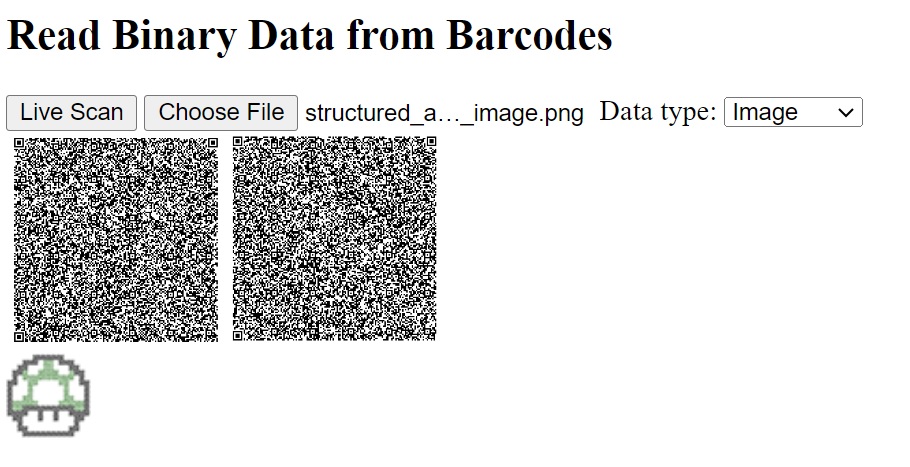
Here is a screenshot of a test of reading two QR codes which have an image encoded:
Step 5: Package and Publish as an NPM Library
We can publish it as a library onto NPM for ease of use.
-
Install
devDependencies:npm install -D @types/node vite-plugin-dts -
Create a new
vite.config.tsfile:// vite.config.ts import { resolve } from 'path'; import { defineConfig } from 'vite'; import dts from 'vite-plugin-dts'; // https://vitejs.dev/guide/build.html#library-mode export default defineConfig({ build: { lib: { entry: resolve(__dirname, 'src/index.ts'), name: 'barcode-data-reader', fileName: 'barcode-data-reader', }, }, plugins: [dts()], }); -
Add the entry points of our package to
package.json.{ "main": "./dist/barcode-data-reader.umd.cjs", "module": "./dist/barcode-data-reader.js", "types": "./dist/index.d.ts", "exports": { "import": { "types": "./dist/index.d.ts", "default": "./dist/barcode-data-reader.js" }, "require": { "types": "./dist/index.d.ts", "default": "./dist/barcode-data-reader.umd.cjs" } }, "files": [ "dist/*.css", "dist/*.js", "dist/*.cjs", "dist/*.d.ts" ] }
Run npm run build. Then, we can have the packaged files in the dist.
Common Issues and Edge Cases
- Encoding detection fails for short byte-mode payloads. The
chardetlibrary needs a minimum number of bytes for reliable charset detection. For very short strings (under ~20 bytes), force a known encoding like UTF-8 instead of relying on auto-detection. - Structured append QR codes arrive out of order. If your scanner returns results in an unpredictable order, always sort by
details.pagebefore concatenating. Missing pages will produce corrupted output — validate thatbarcodes.lengthequalsdetails.totalPagebefore merging. - Binary blob URLs are not revoked. Each call to
URL.createObjectURL()allocates memory. In long-running apps that decode many images from QR codes, callURL.revokeObjectURL()after the image has loaded to prevent memory leaks.