




Parameter Template Structure
This article introduces the parameter definitions, organization structure, usage rules, and related interfaces involved in Dynamsoft Barcode Reader.
Definitions
Dynamsoft Barcode Reader uses a template to set parameters. A template contains three types of data: ImageParameter , RegionDefinition , and FormatSpecification .
ImageParameteris used to specify the decoding settings on the entire image. The value of theImageParameter.Namefield is the unique identifier of theImageParameter. Read more aboutImageParameter.RegionDefinitionis used to specify a decoding region. It is also used to specify the decoding settings in this area. The value of theRegionDefinition.Namefield is the unique identifier ofRegionDefinition. Read more aboutRegionDefinition.FormatSpecificationis used to specify a barcode format. It is also used to specify the decoding settings of this barcode format. The value of theFormatSpecification.Namefield is the unique identifier ofFormatSpecification. Read more aboutFormatSpecification.
Organizational Relationship
-
There is only one
ImageParameterin a template definition. TheImageParameter.Namefield denotes the unique identifier of the template; - One or more
RegionDefinitioncan be referenced throughRegionDefinitionNameArrayinImageParameter; - One or more
FormatSpecificationcan be referenced throughFormatSpecificationNameArrayinImageParameter; - One or more
FormatSpecificationcan be referenced throughFormatSpecificationNameArrayinRegionDefinition; - In a JSON template file/string, you can use
ImageParameterContentArray/RegionDefinitionArray/FormatSpecificationArrayfield to define multipleImageParameter/RegionDefinition/FormatSpecification, for example:
{
  "FormatSpecificationArray": [{
    "Name": "IP1_BF_QR_CODE"
  }],
  "ImageParameter": {
    "FormatSpecificationNameArray": [
      "IP1_BF_QR_CODE"
    ],
    "Name": "default",
    "RegionDefinitionNameArray": [
      "region1"
    ]
  },
  "RegionDefinition": {
    "Name": "region1"
  },
  "Version": "3.0"
}
Scope
-
When the same parameter is set in both
ImageParameterandRegionDefinition, the decoding operation in the region specified byRegionDefinitionis used; otherwise, the parameter values under theImageParameterwill be used. -
When the same parameter is set in both
ImageParameterandFormatSpecification, the decoding operation for the barcode format specified byFormatSpecificationis used; otherwise, the parameter values under theImageParameterwill be used. -
When the same parameter is set in both
RegionDefinitionandFormatSpecification, the decoding operation for the barcode format specified byFormatSpecificationis used in the region specified byRegionDefinition; otherwise, the parameter values under theImageParameterwill be used.
Parameter list
The parameters of ImageParameter are:
- ImageParameter.BarcodeColourModes
- ImageParameter.BarcodeComplementModes
- ImageParameter.BarcodeFormatIds
- ImageParameter.BarcodeFormatIds_2
- ImageParameter.BinarizationModes
- ImageParameter.ColourClusteringModes
- ImageParameter.ColourConversionModes
- ImageParameter.DeblurLevel
- ImageParameter.DeblurModes
- ImageParameter.DeformationResistingModes
- ImageParameter.Description
- ImageParameter.DPMCodeReadingModes
- ImageParameter.ExpectedBarcodesCount
- ImageParameter.FormatSpecificationNameArray
- ImageParameter.GrayscaleTransformationModes
- ImageParameter.ImagePreprocessingModes
- ImageParameter.IntermediateResultSavingMode
- ImageParameter.IntermediateResultTypes
- ImageParameter.LocalizationModes
- ImageParameter.MaxAlgorithmThreadCount
- ImageParameter.Name
- ImageParameter.Pages
- ImageParameter.PDFRasterDPI
- ImageParameter.PDFReadingMode
- ImageParameter.RegionDefinitionNameArray
- ImageParameter.RegionPredetectionModes
- ImageParameter.ResultCoordinateType
- ImageParameter.ReturnBarcodeZoneClarity
- ImageParameter.ScaleDownThreshold
- ImageParameter.ScaleUpModes
- ImageParameter.TerminatePhase
- ImageParameter.TextFilterModes
- ImageParameter.TextResultOrderModes
- ImageParameter.TextureDetectionModes
- ImageParameter.Timeout
The parameters of RegionDefinition are:
- RegionDefinition.BarcodeFormatIds
- RegionDefinition.BarcodeFormatIds_2
- RegionDefinition.Bottom
- RegionDefinition.ExpectedBarcodesCount
- RegionDefinition.FormatSpecificationNameArray
- RegionDefinition.Left
- RegionDefinition.MeasuredByPercentage
- RegionDefinition.Name
- RegionDefinition.Right
- RegionDefinition.Top
The parameters of FormatSpecification are:
- FormatSpecification.AllModuleDeviation
- FormatSpecification.AustralianPostEncodingTable
- FormatSpecification.BarcodeAngleRangeArray
- FormatSpecification.BarcodeBytesLengthRangeArray
- FormatSpecification.BarcodeBytesRegExPattern
- FormatSpecification.BarcodeComplementModes
- FormatSpecification.BarcodeFormatIds
- FormatSpecification.BarcodeFormatIds_2
- FormatSpecification.BarcodeHeightRangeArray
- FormatSpecification.BarcodeTextLengthRangeArray
- FormatSpecification.BarcodeTextRegExPattern
- FormatSpecification.BarcodeWidthRangeArray
- FormatSpecification.BarcodeZoneBarCountRangeArray
- FormatSpecification.BarcodeZoneMinDistanceToImageBorders
- FormatSpecification.Code128Subset
- FormatSpecification.DeblurLevel
- FormatSpecification.DeformationResistingModes
- FormatSpecification.EnableDataMatrixECC000-140
- FormatSpecification.EnableQRCodeModel1
- FormatSpecification.FindUnevenModuleBarcode
- FormatSpecification.HeadModuleRatio
- FormatSpecification.MinQuietZoneWidth
- FormatSpecification.MinRatioOfBarcodeZoneWidthToHeight
- FormatSpecification.MinResultConfidence
- FormatSpecification.MirrorMode
- FormatSpecification.ModuleSizeRangeArray
- FormatSpecification.MSICodeCheckDigitCalculation
- FormatSpecification.Name
- FormatSpecification.PartitionModes
- FormatSpecification.PatchCodeSearchingMargins
- FormatSpecification.RequireStartStopChars
- FormatSpecification.ReturnPartialBarcodeValue
- FormatSpecification.StandardFormat
- FormatSpecification.TailModuleRatio
Parameter template files assignment rules
When setting parameters through a JSON template, Dynamsoft Barcode Reader will process the template according to the following rules:
- Parameters not defined in
ImageParameter/RegionDefinition/FormatSpecificationwill be filled with default values FormatSpecificationis automatically split into multiple settings for a single barcode format, for example:
Template you set
{
    "ImageParameter":{
        "Name": "ImageParameter1",
        "BarcodeFormatIds": ["BF_ONED"],
        "FormatSpecificationNameArray": [
          "FormatSpecification1"
        ]
    },
    "FormatSpecification": {
      "Name": "FormatSpecification1",
      "BarcodeFormatIds": ["BF_CODE_39","BF_CODE_128"],
      "MinResultConfidence": 20
    }
}
Template used by DBR
{
    "ImageParameter":{
        "Name": "ImageParameter1",
        "BarcodeFormatIds": ["BF_ONED"],
        "FormatSpecificationNameArray": [
          "FormatSpecification1_BF_CODE_39",
          "FormatSpecification1_BF_CODE_128"
        ]
    },
    "FormatSpecificationArray":[
      {
        "Name": "FormatSpecification1_BF_CODE_39",
        "BarcodeFormatIds": ["BF_CODE_39"],
        "MinResultConfidence": 20
      },
      {
        "Name": "FormatSpecification1_BF_CODE_128",
        "BarcodeFormatIds": ["BF_CODE_128"],
        "MinResultConfidence": 20
      }
    ]
}
-
When the two templates are merged, duplicate parameter settings in the defined
ImageParameterare handled as follows:- The following parameters take the maximum of the two settings
- DeblurLevel
- ExceptedBarcodeCount
- MaxAlgorithmThreadCount
- PDFRasterDPI
- ScaleDownThreshold
- Timeout
- The following parameters take the combined values of two settings
- BarcodeFormatIds
- BarcodeFormatIds_2
- IntermediateResultTypes
- Pages
- The following parameters are controlled by the
ConflictMode. IfConflictModeisIGNORE, the first value is taken. IfConflictModeisOVERWRITE, the last value is taken- AccompanyingTextReadingModes
- BarcodeColourModes
- BarcodeComplementModes
- BinarizationModes
- ColourClusteringModes
- ColourConversionModes
- DeblurModes
- DeformationResistingModes
- DPMCodeReadingModes
- GrayscaleTransformationModes
- ImagePreprogressingModes
- IntermediateResultSavingMode
- LocalizationModes
- PDFReadingMode
- RegionPredetectionModes
- ResultCoordinateType
- ReturnBarcodeZoneClarity
- ScaleUpModes
- TerminatePhase
- TextFilterModes
- TextResultOrderModes
- TextureDetectionModes
- RegionDefinitionNameArray: Take the last RegionDefinitionName in the last RegionDefinitionNameArray
- FormatSpecificationNameArray: Take the combined value of the two settings, but if the FormatSpecification is set for the same barcode format, FormatSpecificationNameArray will only keep the name of the last FormatSpecification
- The following parameters take the maximum of the two settings
Modes, Mode and Arguments
The entire decoding process of Dynamsoft Barcode Reader consists of many subdivided functions, among which the control parameters of some function blocks are designed in accordance with the format of Modes-Mode-Argument. That is, a function is controlled by a Modes parameter. There are many ways to implement this function, each method (Mode) has multiple unique settings, and each setting is an Argument.
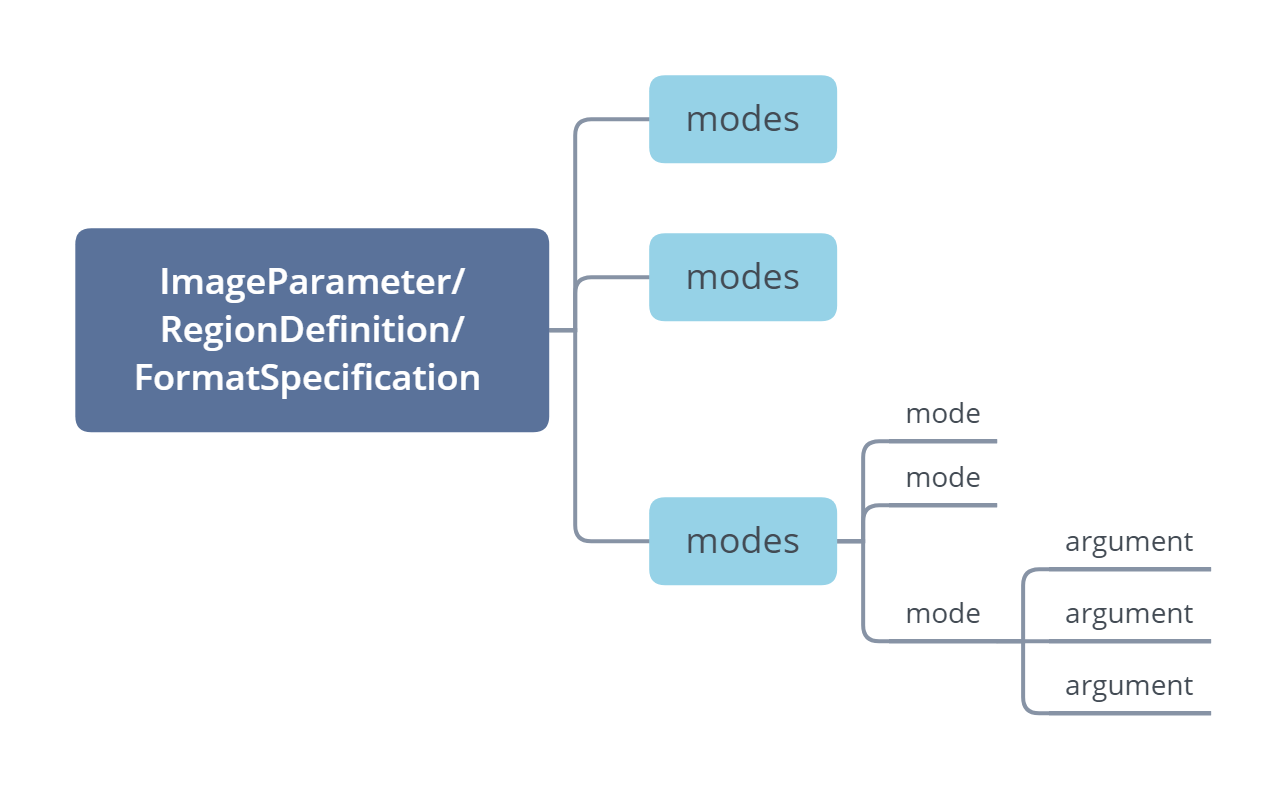
For example, one of the functions in the decoding process is barcode localization. Dynamsoft Barcode Reader provides the LocalizationModes parameter to control this function. It provides LM_CONNECTED_BLOCKS , LM_STATISTICS , LM_LINES , LM_SCAN_DIRECTLY , LM_STATISTICS_MARKS , LM_STATISTICS_POSTAL_CODE , a total of 6 methods to implement barcode localization. For LM_SCAN_DIRECTLY, there are two Arguments, ScanStride and ScanDirection .
Interfaces to change settings
Dynamsoft Barcode Reader provides two ways to set parameters: PublicRuntimeSettings and JSON template files.
PublicRuntimeSettings is used to modify the Dynamsoft Barcode Reader built-in template, and only supports commonly used parameters. The following are the steps to update Dynamsoft Barcode Reader parameters through PublicRuntimeSettings :
- (optional) Restore the parameter settings of the Dynamsoft Barcode Reader built-in template to the default values through the
ResetRuntimeSettingsinterface - Call the
GetRuntimeSettingsinterface to get the currentPublicRuntimeSettingsof the Dynamsoft Barcode Reader object - Modify the contents in
PublicRuntimeSettingsin the previous step - Call the
UpdateRuntimeSettingsinterface to apply the modifiedPublicRuntimeSettingsin the previous step to the Dynamsoft Barcode Reader object - (optional) Call the
SetModeArgumentinterface to set the optional argument for a specified mode in Modes parameters.
JSON templates supports all Dynamsoft Barcode Reader parameters. The related parameter setting interfaces are:
InitRuntimeSettingsWithFile: After calling this interface, the template definition in the file are processed according to the merging rules stated in the “Multiple parameter template files” section. Each independent template is stored in the Dynamsoft Barcode Reader object. All templates are merged into one template, then replace the built-in template of Dynamsoft Barcode Reader;InitRuntimeSettingsWithString: The effect after calling this interface is the same asInitRuntimeSettingsWithFile. The only difference is the template definition ofInitRuntimeSettingsWithStringis saved as a string;AppendTplFileToRuntimeSettings: After calling this interface, the template definition in the file will be processed according to the merging rules stated in the “Multiple parameter template files” section . Each independent template is stored in the Dynamsoft Barcode Reader object. All templates, including Dynamsoft Barcode Reader’s built-in template, are merged into one template to replace the built-in template of Dynamsoft Barcode Reader;AppendTplStringToRuntimeSettings: The effect after calling this interface is the same asAppendTplFileToRuntimeSettings. The only difference is the template definition ofAppendTplStringToRuntimeSettingsis saved as a string.
RegionDefinition and How It Works
Limiting the reading area of the barcode reader instance can help provide a better scanning UI as well optimize the performance of the SDK. It is important to understand how the RegionDefinition interface works, and what exactly you need to consider when coming up with the region percentage values.
By definition, the top parameter of the RegionDefinition is used to represent the top-most coordinate of the region, while bottom represents the bottom-most coordinate of the region. But how do you figure out the appropriate values to set them?
In order to set these values, we highly recommend setting MeasuredByPercentage to 1 to make this process as easy as possible. The next section assumes that this parameter is set to true.
For top and bottom , think of the height of the image or frame as a vertical axis that goes from 0 to 100:
- 0 represents the top-most point of the image or frame
- 100 represents the bottom-most point of the image or frame.
Please follow this diagram for a visual representation of different regions with various top and bottom values:
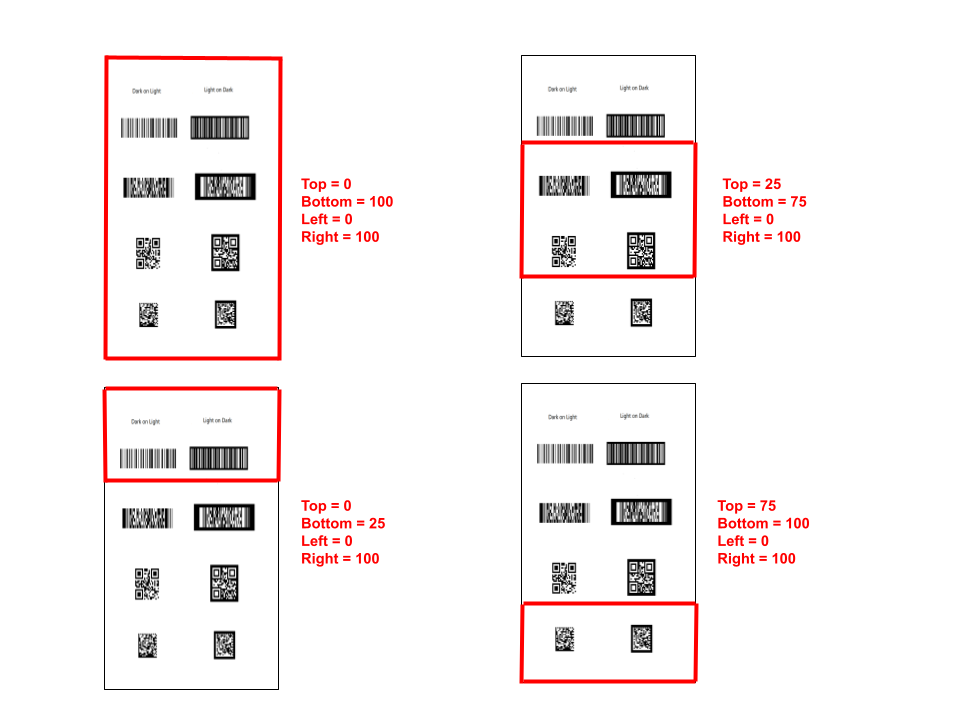
Please note that the above diagram is not limiting the horizontal view at all.
After determining where you want the top-most and bottom-most points of the reading region, you can find its corresponding percentage value either by trial and error (and using the naked eye) or you can take exact measurements and use those to calculate the exact percentage values.
Now for left and right , think of the width of the image or frame as a horizontal axis that goes from 0 to 100:
- 0 represents the left-most point of the image of frame
- 100 represents the right-most point of the image of frame
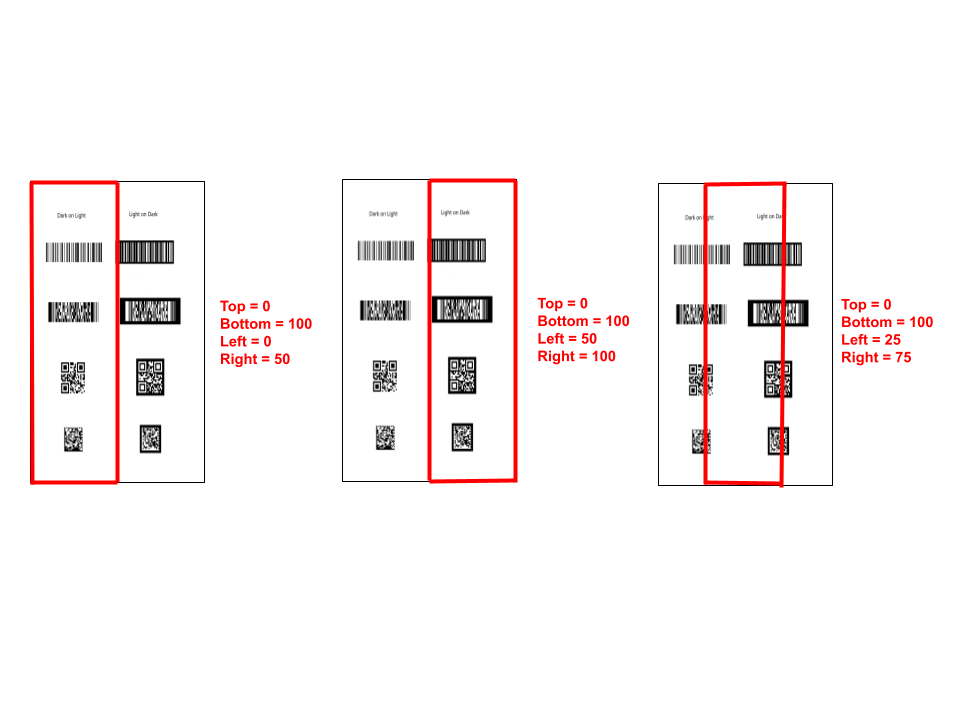
The above diagram represents various percentages and their visual representation. This assumes that you are not restricting the vertical area and leaving top and bottom unaffected.
Now let’s group them all together to demonstrate various scanerios and their corresponding values
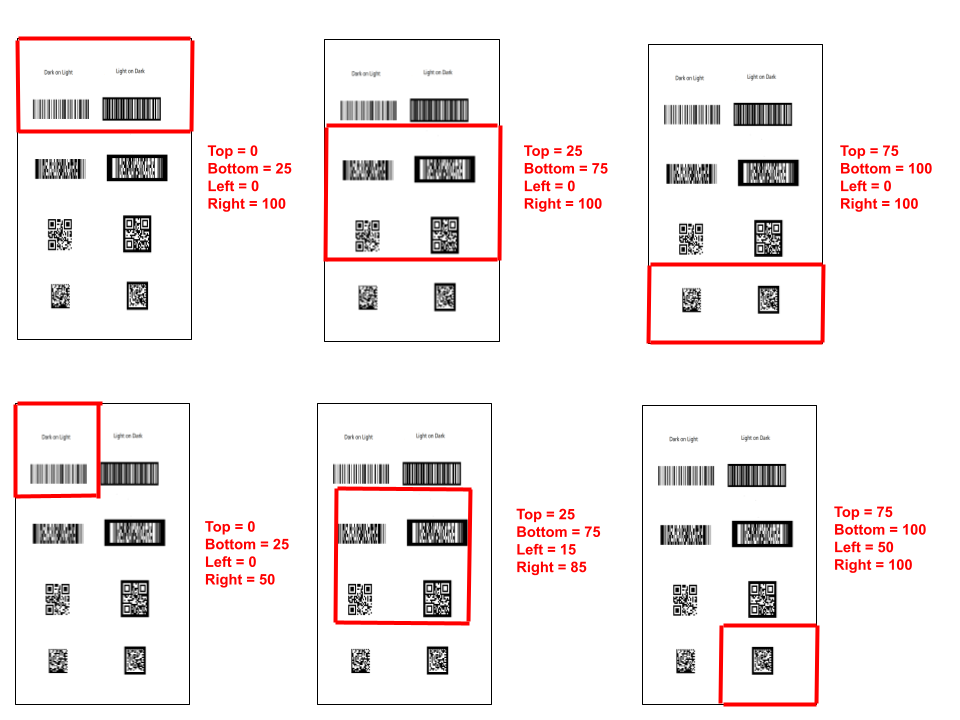
And that is pretty much a gist of how the RegionDefinition works. If anything is unclear, please contact support.
Using Runtime Settings Templates
When getting started with the runtime settings, it could be a bit overwhelming given how many settings there are and the different scenarios in which they apply.
To make things easier, we introduced three general modes to represent the RuntimeSettings :
speed: configures the SDK to read the image or frame as fast as possible, disregarding accuracy. This mode is not recommended for 2D codes in general, but specifically PDF417 codes.coverage: opposite tospeed, this mode prioritizes accuracy by sacrificing speed.balance: As the name suggests, this mode offers the best of the two modes, achieving a good combination of the two extremes.single: This is the default setting which is optimized for detecting one barcode from video input.
When using the JavaScript edition, the RuntimeSettings can be updated to any one of the three templates directly instead of having to update each RuntimeSetting individually. Please check out the corresponding documentation for more info. Please note that updating the runtime settings using a preset template is currently only supported by the JavaScript edition.
Please refer to the following breakdown the difference in the individual RuntimeSettings between the three modes, as well as the default settings
| Parameter | speed |
balance |
coverage |
single |
|---|---|---|---|---|
DeblurModes |
[DM_BASED_ON_LOC_BIN, DM_THRESHOLD_BINARIZATION, DM_DIRECT_BINARIZATION] |
[DM_BASED_ON_LOC_BIN, DM_THRESHOLD_BINARIZATION, DM_DIRECT_BINARIZATION, DM_SMOOTHING] |
[DM_BASED_ON_LOC_BIN, DM_THRESHOLD_BINARIZATION, DM_DIRECT_BINARIZATION, DM_SMOOTHING, DM_GRAY_EQUALIZATION, DM_MORPHING, DM_DEEP_ANALYSIS] |
[DM_BASED_ON_LOC_BIN, DM_THRESHOLD_BINARIZATION, DM_DIRECT_BINARIZATION, DM_SMOOTHING, DM_GRAY_EQUALIZATION, DM_MORPHING, DM_DEEP_ANALYSIS] |
BarcodeFormatIds_2 |
BF2_POSTALCODE |
BF2_POSTALCODE |
BF2_POSTALCODE |
BF2_NULL |
ExpectedBarcodesCount |
512 |
512 |
512 |
1 |
GrayscaleTransformationModes |
[GTM_ORIGINAL, 0, 0, 0, 0, 0, 0, 0] |
[GTM_ORIGINAL, 0, 0, 0, 0, 0, 0, 0] |
[GTM_ORIGINAL, GTM_INVERTED, 0, 0, 0, 0, 0, 0] |
[GTM_ORIGINAL, 0, 0, 0, 0, 0, 0, 0] |
TextFilterModes |
[0, 0, 0, 0, 0, 0, 0, 0] |
[TFM_GENERAL_CONTOUR, 0, 0, 0, 0, 0, 0, 0] |
[TFM_GENERAL_CONTOUR, 0, 0, 0, 0, 0, 0, 0] |
[TFM_GENERAL_CONTOUR, 0, 0, 0, 0, 0, 0, 0] |
LocalizationModes |
[LM_CONNECTED_BLOCKS, LM_STATISTICS_MARKS, LM_STATISTICS_POSTAL_CODE, 0, 0, 0, 0, 0] |
[LM_CONNECTED_BLOCKS, LM_STATISTICS, LM_STATISTICS_MARKS, LM_STATISTICS_POSTAL_CODE, 0, 0, 0, 0] |
[LM_CONNECTED_BLOCKS, LM_SCAN_DIRECTLY, LM_STATISTICS, LM_LINES, LM_STATISTICS_MARKS, LM_STATISTICS_POSTAL_CODE, 0, 0] |
[LM_CONNECTED_BLOCKS, LM_SCAN_DIRECTLY, LM_STATISTICS, LM_LINES, 0, 0, 0, 0] |
ScaleDownThreshold |
2300 |
2300 |
214748347 |
2300 |
 Yes
Yes No
No