




Configure the Scan Region Style
Visibility
After you call setScanRegion, the scan region is visible by default. You can hide it by calling setScanRegionMaskVisible.
- Objective-C
- Swift
[self.dce setScanRegion:[[DSRect alloc] initWithLeft:0.1 top:0.35 right:0.9 bottom:0.55 measuredInPercentage:YES]  error:nil];
[self.cameraView setScanRegionMaskVisible:NO];
try! dce.setScanRegion(Rect(left: 0.1, top: 0.35, right: 0.9, bottom: 0.55, measuredInPercentage: true)) cameraView.setScanRegionMaskVisible(false)
Scan Region Mask Style
The scan region mask style includes the stroke color, stroke width, and mask color.
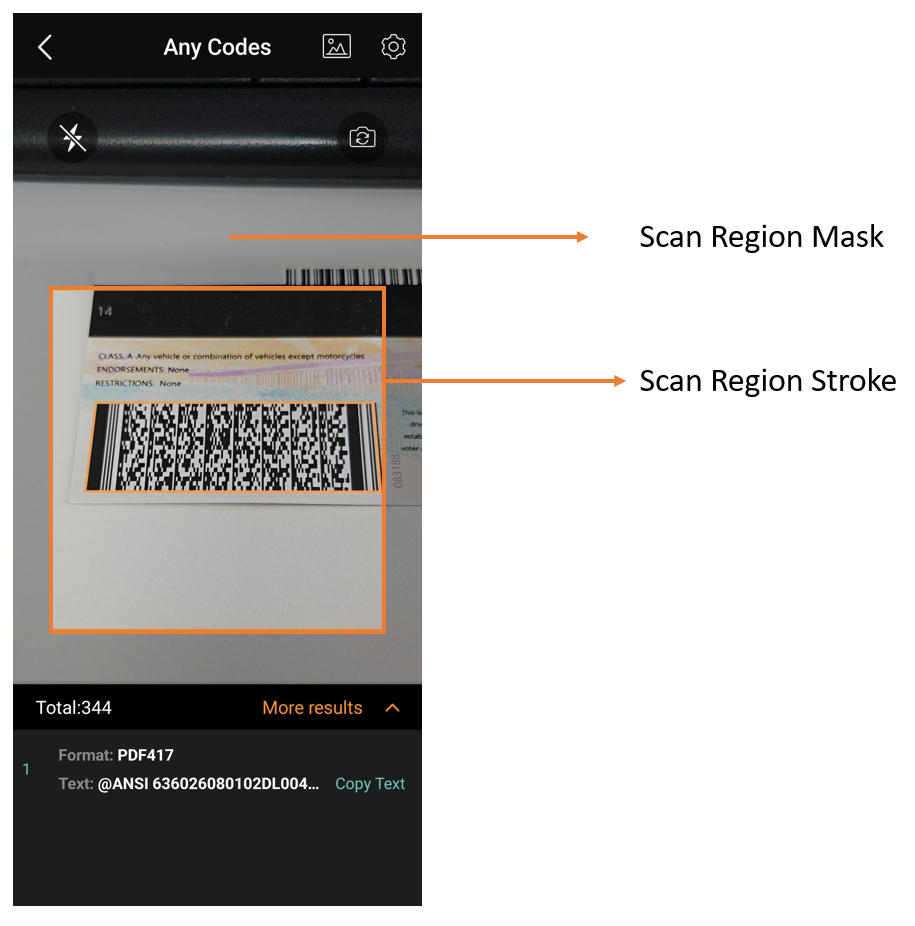
Scan Region Style
- Objective-C
- Swift
[self.cameraView setScanRegionMaskStyle:UIColor.whiteColor strokeWidth:2 surroundingColour:[[UIColor darkGrayColor] colorWithAlphaComponent:0.65]];cameraView.setScanRegionMaskStyle(.white, strokeWidth: 2, surroundingColour: UIColor.darkGray.withAlphaComponent(0.65))
Laser
The scan laser is a light bar that moves up and down to indicate active scanning. It does not affect performance. It is hidden by default. When a scan region is set, the laser movement is limited to that region.
- Objective-C
- Swift
[self.cameraView setScanLaserVisible:YES];cameraView.setScanLaserVisible(true)
 Yes
Yes No
No