




Configure the UI Elements
| Available UI Element |
|---|
| Scan region |
| Scan Laser |
| Torch button |
| Camera toggle button |
| Close button |
BarcodeScanner provides a set of UI elements that can be easily customized.
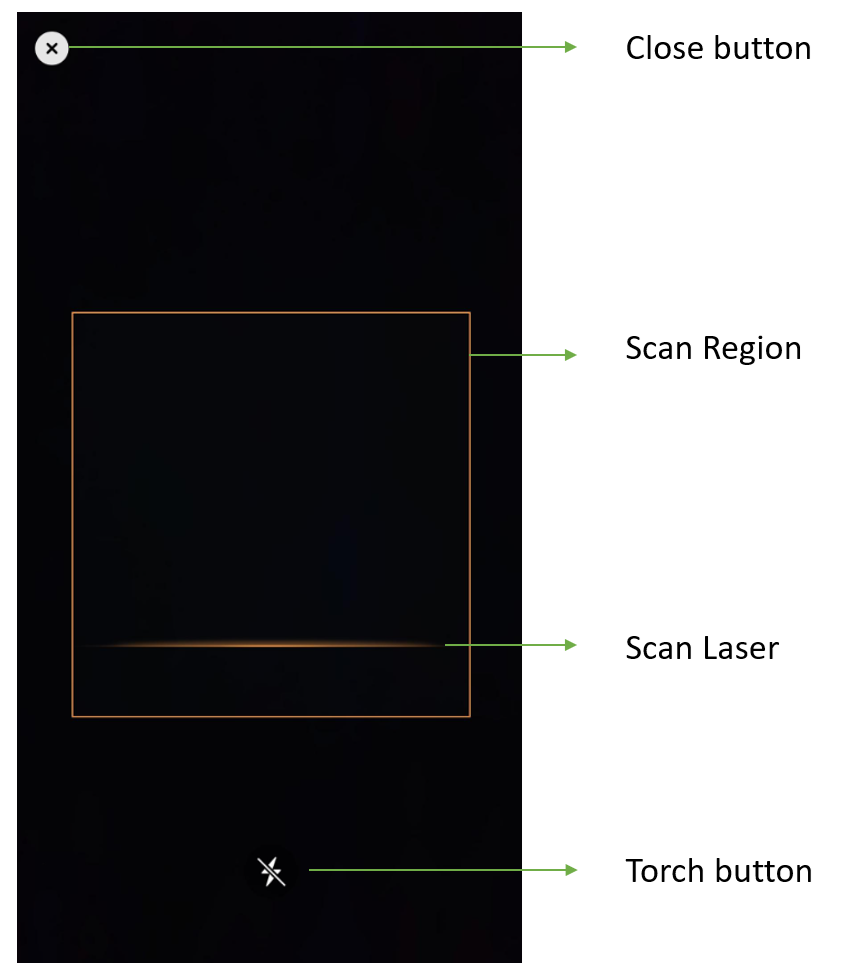
Barcode Scanner UI Components
- Close button: Stop barcode scanning and go back to the previous activity.
- Scan Region: Set a region of interest so that the algorithm focus on this region only. It can sharpenly improve the processing speed. For some special barcode types like DotCode the scan region improves the read-rate as well.
- Scan Laser: A line that moving up and down. Its moving area is limited in the scan region.
- Torch button: A clickable button that can turn on/off the torch.
Scan Region & Scan Laser
Configure with BarcodeScanner APIs
- Objective-C
- Swift
DSBarcodeScannerConfig *config = [[DSBarcodeScannerConfig alloc] init];
config.isCloseButtonVisible = false;
DSRect *region = [[DSRect alloc] init];
region.left = 0.15;
region.top = 0.3;
region.right = 0.85;
region.bottom = 0.7;
config.scanRegion = region;
config.isTorchButtonVisible = false;
config.isScanLaserVisible = false;
config.isCameraToggleButtonVisible = true;
let config = BarcodeScannerConfig() config.isCloseButtonVisible = false let region = Rect() region.left = 0.15 region.top = 0.3 region.right = 0.85 region.bottom = 0.7 config.scanRegion = region config.isTorchButtonVisible = false config.isScanLaserVisible = false config.isCameraToggleButtonVisible = true
Related APIs
Buttons
Add Buttons with BarcodeScanner APIs
Button visibility is also configured through BarcodeScannerConfig.
Related APIs
 Yes
Yes No
No