


 Blog
Blog
Dynamic Web TWAIN Security Architecture for Large-Volume Scanning
When dealing with high-volume document scanning in the browser, a critical challenge arises: what happens when you scan more pages than the available memory can handle? Without a proper solution, the application could crash, leading to data loss and a broken user experience.
This is where the ability to securely offload data to disk becomes a crucial differentiator, not just a technical feature. While many solutions might temporarily use the local disk, Dynamic Web TWAIN (DWT) ensures that this necessary step doesn’t become a security liability. It automatically encrypts all data written to the disk, protecting sensitive documents—like contracts, medical records, or financial statements—even in the event of unauthorized file access.
This post explores the two mechanisms DWT uses to manage and encrypt local data, ensuring both performance and robust security for your scanning applications.
When available memory is insufficient to hold scanned images, Dynamic Web TWAIN (DWT) automatically offloads image data to the local disk. Depending on configuration, this data is managed using Local Disk Caching or Local Storage. Both mechanisms encrypt data before writing it to disk, ensuring confidentiality even in the event of unauthorized file access.
1. Local Disk Caching
Local Disk Caching is automatically enabled and activates when available memory is insufficient, providing temporary, non-persistent storage for image data. Cache files are bound strictly to the lifetime of the DWT instance.
Security Properties
Per-Instance Key Generation
Each DWTObject generates a unique random encryption key at initialization. Keys are never written to disk and remain solely in memory.
Encrypted Cache Files
Cached image data is compressed and then protected using a dual-layer encryption scheme: AES-256-GCM and AES-128-GCM.
The encrypted output is stored on the local disk in a proprietary format that only DWT can interpret.
Strict Instance Isolation
A DWTObject can access only its own cache files. It cannot read or decrypt cache data created by other instances.
Automatic Expiration and Key Volatility
When a DWTObject is destroyed:
-
Its in-memory encryption key is lost, rendering its cache files permanently unreadable.
-
DWT automatically deletes all cache files associated with that instance.
2. Local Storage
While Local Disk Caching is temporary, Local Storage provides persistent, encrypted storage across browser sessions. It enables session recovery after crashes, restarts, or intentional exits—ideal for mission-critical or high-volume scanning workflows.
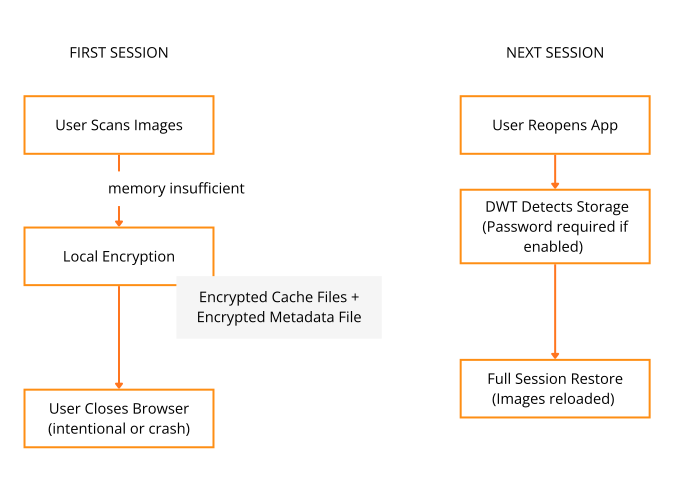
On return, DWT detects the existing session and automatically restores all previously scanned images, delivering uninterrupted workflow continuity. (This capability requires implementing the Local Storage API.)
Storage Mechanics
Local Storage uses the same encrypted and compressed caching mechanism as Local Disk Caching. It is enhanced with two key features:
-
A dedicated storage metadata file for recovery.
-
Optional password-based protection for the local storage folder.
Password-Based Protection
When creating a Local Storage instance, you can assign a password. If enabled:
-
The recovery metadata file (which contains the encryption keys) is encrypted using a key derived from the user’s password.
-
To load the storage, the correct password must be provided. Without it, the stored data is inaccessible and cannot be decrypted or restored.
Get Started
Dynamic Web TWAIN is designed to handle the realities of modern, large-volume scanning workflows—where speed, reliability, and security all matter. Feel free to explore the documentation or reach out to us for guidance on implementing these features in your environment.