


 Blog
Blog
How to Improve Enterprise Barcode Scanning Accuracy in Low Light, Glare, and Damaged Labels
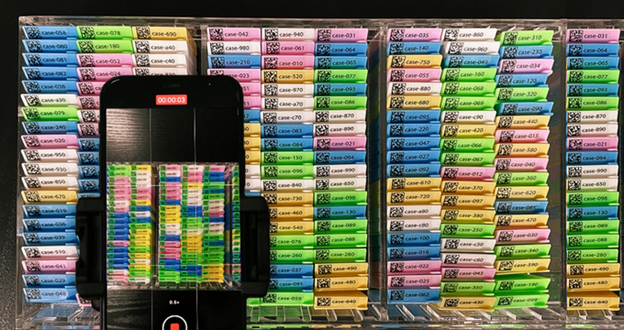
Enterprise barcode scanning requires more than image decoding; it demands reliable performance across high-speed operations, large device fleets, varied lighting, and worn labels in industries such as retail, logistics, healthcare, and manufacturing.
Barcode scanning may perform well in demonstrations but often encounters issues in production, such as variable lighting, damaged or obscured labels, small or distorted barcodes, reflective packaging, and users not allowing time for proper focus or alignment.
At Dynamsoft, we regularly analyze these patterns in enterprise deployments. To maintain accuracy in production, developers must manage and adapt the entire scanning pipeline, from image capture and preprocessing to localization, decoding, and confidence-based decisions.
This guide provides practical, product-focused techniques to enhance barcode scanning accuracy in challenging enterprise environments.
Key Takeaways for Building Reliable Enterprise Barcode Scanning
- Enterprise barcode scanning accuracy depends on pipeline control, not just decoding algorithms.
- Most accuracy failures stem from combined degradations in lighting, hardware limits, label damage, and human behavior.
- Implementing image validation, strategic preprocessing, and scannability gates prevents wasted processing and silent errors.
- Multi-strategy decoding pipelines with configurable templates are more resilient than single-path approaches.
- Confidence scores should be treated as a first-class output, enabling deterministic acceptance, retry, or user feedback decisions.
What “Accuracy” Means in Enterprise Barcode Scanning
Correctness vs Consistency vs Business Reliability
In consumer scenarios, accuracy is often binary: either a decode succeeds or fails. In enterprise systems, accuracy is multidimensional:
- Correctness: returning the right payload and avoiding false positives
- Consistency: producing the same result across devices, lighting conditions, and operators
- Business reliability at scale: ensuring results are trustworthy enough to trigger downstream actions like inventory updates, patient ID matching, or parcel routing
A scanner that occasionally returns incorrect barcodes poses greater risk than one that fails transparently. Silent errors can propagate through systems and are much harder to detect and correct later.
Why Barcode Scanning Accuracy Breaks Down in Production
Accuracy failures rarely stem from a single root cause. They usually result from minor degradations across multiple layers:
Physical Damage and Print Degradation
Physical damage and print issues such as abrasion, smudging, low-contrast ink, and partial occlusion directly reduce symbol readability and localization reliability.
Lighting, Glare, and Environmental Variability
Environmental conditions including glare from plastic wrap, shadows, and uneven illumination introduce contrast variation that often defeats uniform thresholding and naive preprocessing.
Hardware and Camera Pipeline Limitations
Hardware and capture limits, such as rolling shutter artifacts, low-light noise, autofocus lag, and insufficient resolution, can degrade image quality before decoding even begins.
Human Behavior and Scanning Technique
Human factors such as fast scanning motion, steep angles, inconsistent distance, and poor framing further compound these issues.
The bottom line? Accuracy issues usually arise from a mix of small problems, not from a single issue. That’s why you need a scanning process that can adapt and be fine-tuned, rather than relying on a one-size-fits-all approach.
Improve Accuracy by Strengthening the Image Pipeline
Validate and Normalize Image Input Early
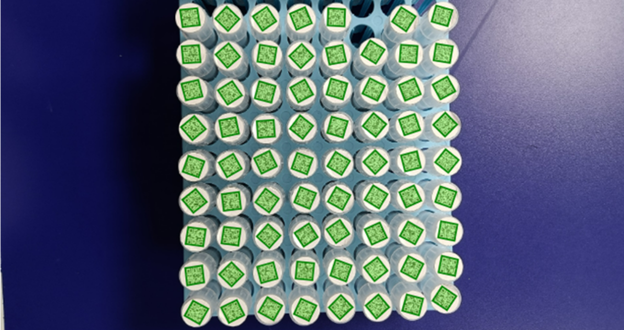
If the input frame is fundamentally weak, further decoding will not improve results. Validation and normalization must occur before decoding:
- Check barcode size in the frame: tiny symbols are extremely sensitive to blur and noise.
- Assess focus and sharpness: a lightweight sharpness metric can detect when autofocus has not settled.
- Normalize orientation, brightness, and contrast to provide more consistent input for downstream steps.
In enterprise deployments, treat camera input as untrusted. Different devices and OS-level camera APIs can produce significantly different image characteristics.
In Dynamsoft Capture Vision workflows, this stage is typically controlled by template parameters, such as RegionDefinition (to restrict scanning to a defined ROI) and ExpectedBarcodeCount (to constrain detection behavior), as well as preprocessing parameters that normalize grayscale input before localization and decoding.
Dynamsoft’s public barcode dataset includes real examples, such as a 2 mm × 2 mm DataMatrix embedded in a larger image, where slight blur or distance can immediately threaten decode reliability. These samples are invaluable for validating your input checks against reality.
Strategic Preprocessing Without Sacrificing Speed
Image preprocessing often determines whether a barcode is “unreadable” or “stable,” especially in low light or uneven illumination. Common techniques include:
- denoising to suppress sensor noise
- sharpening to restore edge contrast
- adaptive or block-based binarization to handle non-uniform lighting
However, preprocessing should be strategic, not excessive. Every millisecond matters in enterprise workflows with repeated scans or continuous operation.
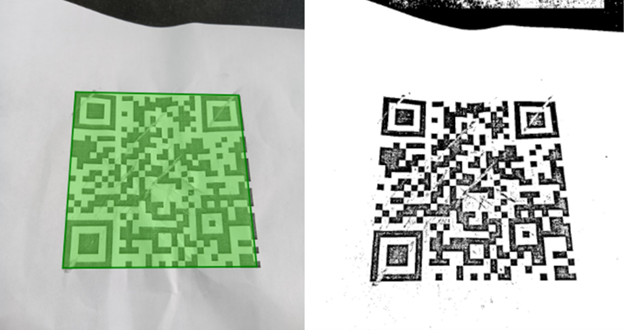
In Dynamsoft-based implementations, these behaviors are tuned via preprocessing and binarization parameters, such as BinarizationModes, enabling adaptive or block-based thresholding to be applied selectively rather than globally across all frames.
For example, a QR code partially in shadow illustrates why uniform thresholding often fails. Adaptive binarization can improve results but should be applied selectively to avoid unnecessary overhead.

Implement a Scannability Gate (Fail Fast, Guide Users)
One of the most effective ways to improve accuracy is to decide early whether an image is suitable for decoding.
A “scannability” gate can evaluate:
- insufficient sharpness
- barcode too small relative to the frame
- extreme underexposure or overexposure
- likely motion blur
When image quality is too low, fail fast and guide the user with concise prompts such as “hold steady” or “move closer.” This approach improves accuracy and perceived speed by providing immediate feedback rather than repeated failed attempts.
In practice, this logic is implemented by combining frame-level quality checks with decoding confidence values and intermediate results returned by the SDK, allowing developers to apply acceptance thresholds instead of forcing low-quality frames through full localization and decoding.
Real-world problem images (damaged, distorted, low-contrast, such as those in our dataset) are ideal for stress-testing quality assessment logic before deployment.
Image validation works best when paired with realistic test data and configurable decoding. The Dynamsoft public barcode dataset provides real-world samples, while Dynamsoft Barcode Reader (DBR) lets you adjust preprocessing, binarization, and decoding behavior through Capture Vision templates.
Use Multi-Strategy Decoding Instead of a Single Path
Because real-world scanning conditions vary widely, relying on a single decoding strategy is fragile. Robust systems use multiple, configurable decode paths to handle diverse failure modes.
Redundancy and Fallback Decode Strategies
In variable conditions, a single decoding strategy is brittle. Resilient systems rely on multiple, coordinated strategies, including:
- Repeated localization passes
- Alternative binarization settings
- Rotation and deskew retries
- Inversion handling (dark-on-light vs light-on-dark)
- Targeted blur compensation when needed
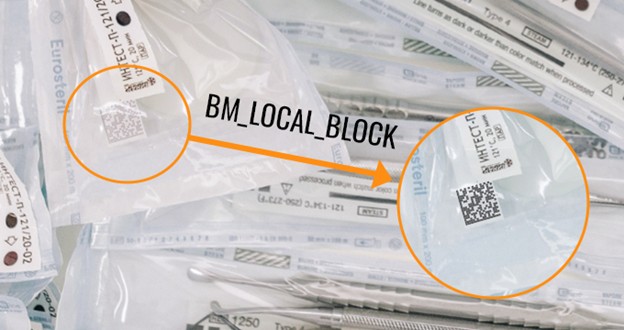
Complex samples, such as tiny inverted DotCodes with glare from plastic wrapping, often defeat single-path decoders. Multi-strategy pipelines increase success rates and reduce false positives through cross-checking.
With Dynamsoft Capture Vision, these strategies are typically implemented using multiple capture and decoding templates, each configured with different parameter sets (e.g., varying BinarizationModes, rotation handling, or inversion behavior), and executed sequentially as structured fallback strategies.
Template-Based and Modular Scanning Pipelines
Enterprise environments evolve. Label designs change. Suppliers switch printers. New barcode standards appear. Designing your pipeline with modular components allows you to adapt without extensive rewrites.
Designing the scanning workflow around configurable Capture Vision templates allows teams to adapt to these changes by adjusting parameters rather than rewriting application logic.
Product-aware integration is essential. The Dynamsoft Barcode Reader SDK is designed for configurability, allowing developers to adjust detection, preprocessing, and decoding strategies for scenarios such as tiny symbols, glare, and uneven lighting. The accompanying dataset demonstrates how different configurations affect results under real-world conditions.
Make Confidence Scores Part of Your API Contract
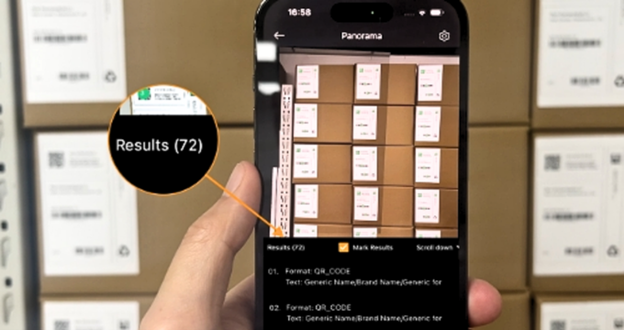
Using Confidence Thresholds to Prevent Silent Errors
Returning only a decoded string is insufficient in enterprise applications. Confidence must be included in the API contract:
- Return confidence or quality signals alongside decoded data
- Flag uncertain reads instead of forcing acceptance
- Use thresholds to decide whether to accept, retry, or request confirmation
- Expose confidence to the UI layer so applications can guide user behavior gracefully
In Dynamsoft-based systems, decoding confidence and intermediate results are exposed directly to the application layer, enabling deterministic decision-making based on SDK-provided signals rather than heuristic guessing.
This approach can eliminate a significant class of silent errors and improve trust in scanning workflows.
Learn from Production Data to Continuously Improve Accuracy
No test suite can fully replicate the diversity of production environments. Continuous learning is essential:
- Observe: log failed and low-confidence scans with device model, basic capture context, and barcode type.
- Collect feedback: allow users to mark “wrong scan” versus “couldn’t scan.”
- Improve: identify patterns and refine preprocessing, decoding strategies, or UX accordingly.
Treat barcode scanning accuracy as an ongoing process, not a one-time implementation.
Balancing Accuracy, Speed, and Resource Usage in Enterprise Environments
Perfect accuracy at the expense of responsiveness is not sustainable in enterprise environments. Developers must balance:
- fast time-to-first-result
- bounded CPU and battery usage
- stable performance on older devices
- offline capability where required
Reliability is not just correctness; it is predictable performance under real constraints.
Conclusion: Building Barcode Scanning for the Real World
Improving barcode scanning accuracy in challenging conditions requires a shift in mindset. Success depends on:
- validating and normalizing input early
- using multi-template, multi-strategy decoding instead of a single brittle path
- treating confidence as a first-class output
- learning continuously from real deployment data
Above all, test against real-world conditions, not perfection. Glare, shadows, low light, tiny symbols, and damaged labels are not edge cases; they are the norm. Enterprise-grade barcode scanning is about reliability, scalability, and adaptability in the environments where work actually happens.
Many of the behaviors discussed in this article, such as ROI definition, preprocessing and binarization control, multi-template decoding strategies, and confidence-based decision logic, are configured through Dynamsoft Capture Vision template parameters rather than hardcoded application logic.
Download 30-day trial of Dynamsoft Barcode Reader