


 Blog
Blog
Processing Human Readable Text That Accompanies a Linear Barcode
Linear barcodes are ubiquitous, found in everything from grocery stores to hospital wristbands. They’re fast and efficient, but what if a barcode is smudged or poorly printed? Compared to 2D barcodes, linear barcodes are less robust and error-prone due to the lack of, or low level of, error detection and error correction mechanisms. For this reason, we often print text that encodes the same data as the barcode.
Most often, the text string is put beneath the barcode. In demanding situations, OCR is used in two key ways: to cross-check the barcode result for 100% accuracy, or to act as a crucial backup when a barcode is completely unreadable.
The All-in-One Solution: Dynamsoft Capture Vision
To address this challenge, Dynamsoft provides an enterprise-grade solution within its Dynamsoft Capture Vision suite. It uses two specialized SDKs working in perfect collaboration:
- Dynamsoft Barcode Reader (DBR): A high-performance barcode scanner SDK that rapidly and accurately locates and decodes dozens of barcode types from any image or video.
- Dynamsoft Label Recognizer (DLR): A specialized OCR engine, powered by neural networks, designed to read text from labels and tags with exceptional precision.
DBR first identifies the barcode’s precise location, which then serves as a reference point for DLR to locate and read the accompanying text. This collaboration is managed seamlessly within the Capture Vision architecture, ensuring a fast and efficient workflow.
How to Read Human-Readable Text with a Barcode
The process of handling accompanying text is divided into two major stages: text detection and text recognition. Workflows can be configured using a JSON template.
Text Detection
Dynamsoft’s Capture Vision Suite features a modular architecture, allowing all functional modules to be seamlessly pluggable and interoperable. These modules work in a cascading sequence, where the output of one task dynamically adjusts the region of interest for the next. Task settings can be conveniently configured using a JSON template file.
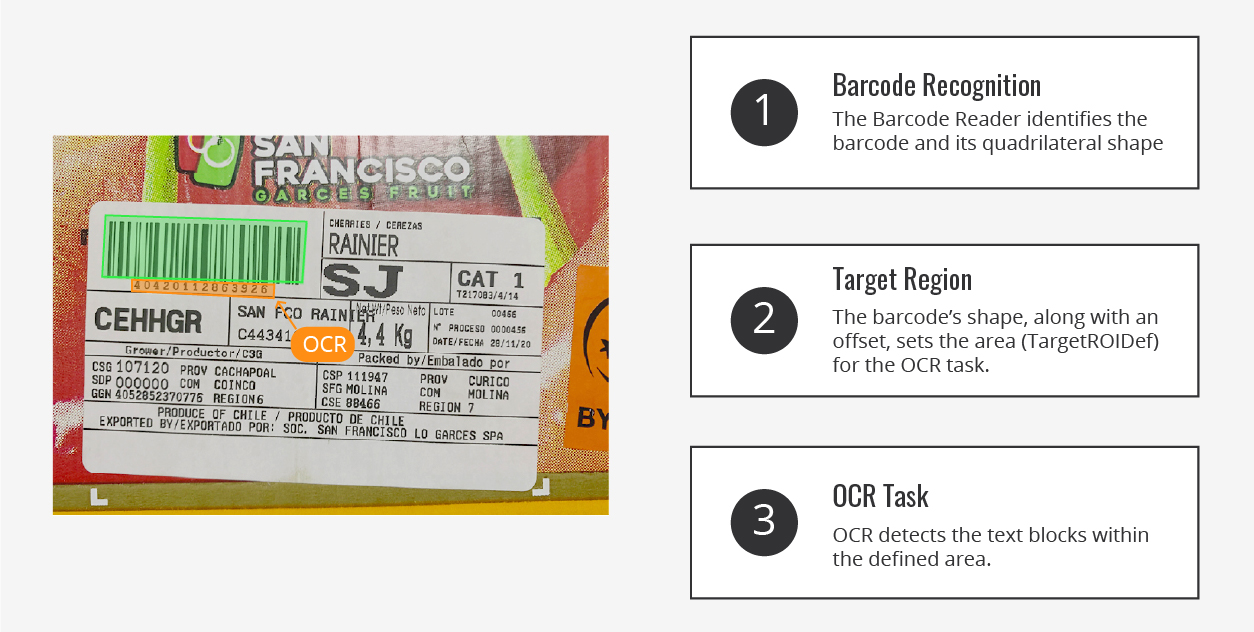
A straightforward example of this architecture in action is reading human-readable interpretations. In this workflow, Dynamsoft Barcode Reader serves as the initial task, identifying the quadrilateral of the barcode. This quadrilateral, combined with an offset setting, defines the TargetROIDef (target region of interest) for the label OCR task. The label OCR task then proceeds to detect text blocks.
Text Recognition
For each detected text block, Dynamsoft Label Recognizer SDK leverages a highly trained neural network model to perform text recognition. This SDK can be tailored to extract alphanumeric characters and standard symbols from images with different fonts, background colors, and text sizes, making it ideal for applications such as vehicle identification numbers (VINs), ID cards, inventory labels, price tags, etc. The detected characters are then returned as the OCR result, which can be compared against the barcode decoding output to ensure data integrity.
What to Do When Barcode and OCR Results Don’t Match?
If barcode and OCR data differ, handling depends on the app’s data integrity needs.
- High accuracy: Flag mismatches for manual review.
- Operational continuity: Use OCR data if the barcode fails.
Developers can choose the approach that best fits their workflow.
Customer Stories: Decoding Text Beyond Human-Readable Interpretation
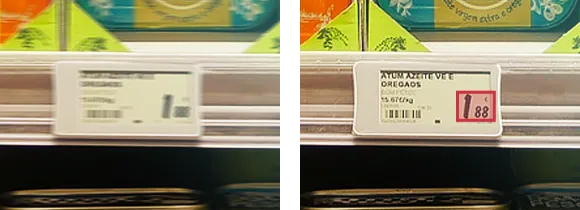
The following case studies illustrate how organizations have successfully implemented the DBR and DLR combination to solve specific business challenges and achieve measurable improvements in their workflows.
Customer No.1: Extracting Contextual Information Alongside Barcodes
A barcode scan is only useful if you can link its data to the correct field. Here is a look at how one customer solved this exact problem.
- Challenge: The customer using the Dynamsoft Barcode Reader JavaScript SDK (DBRJS) faced challenges associating scanned barcodes with the correct data fields because the scans lacked contextual information.
- Solution: The customer integrated Dynamsoft Label Recognizer (DLR) with their existing DBRJS application. This enhancement enabled real-time recognition from a video stream and allowed for the interpretation of contextual data using customizable, regex-based templates.
- Result: The integration successfully provided accurate, context-aware barcode recognition by mapping barcodes to their corresponding fields, significantly enhancing the customer’s operational efficiency.
Customer No. 2: Achieving Efficiency with Barcode and Label Scanning Integration
For many workflows, capturing just a barcode isn’t enough. Here’s how one customer validated a solution that simultaneously scans barcodes and text labels without compromising performance.
- Challenge: The customer needed to confirm that they could perform combined barcode and text label scanning in a single workflow without sacrificing the high-speed performance of their existing barcode reading operations.
- Solution: The customer rigorously tested an integrated solution using both Dynamsoft Barcode Reader and Dynamsoft Label Recognizer. Their evaluation focused on the solution’s accuracy, speed, and overall reliability.
- Result: The tests were a success, demonstrating “highly positive results.” The customer was impressed with the solution’s performance and reliability, noting three key outcomes:
- Combined Scanning Success: The solution effectively scans both barcodes and labels, ensuring accurate data capture even in scenarios where label extraction faced challenges.
- Scalability: The customer is confident in DLR’s ability to handle new label types with minimal adjustments, showcasing its adaptability.
- Performance Excellence: DBR maintained its fast-scanning speed even when combined with DLR, meeting the customer’s expectations for efficiency.
Why Use Dynamsoft Label Recognizer SDK?
Beyond a simple operational enhancement, integrating Dynamsoft Label Recognizer into a barcode scanning workflow delivers measurable benefits to the business.
- Enhanced Accuracy: Cross-checking barcode results with OCR enhances reliability, particularly in critical applications such as healthcare and inventory management.
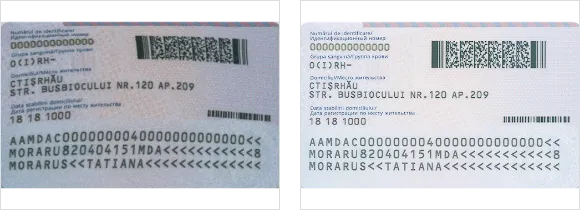
- Sophisticated Image Pre-Processing Algorithms: Dynamsoft Label Recognizer SDK employs advanced algorithms while tackling poor-quality images to enhance contrast, reduce noise, and refine image quality. These algorithms also leverage text characteristics, such as curvature, to correct distortions.
- Seamless Integration: Dynamsoft Label Recognizer SDK complements Dynamsoft Barcode Reader SDK, creating a unified solution for barcode reading as well as text recognition.
Build a Smarter, Faster, and More Resilient Solution Today
Move beyond simple scanning and build a truly intelligent workflow. Combine the power of Dynamsoft Barcode Reader SDK and Dynamsoft Label Recognizer SDK to build a faster, more accurate, and more resilient data capture solution.
See it in action with our online demos:
Download the 30-Day Free Trial: