


 Blog
Blog
How to Scan Inverted Barcodes Reliably with Dynamsoft Barcode Reader SDK
Barcodes are everywhere, and rightly so. They help streamline workflows across various industries, resulting in increased efficiency and enhanced productivity. While barcodes make everyday tasks easier, not all of them are easy to scan. One such type is the inverted barcode. If you’ve ever struggled to scan one, this blog will help you find the solution.
What is an Inverted Barcode?
Before we find the solution, let us first understand what an inverted barcode is and why most scanners fail to read them.
An inverted barcode is a barcode with reversed colors. Instead of black bars on a white background, there are white bars on a black background.
This design choice is often used to:
- Complement product packaging aesthetics
- Enhance marketing materials
- Adapt to different industrial printing conditions
Inverted barcodes may look visually appealing, but they give most barcode scanners a tough time!
What makes Inverted Barcodes Difficult to Read
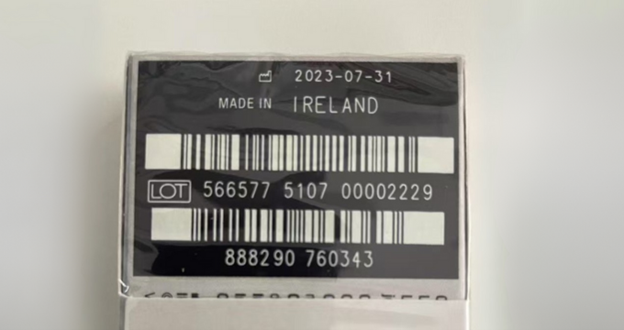
While barcodes appear to be just random stripes, they are much more than that. They contain critical information in the form of structural elements to help barcode scanners decode them.
Let’s understand the structure of a barcode.
- Start and stop patterns: These indicate where the data begins and ends.
- Quiet zone: A blank border that helps scanners identify the boundaries of a barcode.
The problem lies in the contrast of a barcode. This difference in contrast affects how various types of barcode scanners respond:
- Laser scanners rely on light reflection. If the quiet zone is dark instead of white, the scanner often fails.
-
Camera-based scanners can analyze the image for inversion clues, such as:
- A dark quiet zone instead of a light one
- Missing or flipped start/stop patterns
Without processing both inverted and non-inverted versions, it’s nearly impossible for a barcode reader to identify the right interpretation immediately.
How Advanced Barcode Scanners Handle Inverted Codes
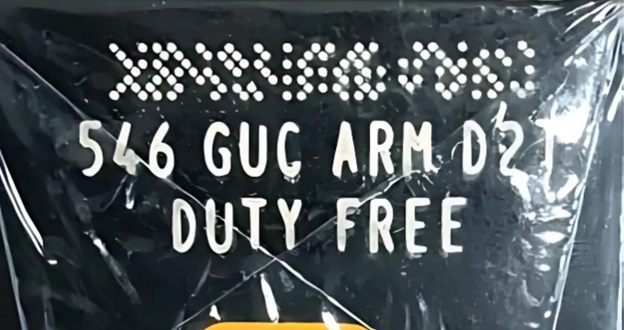
While many basic or open-source barcode readers struggle with inverted barcodes, advanced camera-based scanners are built to detect and decode them reliably and efficiently because of their image processing capabilities.
-
Quiet Zone Detection Camera-based scanners inspect the border around the barcode. A dark quiet zone signals inversion, allowing the software to adjust.
-
Finder Patterns in 2D Codes In 2D barcodes like QR codes, finder patterns (the large corner squares) make inversion detection straightforward.
-
Inverted Mode in Software Some apps include an “inverted mode,” flipping the camera input to restore a standard barcode. However, this requires manual activation, which users may not realize.
-
Machine Learning for Automatic Detection The most reliable method is automatic detection. Scanning solutions trained on thousands of barcode variations (including inverted codes) can instantly identify the format and decode it without user input.
Why It Matters
Inverted barcodes aren’t just a stylistic twist; they’re common in:
- Retail packaging, for better branding consistency
- Promotional materials, where aesthetics is crucial
- Manufacturing and logistics, where labels differ by surface and print method
If your scanning solution can’t handle inversion, you risk:
- Failed scans
- Slower workflows
- Frustrated users
Dynamsoft Barcode Reader: No Mode Switching Required to Tackle Inverted Barcodes
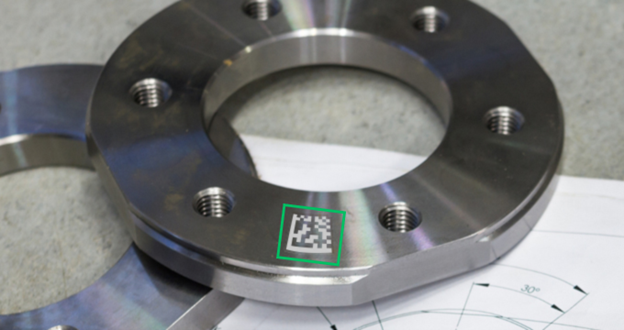
An Inverted DPM Code
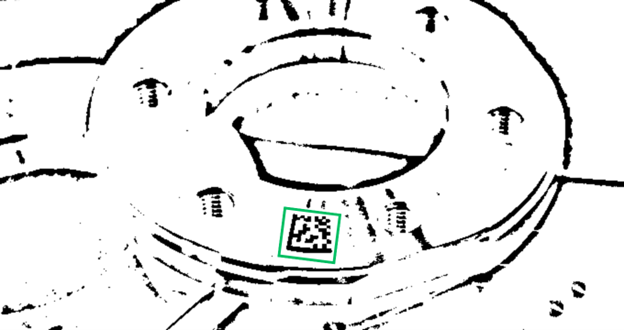
A Binarized Image produced by Dynamsoft Barcode Reader
Designed to handle inverted barcodes automatically, Dynamsoft Barcode Reader leverages the GrayscaleTransformationModes setting to fine-tune image preprocessing for accurate barcode recognition. Other features include:
- No need to toggle scanning modes
- Works seamlessly with both 1D and 2D formats
- Powered by a machine-learning model trained on countless barcode type, including inverted ones
Next Steps
Want to see it in action? Try our barcode scanner online demo and test it on any inverted barcode you’ve been struggling to scan.
Get in touch with our technical support team to learn more.