


 Blog
Blog
Why Direct-to-Backend Scanning Matters for Financial Institutions and How Dynamsoft Makes It Possible
When it comes to banking and financial services, there is zero room for ambiguity around data security. Institutions that handle sensitive documents—ID cards, contracts, application forms, checks, and compliance records—need these documents transferred securely from the scanner to their backend systems without any chance of unauthorized access or accidental storage on the end-user’s machine.
This requirement is not simply “nice to have.” It is a core part of risk mitigation, compliance, and customer trust. For many organizations, this means that security takes precedence over offering a frictionless, integrated workflow for staff. Historically, this trade-off forced teams to choose between secure but clunky methods or convenient but riskier ones.
That’s exactly the gap Dynamic Web TWAIN (DWT) fills. You can have both the end-to-end data security and a convenient data capture workflow.
Traditional Scanning Methods — And Their Limitations
Before solutions like DWT existed, most enterprises relied on one of the following workflows:
1. Using the Scanner’s Built-In Send-To Features
Many hardware scanners can send documents directly to:
- FTP servers
- Cloud services
While functional, these approaches introduce several issues:
- IT has little control over how files are transmitted.
- Devices must be configured individually.
- Email or FTP endpoints can be vulnerable to interception or misconfiguration.
- Audit logging is limited or inconsistent.
2. Saving Locally, Then Uploading Through an Application
This is still extremely common:
- User scans a document.
- Scanner software saves it on the local disk.
- Users upload the file via their internal web app.
The problems here are obvious:
- A digital copy now sits on the local machine—often unencrypted.
- Temporary or hidden files may remain even after deletion.
- Malware or unauthorized users can access these files.
- Compliance teams lose control over document flow.
These workflows are not designed for modern security expectations. Nor do they scale well for teams processing thousands of documents per day.
How DWT Modernizes the Scanning Workflow Securely
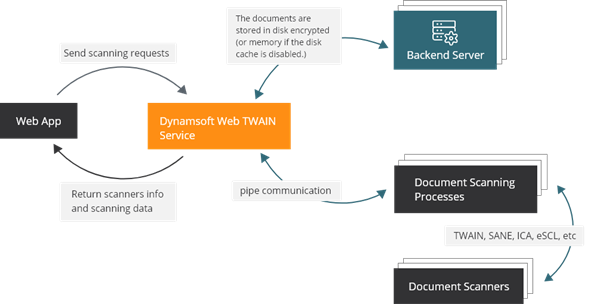
Dynamic Web TWAIN (DWT) introduces a secure, browser-based approach that eliminates unnecessary storage, reduces risk, and streamlines workflows. Full product details: https://www.dynamsoft.com/web-twain/overview/
Here’s how it works:
1. Scan Directly into the Browser — No Local Copies
DWT creates a secure in-memory buffer inside the browser environment.
This enables:
- Direct scanning to the web application
- No temporary file creation on the user’s disk
- Immediate transmission to the backend database
All operations - from capturing to previewing to submitting—occur entirely inside the organization’s-controlled web app. This dramatically reduces the attack surface.
2. Encrypted, Secure Caching for Large-Volume Scanning
Some banking workflows involve:
- Batch scans
- Multi-page transactions
- Long archival sessions
DWT handles these cases by:
- Encrypting data at rest when cached
- Automatically deleting cached files when the web application closes
- Preventing unauthorized local access
This balances security with performance, ensuring that large workflows do not overwhelm the browser.
3. Consistent, Centralized Security Policies
Compared to hardware-managed workflows, DWT places all security controls where they belong: inside your institution’s software stack.
You gain:
- Centralized configuration
- Enforced encryption
- Uniform access control
- End-to-end oversight and logging
This is significantly more secure than sending files through email or relying on unpredictable local storage behavior.
Full list of DWT security features (PDF): https://www.dynamsoft.com/Products/Dynamic-Web-TWAIN-Security-Features.pdf
Why This Approach is More Secure
To put it bluntly, the biggest risk in traditional scanning workflows is the creation of uncontrolled digital copies. Once a file touches a user’s desktop—even for a millisecond—you lose deterministic control.
DWT avoids this entirely:
- No files saved on local disk
- No unknown backups
- No exposure to OS-level vulnerabilities
- No dependency on risky email/FTP transfers
Everything stays inside the browser and passes straight into your backend environment.
For financial institutions that process critical, personally identifiable, or regulated information, this architecture is dramatically safer than legacy models.
Next Steps: Try it Free for 30 Days
If you want to modernize your scanning workflow while reinforcing security, Dynamic Web TWAIN offers a full-featured 30-day free trial.
Download it here: https://www.dynamsoft.com/web-twain/overview/
And if you want to review the platform’s security posture in detail, you can read the official security feature document: https://www.dynamsoft.com/Products/Dynamic-Web-TWAIN-Security-Features.pdf