


 Blog
Blog
Pallet Barcode Scanning Guide: From SSCC Labels to Carton-Level Verification
In the logistics and supply chain industry, barcodes are applied at every level of packaging — from the largest containers down to the smallest retail units — to support traceability, handling, and inventory control. Barcode scanning happens at all these levels and is essential for ensuring inventory accuracy and the smooth flow of goods through warehouses, distribution centers, and shipping hubs.
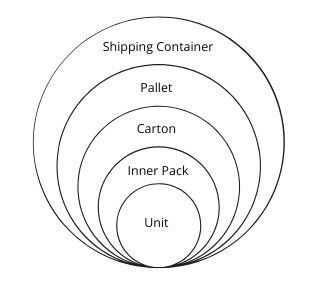
In this article, we’ll focus on barcode scanning at the pallet level, a critical step in modern logistics workflows.
Key Takeaways for Pallet Barcode Scanning
- Pallet barcode scanning enables fast identification and tracking of logistics units using SSCC labels and carton barcodes.
- Two scanning approaches are commonly used: pallet label scanning for shipment identification and carton-level batch scanning for content verification.
- Batch barcode scanning captures dozens of carton barcodes in a single workflow.
- Panoramic scan images can serve as visual audit records for traceability and compliance.
- Modern scanning solutions can reduce pallet inspection time by up to 80% compared to manual scanning.
What Is Pallet Barcode Scanning in Warehouse Logistics?
In warehouse operations, pallet barcode scanning is used to quickly identify palletized goods and confirm that the cartons or products on the pallet match the shipment records stored in a warehouse management system (WMS). This process improves traceability, reduces manual inspection time, and helps prevent shipping errors.
Common Methods for Pallet Barcode Scanning in Warehouses
Pallet scanning refers to the process of reading data from barcodes affixed to or associated with a pallet at strategic points in the logistics chain — such as loading docks, staging areas, or warehouse entrances. This can be done manually using handheld scanners or smartphones, or automated using fixed scanning systems.
There are two key types of barcode scanning when it comes to pallets, each serving a specific purpose in verifying inventory and shipment accuracy.
1. Scanning the Pallet Label or Packing List for All Barcodes
Every pallet is typically labeled with a Serial Shipping Container Code (SSCC), encoded in a GS1-128 barcode. This unique identifier is used to represent the pallet as a logistics unit. In addition to the SSCC, the label may also display critical details such as:
- Product ID
- Quantity
- Batch or lot number
- A list of carton IDs or serial numbers
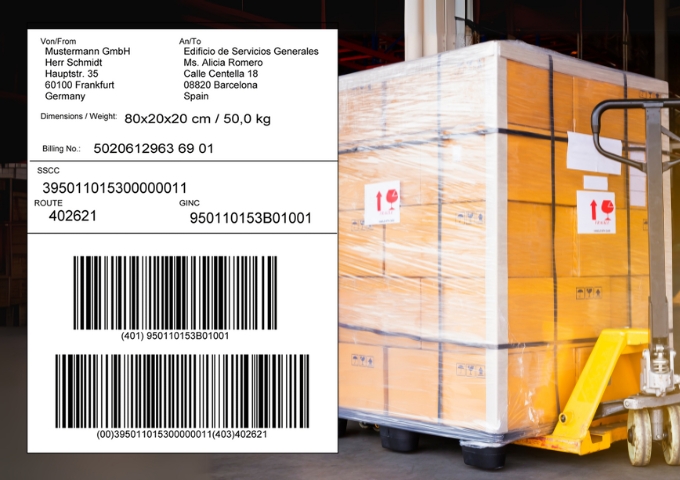
Scan the Entire Packing List at Once Using Dynamsoft Barcode Reader
Dynamsoft Barcode Reader (DBR) is optimized for high-density barcode recognition. Its Best Coverage mode processes each image with a comprehensive set of algorithms to ensure all barcodes are detected — even if they are small, close together, or printed in different formats.
Unlike typical scanners that rely on predefined symbologies, DBR’s algorithms are barcode-format independent, enabling fast and accurate decoding of mixed-format labels (e.g., Code 128 + Data Matrix) without configuration changes.
Key capabilities include:
- High-density barcode detection on pallet labels and packing lists
- Automatic decoding of mixed barcode formats without configuration
- Reliable scanning even when barcodes are small, closely spaced, or partially obscured
By scanning the pallet label with DBR, warehouse staff can quickly link the physical pallet to a digital packing list in the warehouse management system (WMS). This enables fast check-in, verification, and assignment to storage or shipment workflows. However, this step alone doesn’t confirm whether the listed cartons are actually present.
2. Batch Scanning Carton Barcodes Directly on the Pallet
To validate the actual physical contents of the pallet, logistics teams often perform carton-level batch scanning. Instead of scanning cartons one by one, workers use batch scanning software to capture dozens of barcodes in a single scan — even when they’re densely packed or partially overlapping.
This process is critical for:
- Verifying all expected cartons are present
- Detecting missing, extra, or duplicate items
- Ensuring compliance with traceability and serialization regulations
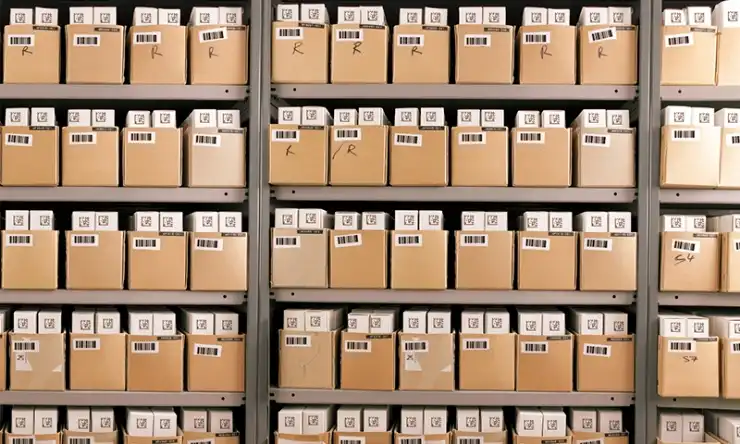
Capture All Carton Barcodes in One Image with Dynamsoft Batch Barcode Scanner
Scanning all cartons on a pallet can be challenging due to the large area and angle limitations of handheld devices. The Dynamsoft Batch Barcode Scanner iOS app solves this by letting users scan the pallet section by section. Each scan frame is stitched together into a giant panoramic image, preserving barcode positions and visibility.
Barcodes are automatically decoded and highlighted visually in the result. Users can then compare the decoded carton IDs against the expected list from the packing label to identify discrepancies instantly.
Benefits of batch pallet barcode scanning include:
- Capturing dozens of carton barcodes in a single scanning workflow
- Reducing manual scanning errors caused by one-by-one scanning
- Speeding up pallet inspection and shipment verification
Capture a Panoramic Pallet Image for Audit and Traceability
In addition to real-time verification, the stitched panoramic image generated by the Dynamsoft Batch Barcode Scanner can also serve as a visual audit record. Warehouses and logistics providers can store the image alongside shipment data to maintain a clear record of what was scanned and when — providing traceability and accountability for future inspections or compliance checks.
Improve Warehouse Scanning Efficiency – Save Up to 80% of Time
Compared to traditional handheld scanners, Dynamsoft’s scanning solutions drastically reduce the time required for pallet inspection. While a manual scanner may require several minutes to check each carton individually, Dynamsoft’s batch scanning approach allows the same task to be completed in seconds, saving up to 80% of operational time.
| Method | Time to Scan 30 Cartons | Accuracy | Notes |
|---|---|---|---|
| Manual Scanner (1-by-1) | 3–5 minutes | Medium | Labor-intensive |
| Dynamsoft Batch Scanning | < 30 seconds | High | Fully automated stitching and decoding |
Getting Started
Want to see how Dynamsoft’s barcode scanning technologies can improve pallet verification in your logistics workflow?
Book a meeting with our team to explore the solution in action, get technical guidance, and start a free trial.