


Build a Cross-Platform Python Barcode and QR Code Scanner with OpenCV and Dynamsoft SDK
Barcode Scanning has become an essential tool across various industries, from retail and logistics to healthcare. On desktop platforms, it enables the quick capture and processing of information without manual data entry, saving time and reducing errors. In this tutorial, we will continue exploring the capabilities of the Dynamsoft Capture Vision SDK by building a Python barcode scanner for Windows, Linux, and macOS.
What you’ll build: A cross-platform Python barcode and QR code scanner that decodes barcodes from static images and live webcam streams using the Dynamsoft Capture Vision SDK and OpenCV.
Key Takeaways
- The Dynamsoft Capture Vision Python SDK decodes 1D/2D barcodes (including QR codes) from images and webcam frames on Windows, Linux, and macOS with a single API call.
- Use
CaptureVisionRouter.capture()withPT_READ_BARCODESfor image files, andstart_capturing()withImageSourceAdapterfor real-time webcam barcode detection. - The SDK processes video frames asynchronously on a native C++ worker thread, keeping the Python main thread free for UI rendering with OpenCV.
- This approach supports retail inventory scanning, logistics label reading, and any desktop workflow requiring automated barcode data capture.
Common Developer Questions
How do I read QR codes and barcodes from a webcam in Python on Windows, Linux, or macOS?
Use OpenCV to capture the camera frames and send them into the Dynamsoft Capture Vision SDK through the real-time image source pipeline. The SDK handles barcode decoding on each frame while Python keeps the preview responsive on all three desktop platforms.
What Python library can decode multiple barcodes from a single image?
The dynamsoft-capture-vision-bundle package can decode multiple 1D and 2D barcodes from one image by using the barcode-reading preset templates. It is the library used throughout this article for both still images and live video.
How do I integrate the Dynamsoft Capture Vision SDK with OpenCV for real-time barcode scanning?
Let OpenCV handle frame acquisition and display, then pass the frame data into CaptureVisionRouter or the SDK’s asynchronous capture pipeline. That split keeps camera I/O simple while the barcode engine focuses on decoding.
This article is Part 3 in a 4-Part Series.
- Part 1 - Python Document Edge Detection Tutorial: Detect, Auto-Crop, and Correct Document Orientation
- Part 2 - Extract Passport MRZ Data in Python on Windows, Linux, and macOS
- Part 3 - Build a Cross-Platform Python Barcode and QR Code Scanner with OpenCV and Dynamsoft SDK
- Part 4 - Python OCR Tutorial: Recognize SEMI Semiconductor Fonts with Dynamsoft Capture Vision SDK
Python Barcode Scanner Demo on macOS
Prerequisites
-
Dynamsoft Capture Vision Trial License: Get a 30-day free trial license for the Dynamsoft Capture Vision SDK.
-
Python Packages: Install the required Python packages using the following commands:
pip install dynamsoft-capture-vision-bundle opencv-pythonWhat are these packages for?
dynamsoft-capture-vision-bundleis the Dynamsoft Capture Vision SDK for Python.opencv-pythoncaptures camera frames and displays processed image results.
Read Barcodes from Static Images with Python
Since the Dynamsoft Capture Vision SDK is a unified framework integrated with various image processing tasks, we can easily switch between image processing modes by passing the PresetTemplate name to the capture() method.
Choose the Right Preset Template for Barcode Detection
The following code snippet shows the built-in PresetTemplate enumeration in the Dynamsoft Capture Vision SDK:
class EnumPresetTemplate(Enum):
    PT_DEFAULT = _DynamsoftCaptureVisionRouter.getPT_DEFAULT()
    PT_READ_BARCODES = _DynamsoftCaptureVisionRouter.getPT_READ_BARCODES()
    PT_RECOGNIZE_TEXT_LINES = _DynamsoftCaptureVisionRouter.getPT_RECOGNIZE_TEXT_LINES()
    PT_DETECT_DOCUMENT_BOUNDARIES = (
        _DynamsoftCaptureVisionRouter.getPT_DETECT_DOCUMENT_BOUNDARIES()
    )
    PT_DETECT_AND_NORMALIZE_DOCUMENT = (
        _DynamsoftCaptureVisionRouter.getPT_DETECT_AND_NORMALIZE_DOCUMENT()
    )
    PT_NORMALIZE_DOCUMENT = _DynamsoftCaptureVisionRouter.getPT_NORMALIZE_DOCUMENT()
    PT_READ_BARCODES_SPEED_FIRST = (
        _DynamsoftCaptureVisionRouter.getPT_READ_BARCODES_SPEED_FIRST()
    )
    PT_READ_BARCODES_READ_RATE_FIRST = (
        _DynamsoftCaptureVisionRouter.getPT_READ_BARCODES_READ_RATE_FIRST()
    )
    PT_READ_SINGLE_BARCODE = _DynamsoftCaptureVisionRouter.getPT_READ_SINGLE_BARCODE()
    PT_RECOGNIZE_NUMBERS = _DynamsoftCaptureVisionRouter.getPT_RECOGNIZE_NUMBERS()
    PT_RECOGNIZE_LETTERS = _DynamsoftCaptureVisionRouter.getPT_RECOGNIZE_LETTERS()
    PT_RECOGNIZE_NUMBERS_AND_LETTERS = (
        _DynamsoftCaptureVisionRouter.getPT_RECOGNIZE_NUMBERS_AND_LETTERS()
    )
    PT_RECOGNIZE_NUMBERS_AND_UPPERCASE_LETTERS = (
        _DynamsoftCaptureVisionRouter.getPT_RECOGNIZE_NUMBERS_AND_UPPERCASE_LETTERS()
    )
    PT_RECOGNIZE_UPPERCASE_LETTERS = (
        _DynamsoftCaptureVisionRouter.getPT_RECOGNIZE_UPPERCASE_LETTERS()
    )
The PT_DEFAULT template supports multiple tasks, including document detection, MRZ recognition, and barcode detection. To optimize performance specifically for barcode detection, set the template to EnumPresetTemplate.PT_READ_BARCODES.value.
Decode Barcodes from an Image File
Referencing the previous document detection and MRZ recognition examples, the following code can be used to read barcodes from static images:
import sys
from dynamsoft_capture_vision_bundle import *
import os
import cv2
import numpy as np
from utils import *

if __name__ == '__main__':

    print("**********************************************************")
    print("Welcome to Dynamsoft Capture Vision - Barcode Sample")
    print("**********************************************************")

    error_code, error_message = LicenseManager.init_license(
        "LICENSE-KEY")
    if error_code != EnumErrorCode.EC_OK and error_code != EnumErrorCode.EC_LICENSE_CACHE_USED:
        print("License initialization failed: ErrorCode:",
              error_code, ", ErrorString:", error_message)
    else:
        cvr_instance = CaptureVisionRouter()
        while (True):
            image_path = input(
                ">> Input your image full path:\n"
                ">> 'Enter' for sample image or 'Q'/'q' to quit\n"
            ).strip('\'"')

            if image_path.lower() == "q":
                sys.exit(0)

            if image_path == "":
                image_path = "../../../images/multi.png"

            if not os.path.exists(image_path):
                print("The image path does not exist.")
                continue
            result = cvr_instance.capture(
                image_path, EnumPresetTemplate.PT_READ_BARCODES.value)
            if result.get_error_code() != EnumErrorCode.EC_OK:
                print("Error:", result.get_error_code(),
                      result.get_error_string())
            else:
                cv_image = cv2.imread(image_path)

                items = result.get_items()
                print('Found {} barcodes.'.format(len(items)))
                for item in items:
                    format_type = item.get_format()
                    text = item.get_text()
                    print("Barcode Format:", format_type)
                    print("Barcode Text:", text)

                    location = item.get_location()
                    x1 = location.points[0].x
                    y1 = location.points[0].y
                    x2 = location.points[1].x
                    y2 = location.points[1].y
                    x3 = location.points[2].x
                    y3 = location.points[2].y
                    x4 = location.points[3].x
                    y4 = location.points[3].y
                    del location

                    cv2.drawContours(
                        cv_image, [np.intp([(x1, y1), (x2, y2), (x3, y3), (x4, y4)])], 0, (0, 255, 0), 2)

                    cv2.putText(cv_image, text, (x1, y1 - 10),
                                cv2.FONT_HERSHEY_SIMPLEX, 0.5, (0, 0, 255), 2)

                cv2.imshow(
                    "Original Image with Detected Barcodes", cv_image)
                cv2.waitKey(0)
                cv2.destroyAllWindows()

    input("Press Enter to quit...")
Note: Replace the
LICENSE-KEYwith your valid license key.
Test Multi-Barcode Detection from a Single Image
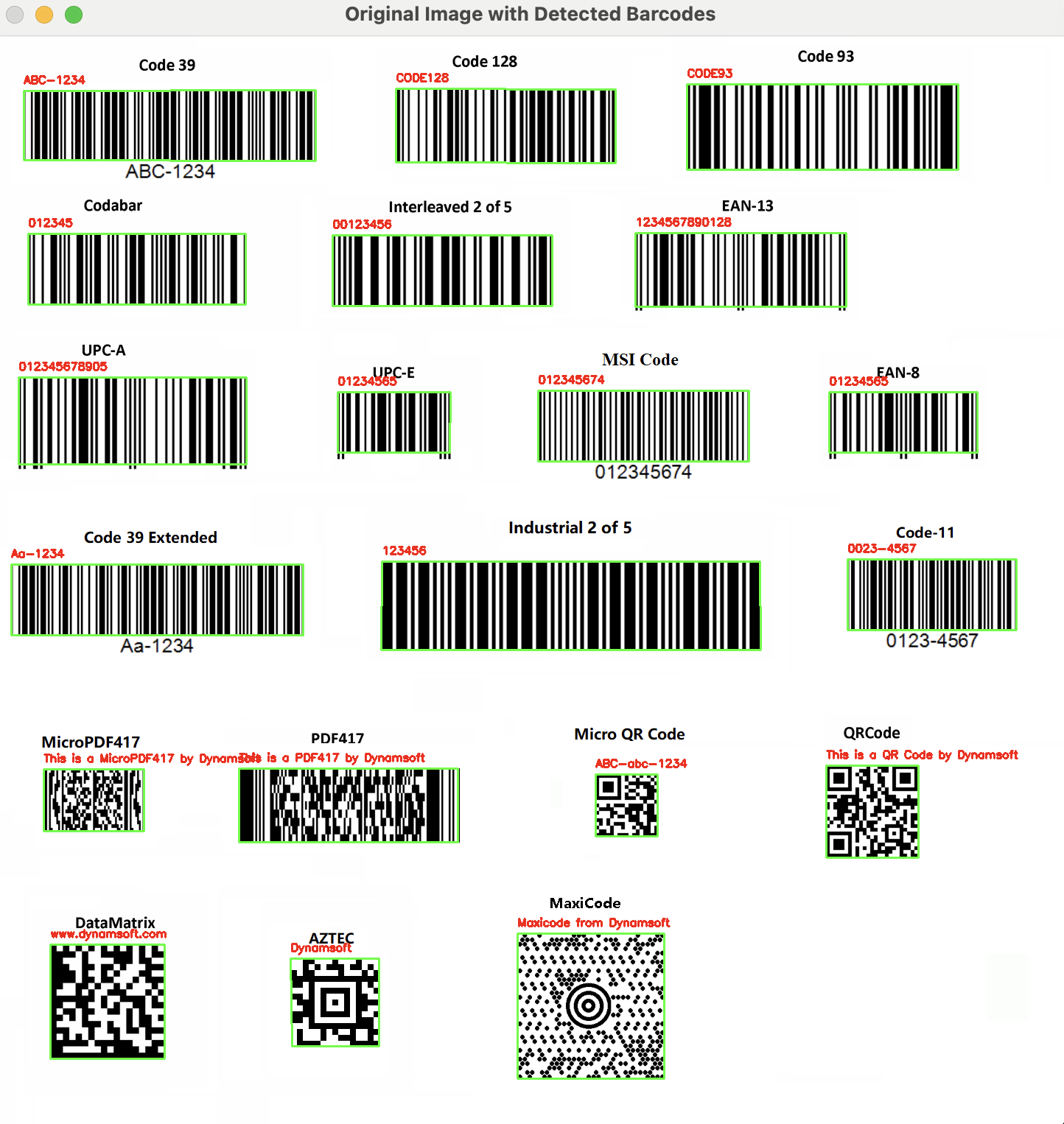
Decoding multiple barcodes from a single image is a common use case in retail and logistics. The following image contains multiple barcodes of different formats:
Scan Barcodes in Real Time from a Webcam Stream
When reading barcodes from an image file, we invoke the capture() method in the main thread. However, for processing real-time video streams from a webcam, a different approach is needed to avoid blocking the main thread. The Dynamsoft Capture Vision SDK provides a built-in mechanism for handling real-time video frames and processing them asynchronously on a native C++ worker thread. To implement this, extend the ImageSourceAdapter and CapturedResultReceiver classes to handle the image data and captured results, respectively, then call the start_capturing() method to begin processing the video stream.
from dynamsoft_capture_vision_bundle import *
import cv2
import numpy as np
import queue
from utils import *


class FrameFetcher(ImageSourceAdapter):
    def has_next_image_to_fetch(self) -> bool:
        return True

    def add_frame(self, imageData):
        self.add_image_to_buffer(imageData)


class MyCapturedResultReceiver(CapturedResultReceiver):
    def __init__(self, result_queue):
        super().__init__()
        self.result_queue = result_queue

    def on_captured_result_received(self, captured_result):
        self.result_queue.put(captured_result)


if __name__ == '__main__':
    errorCode, errorMsg = LicenseManager.init_license(
        "LICENSE-KEY")
    if errorCode != EnumErrorCode.EC_OK and errorCode != EnumErrorCode.EC_LICENSE_CACHE_USED:
        print("License initialization failed: ErrorCode:",
              errorCode, ", ErrorString:", errorMsg)
    else:
        vc = cv2.VideoCapture(0)
        if not vc.isOpened():
            print("Error: Camera is not opened!")
            exit(1)

        cvr = CaptureVisionRouter()
        fetcher = FrameFetcher()
        cvr.set_input(fetcher)

        # Create a thread-safe queue to store captured items
        result_queue = queue.Queue()

        receiver = MyCapturedResultReceiver(result_queue)
        cvr.add_result_receiver(receiver)

        errorCode, errorMsg = cvr.start_capturing(
            EnumPresetTemplate.PT_READ_BARCODES.value)

        if errorCode != EnumErrorCode.EC_OK:
            print("error:", errorMsg)

        while True:
            ret, frame = vc.read()
            if not ret:
                print("Error: Cannot read frame!")
                break

            fetcher.add_frame(convertMat2ImageData(frame))

            if not result_queue.empty():
                captured_result = result_queue.get_nowait()

                items = captured_result.get_items()
                for item in items:

                    if item.get_type() == EnumCapturedResultItemType.CRIT_BARCODE:
                        text = item.get_text()
                        location = item.get_location()
                        x1 = location.points[0].x
                        y1 = location.points[0].y
                        x2 = location.points[1].x
                        y2 = location.points[1].y
                        x3 = location.points[2].x
                        y3 = location.points[2].y
                        x4 = location.points[3].x
                        y4 = location.points[3].y
                        cv2.drawContours(
                            frame, [np.intp([(x1, y1), (x2, y2), (x3, y3), (x4, y4)])], 0, (0, 255, 0), 2)

                        cv2.putText(frame, text, (x1, y1),
                                    cv2.FONT_HERSHEY_SIMPLEX, 1, (0, 255, 0), 2)

                        del location

            if cv2.waitKey(1) & 0xFF == ord('q'):
                break

            cv2.imshow('frame', frame)

        cvr.stop_capturing()
        vc.release()
        cv2.destroyAllWindows()
Explanation
- The
FrameFetcherclass implements theImageSourceAdapterinterface to feed frame data into the built-in buffer. - The
MyCapturedResultReceiverclass implements theCapturedResultReceiverinterface. Theon_captured_result_receivedmethod runs on a native C++ worker thread and sendsCapturedResultobjects to the main thread where they are stored in a thread-safe queue for further use. - A
CapturedResultcontains severalCapturedResultItemobjects. TheCRIT_BARCODEtype represents recognized barcode data.
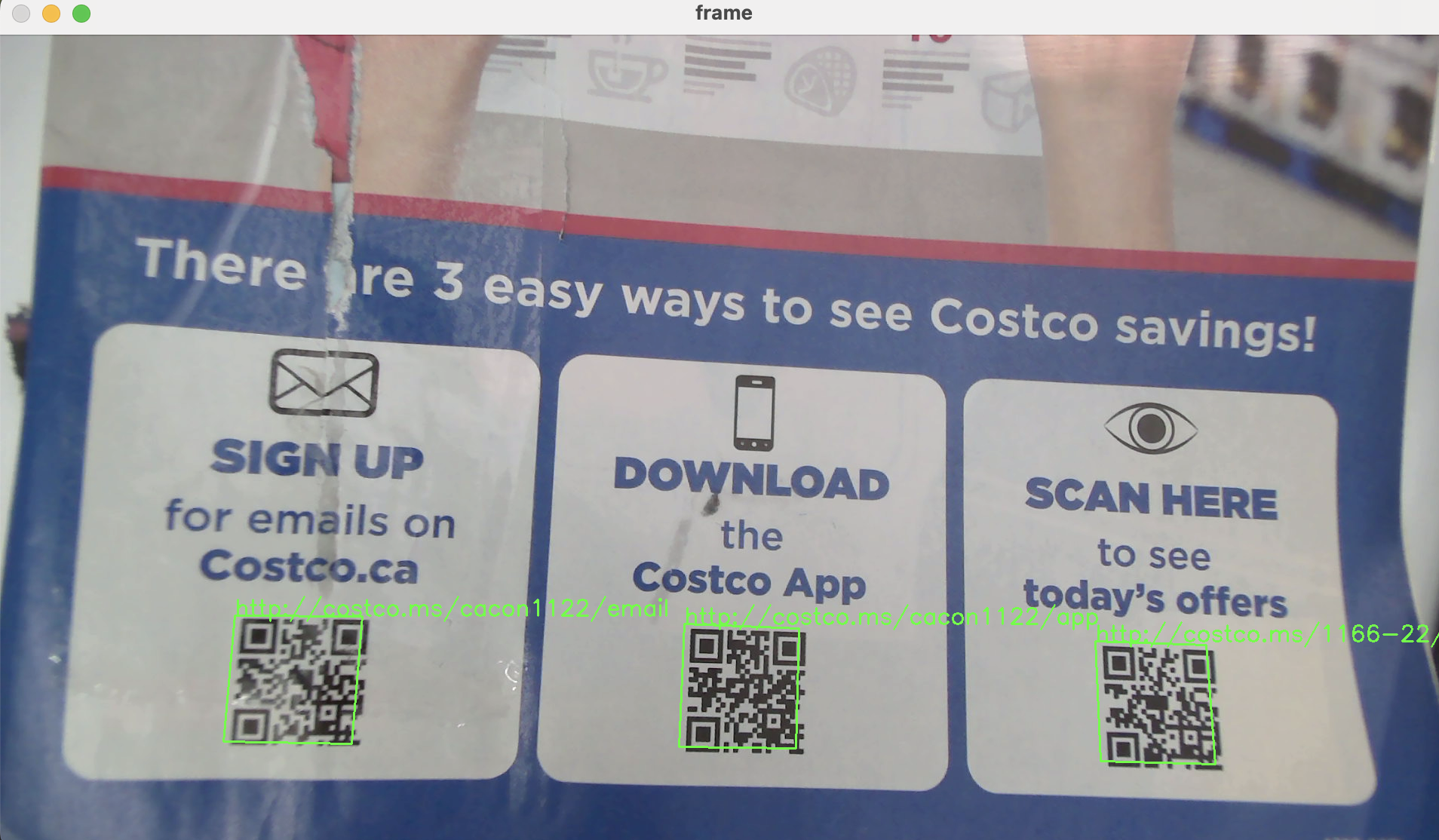
Verify Real-Time Barcode Scanning on macOS
Common Issues and Edge Cases
- Camera not detected on Linux: OpenCV’s
VideoCapture(0)may fail if the video device permissions are restricted. Runls /dev/video*to confirm the device exists and ensure your user has access (e.g., add to thevideogroup). - License initialization error: If
init_license()returns an error code other thanEC_OKorEC_LICENSE_CACHE_USED, verify that your license key is valid, has not expired, and that the machine has internet access for online activation. - Slow decoding on high-resolution frames: If webcam frames are large (e.g., 4K), decoding latency increases. Resize frames before passing them to the SDK, or switch to
PT_READ_BARCODES_SPEED_FIRSTfor faster throughput at the cost of read rate.