


 Blog
Blog
Choosing the Right Industrial Camera for Barcode Scanning on Pallets
Selecting the right industrial camera for pallet scanning is critical for reliable barcode scanning in warehouse automation environments. Camera resolution, field of view, mounting distance, and frame rate all impact performance. This guide explains how to choose the best setup for accurate 2D barcode decoding on pallets in logistics and distribution operations.
Key Takeaways
- For pallet barcode scanning, area scan cameras with at least 8MP resolution are typically recommended.
- Ensure each barcode module covers more than 2 pixels to maintain reliable decoding performance.
- Camera distance and FoV must be calculated based on pallet size and label placement.
- Higher frame rates are important when scanning moving pallets on conveyor systems.
- 2D barcodes are generally more robust and easier for industrial cameras to decode in logistics environments.
Industrial cameras play a pivotal role in automated barcode scanning across a wide range of applications—from warehousing and manufacturing to retail and logistics. Whether mounted above a conveyor belt or integrated into a robotic inspection line, the combination of an industrial camera and barcode scanning software enables fast, accurate, and hands-free barcode decoding.
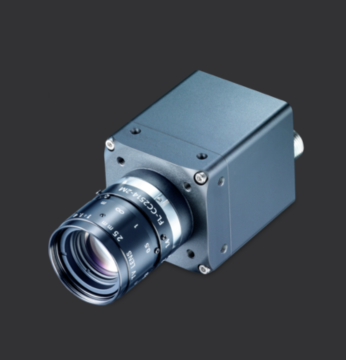
Key Factors to Consider When Selecting an Industrial Camera for Pallet Barcode Scanning
Barcode scanning performance depends heavily on the quality of the image captured. A successful scan requires careful consideration of camera specs, environmental factors, and how the barcode is presented. Below are some key aspects to evaluate:
1. Area Scan Cameras Are Preferred for General Barcode Scanning
There are two main types of industrial cameras: area scan and line scan. Area scan cameras capture a full 2D image in one shot, making them ideal for scenarios where barcodes are placed at different positions or orientations. Line scan cameras, which capture one row of pixels at a time, are better suited for continuous-motion scenarios such as high-speed production lines. For most barcode scanning use cases, especially when the object is stationary or moving intermittently, area scan cameras are the optimal choice.
2. Use a Camera with at Least 8 Megapixels for Pallet Labels
High resolution allows the camera to capture finer details, making it easier to decode smaller or more densely encoded barcodes. We recommend using cameras with at least 8 megapixels. For context, a 4K UHD camera (3840 x 2160 pixels) is roughly 8.3 MP. Higher resolution cameras also offer more flexibility when barcodes are scanned from a distance.
3. Opt for a Medium-to-Wide Field of View (FoV) Based on Pallet Size
The field of view (FoV) determines how much of the scene the camera can capture in one frame. It’s influenced by the lens, sensor size, and camera positioning. A medium-to-wide FoV is typically ideal for barcode scanning, as it allows you to cover the entire object (e.g., a box, label, or package) without compromising too much detail.
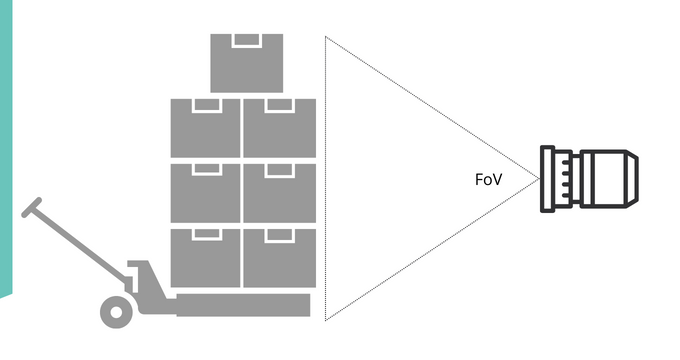
FoV is calculated using the focal length, sensor size, and working distance. This determines the visible width and height captured by the camera.
4. Manual Focus Is Usually Sufficient for Fixed-Distance Scanning
Most industrial lenses are manually focused. Once the lens is adjusted to the correct focus distance, everything within the depth of field (DoF) remains sharp. This is suitable for many fixed installations where the object distance doesn’t change. A wide DoF also provides tolerance for slight variations in object placement.
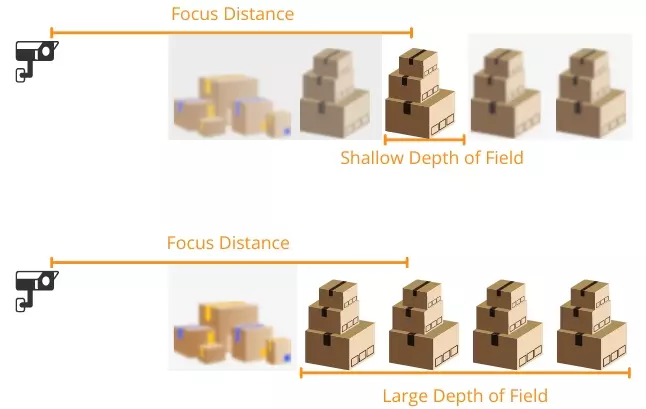
Depth of Field depends on focal length, aperture size, and focus distance—indicating how much of the image appears acceptably sharp.
5. Frame Rate Matters for Moving Pallets on Conveyors
If you’re scanning barcodes on moving objects, such as items on a conveyor belt, a high frame rate ensures that the camera captures enough images for reliable decoding. Look for cameras capable of 30 FPS or more in motion scenarios.
How Far Should the Camera Be Placed for Pallet Barcode Scanning?
The distance between the camera and the barcode depends on several factors:
- Field of View: Must be wide enough to cover the entire target area.
- Resolution: High-resolution cameras can scan smaller barcodes from further away.
- Depth of Field: Affects how much of the image remains sharp across varying distances.
- Lighting: Sufficient, even lighting is essential to avoid glare, shadows, or underexposure.
Calculate the Visible Area Based on Pallet Dimensions
To determine the width and height the camera can “see,” use:
Width = 2 * tan(FoV_horizontal / 2) * Distance
Height = 2 * tan(FoV_vertical / 2) * Distance
Example: With a 60° horizontal FoV and 1-meter distance, the width captured is approximately 1.15 meters.
| Example | |
|---|---|
| FoV_horizontal | 60° |
| Distance | 1 m |
| Width captured | 1.15 m |
Ensure Barcode Module Size Is Greater Than 2 Pixels
A common benchmark for decoding success is that each barcode module (the smallest element of the barcode) should occupy at least 2 pixels in the captured image.
| Example | |
|---|---|
| Print size of QR Code (cm) | 3 x 3 |
| Number of modules | 29 x 29 |
| Camera resolution (pixels) | 4096 x 3072 |
| Module size | 2.75 px |
Camera Mounting Guidelines for Warehouse and Conveyor Systems
For robust barcode automation, cameras must be positioned to handle:
- Various object heights or sizes
- Changes in lighting conditions
- Motion blur from fast-moving items
- Reflective or curved surfaces
Common Mounting Positions for Pallet Barcode Scanning
- Overhead: Ideal for top-down barcode placement
- Side-mounted: Good for scanning barcodes on product packaging or containers
- Angled setups: Useful for capturing barcodes at different orientations
How to Determine the Number of Cameras Needed
The number of cameras depends on your coverage needs. You might use one camera for a single-sided view, or multiple cameras to capture all sides of a product or package.
Why 2D Barcodes Are Easier for Industrial Cameras to Read
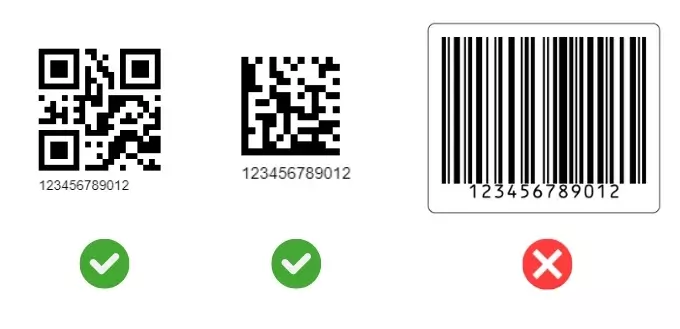
For general-purpose scanning, 2D barcodes like QR Codes or Data Matrix offer several advantages:
- Can be scanned from any angle
- Maintain readability even when partially damaged
- Take up less space and store more data
- More forgiving with lighting and alignment
Linear barcodes (e.g., Code 128) require higher resolution and precise alignment, making them more challenging in camera-based setups.
Partnering with Dynamsoft for Industrial Barcode Decoding Solutions
Selecting the right industrial camera is only part of the equation. The software that decodes the barcodes is just as important.
Dynamsoft Barcode Reader SDK supports a wide range of symbologies, offers high-speed decoding, and integrates easily with industrial cameras.
Let us help you design a camera-based barcode scanning solution that fits your exact needs.
| 📩 sales@dynamsoft.com | 📞 1-(604) 605-5491 |
Industrial Camera for Pallet Scanning – FAQs
What resolution is recommended for pallet barcode scanning?
For pallet scanning, an industrial camera with at least 8 megapixels is typically recommended. Higher resolution ensures each barcode module is captured with more than 2 pixels, improving decoding reliability at longer distances.
How far should a camera be placed from a pallet for barcode scanning?
Camera distance depends on pallet size, field of view (FoV), and barcode dimensions. The camera should be positioned far enough to capture the full pallet area while ensuring each barcode module remains larger than 2 pixels for accurate decoding.
What field of view (FoV) is needed for pallet scanning?
A medium-to-wide FoV is commonly used to cover standard pallet dimensions. The exact FoV should be calculated based on pallet width, height, and camera mounting position to ensure complete barcode visibility.
Are area scan or line scan cameras better for pallet barcode scanning?
Area scan cameras are generally preferred for pallet barcode scanning because they capture full-frame images, making them more suitable for reading 1D and 2D barcodes in warehouse automation environments.
Why are 2D barcodes easier to decode in warehouse automation?
2D barcodes include built-in error correction and store data in both horizontal and vertical directions. This makes them more robust against damage, distortion, and partial obstruction compared to traditional 1D barcodes.