


 Blog
Blog
Document Digitization Challenges in Legal Firms: Automating Classification of Receipts, Invoices, and Forms
In the high-stakes legal landscape, inefficient document management is more than an inconvenience; it’s a direct threat to a firm’s bottom line, reputation, and ethical obligations. Law firms are inundated with a constant flow of diverse documents, ranging from critical evidence files to administrative paperwork, such as receipts, invoices, and client intake forms.
Here’s why manual classification isn’t just inefficient- it’s risky. The real problem isn’t just the volume; it’s the risk that comes with manually sorting and classifying these documents. This blog post examines the distinct challenges that law firms encounter when categorizing administrative documents and proposes a secure, automated solution to mitigate risks and enhance efficiency
Why Manual Classification Puts Legal Firms at Risk

While many industries deal with paperwork, the consequences of mismanaging documents in a legal setting are uniquely severe. Manual classification is not only slow, but it’s also a liability.
- eDiscovery and Audit Deadlines: The discovery process demands the rapid production of relevant documents under strict court-ordered deadlines. Manually searching for a misfiled invoice or a specific client form can take hours, risking missed deadlines that can lead to court sanctions or even the dismissal of a case.
- Risk of Malpractice and Inadmissible Evidence: The classification of a document determines its handling and treatment. Misclassifying a form containing privileged client notes as a standard administrative document could lead to its inadvertent disclosure, potentially waiving attorney-client privilege. Such an error can result in critical evidence being deemed inadmissible and, in the worst-case scenario, form the basis of a malpractice claim.
- Compromised Client Confidentiality: The legal profession is bound by a strict duty of confidentiality. Manual processes that involve printing and physical handling increase the attack surface for unauthorized access to sensitive client information, a clear violation of professional conduct rules.
Why Receipts, Invoices, and Forms Are Especially Challenging
Manually sorting legal documents is already a risky process, and it becomes even more challenging when key files, such as invoices and receipts, all appear different.
- Receipts: Receipts are essential for billing clients and tracking expenses, but they come in various formats. For example, a dinner receipt, a travel expense, or office supplies all look different. Entering this information by hand takes time and can lead to errors, which may result in billing discrepancies and disputes.
- Invoices: These are usually more organized than receipts, but they still vary a lot between vendors. Manually finding details such as the vendor name, due date, invoice number, and line items for each invoice takes a significant amount of time and can slow down your accounts payable process.
- Forms: Forms are especially challenging. Client intake forms, court filings, and HR documents often include printed text, checkboxes, and handwritten notes. Someone has to review each form to understand and categorize it, which is challenging to do quickly and accurately.
The Solution: Secure, Automated Classification with Dynamsoft

For law firms, data security and compliance are non-negotiable. Regulations like GDPR and HIPAA impose strict requirements on data handling, and the American Bar Association’s Model Rules of Professional Conduct require lawyers to make reasonable efforts to prevent the inadvertent or unauthorized disclosure of client information.
Security/Compliance: This is where cloud-based document processing services often fall short, as they require firms to upload sensitive client data to third-party servers, creating an additional point of vulnerability. An on-premise solution keeps all your data within your firm’s secure network.
Automation Benefits: Advanced document processing technology can then be leveraged to solve classification challenges without compromising security. Rather than depending on human eyes to identify each document, modern systems can be trained to recognize and sort documents quickly and accurately.
How On-Premise Automation Solves the Problem
Dynamsoft provides a definitive solution. Our developer SDKs are engineered for on-premise deployment, meaning all document processing, from scanning and classification to data extraction, happens entirely within your firm’s own secure infrastructure.
- No Data Leaves Your Network: Client data is never transmitted to Dynamsoft or any other third-party servers, giving you complete control and eliminating the risks associated with external data processors.
- Build Compliant Workflows: By processing data on-premise, you can build applications that adhere to the strictest data privacy and residency requirements, ensuring you meet your legal and ethical obligations.
Let’s take a look at how you can use the specific capabilities of Dynamsoft’s computer vision SDKs to build a custom, automated workflow for your firm.
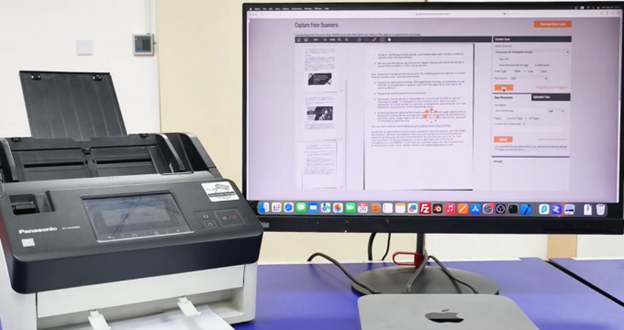
Step 1: Achieve Optimized Scans from Any Source
The accuracy of any automation process begins with a high-quality image. Dynamic Web TWAIN enables you to create powerful, browser-based scanning applications that capture high-quality images from scanners or mobile cameras. The integrated Dynamsoft Document Normalizer then automatically pre-processes these images by correcting skew, removing noise, and optimizing brightness and contrast.
Step 2: Instantly Identify & Route with Barcode Recognition
For documents that are already organized, you can create a “fast lane” for routing. Law firms often use cover sheets or stickers with barcodes to track case files, evidence, or client matters. Using the Dynamsoft Barcode Reader SDK, you can automatically:
- Read the Case or Client Number directly from a barcode on the document.
- Automate Filing: Instantly route the scanned document to the correct digital case file without any manual intervention.
- Bridge Physical and Digital: Establish a reliable connection between the physical paper document and its digital counterpart within your system.
What if there’s no barcode?
No problem. Any document without a barcode proceeds directly to the next step for full content analysis. The system will then classify it based on its text and layout, ensuring every document is correctly identified and filed.
Step 3: Pinpoint and Extract Key Data with Dynamsoft Label Recognizer
After a clean image is captured and routed, the Dynamsoft Label Recognizer analyzes the document to find and extract critical information.
Unlike traditional OCR that reads every word on a page, Dynamsoft Label Recognizer is a specialized engine designed to parse text that doesn’t follow natural language rules. You can train it to recognize the specific character patterns and layouts found in your firm’s administrative documents. This allows it to intelligently:
- Classify Document Types: By locating a unique identifier, such as the title “INVOICE” at the top of a page or a specific form number, the SDK can accurately determine the document’s type.
- Extract Critical Data Points: Its powerful OCR is used to read alphanumeric characters and symbols from specific zones. This is perfect for extracting structured data, such as an Invoice Number, Client ID, Case Filing Code, or total amount due, from a receipt. This targeted approach ensures high accuracy for the data that is essential for your workflows, eliminating the errors and inefficiencies of manual data entry.
Develop a Custom Document Processing Solution for Your Firm
Optimize workflows by adopting solutions designed to address your firm’s specific needs rather than relying on rigid, off-the-shelf applications. Dynamsoft provides robust, secure, and flexible SDKs to build the exact document processing solution you require for your legal firm.
- Integrate with Your Existing Systems: Add powerful document capture and automation features directly into your existing Case Management or Practice Management software.
- Ensure Total Security: Keep all sensitive client data on-premise, under your control.
- Build Compliant Workflows: By processing data on-premise, you can build applications that adhere to the strictest data privacy and residency requirements.
- Eliminate Manual Errors: Automate classification and data extraction to reduce risk and free up your staff for high-value, billable work.
Ready to see how our SDKs can transform your firm’s document handling?
Discuss Your Use Case with an Expert
See in Action: Try Online SDKs