


 Blog
Blog
Automating Batch Document Scanning: From Capture to Splitting, Review, and Upload
In today’s modern enterprises, paper-based workflows create significant bottlenecks. The manual process of scanning, sorting, naming, and filing documents is not only slow but also a drain on resources, a source of human error, and a barrier to efficient data access. While many businesses know they need to digitize, the sheer volume of paperwork can make the task seem insurmountable.
This is where automated batch document scanning changes the game. It’s a systematic approach that transforms stacks of mixed paperwork into organized, searchable, and secure digital assets with minimal human intervention.
Here’s how a modern automated document scanning workflow works, step by step.
Stage 1: High-Speed Batch Capture
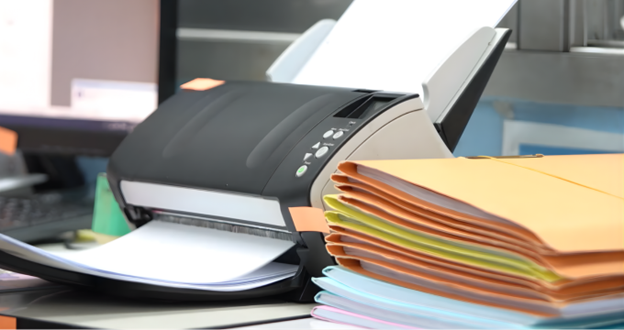
The goal of the first stage is to get a high-quality digital image of every page as quickly as possible. Manual scanning, where an operator feeds pages one by one, is too slow for high-volume environments.
How it Works: The process starts by loading an entire stack of documents into a scanner equipped with an Automatic Document Feeder (ADF). To prepare for automated separation in the next step, a simple blank page is inserted between each distinct document (e.g., between each invoice or each patient file). The scanning software then captures the entire stack in a single operation, creating one multi-page digital file.
Key Benefits:
- Speed: Ingest hundreds or thousands of pages in a single, unattended job.
- Flexibility: Handle mixed document types, sizes, and conditions without pre-sorting.
- Simplicity: Using blank sheets as separators requires no special hardware or complex pre-processing.
Stage 2: Intelligent Document Separation
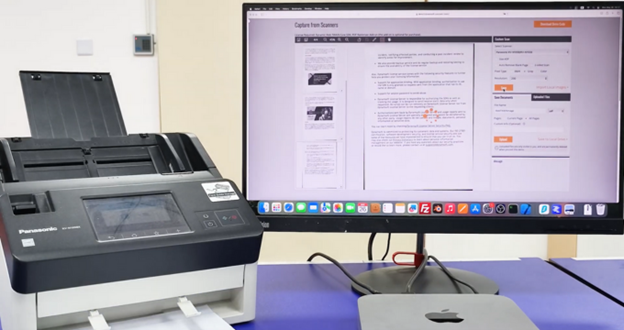
Once you have a single large file containing all your documents, the next step is to intelligently split it into individual, logically separated files.
How it Works: The software automatically analyzes the scanned batch and identifies the separator pages. Instead of just deleting these pages, it uses them as markers to divide the batch. An intelligent blank page detection algorithm is crucial here, as it can distinguish a true separator from a page with faint markings or a light letterhead, thereby preventing accidental splits or missed documents. For more complex workflows, barcodes can be used as separators, enabling documents to be categorized simultaneously.
Key Benefits:
- Automation: Eliminates the tedious and error-prone task of manually splitting files.
- Accuracy: Reduces the risk of pages from one document being inserted into another.
- Efficiency: Dramatically reduces post-scan processing time.
Stage 3: Automated Review and Data Enhancement
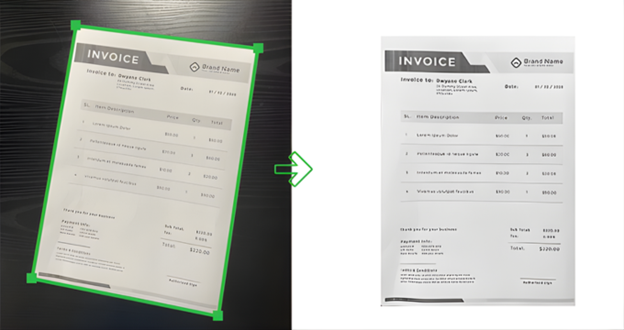
A raw scan is just an image. To be truly valuable, it needs to be legible, accurate, and searchable. This stage cleans up the images and extracts key data.
How it Works: A well-designed review interface allows an operator to quickly verify the automatically separated documents. Powerful image processing algorithms can run in the background to:
- Normalize Images: Automatically straighten skewed pages (deskew), correct orientation, and crop away black borders.
- Enhance Readability: Remove noise, spots, or shadows to produce a clean, professional-looking document.
- Capture Data via Barcodes: Key information for metadata tagging is captured automatically by reading barcodes placed on the documents. This data (e.g., a customer ID or invoice number) is used for indexing.
Key Benefits:
- Data Integrity: Ensures all digital documents are complete and legible before being archived.
- Improved Findability: Documents are indexed with reliable barcode data, making them easy to find and retrieve.
- Process Automation: Extracted barcode data can be used to automate subsequent business workflows, such as routing or naming files.
Stage 4: Secure Upload and Seamless Integration

The final step is to deliver the processed, enhanced, and indexed documents to their destination, be it a cloud storage service, an Enterprise Content Management (ECM) system, or a custom line-of-business application.
How it Works: The system automatically uploads the finalized documents. Based on the metadata extracted in Stage 3, it can perform intelligent actions, such as automated file naming (e.g., INV_12345_2025-10-08.pdf) and routing the document to the correct digital folder (e.g., /Invoices/ClientA/). All transfers should be performed over secure protocols, such as HTTPS, to ensure data protection.
Key Benefits:
- Consistency: Automated naming and filing means every document ends up in the right place.
- Accessibility: Documents are instantly available in the right systems for the right people.
- Security: Protects sensitive information during transfer and storage with encryption and secure protocols.
Building Your End-to-End Solution with Dynamsoft
Understanding the ideal workflow is the first step. To implement it, you need a powerful and flexible set of developer tools. Dynamsoft provides a comprehensive suite of SDKs that perfectly map to each stage of the automated batch scanning process, allowing you to build a custom solution tailored to your specific needs.
- For Batch Capture: Dynamsoft Dynamic Web TWAIN is an enterpise-grade SDK that embeds robust scanning capabilities directly into web applications, perfect for high-volume tasks, such as processing a day’s worth of patient intake forms or logistics paperwork.
- For Document Separation and Indexing: Dynamsoft SDKs provide highly accurate blank page detection for simple separation tasks. For more advanced workflows, Dynamsoft Barcode Reader can detect barcodes to both split documents and capture data for indexing, such as a shipment number from a proof-of-delivery slip or an invoice number in an accounts payable process.
- For Review and Enhancement: Dynamsoft Document Normalizer is specifically designed to clean scanned images. It uses automatic deskew, border cropping, and noise removal to ensure critical details, like signatures on financial contracts or medical records, are perfectly legible.
Dynamsoft SDKs are built for flexibility. They output standard formats (PDF, TIFF, JPEG) and are designed to integrate easily with any backend, DMS, or cloud service via standard web protocols.
Get Started Today
Automating batch scanning involves re-engineering an entire workflow to achieve speed, accuracy, and efficiency. Leverage the power of Dynamsoft SDKs to move from paper-based problems to data-driven solutions.
Contact our team of seasoned experts for a customized integration plan.
Try Online Demos to see each stage in action.
Download 30-Day Trials to start building.