


 Blog
Blog
Simplifying Medical Inventory: Batch Barcode Scanning for Consumer Medical Products
Managing inventory in medical clinics is a critical but often inefficient process—especially when it involves large quantities of small, tightly packed items like contact lenses. Medical reps regularly visit clinics to restock shelves, remove expired items, and ensure that the right products are available at the point of care. But traditional manual barcode scanning tools just aren’t built for speed or confined spaces, and rep time is expensive.
That’s where our batch barcode scanning solution comes in. Scanning over 100 barcodes at once and creating a panoramic image of densely packed inventory—our solution helps medical reps save time, avoid errors, and improve compliance.
In this blog, we explore how batch scanning transforms clinic visits and simplifies inventory management for consumer medical products.
The Challenge of Managing Tightly Packed Medical Inventory
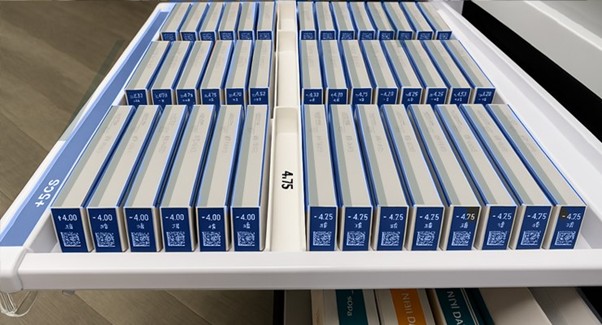
Anyone who has opened a drawer full of contact lenses knows the challenge: limited space, hundreds of SKUs, and a pressing need for accuracy. Contact lens boxes are arranged in drawers within cabins. Each has a small DataMatrix code at the end of the box which encodes the batch, prescription and expiration date. Contact lens boxes have specific slots within the drawer. A barcode at the base of an empty slot shows exactly which lens type is missing.
Medical sales reps often deal with:
- Manually scanning items laboriously one-by-one
- Missing items hidden behind others
- Difficult-to-read or damaged barcodes
- Time pressure during clinic visits
- Failure to spot and replace expired products
As a result, inventory checks are time consuming, prone to inaccurate counts and may miss replenishment opportunities.
Scanning 100+ Small Items at Once
Our batch barcode scanner was designed for exactly these challenges.
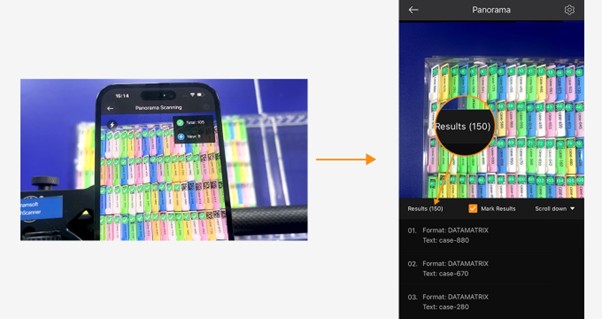
Using multi-frame scanning and image stitching, our solution captures a high-resolution panoramic image of an entire drawer, box or tray—even if items are densely packed, angled, or irregularly spaced. In one pass, you can detect, decode and capture over 100 barcodes. Items can remain in their boxes or drawers, without needing to be moved. This makes it ideal for tight spaces in clinics, eye care offices, or medical storage cabinets.
The panoramic image contains:
- Captured barcodes
- Decoded data (SKUs, lot numbers, expiry dates)
- Barcode positions
Automatically Count Items with Visual Confirmation
Forget manual counting. Our system automatically detects and counts every barcode, while also providing a clear visual confirmation. Reps can trust that every item has been logged. An itemized list of each SKU and quantity is shown.
This is valuable for:
- Checking quantities of each SKU
- Preparing restock orders
- Providing post-visit inventory reports
- Reducing administrative work for reps and back-office teams
Search and Find Specific SKUs or Expiry Dates
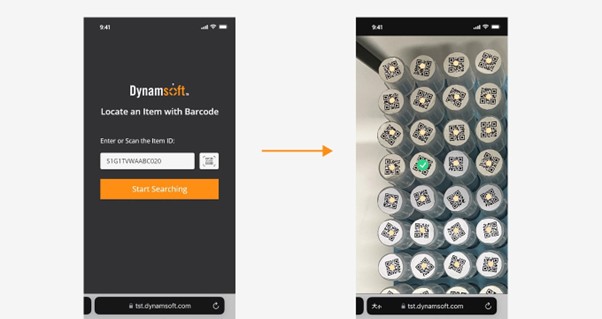
Need to locate a specific lot number or expired item? Instead of rescanning an entire batch, reps can simply search and highlight the target barcode directly within the captured image. This visual “search and find” feature helps reps:
- Quickly remove expired products
- Confirm prescription strengths before replenishment
- Instantly identify missing or low-stock items
- Rapidly find a specific product for practitioners
Save Image Records for Audit, Expiry, and Compliance
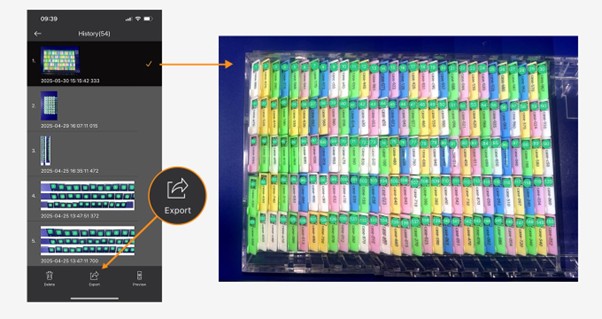
One of the most powerful features is the creation of a panoramic image showing all captured barcodes, their positions and decoded data. This not only enables reps to visually confirm the scan results but also provides documentary evidence for archive and compliance.
This means reps and manufacturers can:
- Confirm all items have been scanned correctly
- Keep records for regulatory compliance (e.g., FDA, GMP)
- Prove that expired products were removed
- Validate rep visits and inventory actions
Export Results to .CSV for archive
The summary scan image can be exported to .CSV / Excel format for easy storage and record keeping. If needed, the scanned results image can be automatically exported after every completed scan. Later, if an item needs to be checked, the stored format is easily searchable.
Faster Replenishment, Fewer Returns, and Higher Rep Productivity
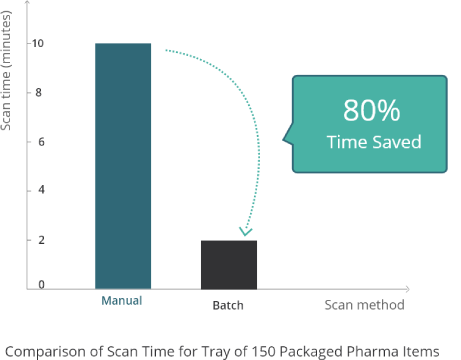
By replacing manual one-by-one scanning with accurate bulk scanning, reps can cut clinic visit times by up to 80%.
That means:
- More clinics visited per day
- Fewer errors from miscounts or missed items
- Better alignment between clinic inventory and centralized stock systems
- Reduced returns from expired or incorrect items
Better Accuracy and More Productive Reps
For any company managing packaged consumer medical products such as contact lenses, diagnostic supplies or skincare treatments, our batch barcode scanning solution offers faster scanning, visual search and verification, audit-friendly image archives. Reps visits are more efficient, errors are reduced, and time is freed up to strengthen relationships with clinic staff.
- High-speed scanning of 100+ items
- Search and find specific items
- Scan and count quantities of each SKU
- Save an archive image for compliance
Clinic-Managed Inventory
In larger clinics or clinic chains with their own inventory management software, clinic staff may handle their own stock checking and group purchasing. In this scenario, it is important that inventory scanning is easy and self-serve with minimal training needed. Our solution has several features that make scanning effortless for clinic staff:
- User guided scanning- tips to zoom in/out
- Highlight any missing or duplicate barcodes for re-scanning
- Colour-coded visual overlay to show “barcode read” and “item found”
Clarity and Control for Medical Inventory
Whether it’s during manufacturing or routine clinic visits, accurately tracking medical inventory—especially small items like contact lenses—is critical. Manual barcode scanning methods are too slow and error-prone for the pace and precision that modern healthcare demands.
Batch barcode scanning changes that by enabling users to capture over 100 barcodes in a single scan, visually confirm every item, and count, search or archive inventory records. With fewer manual errors, faster processes, and built-in audit trails, batch scanning brings clarity and control to every stage of the medical product lifecycle.
Dynamsoft Batch Barcode Scanner
Our Batch Barcode Scanner is designed to scan 100+ barcodes. It is effectively unlimited since we read multiple frames and panoramic stitching techniques. Our solution is currently available for iOS, Windows, Linux and JavaScript (beta).
Watch the video to see batch scanning in action.
Ready to start scanning smarter?
Schedule a call to discuss your specific use case.