


 Blog
Blog
Scan Document from the Web and Upload to Azure Blob Storage
Modern document scanning solutions come with the feature to scan documents from the web and upload them onto the cloud for easy access. This approach delivers seamless user experience while leveraging enterprise-grade cloud technology. Users can digitize documents without needing to install any additional software and the documents are immediately available in a secure, centralized cloud repository.
In this blog post we will explore a robust and modern solution for building a web application that can scan documents directly from a user’s browser using Dynamic Web TWAIN (DWT) and store them securely in the cloud.
The Workflow – from Scanner to the Could
The entire process is a two-step journey, starting with scanning documents using a scanner and then uploading them onto the cloud.
Step 1 - Client-Side Scanning with Dynamic Web TWAIN
Dynamic Web TWAIN is a browser-based SDK that allows users to:
- Scan documents using TWAIN/WIA/ICA-compatible scanners
- Import images and PDFs
- Edit, crop, rotate, or clean up scanned images
- Export images to base64, Blob, or PDF formats
Once the user scans a document, it can be converted into a format suitable for uploading — typically as a Blob or base64 string.
Step 2 - Uploading Documents to Azure Blob Storage
Once the document is ready, it needs to be uploaded to the Azure Blob storage. There are two primary architectural patterns to accomplish this securely and efficiently.
Option 1: Direct Upload from Browser using a SAS Token
How it works:
- The administrator generates a Shared Access Signature (SAS) . This token grants temporary, limited permission access to a specific resource in user’s Azure storage account.
- The backend securely sends the client a pre-signed URL that includes a short-lived SAS token as a query string. This URL gives the client direct, temporary access to specific resource in Azure Blob Storage for the Upload. Example -https://mystorageacct.blob.core.windows.net/?ACCOUNT_OR_CONTAINER_SAS
- The browser then uses this token to upload the scanned document directly to Azure Blob storage.
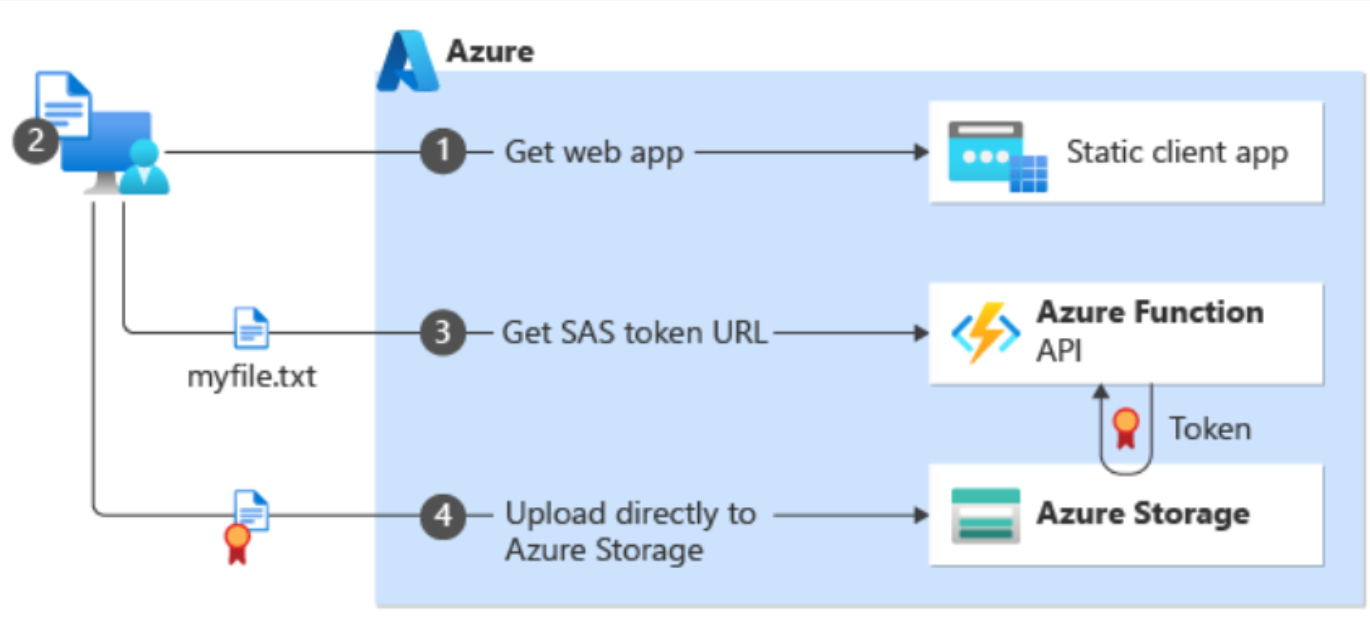
Image source: Microsoft
Pros:
- Performance: This is highly efficient method as the upload traffic goes directly from client to Azure, reducing server load and potential bottlenecks.
- Simplicity: The architecture can be simpler as the backend only needs to generate a token, not handle large file upload itself.
Considerations:
- Security: This approach is secure only if SAS tokens are strictly limited in time and permissions. Exposing long-lived tokens on the client side poses a significant security risk.
Option 2: Upload via Backend using Azure SDK or Managed Identity
How it works
- The browser sends the scanned document to the backend server via a standard HTTP POST or API endpoint.
- The backend application receives the file and uploads it using:
- The official Azure SDK to perform the upload to Blob Storage.
- If the backend is hosted on an Azure service like App Service or a Function App, users can use a Managed Identity to authenticate with Blob Storage.

Image source: Microsoft
Pros:
- Enhanced Security: User’s Azure credentials remain entirely on the server and are never exposed to the client. This is ideal for application handling sensitive data.
- Control and Flexibility: This method gives user complete control over the upload process. Users can perform additional validation, processing, or logging onto the server before the file is committed to storage.
Considerations:
- Infrastructure: It requires the user to maintain and scale a backend API to handle the upload traffic.
- Complexity: The implementation is slightly more complex, involving server-side code to receive and forward the file.
Choosing the Right Approach
Both methods work, and the best choice depends on specific needs. Here are different scenarios and the recommended approach.
| Scenario | Recommended Approach |
|---|---|
| Lightweight app, minimal backend | Direct upload using SAS |
| Enterprise security, centralized control | Upload via backend |
| Need to post-process scanned files (OCR, tagging etc.) | Upload via backend |
| High-frequency uploads with user-lever access control | Upload via backend with short-lived SAS |
Final Thoughts
By leveraging Dynamic Web TWAIN and Azure Blob Storage, you can build a powerful and modern document management solution. If you are building a document scanning solution with cloud integration, our team of experts are ready to help.
Contact us today to discuss how we can assist you in developing a seamless, secure, and scalable document scanning system.