


How to Test Document Scanning Apps with Custom Images Using Apple's Virtual Scanner on macOS
Apple provided a sample project demonstrating how to create a virtual scanner device a long time ago. The last revision was on June 12, 2012. In this article, we build a modernized fork of that sample that compiles with the latest Xcode on macOS Sequoia, ships build/install scripts, bundles multiple custom sample images that the scanner cycles through automatically, and even simulates an ADF (automatic document feeder) for multi-page scanning — then use it to test front-end document scanning applications like Image Capture and the Dynamic Web TWAIN online demo.
This article is Part 3 in a 3-Part Series.
What you’ll build: A macOS virtual scanner device (built from Apple’s archived ICA sample code, modernized and extended) that feeds your own images into any ICA-compatible scanning app — including Image Capture and Dynamic Web TWAIN — without requiring physical hardware. It automatically cycles through a folder of sample images, supports ADF multi-page scanning, and can be installed with a single script.
Key Takeaways
- Apple’s VirtualScanner sample (last revised June 2012) compiles and runs on macOS Sequoia with a single macro fix for the deprecated Carbon
require_actionfunction — already applied in the ported repo. - The modernized project bundles a folder of sample images (
Resources/SampleImages) and automatically cycles through them, so every Scan returns a different image — no manual file swapping required. - Enabling the ADF / document feeder functional unit makes a single scan job return all bundled images at once, letting you test multi-page scanning end to end.
- A one-line
build_and_install.shscript builds the Release app and installs it as an ICA device module; a Python script (verify_scanner.py) confirms discovery and scanning through the Dynamic Web TWAIN Service REST API. - This workflow is the most practical approach for automated SDK integration testing and CI pipelines where scanner hardware is unavailable.
Common Developer Questions
How do I use a virtual scanner to test document scanning apps on macOS without hardware?
Use the modernized virtual-scanner fork, run ./Scripts/build_and_install.sh, and let it install VirtualScanner.app into the Image Capture Devices folder as an ICA device module. Once the services restart, the scanner appears as Virtual Scanner EX/AF in macOS Image Capture and ICA-compatible clients such as the Dynamic Web TWAIN online demo, so you can validate scan flows without connecting any physical scanner.
How do I make a macOS virtual scanner return different images on each scan, or scan multiple pages via an ADF?
Put your sample files in Resources/SampleImages and the fork will enumerate and sort them numerically, then return the next file on every flatbed scan while persisting the current index in ~/Library/Application Support/VirtualScanner/scan_cycle_index.txt. If the client switches to the document feeder functional unit, beginScanJobImagePathsForADF: returns the whole ordered image set in one job so the same virtual device behaves like a multi-page ADF scanner.
How do I fix the “Call to undeclared function ‘require_action’” build error in Apple’s VirtualScanner sample?
That error happens because Apple’s original sample still depends on the old Carbon require_action macro, which is no longer available by default in newer Xcode toolchains. The fix is to define the macro manually in both VirtualScanner.m and EntryPoints.m; the fork linked in the article already applies that patch, so current Xcode versions can build the project without extra source edits.
Can I use the virtual scanner with Dynamic Web TWAIN or other ICA-compatible document scanning SDKs?
Yes. After installation, the virtual device is exposed through the normal ICA stack, which means Image Capture can acquire from it directly and the Dynamic Web TWAIN Service can discover it over its scanner API as Virtual Scanner EX/AF. The repo also includes Scripts/verify_scanner.py, which uses the twain-wia-sane-scanner package to list scanners, trigger a scan, and save the returned page to ./output for automated verification.
macOS Virtual Scanner Demo Video
Prerequisites
- Xcode (on macOS Sequoia or later) — not needed if you use the prebuilt package below
- The ported, ready-to-build project: github.com/yushulx/virtual-scanner/tree/main/macos
- (Alternative, no Xcode) the prebuilt
VirtualScanner-1.0.7.pkgfrom the release page - (Optional, for the original) Apple’s Virtual Scanner source code
- (Optional, for automated verification) the Dynamic Web TWAIN Service
- Get a 30-day free trial license for Dynamsoft Capture Vision.
Step 1: Build and Install the macOS Virtual Scanner
The ported repository already fixes the classic build error and adds install scripts, so you no longer have to run the target from Xcode every time.
Option A: Install the prebuilt package (no Xcode needed)
Since v1.0.4 you can skip building entirely, and the one-line installer is the easiest way to do it. The .pkg is ad-hoc signed, so a browser-downloaded copy is refused by Gatekeeper (“Apple could not verify …”), while the curl path installs cleanly:
curl -fsSL https://raw.githubusercontent.com/yushulx/virtual-scanner/main/macos/Scripts/install.sh | bash
The script resolves the latest release automatically (pin one with … | bash -s -- 1.0.7). To install the package manually instead, download VirtualScanner-1.0.7.pkg from the release page and run:
sudo installer -pkg VirtualScanner-1.0.7.pkg -target /
# then open Image Capture: "Virtual Scanner EX/AF"
The package installs VirtualScanner.app as an ICA device module together with the 11 sample images, so Image Capture and Dynamic Web TWAIN list Virtual Scanner EX/AF right after installation, with a different picture on every scan. The package is ad-hoc signed; sign and notarize it with your own Developer ID before distributing it widely.
Option B: Build from source
The ported repository already fixes the classic build error and adds install scripts, so you no longer have to run the target from Xcode every time.
On a fresh Mac, the one-command route is ./Scripts/setup.sh: it builds and installs the device module (delegating to build_and_install.sh), starts the Bonjour advertisement, makes sure the Dynamic Web TWAIN Service is installed and running, and prepares the Python environment for verify_scanner.py. Pass --skip-dwt, --skip-python or --skip-build to opt out of individual steps. The few tunable values — the service URL, the installer download URL and the license key used for local CLI scanning — are centralized in Scripts/scanner.config.
Fixing the require_action build error (already applied)
If you build Apple’s original sample on Xcode 14+, you hit:
Call to undeclared function 'require_action'; ISO C99 and later do not support implicit function declarations
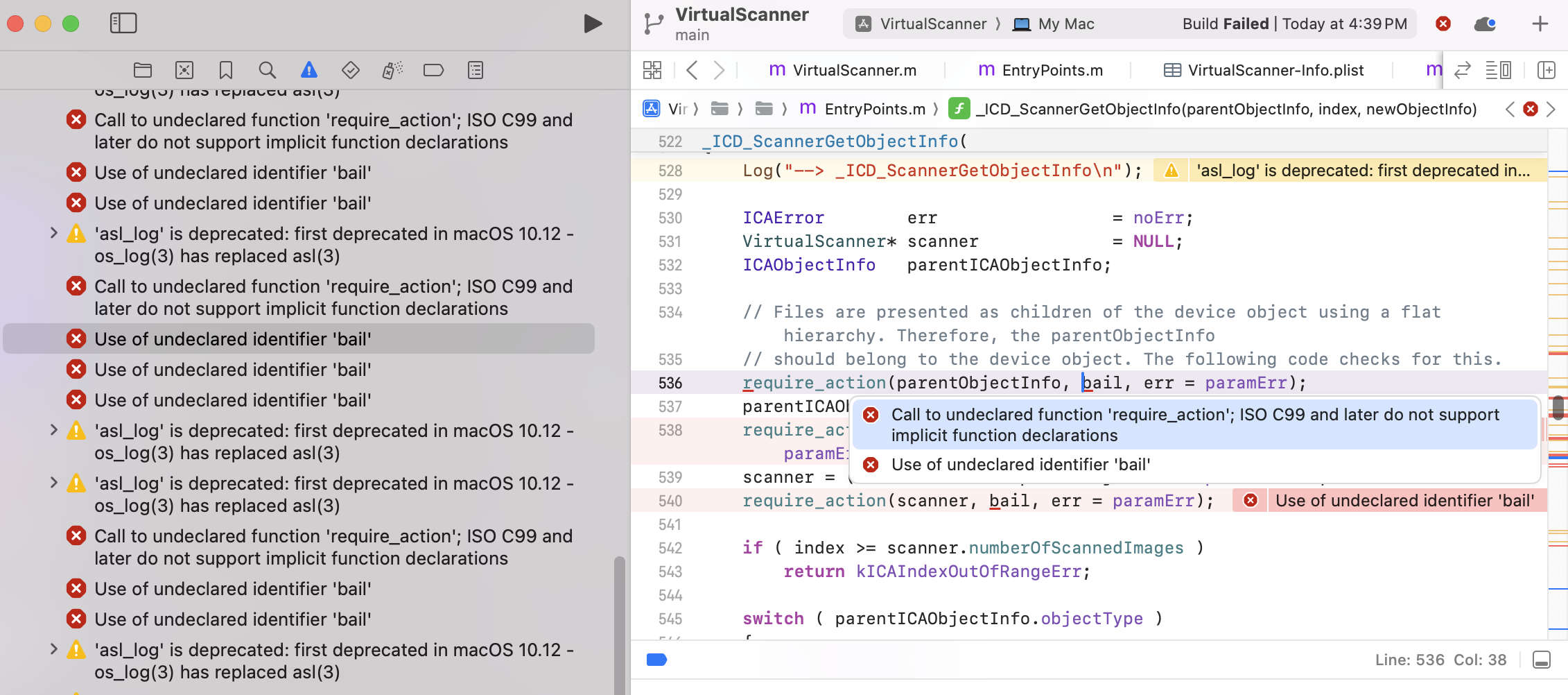
This happens because the require_action macro lived in the now-deprecated Carbon framework. The fix is to define the macro in both VirtualScanner.m and EntryPoints.m:
#define require_action(condition, exceptionLabel, action) \
    do { \
        if ( __builtin_expect(!(condition), 0) ) { \
            action; \
            goto exceptionLabel; \
        } \
    } while(0)
The ported project already includes this fix, so it builds out of the box with ad-hoc signing (Sign to Run Locally) — no Apple Developer account required.
Build and install as an ICA device module
Instead of placing the app in /Library/Image Capture/Devices/ by hand (which is unreliable on recent macOS), use the provided script:
# Install for the current user (no admin rights)
./Scripts/build_and_install.sh

# Or install machine-wide (requires sudo)
./Scripts/build_and_install.sh --system
The script builds the Release configuration, copies VirtualScanner.app into the Image Capture Devices folder, and restarts the Image Capture services so the device is picked up immediately. In Image Capture and Dynamic Web TWAIN it appears as Virtual Scanner EX/AF.
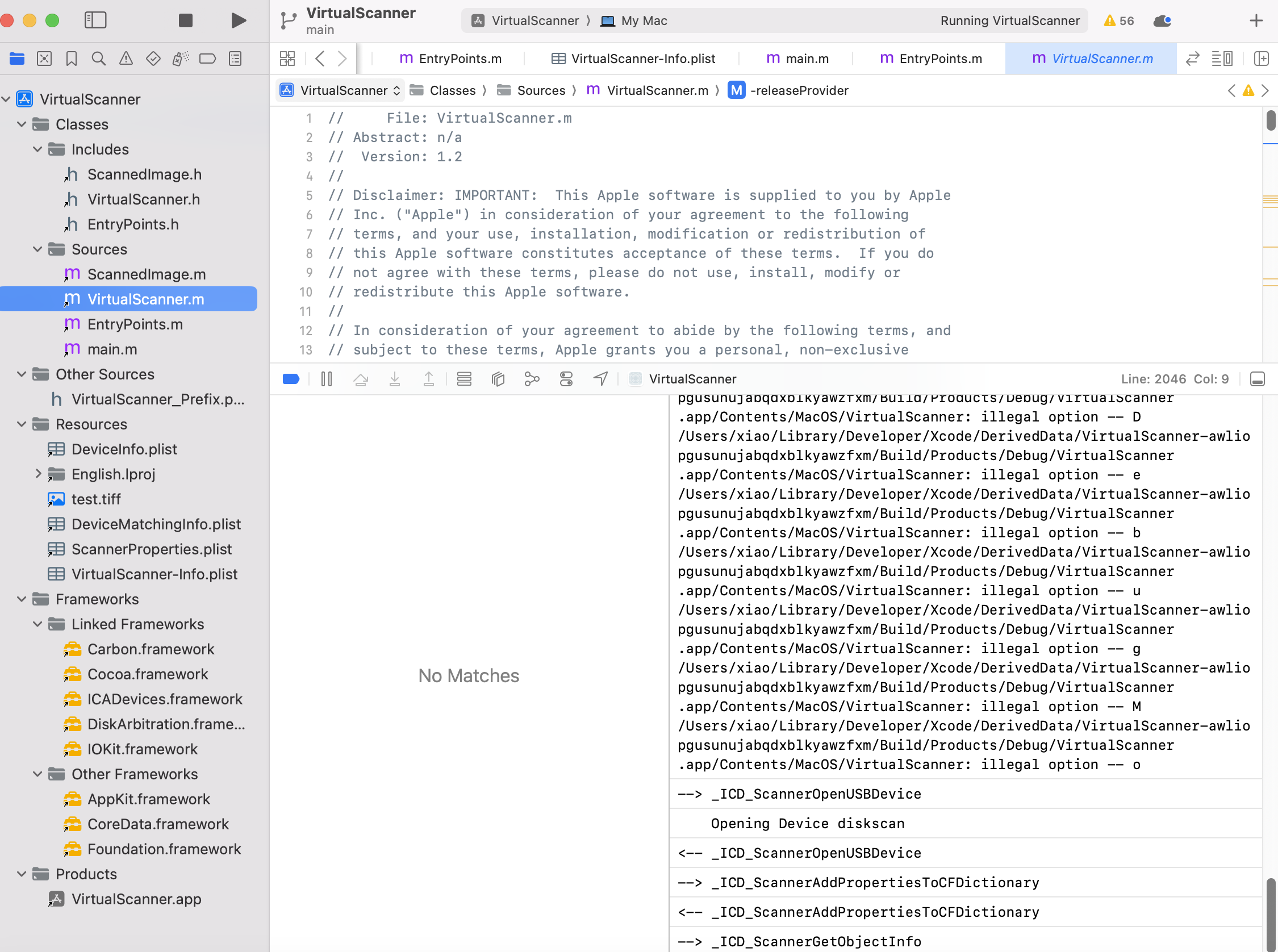
Tip: If a machine-wide copy exists at
/Library/Image Capture/Devices/VirtualScanner.app, macOS (icdd) loads it in preference to the per-user copy — so a user-scope rebuild can appear to have “no effect.”build_and_install.shnow detects this and offers to update the system-scope copy too.
Step 2: Feed Custom Images (with Automatic Cycling)
The original sample scanned a single hard-coded test.tiff. The modernized project instead bundles a folder of images under Resources/SampleImages (named 1.png … 11.png) and automatically cycles through them:
- Each Scan returns the next image in the folder, wrapping back to the first after the last.
- The current position is persisted in
~/Library/Application Support/VirtualScanner/scan_cycle_index.txt, so cycling continues across separate scan sessions — even from the online demo, which has no way to pick an image itself.
To add your own documents, just drop images into Resources/SampleImages and rebuild. To force a specific image instead of cycling, write its filename to ~/Library/Application Support/VirtualScanner/selected_image.txt (or use verify_scanner.py --image 3.png); delete that file to resume auto-cycling.
Step 3: Simulate an ADF for Multi-Page Scanning
When the client enables the document feeder / ADF functional unit — for example by checking Use ADF in the Dynamic Web TWAIN demo — a single scan job returns all bundled sample images at once, one page per image, starting from the current cycle position. This lets you exercise multi-page acquisition without any manual selection. Flatbed scans return a single image per click and advance the cycle by one.
Under the Hood: Key Source Code Changes
All the behavior above lives in Sources/VirtualScanner.m. Here are the essential changes over Apple’s original sample.
1. Load bundled sample images instead of a single test.tiff
Apple’s sample always scanned one hard-coded test.tiff. The fork enumerates every image in Resources/SampleImages and sorts them numerically so the cycle order is predictable (1.png, 2.png, … 11.png):
- (NSArray*)bundledSampleImagePaths
{
    NSString* imagesDir = [[[NSBundle mainBundle] resourcePath] stringByAppendingPathComponent:@"SampleImages"];
    // ... collect non-dot filenames ...

    // Sort numerically by filename stem (1.png, 2.png, ... 11.png)
    [names sortUsingComparator:^NSComparisonResult(NSString* a, NSString* b) {
        NSInteger aNum = [[a stringByDeletingPathExtension] integerValue];
        NSInteger bNum = [[b stringByDeletingPathExtension] integerValue];
        if ( aNum > 0 && bNum > 0 )
            return (aNum < bNum) ? NSOrderedAscending : (aNum > bNum) ? NSOrderedDescending : NSOrderedSame;
        return [a compare:b];
    }];
    // ... return absolute paths ...
}
2. Persist the cycle index across scan sessions
The current position is stored in a tiny file under Application Support, so cycling survives across separate scan sessions and processes (each scan spins up a fresh device process):
- (NSInteger)currentCycleIndex
{
    NSString* indexContents = [NSString stringWithContentsOfFile:[self cycleIndexFilePath]
                                                        encoding:NSUTF8StringEncoding error:NULL];
    return indexContents ? [indexContents integerValue] : 0;
}

- (void)persistCycleIndex:(NSInteger)index
{
    // create ~/Library/Application Support/VirtualScanner/ and write scan_cycle_index.txt
    [[NSString stringWithFormat:@"%ld", (long)index] writeToFile:[self cycleIndexFilePath]
                                                      atomically:YES encoding:NSUTF8StringEncoding error:NULL];
}
3. Split flatbed and ADF image selection
This is the heart of the change. For each scan job, beginScanJobImagePathsForADF: returns the ordered list of images to scan and advances the cycle index. A flatbed job returns one image (and moves the cycle forward by one); an ADF job returns all images at once:
- (NSArray*)beginScanJobImagePathsForADF:(BOOL)isADF
{
    // An explicit selection file always wins (no cycling).
    NSString* explicit = [self explicitSelectionImagePath];
    if ( explicit )
        return [NSArray arrayWithObject:explicit];

    NSArray*  images = [self bundledSampleImagePaths];
    NSInteger count  = (NSInteger)[images count];
    NSInteger start  = [self currentCycleIndex];
    if ( start < 0 || start >= count ) start = 0;

    NSMutableArray* jobPaths = [NSMutableArray array];
    if ( isADF )
    {
        // ADF: one page per bundled image, in cycle order.
        for ( NSInteger i = 0; i < count; i++ )
            [jobPaths addObject:[images objectAtIndex:( ( start + i ) % count )]];
        [self persistCycleIndex:( ( start + count ) % count )]; // keep next job aligned
    }
    else
    {
        // Flatbed: one image, then advance so the next Scan differs.
        [jobPaths addObject:[images objectAtIndex:start]];
        [self persistCycleIndex:( ( start + 1 ) % count )];
    }
    return jobPaths;
}
4. Reload the image source for each scanned page
Apple’s original used a hard-coded two-page feeder (int documentFeederScans = 2;) and reused the same loaded image for every page. The fork drives the loop from the resolved image list and reloads the image source for each page, so ADF pages actually differ:
BOOL     isADF          = [self.selectedFunctionalUnitTypeString isEqualToString:@"3"]; // "3" == document feeder
NSArray* jobImagePaths  = [self beginScanJobImagePathsForADF:isADF];
if ( [jobImagePaths count] == 0 )
    return kICADeviceInternalErr;

// One page per entry: 1 for flatbed, N for ADF.
int        documentFeederScans = (int)[jobImagePaths count];
NSUInteger currentPageIndex    = 0;

do
{
    // (Re)load THIS page's image so ADF pages can be different files.
    NSString* currentPageImagePath = [jobImagePaths objectAtIndex:
                                          MIN( currentPageIndex, [jobImagePaths count] - 1 )];
    fileRef     = CFURLCreateWithFileSystemPath( kCFAllocatorDefault, (CFStringRef)currentPageImagePath,
                                                 kCFURLPOSIXPathStyle, 0 );
    imageSrcRef = CGImageSourceCreateWithURL( fileRef, NULL );
    // ... scan / send this page ...

    // Release this page's resources before loading the next one.
    if ( metaData )    { CFRelease( (CFTypeRef)metaData ); metaData = NULL; }
    if ( fileRef )     { CFRelease( fileRef ); fileRef = NULL; }
    if ( imageSrcRef ) { CFRelease( imageSrcRef ); imageSrcRef = NULL; }

    documentFeederScans--;
    currentPageIndex++;
}
while ( ( documentFeederScans > 0 ) && !userCancel );
The "3" string is the functional-unit type for a document feeder; the client selects it when ADF is enabled, which is how the same code path serves both flatbed (single page) and ADF (multi-page) scans.
Step 4: Test the Virtual Scanner in Image Capture and Dynamic Web TWAIN
-
Image Capture
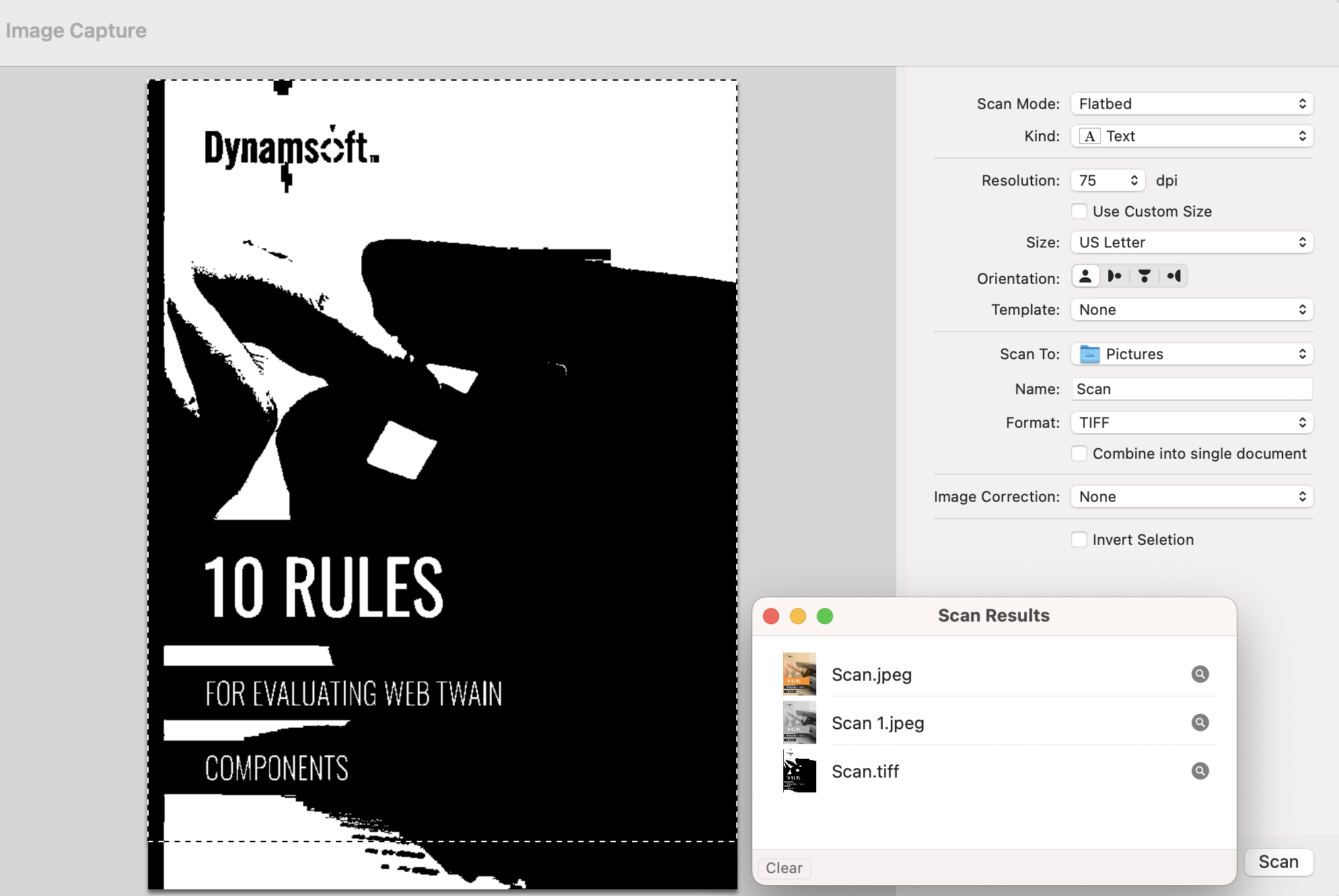
-
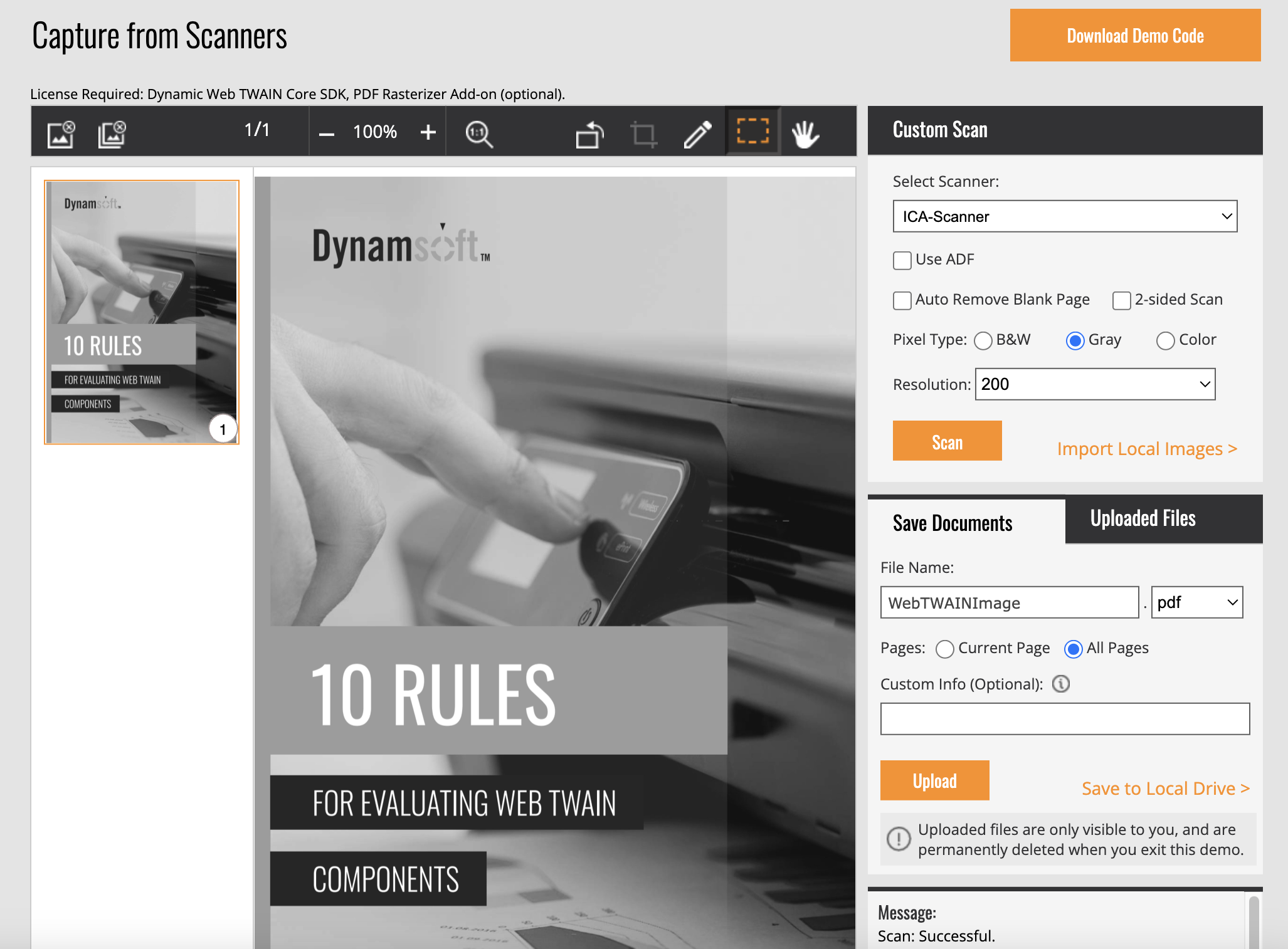
Step 5 (Optional): Verify Scanner Discovery and Scanning with Python
The repo includes Scripts/verify_scanner.py, which uses the twain-wia-sane-scanner package to talk to scanners through the Dynamic Web TWAIN Service REST API:
pip install -r Scripts/requirements.txt
python3 Scripts/verify_scanner.py --list-images   # list bundled sample images
python3 Scripts/verify_scanner.py                 # scan the next cycled image
python3 Scripts/verify_scanner.py --image all     # scan every bundled image once
It lists all ICA scanners found by the service (VirtualScanner appears as Virtual Scanner EX/AF), scans a page, and saves it under ./output.
Common Issues & Edge Cases
- Rebuilds seem to have no effect: If a machine-wide copy exists at
/Library/Image Capture/Devices/VirtualScanner.app,icddloads it in preference to the per-user copy, so user-scope rebuilds are silently ignored. Reinstall the system copy withsudo ./Scripts/build_and_install.sh --system(the script also auto-detects and offers to update it). - Device not discovered by Dynamic Web TWAIN: The service finds ICA scanners via Bonjour, and the advertisement itself ships as
Scripts/bonjour.sh(with a launchd plist, installed and started bysetup.sh). Make sure the Dynamic Web TWAIN Service is installed and running, then restart the Image Capture services (the install scripts do this for you) so the device is re-advertised. require_actioncompile error on Xcode 14+: The Carbon framework is no longer linked by default. If you build Apple’s original sample and seeCall to undeclared function 'require_action', add the macro definition to bothVirtualScanner.mandEntryPoints.mas shown in Step 1. The ported repo already includes this fix.- Python verification returns a
403on scan: The bundled default license inScripts/scanner.config(DWT_LICENSE_KEY) is a public trial key that has expired. Supply your own key withverify_scanner.py --license YOUR-KEYor replaceDWT_LICENSE_KEYinScripts/scanner.config. This is a Dynamsoft Service licensing check, not a VirtualScanner issue — the browser online demo, which injects a fresh server-side license, still scans fine.