


 Blog
Blog
Streamline Lab Inventory with Batch Barcode Scanning for Vial Trays
Automated Batch Barcode Scanning for Vial Inventory Management
Working in a lab requires precision and efficiency. Keeping track of vial inventories is crucial but time-consuming. Manual scanning one-by-one simply can’t keep up with the pace of modern laboratory operations. This is where Dynamsoft’s barcode scanning solutions come in — enabling high-speed, high-volume barcode capture for vial and tube management.
Batch barcode scanning enables laboratories to scan multiple vials in a tray simultaneously, capturing several DataMatrix codes from a single image or video stream. Unlike traditional single-barcode scanning, batch scanning reads multiple vial barcodes at once, significantly reducing manual inventory time.
Key Takeaways
- Modern lab workflows often require scanning 50–100+ DataMatrix codes from vial trays in a single image.
- Batch barcode scanning eliminates slow one-by-one vial scanning and significantly improves throughput.
- Advanced decoding algorithms can read dense, rotated, or partially obstructed DataMatrix codes with high accuracy.
- Batch scanning supports automated traceability and inventory systems by capturing all vial IDs in one pass.
- Real-world lab scenarios (e.g., 96-well trays) can be scanned quickly using camera-based multi-barcode decoding.
How to Scan 50+ DataMatrix Codes from a Single Vial Tray Image
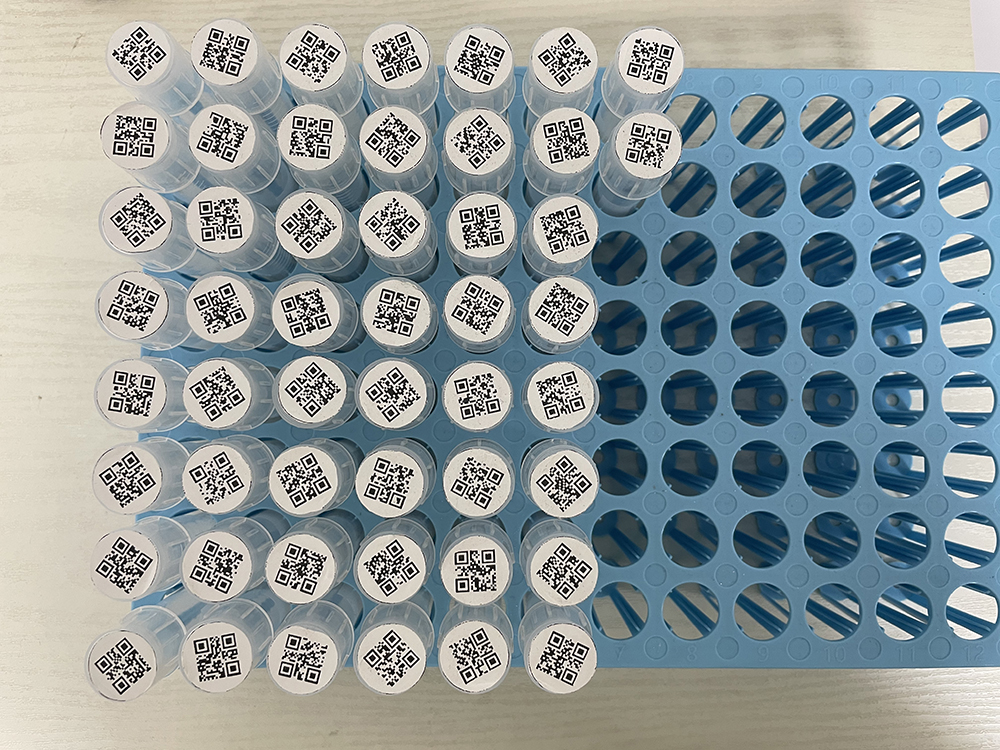
Many standard test tube racks (e.g. 10x10 cm trays) hold up to 50 tubes. Dynamsoft Barcode Reader (DBR) is fully capable of decoding dozens of DataMatrix or QR codes from a single image in one shot, even when barcodes are densely packed, rotated, or partially obstructed.
Powered by Dynamsoft’s advanced decoding algorithms, it ensures high accuracy across various real-world conditions, including uneven lighting, reflections from vial surfaces, and optical distortions near the image edges.
Batch Scanning 100+ Vials in a Tray (High-Density DataMatrix Scanning)
Let’s examine the scanning challenges in this typical setup.
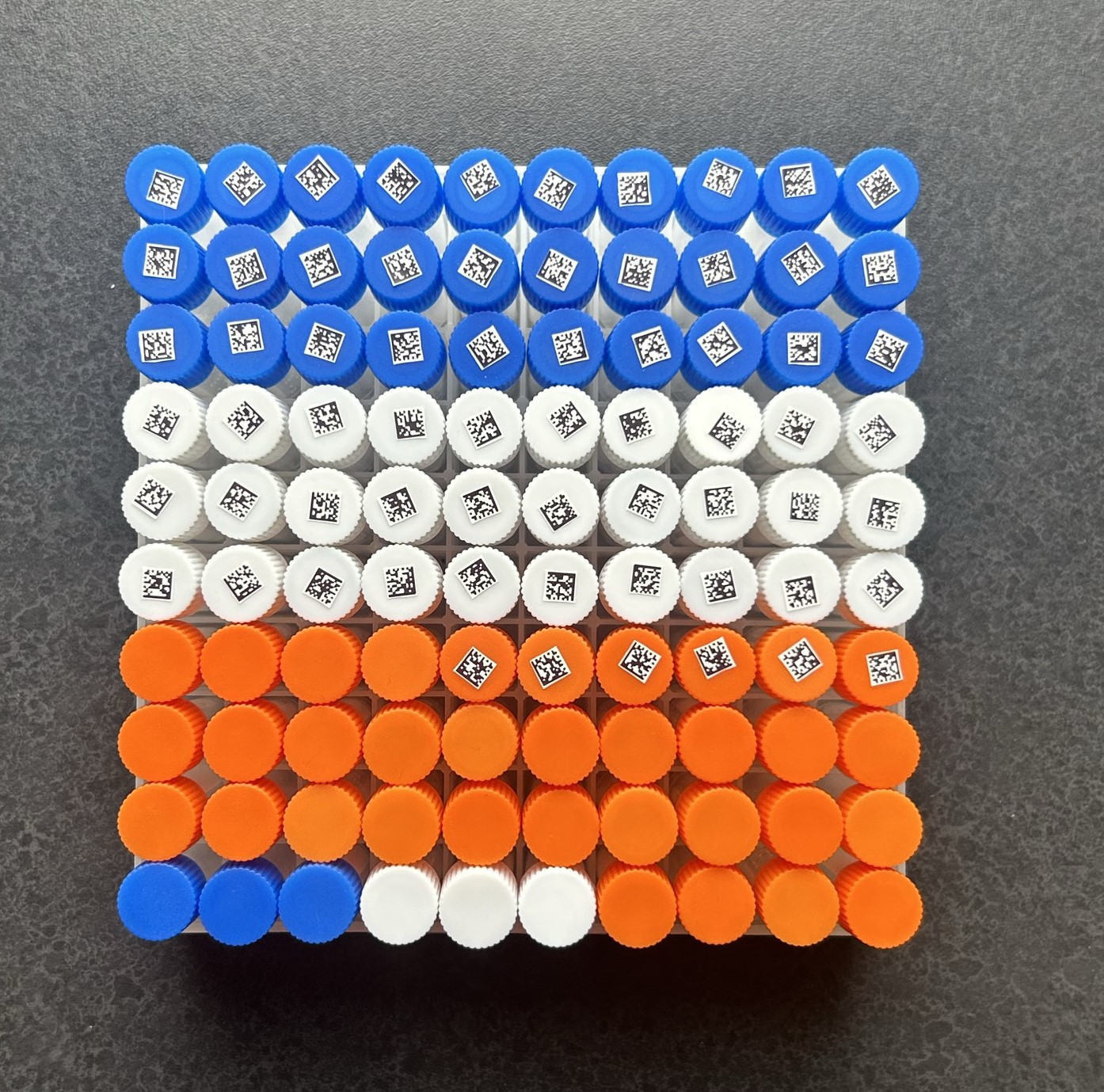
Key Characteristics of a Typical Vial Tray Scanning Setup:
- High Density: Vials are tightly packed with minimal gaps.
- Uniform Barcode Format: All barcodes use the DataMatrix symbology, widely adopted for small items due to its high data capacity in limited space.
- Unique Values: Each barcode represents a distinct sample ID, requiring full batch capture accuracy.
- Small Scan Area: The target is a compact grid, often held in handheld racks.
- Flat Plane: The vials sit evenly on a flat, detectable plane, facilitating AR-assisted scanning.
- High Barcode Quality: Optimal contrast, minimal skew, and clean prints make this an ideal scanning environment.
- Grid Pattern: The uniform arrangement allows for efficient batch localization and decoding.
How Dynamsoft Batch Barcode Scanner Solves High-Density Vial Tray Scanning
Dynamsoft Batch Barcode Scanner is purpose-built for precisely these kinds of high-density, small-area batch scanning tasks:
- Grid-Based Localization: Quickly detects and isolates tightly packed barcodes even when modules are small and edges are close.
- High-Speed Decoding: Efficiently reads dozens of unique DataMatrix codes in a single image with near-perfect accuracy.
- AR Plane Detection Integration: Leverages plane detection to stabilize the field of view and ensure consistent scanning results.
- Rotation Tolerance: Accurately decodes barcodes even when caps are slightly rotated, tilted, or imperfectly aligned.
- Data Validation: Supports batch integrity checks to ensure no barcode is missed or duplicated during capture.
How Batch Barcode Scanning Works for Vial Trays
- Capture a continuous video stream while panning across the vial tray.
- Dynamsoft Barcode Reader processes each frame in real time.
- The system stitches recognized barcodes into a unified panoramic result.
- The final output provides a full inventory across the entire scanned area.
By combining real-time decoding with multi-frame stitching, laboratories can efficiently manage large batches of vials while maintaining high accuracy and minimizing human error.
Real-World Example: Scanning 96 DataMatrix Codes on a 12×8 Vial Tray
A leading medical school adopted Dynamsoft’s solution to automate barcode capture on 12x8 vial trays (96 barcodes). The system:
- Accepted uploaded tray images.
- Detected barcode positions, values, and presence (found vs. missing).
- Exported results into Excel for downstream analysis.
- Delivered clear visual feedback with overlays (green for found, red for missing).
- Streamlined operations and improved research data accuracy.
The solution combined both Dynamsoft Barcode Reader and Batch Barcode Scanner capabilities to meet demanding academic research needs.
Dynamsoft Vial Tray Scanning Solutions (SDK, Mobile App, and Integration)
Dynamsoft Barcode Reader and Batch Barcode Scanner can be integrated into web, desktop, or mobile applications with support for multiple programming languages. The SDKs offer extensive customization, including:
- Supported barcode symbologies (1D, 2D, DataMatrix, QR, PDF417, etc.)
- Adjustable expected barcode count.
- Fine-tuned scanning parameters for different tray sizes and layouts.
Whether you’re building a full LIMS (Laboratory Information Management System) or adding automated vial scanning to existing workflows, Dynamsoft provides the flexibility to adapt to your specific needs.
This article is Part 2 in a 4-Part Series.