


 Blog
Blog
How to Build a Production-Grade Barcode Scanning Pipeline: Camera, Decoding, Validation, and Error Handling
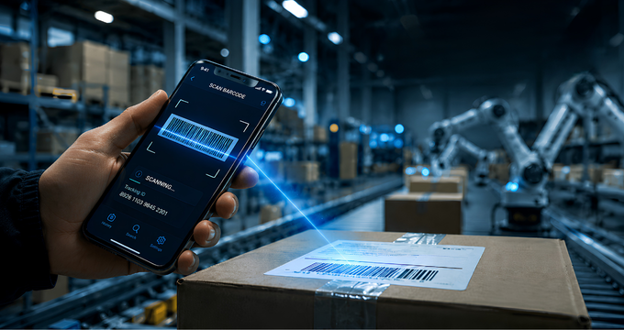
Barcode scanning seems simple: point a camera, decode, and continue. However, real-world production environments introduce frequent challenges not seen in controlled demonstrations.
Production scanning systems operate in demanding environments, including warehouses, pharmacies, retail floors, and delivery vans. Damaged labels, glare, motion blur, low-quality cameras, unreliable connectivity, and user expectations for immediate results can all reduce scan reliability. Workflows that succeed in ideal conditions may fail in these environments.
A reliable barcode scanning system depends on more than a robust decoder SDK. Each pipeline stage, including camera acquisition, preprocessing, detection, decoding, validation, network handling, and user feedback, must be engineered for failure tolerance and recovery.
This article outlines how to design a production-grade barcode scanning workflow from camera input to backend validation, focusing on reliability, performance, and user experience in real-world conditions. Each pipeline stage is reviewed to highlight that production reliability relies on the entire system, not just a single component.
Key Takeaways
- Reliable barcode scanning is a system design challenge. While a strong decoder is essential, failures can occur at any stage of the pipeline.
- Camera configuration, resolution, autofocus, and frame rate determine the quality of every image the decoder processes.
- Preprocessing is often what distinguishes a prototype from a production-ready workflow.
- Decoder configuration is as important as decoder quality. Only enable the symbologies required for your workflow.
- Client-side deduplication and validation prevent malformed data from reaching the backend.
- Server-side validation is the definitive safeguard for data integrity, not a formality.
- Error handling should be implemented at every stage, not only at the network layer.
Why Barcode Scan Failures Are Usually a System Problem, Not a Decoder Problem
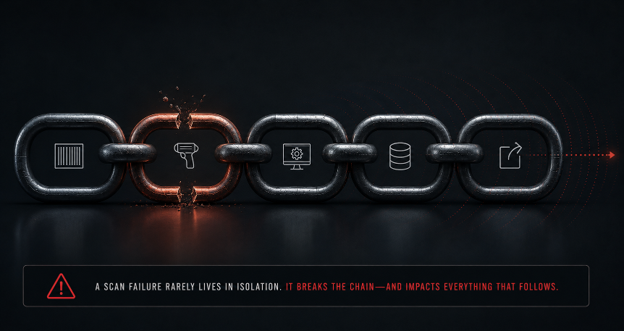
When scans fail in production, the decoder is often the first to be questioned. While this is sometimes accurate, failures frequently originate elsewhere, and switching SDKs rarely resolves the root cause.
For example, a warehouse worker scanning a shipping label under uneven lighting may experience continuous autofocus, resulting in blurry frames and low-confidence reads from the decoder. Without downstream thresholds, these marginal results can reach the backend without independent validation. The issue may only become apparent later as a misrouted package, with the root cause traced to camera configuration rather than the decoder.
Robust scanning systems treat the workflow as an engineered pipeline with clear handoffs. The five stages below help isolate failure modes at their source.
Stage 1: How Camera Configuration Affects Barcode Scan Reliability
The quality of each subsequent stage depends on the camera’s output.
Resolution, frame rate, and autofocus are key. Teams often over-optimize resolution. Larger frames increase processing time and memory use without proportional decoding benefits. For most retail and logistics workflows, 1280 to 1920 pixels strikes a balance between detail and speed. Higher resolutions are justified for dense codes such as GS1 DataMatrix on pharmaceutical packaging. Frame rates of 15 to 30 fps are suitable for most workflows; higher rates increase CPU and thermal load, which is a concern for couriers using handheld devices throughout a shift. Continuous autofocus often fails when users expect a clean read. Tap-to-focus or programmatic locking aligns better with actual scanning behavior.
Lifecycle management is essential. Initialize the camera when the scan view activates and release it when the user navigates away. Omitting this step can cause resource leaks and repeated permission requests.
Stage 2: Why Image Preprocessing Is What Separates Prototypes from Production Scanners
Even a well-configured camera can produce frames that are suboptimal for decoding. Preprocessing addresses this gap.
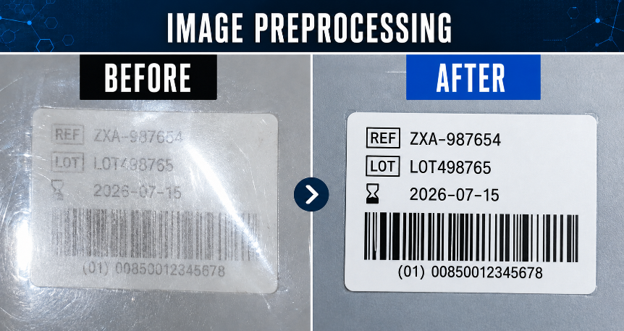
Contrast and binarization are critical. Glare, inconsistent lighting, and worn labels can obscure the module transitions required for decoding. Local adaptive contrast enhancement restores detail without overexposing other areas. Adaptive thresholds are more effective than global thresholds for this purpose.
Perspective correction is important. Operators rarely hold a camera square to the code. For example, a forklift driver scanning a pallet label or a courier at a doorstep is seldom aligned. Applying corner detection and a perspective transform can often convert a multi-attempt scan into a successful first-frame read.
Defining a region of interest (ROI) is efficient. Processing the entire frame is inefficient when the code is confined to a specific area. Defining a region of interest (ROI) reduces per-frame processing and helps users position the code more intuitively.
Stage 3: How to Configure a Barcode Decoder for Accuracy and Speed in Production
SDK selection is most critical at this stage. Decoder accuracy, robustness with damaged codes, and symbology coverage are key. Even with a strong decoder, improper configuration can limit effectiveness.
Symbology selection should be deliberate. Symbology selection should be deliberate because every enabled symbology increases processing time and the likelihood of incorrect matches. For example, a POS system that scans only UPC-A and EAN-13 should not support QR or Code 39, since additional formats increase unnecessary search space without adding value to the workflow.
Confidence thresholds are essential. Marginal reads from obscured or damaged codes are more likely to contain errors. Setting a minimum threshold discards these and waits for a clearer frame.
Continuous scanning and deduplication are critical for high-volume workflows. The same code may be decoded multiple times per second while visible, leading to duplicate submissions. For example, a picker lingering over a bin label for 2 seconds could generate over 30 identical submissions, resulting in multiple inventory decrements for a single action. Self-checkout and proof-of-delivery workflows face similar challenges. Implementing a time-windowed deduplication buffer keyed to the decoded value absorbs repeated reads without blocking intentional rescans.
Stage 4: What Client-Side Validation Should Do in a Scan Workflow
A decoded value that passes deduplication may still be unsuitable for the backend. For example, if a logistics workflow only accepts 14-digit GTINs, any other format should be rejected locally. If wristband IDs follow a specific pattern, a regex check can filter out stray reads from nearby packaging. Client-side validation is not a security boundary, but it provides a fast first-pass filter and specific user feedback. For example, displaying “This isn’t a valid product code” is preferable to a generic server error after a delay.
The Stage-by-Stage Design Reference
The table below summarizes the five pipeline stages, key decisions at each stage, common failure modes, and recommended mitigations.
| Pipeline Stage | Key Design Decisions | Common Failure Modes | Recommended Mitigations |
|---|---|---|---|
| Camera Input | Resolution, autofocus mode, frame rate, torch control | Motion blur, poor lighting, resource leaks | Explicit constraints; lifecycle teardown; tap-to-focus |
| Image Preprocessing | Contrast normalization, perspective correction, ROI | Distorted or low-contrast frames, full-frame overhead | Adaptive thresholding; perspective transform; defined scan zone |
| Decoding | Active symbologies, confidence threshold, scan mode | False positives, marginal reads, missed decodes | Restrict symbology set; enforce confidence minimum; continuous scan |
| Client-Side Validation | Deduplication window, format validation | Duplicate submissions, malformed payloads | Time-windowed buffer; schema or regex enforcement |
| Backend Validation | Idempotency, business rule enforcement, async processing | Duplicate records, unauthorized input, bottlenecks | Idempotency keys; independent server validation; queuing for volume |
Stage 5: Backend Validation — Why Server-Side Checks Are Non-Negotiable
The backend is the authoritative boundary for data integrity. While upstream stages improve data quality, they do not replace the validation and enforcement required at the server level.
Independent validation is essential. Every scan record that reaches the backend, including the decoded value, its metadata, and any identifiers attached to the request, should be validated directly against server-side data, regardless of what the client has already checked. Web application backends can be called independently of client-side logic. Re-apply format checks, range validation, and business rule enforcement on the server using authoritative data.
Idempotency is critical. Mobile networks and warehouse Wi-Fi can be unreliable, causing clients to retry submissions. Without idempotency, retries may result in duplicate actions, such as a package being marked delivered twice or a medication being logged multiple times. Each submission should include a UUID, allowing the backend to track processed keys and ignore duplicates. This is especially important for clients who queue submissions offline and send them when reconnected.
Asynchronous processing is important. During peak fulfillment, sales events, or shift changes, the backend can become a bottleneck even if scanning remains fast. Implementing a message queue between the endpoint and processing allows the API to acknowledge requests immediately while processing continues at a manageable rate.
How Failures Propagate
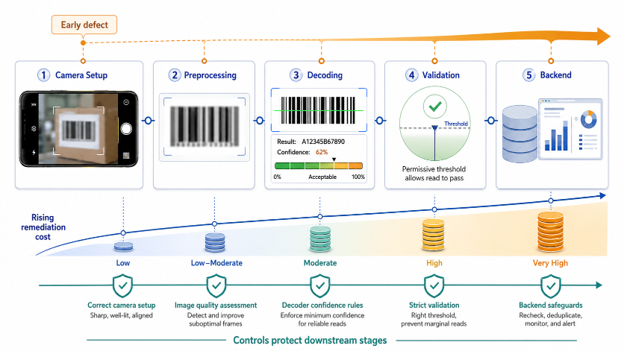
A misconfigured camera produces blurry frames that preprocessing cannot fix. The decoder then generates marginal reads, and a permissive threshold allows them to pass. Loose validation sends them to the backend, where they may enter production. A defect from stage 1 can persist until stage 5, with remediation costs increasing at each stage. Conversely, each well-engineered stage protects all subsequent stages.
How Dynamsoft Fits Into This Architecture
Building this pipeline from the ground up requires significant effort. Dynamsoft provides components that serve as foundational building blocks, allowing engineering efforts to scale effectively.
The Dynamsoft Barcode Reader SDK serves as the core decoding layer, offering high-accuracy decoding with per-symbology control, confidence thresholds, ROI scanning, and multi-barcode detection. It integrates camera lifecycle management, frame capture, and a configurable user interface into a comprehensive Stage 1 solution.
The Dynamsoft Capture Vision SDK supports the entire pipeline, including capture, preprocessing, decoding, and result handling within a unified workflow and consistent cross-stage configuration.
For workflows that capture full documents along with barcodes, such as identity verification, proof of delivery, or field inspections, the Document Normalizer provides perspective correction, and the Label Recognizer adds OCR. This enables a single pipeline to process both machine-readable codes and human-readable content.
Try Dynamsoft Barcode Reader Online Demo
Build the Pipeline, Not Just the Decoder
Barcode scanning failures in production are usually due to system design rather than decoder technology alone. Issues such as camera misconfiguration, missing preprocessing, permissive decoder settings, lack of deduplication, and weak backend validation are more often identified in incident reviews than decoder limitations.
The decoder remains important and is the foundation of the entire system. However, it is necessary but not sufficient. Teams that approach scan flow as an end-to-end systems challenge achieve greater reliability and scalable infrastructure.
Frequently Asked Questions
What causes barcode scanning to fail in production environments?
Failures can occur throughout the pipeline, including camera blur, poor lighting, lack of preprocessing, overly permissive decoder settings, or inadequate backend validation. The decoder is seldom the sole issue; the entire workflow must be designed for reliability.
What resolution should I use for barcode scanning?
A resolution between 1280 and 1920 pixels suits most retail and logistics workflows. Higher resolutions are needed only for dense symbologies like GS1 DataMatrix. A frame rate of 15-30 fps is sufficient for most applications.
What is barcode deduplication, and why does it matter?
Barcode deduplication filters repeated decode results within a set time window, ensuring only one submission per intentional scan reaches the backend. Without deduplication, holding a barcode in the frame for 2 seconds can result in multiple identical submissions, leading to errors such as duplicate inventory decrements.
How do I prevent duplicate barcode scan submissions?
Implement a time-windowed deduplication buffer on the client to suppress repeated reads. On the backend, assign a UUID to each submission so the server can detect and discard retries, especially when devices batch-submit queued offline scans.
What is a region of interest (ROI) in barcode scanning?
An ROI is a defined area within the camera frame that the decoder processes instead of the entire image. This reduces computation, speeds up decoding, and gives users a clear visual target for barcode positioning.
How does autofocus mode affect barcode scan accuracy?
Continuous autofocus can produce blurry frames while searching for focus, making them difficult for the decoder to read. Tap-to-focus or programmatic focus locking delivers consistently sharp frames and often resolves persistent scan failures without requiring a decoder change.
Should barcode validation happen on the client or the server?
Both are necessary. Client-side validation quickly filters malformed values and provides immediate user feedback. Server-side validation enforces business rules against authoritative data and safeguards data integrity.