


 Blog
Blog
Track Cigarettes with DotCode Decoding: Unit-Level Tobacco Traceability Explained
DotCode cigarette tracking plays a critical role in modern tobacco track and trace systems by enabling accurate unit-level traceability from cartons down to individual packs. By decoding high-density DotCode symbols printed on cigarette packaging, manufacturers and regulators can ensure compliance, prevent counterfeiting, and monitor supply chains in real time. Using a robust barcode decoding SDK combined with OCR label recognition technology, organizations can capture serialized data, extract printed information, and build scalable solutions for secure tobacco product tracking and regulatory reporting.

Global tobacco regulations increasingly require strict serialization and track-and-trace systems to combat illicit trade and ensure supply chain transparency. Frameworks such as the WHO Framework Convention on Tobacco Control (FCTC) Protocol and regional regulations like the EU Tobacco Products Directive (TPD) mandate unit-level traceability and secure product identification. DotCode-based serialization, combined with barcode decoding and OCR technologies, supports compliance with these tobacco track and trace requirements by enabling accurate data capture, reporting, and verification across the distribution lifecycle.
Key Takeaways
- Item-Level Compliance: Tobacco regulations, such as the EU TPD, require unique identifiers on each individual cigarette pack, not just cartons.
- Why DotCode: DotCode is optimized for high-speed industrial printing, which makes it ideal for tobacco production lines.
- Multi-Modal Validation: Combining DotCode decoding with OCR ensures verification of both encoded data and printed text.
- High-Throughput Ready: Dynamsoft solutions detect and decode multiple DotCodes simultaneously on fast-moving conveyor systems.
- Hands-On Example: Learn to implement DotCode scanning using our HTML DotCode scanner JavaScript sample.
From Cartons to Packs: DotCode Enables Unit-Level Cigarette Tracking and Traceability
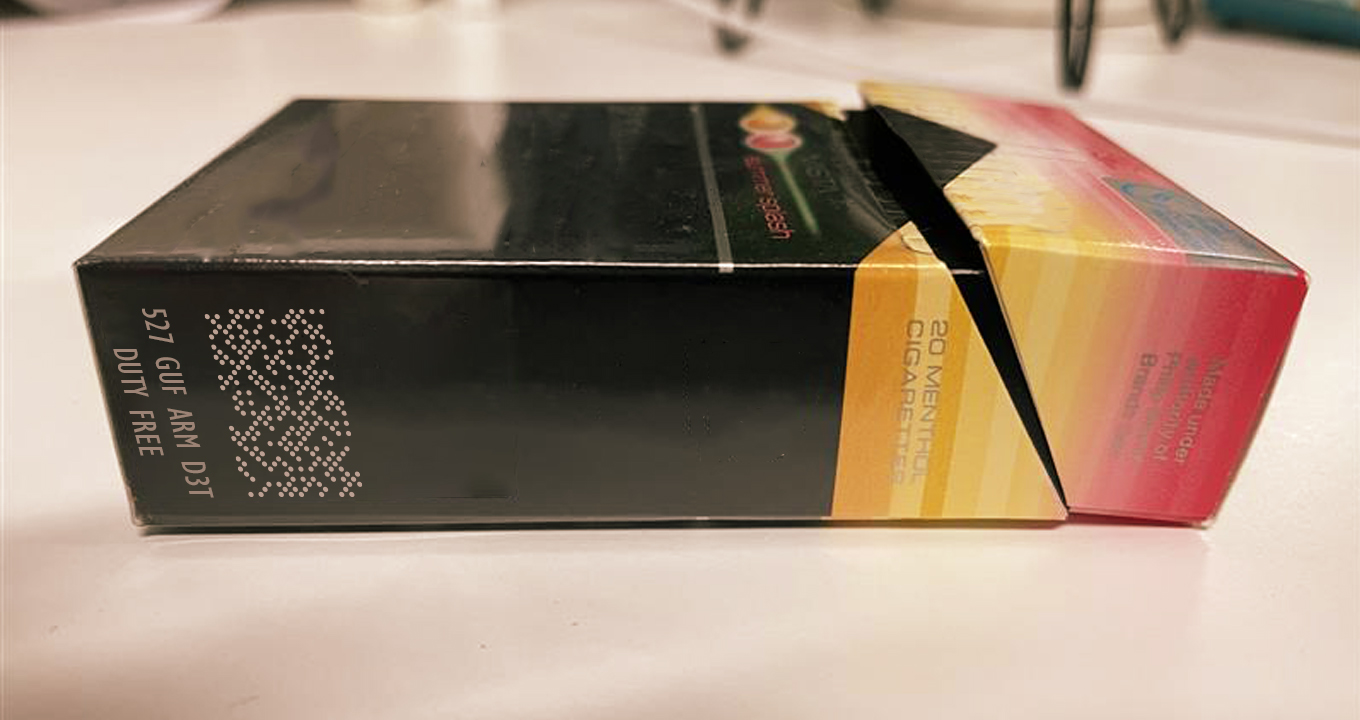
The evolution of cigarette product identification has been significantly propelled by regulatory mandates, most notably the European Union Tobacco Products Directive (EU TPD). A key requirement of this directive was that every individual unit packet of cigarettes and roll-your-own tobacco sold within the EU must bear a unique identifier (UID). This mandate served as a primary catalyst for the widespread adoption of DotCode on cigarette packaging. Prior to EU TPD, barcode usage in the cigarette supply chain was primarily focused on aggregated units:
- Cartons, Master Cases, and Pallets – Logistics labels affixed to these larger units commonly used GS1-128 (formerly UCC/EAN-128) barcodes. These barcodes encoded essential information for supply chain management, including the GTIN, batch or lot number, expiration dates, and Serial Shipping Container Codes (SSCC). However, these barcodes were generally not present on individual packs.
- Cigarette packs (Unit level) – Identification at the individual pack level was less standardized. Typically, packs featured human readable codes such as lot codes, line numbers, and time stamps. While some manufacturers occasionally employed small linear barcodes like Code 128 for internal tracking purposes, their use was inconsistent across different manufacturers, and it was not designed to meet the requirements for comprehensive, globally standardized traceability or anti-illicit trade measures.
This transition from primarily carton-level tracking with OCR to unit-level tracking empowered by DotCode represents a significant advancement in supply chain visibility, anti-counterfeiting efforts, and adherence to stringent regulatory requirements within the tobacco sector.
Why Choose Dynamsoft for DotCode Decoding and OCR Integration?
When it comes to integrating DotCode scanning or OCR for your cigarette pack tracking needs, Dynamsoft offers Barcode Reader & Label Recognizer SDKs. Dynamsoft SDKs are known for their speed, versatility, reliability and customizability. Let’s look at these SDKs.
Dynamsoft Barcode Reader for DotCode Decoding
Dynamsoft Barcode Reader (DBR) is a software development kit that enables users to efficiently and accurately read barcodes from different sources such as camera stream, static images, or PDF documents, thus making it an ideal choice for scanning cigarette packs on a moving conveyer belt or in a stock in an inventory.
Key Features & Capabilities for DotCode Scanning
-
High Accuracy & Reliability – DBR employs advanced algorithms to ensure reliable DotCode decoding, even with challenging barcodes that are blurry, distorted, damaged, or in low-light conditions. Our benchmark tests demonstrated DBR’s superior performance compared to other barcode readers. You can review these test results
-
Speed & Performance – Dynamsoft Barcode Reader offers industry leading speed of scanning 500+ barcodes per minute. In a high-throughput environment like cigarette manufacturing and packaging line, high-scanning speed of DBR ensures minimal impact on production speed.
-
Flexibility and Platform Compatibility – Dynamsoft Barcode Reader offers broad platform compatibility with support for various operating systems (Windows, macOS, Linux, iOS, and Android) and multiple programming languages. This flexibility allows for seamless integration into diverse hardware and software infrastructure.
-
Multiple Barcode Reading – In a high-volume cigarette packing environment, the ability to read multiple barcodes simultaneously is crucial for efficiency. Dynamsoft Barcode Reader’s batch barcode scanning capabilities achieve nearly 100% accuracy while scanning multiple barcodes at once.
How Dynamsoft’s Bulk Barcode Scanner Achieves Near 100% Accuracy
Dynamsoft Label Recognizer for OCR and Label Data Extraction
Dynamsoft Label Recognizer (DLR) SDK offers intelligent text recognition for product packaging, ideally suited for complex codes found on cigarette packs. DLR localizes and extracts key data from specified regions using OCR, particularly helpful with cigarette packaging where alphanumeric codes a placed at a particular location.
Key Features & Capabilities for OCR-Based Label Recognition
-
Advanced OCR Capabilities - DLR’s OCR engine, powered by advanced algorithms, demonstrates exceptional capabilities in accurately deciphering intricate and diminutive text, even when presented with obstacles like low-resolution images or damaged labels.
-
Seamless Integration: Dynamsoft Label Recognizer SDK is designed for seamless integration within your existing operational frameworks, thereby minimizing disruptions during deployment and enabling swift implementation.
-
Cross-Platform Compatibility: Dynamsoft Label Recognizer SDK is engineered to seamlessly function across a diverse range of operating systems and platforms. This inherent cross-platform compatibility ensures flexibility in deployment across a wide array of devices and systems.
DotCode Decoding vs. OCR Label Recognition vs. Combined Workflows
| Capability | DotCode Decoding (2D Barcode Scanning) | OCR Label Recognition | Combined Barcode + OCR Workflow |
|---|---|---|---|
| Primary Function | Reads serialized DotCode symbols on cigarette packs | Extracts printed text from labels and packaging | Captures both encoded barcode data and printed text |
| Data Type | Structured, encoded data (IDs, serial numbers) | Human-readable text (batch numbers, dates, warnings) | Cross-verified structured + printed data |
| Accuracy | High accuracy for machine-generated codes | Dependent on print quality and image clarity | Improved validation through data cross-checking |
| Best Use Case | Unit-level traceability in tobacco track and trace systems | Label inspection and compliance verification | End-to-end cigarette tracking and anti-counterfeiting |
| Compliance Support | Supports serialization requirements | Validates regulatory label information | Enables comprehensive regulatory reporting |
Getting Started with DotCode Decoding and OCR Integration
Dynamsoft offers various licensing options to suit different deployment needs. We also provide technical support during the evaluation process so developers can duly test the SDKs for integration and deployment.