


 Blog
Blog
Advanced Image Processing Techniques in Document Scanning SDKs (Deskewing, Binarization, OCR Optimization)
As the world goes digital, document scanning has become critical for modern business operations, offering easier storage, access, and management of documents. However, the quality of scanned images is crucial for the effectiveness of these digital archives. High-quality scans ensure that text is clear, data is accurately captured, and information is easily retrievable.
On the other hand, poor-quality scans can result in data loss, misinterpretation, and inefficiencies in document management. This blog discusses the importance of image quality in document scanning, addresses common challenges encountered during the scanning process, and the advanced image processing techniques leveraged by document scanning SDKs to tackle these challenges.
In document scanning SDKs, advanced image processing refers to a set of automated techniques such as deskewing, binarization, noise reduction, contrast enhancement, and text localization—designed to improve the clarity and structure of scanned document images before data extraction. These techniques directly enhance OCR accuracy by making text more legible and improving character segmentation, while also increasing barcode and QR code recognition reliability by reducing distortion, background noise, and lighting inconsistencies. By optimizing image quality at the preprocessing stage, document scanning SDKs ensure higher data accuracy and more dependable automated workflows.
Key Takeaways
- Advanced image processing techniques are essential for improving document scan quality, OCR accuracy, and barcode recognition.
- Preprocessing methods such as deskewing, binarization, and noise reduction enhance readability before OCR.
- Image enhancement techniques improve contrast, clarity, and overall scan reliability.
- Proper compression and color space conversion optimize performance without sacrificing quality.
- Modern document scanning SDKs integrate these techniques to enable accurate, automated document management workflows.
Why Image Quality Matters: Common Challenges in Document Scanning and OCR Accuracy
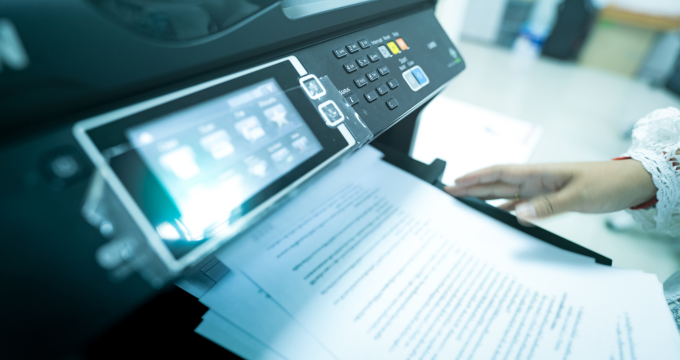
High-quality document scanning ensures accurate data capture and easy retrieval, crucial for effective document management. Common challenges include skewed documents, poor lighting, background noise, faded text, and physical defects like smudges.
Skewed or Misaligned Documents Affecting OCR and Data Extraction
One common problem with document scanning is skewed or improperly positioned documents. When documents are not aligned correctly, the resulting images can be tilted, making text difficult to read and process. This misalignment can cause issues for Optical Character Recognition (OCR) systems, leading to inaccurate text extraction and increased error rates.
Poor Lighting and Uneven Contrast in Document Scanning
Lighting is crucial for high-quality scanned images. Inadequate lighting can lead to uneven contrast, with some parts of the document being too dark and others too bright. This inconsistency can obscure important details and make it challenging for OCR software to differentiate text from the background.
Background Noise and Artifacts in Scanned Documents
Background noise, such as textures, patterns, or unwanted elements like shadows and marks, can disrupt the clarity of scanned documents. These unwanted elements can confuse OCR systems and diminish the overall quality of the scanned image, making it more difficult to read and accurately process the content.
Low-Quality Scans: Faded Ink, Blur, and Readability Issues
Documents with faded ink or blurry text pose significant scanning challenges. Low-quality scans can result from poor scanner settings or deteriorated physical documents. These issues make capturing clear, legible text complex, leading to incomplete or inaccurate data extraction.
Physical Document Damage: Smudges, Stains, and Tears
Physical imperfections like stains or smudges can lower the quality of scanned images by obscuring text and important details. This makes the digitization process more complicated. Effective preprocessing techniques are needed to reduce the impact of these imperfections and enhance the clarity of the scanned images.
Image Processing Techniques in Document Scanning SDKs
Document scanning software development kits (SDKs) utilize a variety of image processing techniques to overcome challenges and enhance the quality of scanned documents. Commercial-grade document scanner SDKs are designed to quickly scan documents by leveraging these techniques for preprocessing, improving, and optimizing scanned images to enhance readability and ensure accurate data extraction.
Preprocessing Techniques for Clean and Accurate Document Scans

Preprocessing techniques help correct alignment, enhance contrast, crop borders, and remove unwanted noise to improve overall image quality.
Deskewing: Correcting Document Alignment
Deskewing is the process of correcting the alignment of scanned documents. It involves detecting the skew angle and rotating the image accordingly to ensure that text lines are horizontal and easier to read. This improves the accuracy of OCR and other processing tasks.
Binarization: Converting Scans to High-Contrast Black and White
Binarization transforms grayscale images into binary images, where each pixel is either black or white. This process increases the contrast between text and background, aiding OCR systems in distinguishing characters and enhancing text recognition accuracy.
Border Detection and Automatic Cropping
Border detection identifies the edges of a document in the scanned image, enabling precise cropping. Removing unnecessary borders and margins helps to focus on the main content, reduce file size, and improve subsequent processing efficiency.
Noise Reduction for Cleaner Document Images
Noise reduction techniques aim to eliminate unwanted elements and background noise from scanned images. By filtering out these distractions, noise reduction enhances the clarity of the text and essential details, facilitating better OCR performance and readability.
Image Enhancement Techniques for Improved OCR Performance
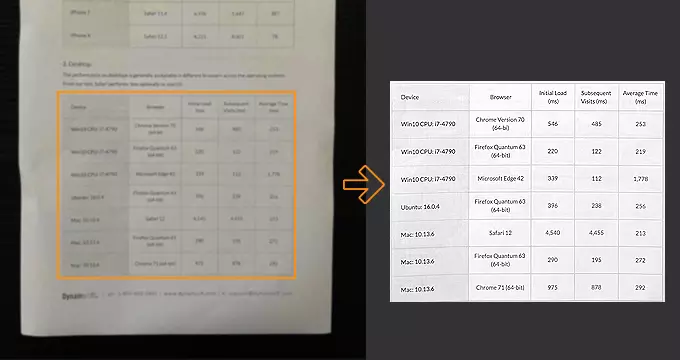
Image enhancement techniques such as noise reduction, contrast adjustment, and sharpening improve the clarity and readability of scanned images.
Advanced Noise Reduction Methods
Besides pre-processing noise reduction, additional enhancement techniques can be used to minimize noise in scanned images. Advanced algorithms can identify and eliminate specific types of noise, such as graininess or random specks, resulting in cleaner and more legible documents.
Contrast Enhancement for Better Text Visibility
Enhancing contrast increases the visibility of text and details in scanned images by modifying brightness and contrast settings. This approach ensures that the text is distinctly visible against the background, facilitating easier reading and processing.
Sharpening to Improve Character Clarity
Sharpening methods improve the clarity of text and details in scanned images by accentuating their edges. This results in crisper, more distinct visuals, enhancing text legibility and boosting OCR precision.
Advanced Image Binarization Techniques
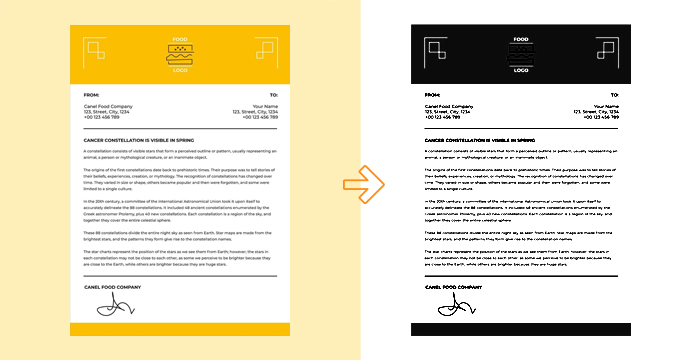
Image binarization transforms a color or grayscale image into black and white, separating the main content from the background. This simplification makes it easier to analyze the image further.
Global and Local Thresholding Techniques
Thresholding is a common binarization technique that transforms grayscale images into binary images using either a fixed or dynamic threshold value. Pixels exceeding the threshold turn white, while those below become black. This method improves text visibility and enhances OCR performance.
Adaptive Binarization for Uneven Lighting Conditions
Adaptive binarization dynamically modifies the threshold value according to the local features of the image. This approach is especially useful for documents with uneven lighting or contrast, ensuring uniform binarization throughout the image.
OCR Preprocessing for Higher Text Recognition Accuracy

OCR preprocessing improves image quality by removing noise and adjusting attributes like contrast, resulting in clearer text that the OCR engine can recognize more easily.
Text Detection and Localization in Document Images
Prior to performing OCR, text detection and localization methods identify the areas of the image containing text. By isolating these text regions, these methods enhance the efficiency and accuracy of OCR by concentrating processing power on pertinent section.
Background Removal to Improve OCR Results
Background removal techniques eliminate non-text elements and unnecessary backgrounds from scanned images. This process improves text visibility and reduces interference, resulting in more precise OCR outcomes.
Color Space Conversion in Document Image Processing

Color space conversion involves translating color information between different systems (e.g. RGB for screens, CMYK for printing) leveraging mathematical formulas to match the specific capabilities of a device.
Conversion to Grayscale for Efficient OCR Processing
Converting color images to grayscale simplifies the processing and analysis of scanned documents. Grayscale images reduce file size and focus on the essential information, making subsequent image processing tasks more efficient.
Handling Color Documents in Scanning Workflows
Color space conversion techniques can preserve essential color information for improved processing and OCR accuracy in documents requiring color, such as charts or highlighted text.
Image Compression Techniques in Document Scanning
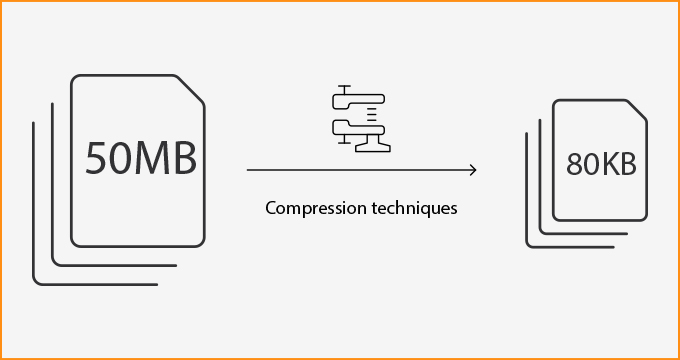
Compression techniques are used to reduce the file size of scanned images, making them easier to store and transmit.
Lossy vs. Lossless Compression in Document Images
There are two types of compression: lossless and lossy. Lossless compression preserves all original data, ensuring no loss of quality. On the other hand, lossy compression reduces file size further by discarding some data, which may affect image quality.
JPEG, PNG, and TIFF Compression for Scanned Documents
Different compression formats offer various benefits for scanned documents. JPEG provides efficient lossy compression and is suitable for images with acceptable quality loss. PNG offers lossless compression with better quality preservation, and TIFF provides flexible compression options, including both lossy and lossless methods.
Barcode and QR Code Recognition in Document Scanning SDKs

Barcode and QR code recognition identifies and decodes these codes in scanned images, automating data extraction and indexing for efficient document management, thereby enhancing productivity through quick and accurate information retrieval.
Detecting and Decoding Barcodes and QR Codes from Scanned Documents
Barcode and QR code recognition techniques enable the automatic detection and decoding of these codes within scanned documents. This capability is essential for document management systems relying on barcodes and QR codes to index documents efficiently.
Applications of Advanced Image Processing in Document Management Systems
Combining these image-processing techniques ensures high-quality scanned documents, which is crucial for effective document management. High-quality scans facilitate accurate data extraction, efficient storage, and straightforward information retrieval, enhancing overall productivity and operational efficiency. Businesses can leverage advanced document scanning SDKs to overcome common challenges, improve image quality, and streamline document management processes.
Dynamsoft Scanning SDKs: Advanced Image Processing for Accurate OCR and Barcode Recognition
The quality of scanned images is pivotal in document digitization and management effectiveness. By addressing common challenges and employing advanced image processing techniques, businesses can ensure that their digital archives are clear, legible, and easily accessible, driving greater efficiency and productivity in their operations.
Dynamsoft Scanning SDKs are enterprise-grade SDKs powered by advanced image processing techniques to enhance accuracy and efficiency. Leading global companies have leveraged the power of Dynamsoft scanner SDKs to streamline workflows and boost productivity.
Contact our technical support team to learn how to get started with robust document scanning.
Explore Our Developer Hub for Guides, API References, and More
Related Blogs
- Image Processing 101 Chapter 1.1: What is an Image?
- Image Processing 101 Chapter 1.2: Color Models
- Image Processing 101 Chapter 1.3: Color Space Conversion
- Image Processing 101 Chapter 2.1: Image Enhancement
- Image Processing 101 Chapter 2.2: Point Operations
- Image Processing 101 Chapter 2.3: Spatial Filters (Convolution)