Code 39 - Dynamsoft Barcode Reader SDK
What is a Code 39?
Code 39, developed by Intermec in 1974, was the first barcode symbology to support both letters and numbers. It’s a discrete, variable-length barcode that encodes alphanumeric data and is known by several names, including:
- Code 3 of 9
- Alpha39
- Type 39
- USD-3
- USS Code 39
Originally limited to 39 characters (hence the name), Code 39 was later expanded to support 43 characters, including:
- Digits: 0–9
- Uppercase letters: A–Z
- Special characters: -, ., $, /, +, %, and space
- Start/stop character: *
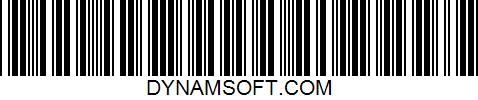
Code 39 Example:
Key Features of Code 39
- No check digit required
- Self-checking: One-character print errors are unlikely to create valid misreads
- Widely supported across barcode scanners and software
- Readable without lookup tables (each character maps to a unique pattern)
Limitations of Code 39
While Code 39 is easy to implement and widely compatible, it has a low data density, making it less suitable for small labels or large amounts of encoded data. For more compact encoding, consider Code 128 or Code 93.
What is Code 39 Extended?
Code 39 Extended (also known as Full ASCII Code 39) builds on standard Code 39 to support the entire ASCII character set (128 characters).
How It Works
To represent characters beyond the basic 43, Code 39 Extended uses two-character combinations. For example:
- The lowercase letter a is encoded as +A
While this enables full ASCII support, it results in longer barcodes for non-standard characters.
Common Applications of Code 39
Code 39 is widely used in non-retail sectors due to its simplicity and versatility.
Industries That Use Code 39 Barcodes:
- Automotive (VIN and parts labeling)
- Manufacturing (asset tracking, labeling)
- Government
- Defense (US Department of Defense compliance)
- Logistics and warehousing
- Healthcare (via HIBCC standards)
- Postal and shipping
Get Started with Code 39 Using Dynamsoft Barcode Reader
Looking to implement Code 39 barcode scanning in your application?
Dynamsoft Barcode Reader SDK makes it easy to add high-performance, cross-platform barcode reading to your web, desktop, or mobile apps.
Why Choose Dynamsoft?
- Fast and accurate Code 39 decoding
- Support for standard and extended Code 39 formats
- Easy integration with JavaScript, .NET, Java, C++, and more
- Comprehensive documentation, tutorials, and sample code
Start your free trial today and explore the Dynamsoft Resource Center for helpful guides and code examples.
FAQ
1. What's a better alternative to Code 39 for compact labels?
Code 128 stores the same numbers in about half the space as Code 39 because it encodes two digits in each symbol. Code 93 is also more compact than Code 39 and has two check digits as well. For even greater space savings, you might look at Data Matrix or Micro QR Code, since these can hold a large amount of data in a small area but need a camera-based imager.
2. What is the difference between Code 39, Code 128 and Code 93?
Although all three are linear barcodes of variable lengths, they differ in the characters they support, their data capacity, and their error-checking features.
- Code 39 consists of 43 characters, is discrete, has self-checking capabilities, and does not require a check digit; although it has the lowest density, it is the most widely supported and the easiest to print.
- Code 93 has the same basic character set, plus the entire ASCII set through the use of shift characters; it is about 25% narrower in width and includes two required check characters.
- Code 128 includes the full range of 128 ASCII characters divided among three subsets, requires a mandatory modulo-103 check digit, provides the highest density when encoding numeric data, and forms the basis of GS1-128.
Use Code 39 for compatibility with older systems, or use Code 128 to save space or comply with GS1 standards.
3. Does the SDK work the same way across web, iOS, Android, and desktop for Code 39 scanning?
Yes, because all versions use the same decoding engine and parameter templates; settings applied on one platform have the same effect on the others. The only difference is the programming language: JavaScript in the browser; on mobile, Swift, Objective-C, Kotlin, Java, Flutter, React Native, and MAUI; and on desktop and server environments, C++, .NET, Java, Python, or Node.js. The results always contain the text, the format, the confidence level, and the corner coordinates.
4. What happens if a Code 39 barcode is damaged, low-contrast, or partially blocked?
Because Code 39 has no error correction, it is not possible to recover bars that are missing or blurred. Even though the code is self-checking, a single error during printing or scanning usually causes the reading to fail rather than producing the wrong character; with the Dynamsoft Barcode Reader, you can recover many imperfect barcodes through deblurring, grayscale enhancement, and adjustable binarization. If your labels are often worn or covered, consider using PDF417 or Data Matrix, as these formats include error correction.