Code 39 - Dynamsoft Barcode Reader SDK
What is a Code 39?
Code 39, developed by Intermec in 1974, was the first barcode symbology to support both letters and numbers. It’s a discrete, variable-length barcode that encodes alphanumeric data and is known by several names, including:
- Code 3 of 9
- Alpha39
- Type 39
- USD-3
- USS Code 39
Originally limited to 39 characters (hence the name), Code 39 was later expanded to support 43 characters, including:
- Digits: 0–9
- Uppercase letters: A–Z
- Special characters: -, ., $, /, +, %, and space
- Start/stop character: *
Code 39 Example:
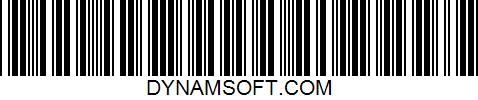
Key Features of Code 39
- No check digit required
- Self-checking: One-character print errors are unlikely to create valid misreads
- Widely supported across barcode scanners and software
- Readable without lookup tables (each character maps to a unique pattern)
Limitations of Code 39
While Code 39 is easy to implement and widely compatible, it has a low data density, making it less suitable for small labels or large amounts of encoded data. For more compact encoding, consider Code 128 or Code 93.
What is Code 39 Extended?
Code 39 Extended (also known as Full ASCII Code 39) builds on standard Code 39 to support the entire ASCII character set (128 characters).
How It Works
To represent characters beyond the basic 43, Code 39 Extended uses two-character combinations. For example:
- The lowercase letter a is encoded as +A
While this enables full ASCII support, it results in longer barcodes for non-standard characters.
Common Applications of Code 39
Code 39 is widely used in non-retail sectors due to its simplicity and versatility.
Industries That Use Code 39 Barcodes:
- Automotive (VIN and parts labeling)
- Manufacturing (asset tracking, labeling)
- Government
- Defense (US Department of Defense compliance)
- Logistics and warehousing
- Healthcare (via HIBCC standards)
- Postal and shipping
Get Started with Code 39 Using Dynamsoft Barcode Reader
Looking to implement Code 39 barcode scanning in your application?
Dynamsoft Barcode Reader SDK makes it easy to add high-performance, cross-platform barcode reading to your web, desktop, or mobile apps.
Why Choose Dynamsoft?
- Fast and accurate Code 39 decoding
- Support for standard and extended Code 39 formats
- Easy integration with JavaScript, .NET, Java, C++, and more
- Comprehensive documentation, tutorials, and sample code
Start your free trial today and explore the Dynamsoft Resource Center for helpful guides and code examples.


