




Thanks for Downloading Dynamic Web TWAIN 30-Day Trial!
Your download will start shortly. If your download does not begin, click here to retry.
Error Troubleshooting
macOS Rosetta Discontinuation and Dynamic Web TWAIN Service
Overview
Apple has announced that Rosetta support for Intel-based applications will be phased out in future macOS releases. Rosetta remains fully supported through macOS 27 (see below for how installation now works). Starting with macOS 28, Intel-only applications will no longer be supported.
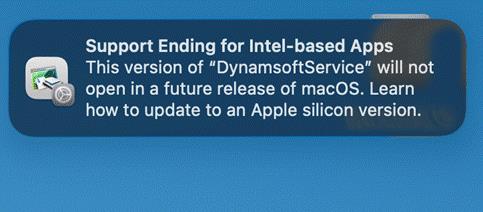
Starting with macOS 26.4, users may also see system notifications warning that Intel-based applications will not be supported in future macOS versions.
What is Apple’s timeline?
| macOS Version | Expected Availability | Rosetta Status |
|---|---|---|
| macOS 26.4+ | Already released | System notifications appear for Intel-only apps |
| macOS 27 | Released September 2026 | Installs on demand rather than preloaded (see below); last version to support it |
| macOS 28 | 2027 | Intel-only apps will no longer run on Apple Silicon Macs |
For the official Apple announcement, see: Using Intel-based apps on a Mac with Apple silicon — Apple Support
Is Rosetta installed by default on macOS 27?
No. Rosetta is no longer preinstalled on macOS 27 — a Mac upgraded from macOS 26 has it auto-removed, and a clean macOS 27 install doesn’t include it either. It’s still fully supported, just installed on demand:
- Automatic prompt: The first time an Intel-based app or component needs it (for example, the legacy Intel-only Dynamic Web TWAIN Service installer, or an Intel-only TWAIN driver), macOS prompts the user to install Rosetta. Clicking Install and entering the macOS username/password completes it in the background.
- Manual install ahead of time: From Terminal, run:
softwareupdate --install-rosetta --agree-to-license
This does not affect the Universal Binary Dynamic Web TWAIN Service (v19.4+) — it runs natively on Apple Silicon and never needs Rosetta. It only matters if end users install the separate Intel-only service installer or use an Intel-only TWAIN driver (see “Why can’t Dynamic Web TWAIN detect my TWAIN scanner on Apple Silicon Macs after upgrading to v19.4+?” below).
For official Apple guidance, see: Install and use Rosetta to run Intel-based apps — Apple Support
Does Dynamic Web TWAIN Service still work on macOS?
Yes. The current version of Dynamic Web TWAIN Service continues to function normally on supported macOS versions, including macOS 26 and macOS 27.
What is Dynamsoft doing to address this?
Dynamsoft has released a Universal Binary version of Dynamic Web TWAIN Service with native Apple Silicon support.
Dynamic Web TWAIN 19.4 is now available, shipping the Universal Binary service installer that runs natively on Apple Silicon — no Rosetta required. This ensures full compatibility ahead of macOS 27.
I’m on Dynamic Web TWAIN v18.x. Do I need to upgrade my SDK to v19.4+?
Not necessarily. The v19.4 service installer includes the DWT 18.6 service module, which is backward compatible with DWT 18.x. This means you can install the v19.4 Dynamic Web TWAIN Service on end-user machines to get Apple Silicon native support while continuing to use your existing v18.x SDK integration.
You do not need to change your application code or upgrade your JavaScript SDK to v19 just to resolve the Rosetta notification.
Do end-users need to take any action now?
Yes. Now that Dynamic Web TWAIN 19.4 is available, we recommend upgrading the Dynamic Web TWAIN Service on end-user machines to get native Apple Silicon support and eliminate the macOS system notification about Intel-based apps. See the deployment section below for details.
How do I deploy the updated service to end users?
The deployment process is the same as the current service. Download the v19.4 macOS service installer and distribute it to your end users. If you use silent installation or enterprise deployment methods, the process remains the same — only the installer binary changes.
For details on deployment options, see: How to deploy the end-user components to all users
Do I need to renew my license or maintenance to get the update?
- Active annual license or maintenance plan: You are entitled to upgrade to v19.4 at no additional cost. Download and deploy the updated service installer now.
- Perpetual license without active maintenance: You will need to renew your maintenance plan to access the v19.4 release. Please contact Dynamsoft Sales to discuss renewal options.
Does this affect Intel-based Macs?
No. Intel-based Macs run Intel binaries natively without Rosetta. The current service installer continues to work on Intel-based Macs regardless of macOS version.
Note: Apple has announced that macOS 26 is the last macOS release to support Intel-based Mac hardware.
Why can’t Dynamic Web TWAIN detect my TWAIN scanner on Apple Silicon Macs after upgrading to v19.4+?
Dynamic Web TWAIN v19.4 introduces a native Universal installation package for Apple Silicon. However, some scanner vendors still provide Intel-only TWAIN Data Sources. Since the Universal service cannot load Intel-only TWAIN Data Sources, no TWAIN Source will be detected.
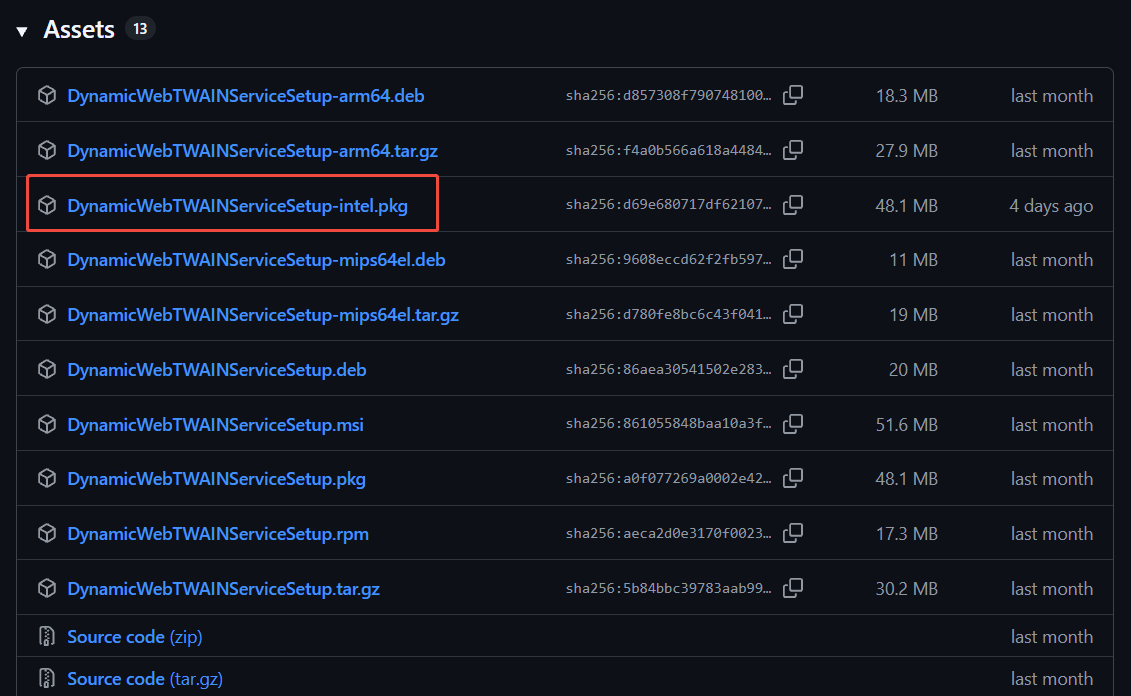
We recommend upgrading to a Universal TWAIN driver whenever available. For scanners that have not yet provided a Universal driver, Dynamsoft also offers an Intel version of the Dynamic Web TWAIN Service as a temporary compatibility option. This installer is available separately through GitHub rather than being included in the standard release. This installer will only be able to detect Intel versions of TWAIN Drivers and will not detect Universal drivers.
Because this fallback installer is Intel-only, it requires Rosetta — see “Is Rosetta installed by default on macOS 27?” above for how to get it installed on macOS 27.
Original post creation date: May 26, 2026
Last modified date: Sep 22, 2026
 Yes
Yes No
No