




Thanks for Downloading Dynamic Web TWAIN 30-Day Trial!
Your download will start shortly. If your download does not begin, click here to retry.
Capture/Image Source
How to test if your camera is DirectShow compliant?
-
[Recommended] Take advantage of our official demo page
If you haven’t installed the Dynamic Web TWAIN Service, a dialog will show up for you to download and install it.
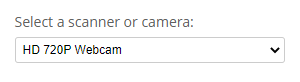
- Make sure the camera shows up in the device list
-
Try showing the video stream and try capturing a frame to see if it works without any errors
-
You can also test with a DirectShow utility such as Amcap (obtainable from third-party sources) to confirm the camera works correctly.
Original post creation date: Jul 14, 2021
Last modified date: Jan 21, 2026
 Yes
Yes No
No